


ACDSee Pro for iOS is one of the best photo editor apps for iPhone and iPad because it combines a powerful, non-destructive RAW editor with intelligent camera software — all in one lightweight package.
This $6.99-valued app is now available for free on the Apple App Store. Interested users can download it by visiting the App Store.
On the App Store, ACDSee Pro has earned a 4.8-star rating from more than 960 user reviews. To run the app, your device must be running on iOS 11.0 or later.
The app size is around 96 MB and is available in 9 languages (English, Dutch, French, German, Italian, Japanese, Portuguese, Spanish, and Simplified & Traditional Chinese).
About ACDSee Pro for iOS
In an era where smartphone photography has replaced dedicated cameras for millions of users, having a professional-grade photo editing app for iPhone is essential. ACDSee Pro for iOS bridges the gap between casual snapshots and professional photography, making it perfect for content creators, travel photographers, and social media enthusiasts.
With ACDSee Pro for iOS, you can capture, edit, and share stunning photographs entirely from your iPhone or iPad. The app is simple enough for beginners yet powerful enough for professionals — no user guide required. Whether you’re an Instagrammer or a seasoned photographer, you can instantly modify your photographs after downloading the app from the Apple App Store.
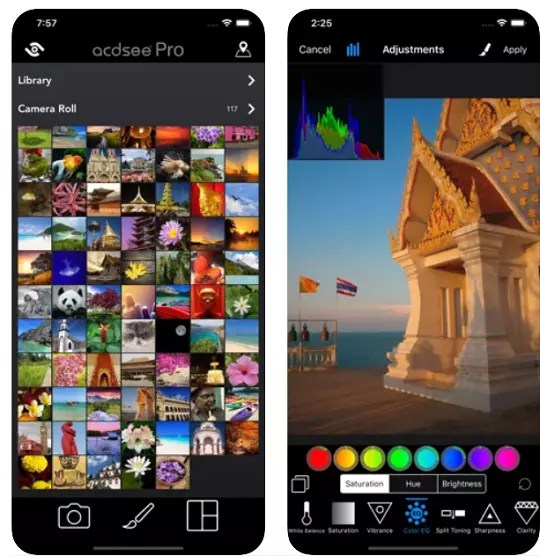

ACDSee Pro for iPhone lets you capture, edit, and share photographs with precision. It includes a professional-grade camera and a photo editor, as well as all the tools you need to create amazing images.
Key Features of ACDSee Pro for iOS
Camera
Utilize your device’s camera to its full potential with specialized shooting modes including lossless RAW, TIFF, and PNG compatibility, manual settings for exposure, focus, and white balance, real-time effects and tweaks, HDR & flash fusion, distinct exposure and focus points, dual-axis level indication, and more. If you enjoy hands-on camera control, you’ll also appreciate apps like the Manual Camera DSLR app for similar manual shooting features.
Edit
Improve your photographs with a sophisticated, non-destructive photo editor for iPhone that supports RAW processing. Use gradients and brushes to apply adjustments and special effects such as shadows and highlights, contrast, dehaze, white balance, saturation, vibrance, sharpness, split toning, and noise removal — plus ACDSee’s unique Light EQ, Tone EQ, and Color EQ tools. Looking for desktop RAW editing alternatives? Check out the Corel AfterShot 3 RAW Photo Editor free license or the ACDSee Gemstone Photo Editor 12 free license.
Collage
An easy-to-use collage builder for sharing your memories. Combine many photographs into a single image quickly for simple sharing. Over 100 different layouts are available.
Why Download ACDSee Pro for iOS?
ACDSee Pro for iOS stands out among the best free photo editing apps available on the Apple App Store in 2024–2025. Here’s why photographers and content creators choose it:
- Non-destructive RAW editing — Your original photos are never permanently altered, giving you full creative control.
- Professional camera controls — Manual exposure, focus, and white balance give you DSLR-like control right from your iPhone.
- HDR & Flash Fusion — Capture high dynamic range shots that look stunning even in challenging lighting conditions.
- Over 100 collage layouts — Perfect for social media content creators who want quick, polished image compositions.
- Multi-language support — Available in 9 languages, making it accessible to photographers worldwide.
If you’re looking for other free iOS photography and editing apps, be sure to also check out Photo Power Tools for iOS — a free image editor packed with filters and adjustments. You may also find PDF Photos+ Scanner and Editor for iOS useful for document scanning combined with photo editing.
How to Download ACDSee Pro for iOS for Free
- Open the Apple App Store on your iPhone or iPad.
- Search for “ACDSee Pro” or use this direct link: Download ACDSee Pro on the App Store.
- Tap Get to download and install the app for free.
- Open the app and start shooting or editing right away — no account required.
Note: Free availability on the App Store may be limited-time. Download it as soon as possible to grab it at no cost.
ACDSee Pro vs Other Free Photo Editing Apps for iPhone
With dozens of photo editing apps available on the App Store, ACDSee Pro for iOS distinguishes itself through its professional-grade RAW support and non-destructive workflow. While apps like Snapseed and Lightroom Mobile offer solid editing tools, ACDSee Pro’s combination of a manual camera, full RAW processing, and collage builder in a single free app makes it exceptionally good value.
For those who want video editing capabilities alongside photo editing, MovieSpirit Movie Maker Pro is another excellent free iOS app worth checking out.
System Requirements
- Compatible with: iPhone and iPad
- Minimum iOS: iOS 11.0 or later
- App Size: ~96 MB
- Languages: English, Dutch, French, German, Italian, Japanese, Portuguese, Spanish, Simplified & Traditional Chinese
- Rating: 4.8 stars (960+ reviews)


