



AnyViewer is a fast, secure, and easy-to-use remote desktop software for Windows, Mac, iOS, and Android. Whether you need to access your work PC from home, provide remote tech support, or control your computer on the go, AnyViewer Solo has you covered — and right now, you can grab a free AnyViewer Solo license.

Get AnyViewer Solo for Free:
Download the installer from: https://dl.anyviewer.com/
- Install and launch AnyViewer on your PC.
- Click the User icon → Signup (you can use Google or Apple account).
- Verify your email and set your password to complete registration.
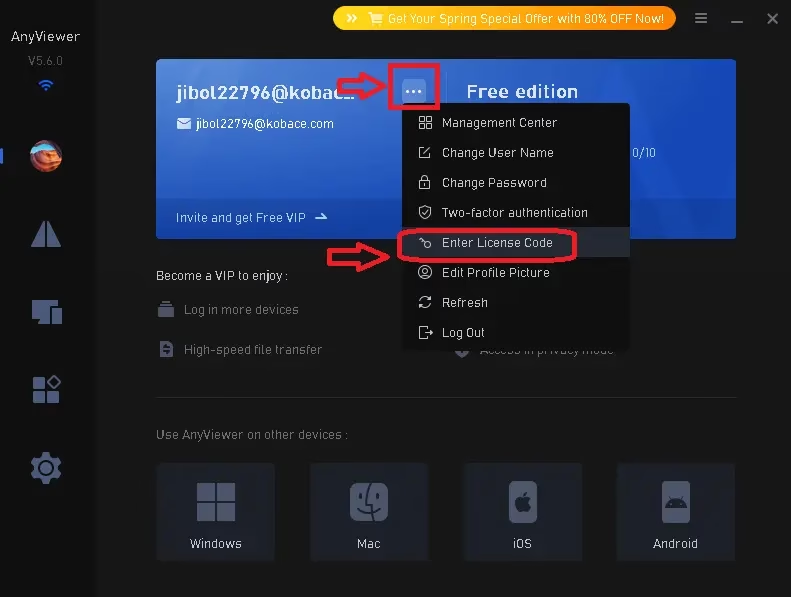
- Once logged in, click your profile icon → Enter License Code.
- Enter the license code below and click Register.
License Code: B620-4D1A-833A-D564
Note: This code provides a 6-month subscription valid until October 04, 2026. Grab it before it expires!


What is AnyViewer Solo?
AnyViewer Solo is the premium individual plan from AnyViewer, designed for single users who need reliable remote access across up to 5 login devices and 30 connected devices. It’s a powerful alternative to TeamViewer and AnyDesk — but unlike those tools, AnyViewer offers a genuinely free tier and an affordable Solo plan at just $3.99/month (billed annually).
AnyViewer uses a 256-bit ECC end-to-end encryption algorithm, is fully GDPR compliant, and supports two-factor authentication (2FA) — making it one of the most secure remote desktop tools available for personal use.

Key Features of AnyViewer Solo (2026)
- Unattended Remote Access – One-click connection to your devices without needing someone on the other end.
- Remote Gaming Support – Up to 60 FPS, 4K image quality, and <0.1 second delay with 3D game mouse support.
- High-Speed File Transfer – Transfer files between local and remote computers both during and outside active sessions.
- Privacy Mode – Blacken the remote screen and disable input to prevent data leakage during remote sessions.
- Multiple Monitor Support – View all remote monitors in one window or switch between them individually.
- Screen Mirroring – Mirror your Android or iOS screen onto your PC wirelessly.
- Screen Wall – Monitor multiple PCs simultaneously from a single dashboard — great for IT admins and remote support.
- In-Session Text Chat – Communicate in real time with the person on the remote device.
- Remote Boot – Restart the remote computer and reconnect automatically.
- Blacklist & Whitelist – Control which accounts or device IDs can connect to your machine.
- Two-Factor Authentication – Extra layer of security for your AnyViewer account.
- Cross-Platform Support – Available on Windows, macOS, iOS, and Android.
AnyViewer Solo System Requirements
AnyViewer supports the following platforms:
- Host (controlled) device: Windows 11 / 10 / 8.1 / 8 / 7 and Windows Server 2022 / 2019 / 2016 / 2012 R2
- Client (controller) device: Windows, macOS, Android 6.0+, iOS 10.0+
AnyViewer Solo Plan — What You Get
- ✅ 1 Licensed User
- ✅ 5 Login Devices
- ✅ 30 Currently Connected Devices
- ✅ Unlimited Simultaneous Sessions
- ✅ Unlimited Channels
- ✅ 1 Screen Wall
- ✅ High-Speed File Transfer
- ✅ Game Mouse Support
- ✅ Access in Privacy Mode
- ✅ Ultra-High Quality Image & True Color Display
- ✅ Display in Separate Window
AnyViewer vs TeamViewer vs AnyDesk — Quick Comparison
| Feature | AnyViewer Solo | TeamViewer (Free) | AnyDesk (Free) |
|---|---|---|---|
| Price (paid) | $3.99/mo | $24.90/mo | $14.90/mo |
| Free Tier | Yes | Yes (non-commercial) | Yes (non-commercial) |
| Unattended Access | Yes | Yes | Yes |
| File Transfer | Yes | Yes | Yes |
| Privacy Mode | Yes | No (free) | No (free) |
| End-to-End Encryption | 256-bit ECC | RSA/AES | TLS 1.2 |
| GDPR Compliant | Yes | Yes | Yes |
| Mobile Support | Yes | Add-on | Yes |
| Gaming Mode (60 FPS) | Yes | No | No |
How to Use AnyViewer for Remote Desktop
Method 1: One-Click Access (for logged-in devices)
- Install AnyViewer and sign in with your account on both devices.
- On the controller device, your linked devices appear under My Devices.
- Click One-Click Control to instantly access the remote PC — no password needed.
Method 2: Security Code (for ad-hoc support)
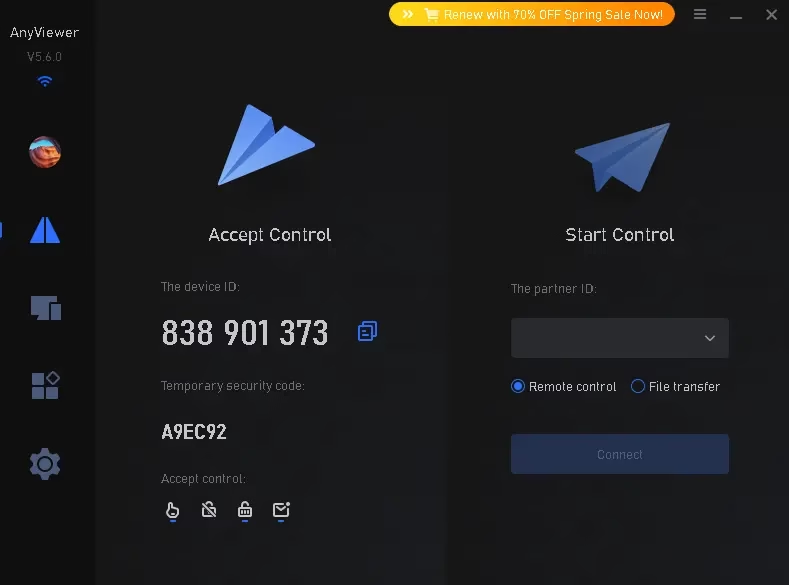
- Ask the person on the remote PC to share their Device ID and temporary security code.
- Enter both in your AnyViewer app and click Connect.
- Choose Remote Control or File Transfer mode.
Frequently Asked Questions (FAQ)
Is AnyViewer safe to use?
Yes. AnyViewer uses 256-bit ECC end-to-end encryption, supports 2FA, and is GDPR compliant. All remote sessions are fully encrypted.
Is AnyViewer free?
AnyViewer offers a free plan that allows remote access on up to 3 devices. The Solo paid plan ($3.99/mo) unlocks more devices, privacy mode, high-speed file transfer, and gaming support. Use the free license code above to try Solo for 6 months!
Does AnyViewer work on Mac?
Yes, AnyViewer supports macOS as a client device. However, the host (controlled) computer must currently run Windows.
Can I use AnyViewer on my phone?
Yes! AnyViewer has dedicated apps for Android (6.0+) and iOS (10.0+) so you can control your PC from your smartphone or tablet.
How is AnyViewer different from TeamViewer?
AnyViewer Solo costs significantly less than TeamViewer, includes gaming mode with 60 FPS support, and offers a more generous free tier. For personal and small-scale professional use, AnyViewer is the better value option in 2026.
Final Verdict — Is AnyViewer Solo Worth It?
For remote workers, IT support professionals, students, and gamers who need reliable remote access software without paying TeamViewer’s steep prices, AnyViewer Solo is an excellent choice in 2026. With 60 FPS gaming support, privacy mode, cross-platform access, and strong encryption, it punches well above its price point.
Grab the free 6-month Solo license above while it lasts — no credit card required, just a free AnyViewer account!


