

AOMEI Partition Assistant Pro 10.10 is one of the most popular professional disk management utilities for Windows in 2026, trusted by millions for partition resizing, OS migration, and disk cloning without data loss.
AOMEI Partition Assistant Pro provides the right set of tools to partition a hard drive and make the process easier with its simple user interface.
If your hard drive is large, partition it into two drives: one for the OS and one for data.
Partition Assistant lets you create, copy, and manage partitions, recover damaged ones, migrate your operating system from a hard drive to an SSD, and easily convert between file formats.
AOMEI’s partitioning software lets you divide a large hard drive into smaller drives, which is useful for tasks such as separating your operating system from your data.
You can also use it to resize, move, merge, split, and copy partitions; allocate free space from one partition to another; copy your OS from a hard drive to a solid-state drive; and more.
Furthermore, Partition Assistant can recover lost or damaged partitions, rebuild the master boot record, and run from a bootable CD.
Its interface is much easier to use, and the latest version of Partition Assistant supports Windows 11 and lets you create a bootable version of it or Windows 10 on a USB memory stick.

Contents
- 1 Frequently Asked Questions (FAQ)
- 1.1 What is AOMEI Partition Assistant Pro used for?
- 1.2 Is it safe to resize partitions with AOMEI Partition Assistant?
- 1.3 How is AOMEI Partition Assistant Pro different from the free version?
- 1.4 Does AOMEI Partition Assistant Pro 10.10 support Windows 11?
- 1.5 How do I migrate my OS to SSD using AOMEI Partition Assistant?
- 1.6 40
- 1.7 Like this:
Key Features of AOMEI Partition Assistant Pro 10.10:
- Compatible with Windows 11 and Windows 10.
- Supports hard disks with 4096-byte sector size
- Install Windows 11 on a USB memory stick with the Windows To Go Creator feature
- Without installing AIK/WAIK, create Windows PE bootable media
- Supports MBR and GPT disks
- Migrate OS on MBR or GPT disks to solid-state drives (SSD).
- Convert a system or data disk between MBR and GPT styles.
Get AOMEI Partition Assistant Pro 10.10 for FREE:
Download the AOMEI Partition Assistant Pro 10.10 trial version (demo) installer from this link.
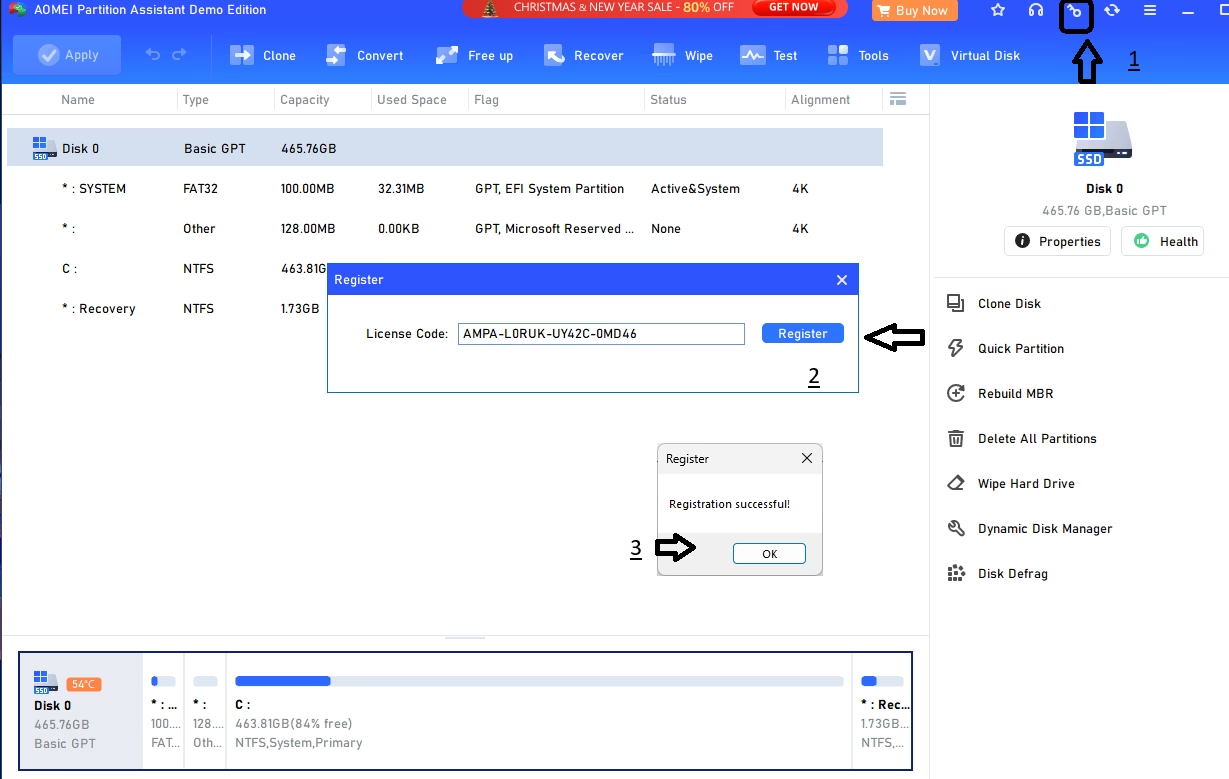
Install the software and activate it with the license code.
AMPA-L0RUK-UY42C-0MD46
Launch the app, and on the app’s main window, click ‘Register’ (key icon) and use the above license code to activate the pro version.
Note: This is a limited-time free license for AOMEI Partition Assistant Pro 10.10. Check back for updated codes when this one expires.
Frequently Asked Questions (FAQ)
What is AOMEI Partition Assistant Pro used for?
AOMEI Partition Assistant Pro is a professional disk partition management tool for Windows. It lets you resize, move, merge, split, copy, and delete partitions without data loss. It also supports migrating your OS to SSD, creating bootable media, converting MBR to GPT, and recovering lost partitions.
Is it safe to resize partitions with AOMEI Partition Assistant?
Yes, AOMEI Partition Assistant Pro uses advanced algorithms to resize partitions safely without erasing data. It creates a pre-operation log and can restore the system to its previous state if an operation fails. Always backup your data before partition operations as a precaution.
How is AOMEI Partition Assistant Pro different from the free version?
The Pro version adds unlimited partition operations for Windows Server, dynamic disk management, partition alignment optimization, command-line support, free lifetime upgrades, and priority customer support — none of which are in the free edition.
Does AOMEI Partition Assistant Pro 10.10 support Windows 11?
Yes, AOMEI Partition Assistant Pro 10.10 fully supports Windows 11, Windows 10, Windows 8.1, Windows 7, and Windows Server editions. It supports both MBR and GPT partition styles and hard disks with 4096-byte sector sizes.
How do I migrate my OS to SSD using AOMEI Partition Assistant?
Connect your new SSD to the PC. Open AOMEI Partition Assistant Pro and choose “Migrate OS to SSD” from the Wizard menu. Select the source OS partition and the destination SSD. Follow the wizard to complete the migration. Your OS will boot from the SSD without needing to reinstall Windows.


Discover more from Techno360
Subscribe to get the latest posts sent to your email.
Hi.
Sorry but the license code don’t work.
“The license code is not in the validity time”
Best regards.
Hi Fred, I just updated the license code. Try the new code : AOPR-913YG-Q76N4-U5A5Q
I had already found this one on another website and it works! Thank you!
Hi,i think the code is not valid again
Hey there! It looks like the code isn’t working anymore. I’ll let you know as soon as I find a new one. Thanks for letting me know!
did you find the new code??
No, will let you know when its available
All provided license are doesn’t work, failed in validity period…