
🎁 FREE GIVEAWAY · UPDATED NOV 2026
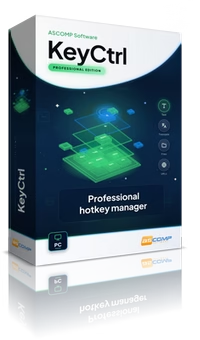
KeyCtrl Professional 2.203 — Full Version, Free
ASCOMP’s hotkey manager normally costs $19.90. Through the current giveaway you can register for the full Professional Edition at no cost, with unlimited usage time. Here is how to claim it and what has changed since our first post.
⚡ Quick Read
- Software: ASCOMP KeyCtrl Professional 2.203 (released 25 October 2026)
- Regular price: $19.90 · Giveaway price: Free
- License: Private licence, unlimited usage period
- Updates & support: 30 days from registration
- Activation: Your 10-digit ASCOMP customer ID (no separate key)
- Works on: Windows 11, 10, 8.1, 8, 7 and Windows Server 2012–2025 (32/64-bit and ARM)
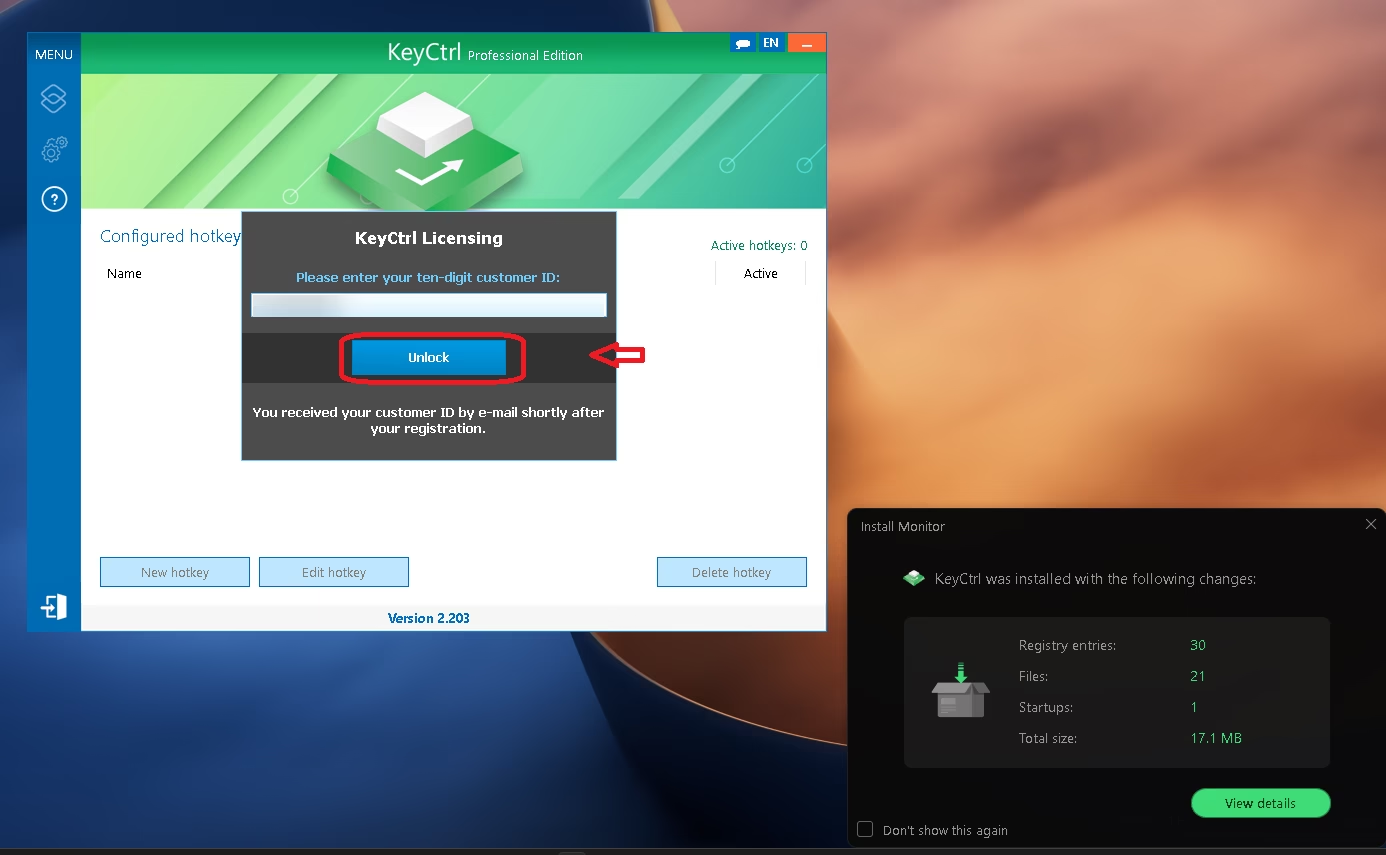
🧪 Our testing: We registered for this giveaway, confirmed the email, downloaded KeyCtrl Professional 2.203 from the ASCOMP customer menu, installed it on a Windows PC and activated it with the customer ID. Our install monitor recorded 21 files, 30 registry entries and one startup entry, about 17.1 MB in total. Every screenshot in this article comes from that test.
What Is ASCOMP KeyCtrl?
KeyCtrl is a hotkey manager for Windows from the German developer ASCOMP Software GmbH, the company behind Synchredible, Backup Maker and ScreenCapt. It lets you tie your own keyboard shortcuts to everyday jobs: typing a saved block of text, launching a program, opening a website or folder, translating selected text, or grabbing a screenshot.
If you type the same email replies, addresses or code snippets every day, or keep digging through the Start menu for the same five apps, KeyCtrl turns each of those into a single key combination that works system-wide.
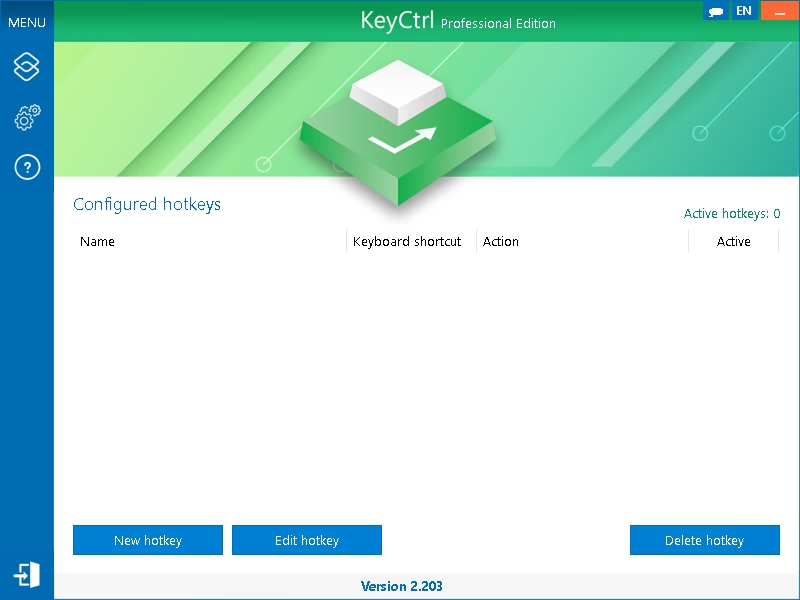
What’s New in This Update
We first covered this giveaway in September 2026. Here’s what is different in the current round:
- Newer version: the giveaway now delivers KeyCtrl Professional 2.203, released 25 October 2026.
- New giveaway link and code: registration uses a new pre-filled code (W6JJ7-9SGW1-1FL22-CHIP). The older link may no longer work.
- Shorter update window: free updates and technical support now run for 30 days (the earlier offer gave 6 months). The licence itself still has no time limit.
- Customer ID activation: you unlock the app with the 10-digit customer ID shown in your ASCOMP customer menu. You don’t receive a separate licence key.
Key Features of KeyCtrl Professional
When you create a new hotkey, KeyCtrl asks what the shortcut should do. Version 2.203 offers nine action types:
| Action | What It Does |
|---|---|
| Execute file | Launches a program or file, with optional parameters, working folder and window state (normal, minimised, maximised or hidden) |
| Open URL | Opens a website in your default browser |
| Open folder | Jumps straight to a folder in File Explorer |
| Insert text | Types a saved text block (email replies, signatures, addresses, code) into any app |
| Save text | Stores selected text so you can reuse it later, for example as one of several saved clipboard items |
| Translate text | Translates selected text or web content using the Microsoft Translation API |
| Create screenshot | Captures the screen or desktop with one key combination |
| Change window state | Minimises, maximises or restores windows |
| System actions | Runs Windows system commands from a shortcut |
ASCOMP also lists context-specific shortcuts: hotkeys that only fire inside a chosen app or window, so the same key combination can do different things in Word and in your browser.
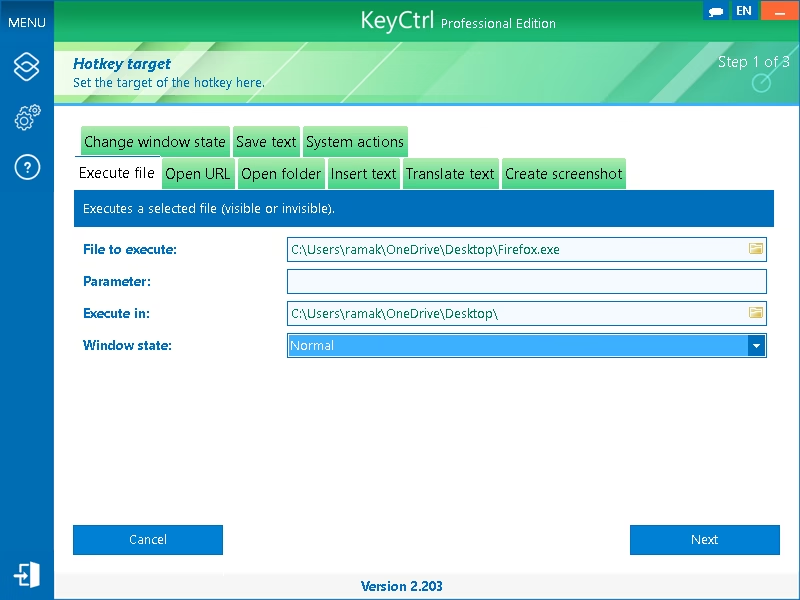
Example Hotkeys You Could Set Up
KeyCtrl doesn’t come with ready-made shortcuts. You pick every key combination yourself. These are example setups to show what’s possible, not built-in defaults:
| Example Shortcut | Action Type | What It Does |
|---|---|---|
| Ctrl + Alt + F | Execute file | Launches Firefox, as set up in the screenshot above |
| Ctrl + Alt + W | Open URL | Opens your WordPress dashboard in the browser |
| Ctrl + Alt + E | Insert text | Types a frequently used email reply into Gmail or Outlook |
| Ctrl + Alt + D | Open folder | Opens your Downloads folder |
Tip: choose combinations that other apps don’t already use. On some non-English keyboard layouts, Ctrl + Alt acts as AltGr and types special characters, so Ctrl + Shift combinations can be safer there.
System Requirements
| Windows | 11, 10, 8.1, 8, 7 |
| Windows Server | 2012, 2016, 2019, 2022, 2025 |
| Architecture | 32-bit and 64-bit; Intel-compatible CPUs and Windows on ARM |
| RAM | 2 GB minimum, 4 GB recommended |
| Disk space | 50 MB |
How to Get KeyCtrl Pro for Free (Step by Step)
Step 1: Register on the giveaway page
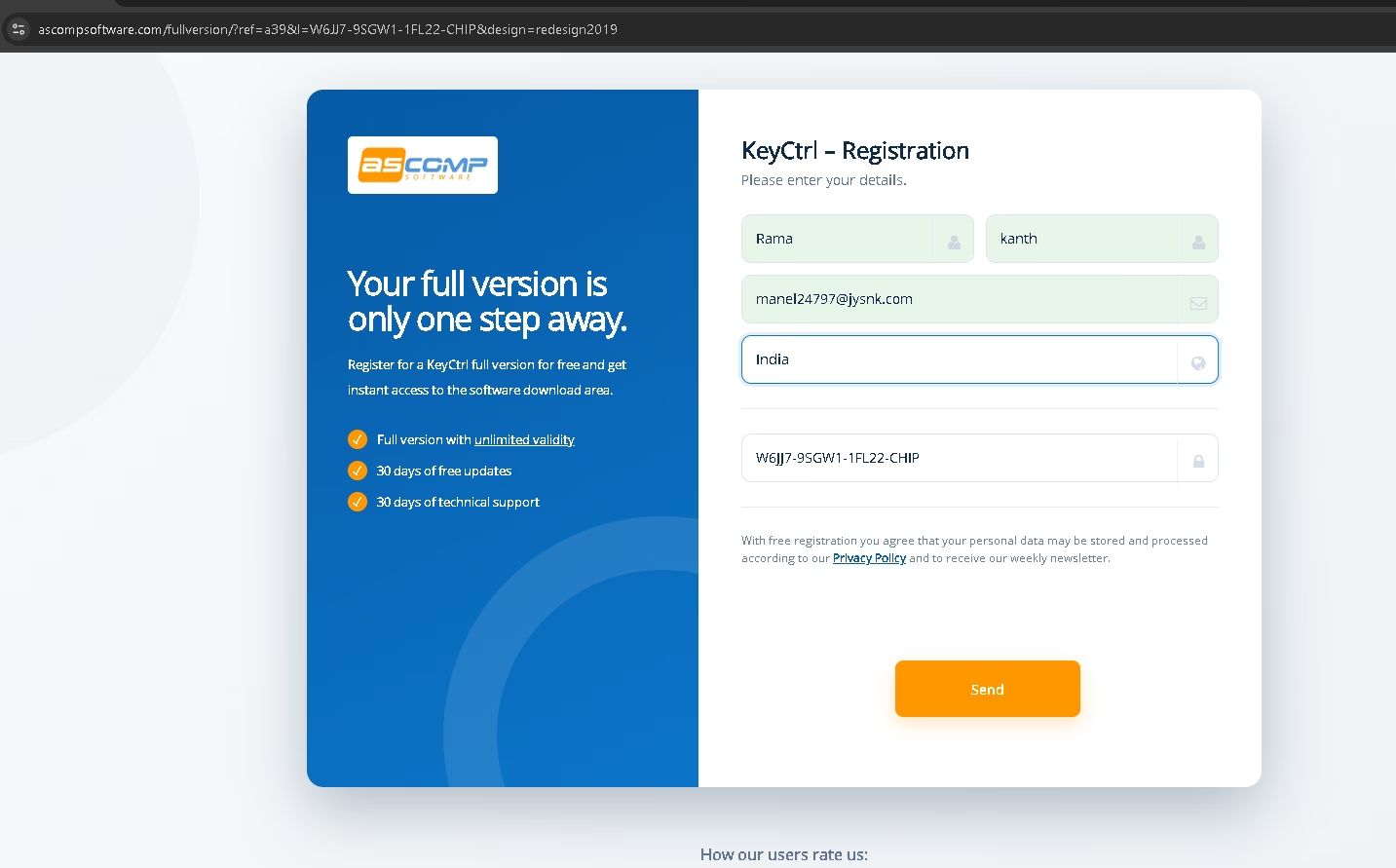
Open the KeyCtrl giveaway page. Enter your first name, last name, email address and country. The giveaway code is already filled in, so leave it as it is. Click Send.
Note: by registering, you agree to ASCOMP storing your details under its privacy policy and to receiving its weekly newsletter. You can unsubscribe later.
Step 2: Confirm your email
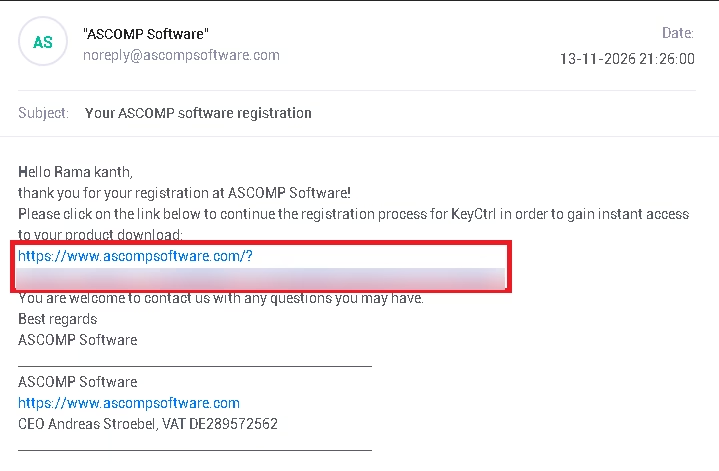
Check your inbox for an email from ASCOMP Software with the subject “Your ASCOMP software registration”. Click the confirmation link in it. If you can’t find it, check your spam or promotions folder.
Step 3: Copy your customer ID and download the installer
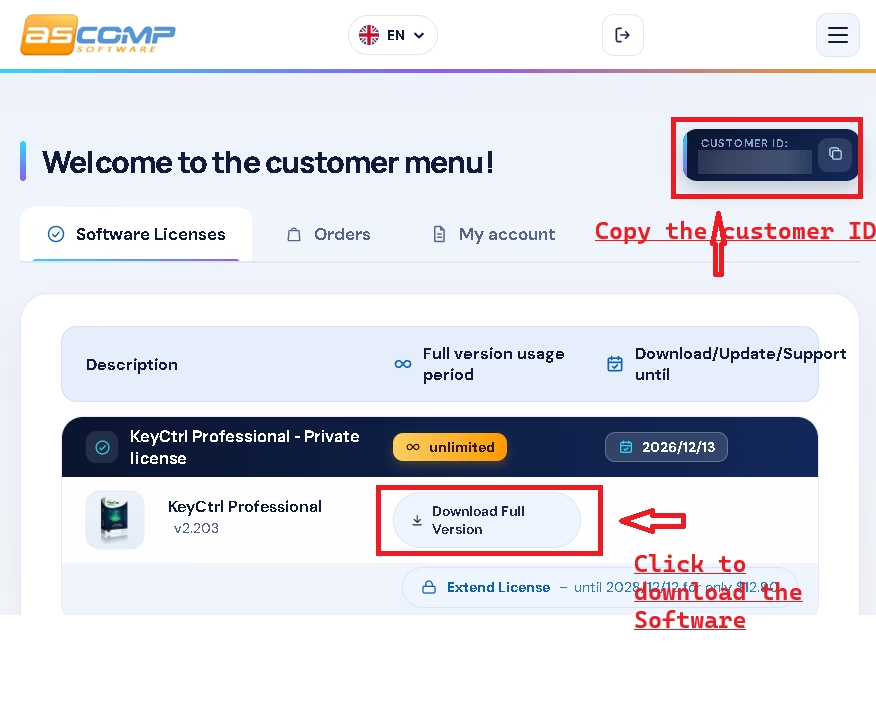
The link opens ASCOMP’s customer menu. Under Software Licenses you’ll see KeyCtrl Professional – Private license with an unlimited usage period. Copy the 10-digit Customer ID in the top-right corner, because this is your activation code. Then click Download Full Version.
Step 4: Install KeyCtrl
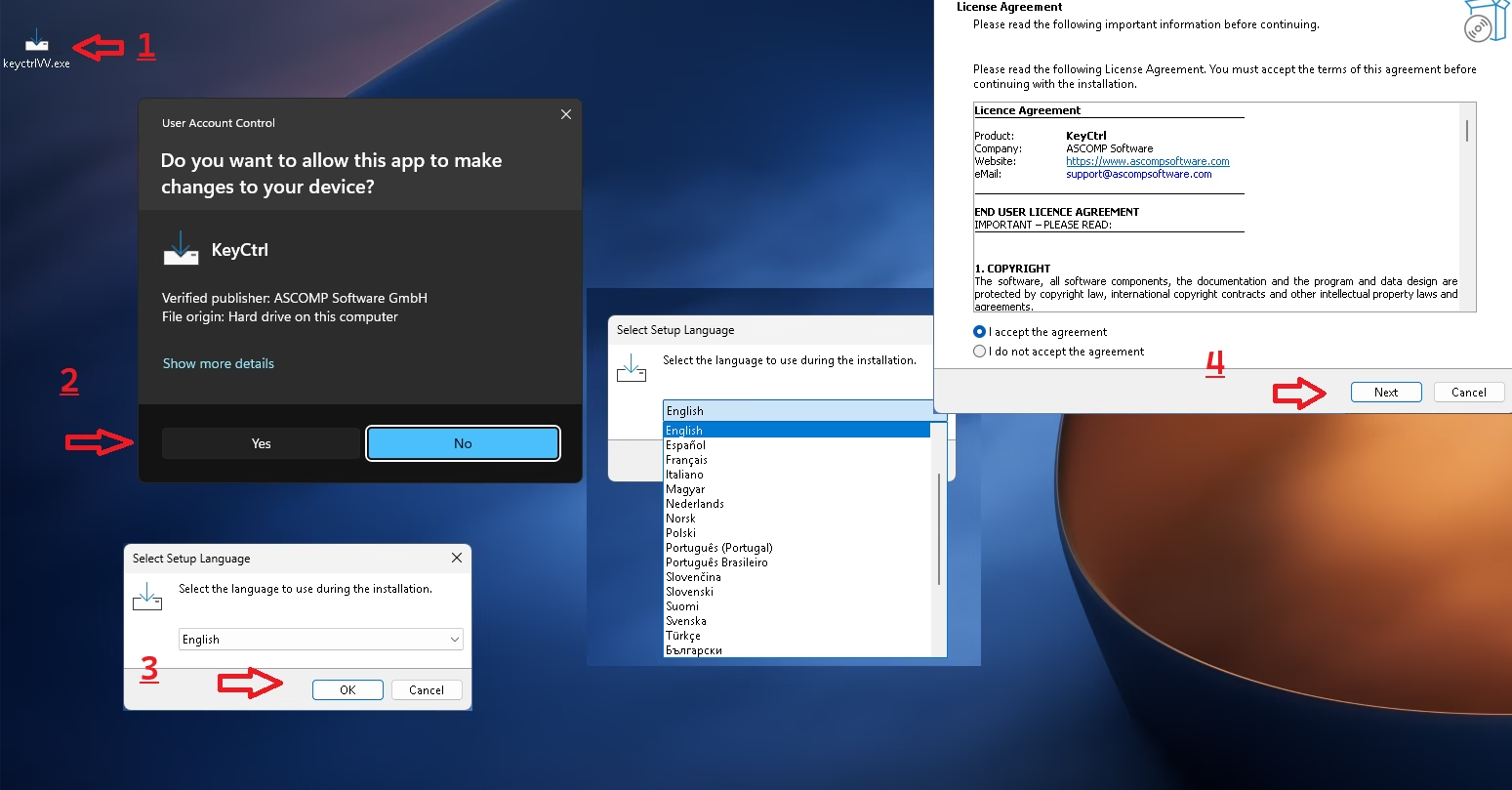
Run the downloaded keyctrlW.exe. In the User Account Control prompt, check that the verified publisher is ASCOMP Software GmbH and click Yes. Choose your setup language, accept the licence agreement and finish the installer.
Step 5: Unlock the full version
When KeyCtrl opens, the KeyCtrl Licensing dialog asks for your ten-digit customer ID. Paste the ID you copied in Step 3 and click Unlock. The title bar now reads KeyCtrl Professional Edition and you can start creating hotkeys.
Giveaway Licence Terms
| Term | Giveaway Version | Paid Version ($19.90) |
|---|---|---|
| Edition | Professional (private licence) | Professional |
| Usage period | Unlimited | Unlimited |
| Free updates | 30 days | Included per ASCOMP’s purchase terms |
| Technical support | 30 days | Included per ASCOMP’s purchase terms |
| Activation | 10-digit customer ID | 10-digit customer ID |
After the 30 days, version 2.203 keeps working with no time limit. You just won’t get newer versions unless you use the paid Extend License option in your customer menu. Grab the installer while your download window is open, and keep a copy of it with your customer ID somewhere safe.
⏳ Time-limited offer: ASCOMP hasn’t published an end date for this giveaway, and earlier KeyCtrl giveaway links have stopped working without notice. If you want it, register today.
Limitations to Know
- Windows only: there’s no macOS or Linux version.
- Must be running: your hotkeys only work while KeyCtrl is open. The installer adds a startup entry for this. If you turn it off in Task Manager → Startup apps, you’ll have to start KeyCtrl yourself after each sign-in.
- Translation caps: ASCOMP limits translation to 5,000 characters per operation and 20,000 characters per user per month. That’s fine for short phrases, but not for long documents.
- Short update window: the giveaway includes only 30 days of free updates and support.
Pros and Cons
👍 Pros
- Nine action types cover most everyday shortcuts
- Simple three-step wizard for each hotkey
- App-specific shortcuts avoid key clashes
- Light footprint (about 17 MB installed)
- Runs on Windows 7 through 11, Server and ARM
👎 Cons
- Only 30 days of free updates with the giveaway
- Translation capped at 20,000 characters a month
- Registration signs you up for a weekly newsletter
- Private licence, so not for business use
Frequently Asked Questions
Is the KeyCtrl Pro giveaway the full version or a trial?
It’s the full Professional Edition with an unlimited usage period. The regular download on ASCOMP’s product page is a 14-day trial. The giveaway unlocks that same app permanently with your customer ID.
Where is my KeyCtrl licence key?
There isn’t a separate key. Your 10-digit customer ID, shown at the top of the ASCOMP customer menu, is what you enter in the KeyCtrl Licensing dialog.
What happens after the 30-day update period?
KeyCtrl keeps working as a full version forever. You only lose access to newer versions and free technical support, unless you pay to extend the licence.
Does KeyCtrl work on Windows 11?
Yes. Version 2.203 supports Windows 11, 10, 8.1, 8 and 7, Windows Server 2012 to 2025, and both Intel-compatible and ARM processors.
Can I use the giveaway licence at work?
The giveaway is issued as a private licence, so it’s meant for personal use. For business use, buy the Professional Edition from ASCOMP.
Can I reinstall KeyCtrl later?
Yes. Keep the installer and your customer ID. After reinstalling, enter the same ID to unlock the Professional Edition again.
✅ Our Verdict
KeyCtrl Professional is an easy way to add custom shortcuts to Windows without learning a scripting tool like AutoHotkey. Text insertion, quick launch and one-key screenshots cover most of what people actually use, and the per-app shortcuts are a nice touch. The 30-day update window is shorter than in the last giveaway, but the licence never expires, so it’s worth claiming while it lasts.
More Free ASCOMP Software
- ScreenCapt Pro free licence: screen recorder for Windows
- Synchredible Pro free licence: folder sync and backup
- ASCOMP Backup Maker Pro free licence
- Text-R Pro: free OCR software
- All current software giveaways on Techno360
Which shortcut would save you the most time: text snippets, quick-launch hotkeys or one-key screenshots? Tell us in the comments.