


Ashampoo AI Filter #1 Is Free: Get the £20 Full Version for Life
Ever nailed the perfect edit on one photo and wished you could stamp that exact look onto a hundred more? That’s the whole trick here. AI Filter #1 watches how you edited a picture, bottles the recipe, and lets you pour it over any other shot — and right now the lifetime full version costs nothing.
£0 £20
Lifetime · Full
Windows 11 / 10
🗓️ Offer status checked: September 10, 2026. Giveaway pricing can change without notice — if AI Filter #1 no longer shows £0 in the Ashampoo App, the promotion has likely closed.


What Is Ashampoo AI Filter #1?
Most “filters” you’ve used are fixed recipes someone else baked. AI Filter #1 flips that idea on its head: it lets you teach the software your own editing style.
You feed it a photo the way it started and the same photo after you finished editing it. Its AI analyses the differences between the two and learns how to reproduce those changes as a reusable filter. Save that filter once, and you can apply it to any other image in a single click. It’s less a filter pack and more a way of cloning your own look — no matter which editor you used to create it.
⚡ Ashampoo AI Filter #1 — 30-Second Summary
- Regular price: £20 lifetime license
- Giveaway price: £0
- License: Lifetime full version
- Version: 1.11
- What it does: Learns your photo edits and turns them into reusable AI filters
- Windows: 11 / 10 (64-bit) — no Mac version
- Activation: Internet connection required
- Delivered via: The Ashampoo App — log in once, hit Get, and the key appears in your account
Why This AI Photo Tool Is Different
Plenty of giveaways are just old utilities being cleared out. AI Filter #1 is different because the core idea genuinely works, and it’s aimed at people who already edit photos and are tired of repeating themselves.
Say you spend twenty minutes perfecting a warm, filmic look on a holiday snap in Lightroom or GIMP. Normally that effort dies with that one image. Here, you hand the tool the original and your finished version, let it train for a bit, and it hands back a filter that recreates that mood on the next 200 photos in seconds.
To be clear, I didn’t just take Ashampoo’s word for it — I ran the workflow on a real before/after image. The app gives you dedicated training slots and a Train AI network control, so the whole thing really is built around learning from your two images rather than applying canned presets. A few things stood out:
- It learns your style, whatever tool made it. The before/after pair can come from any editor — Photoshop, GIMP, your phone. AI Filter #1 only cares what changed, not how.
- A proper filter library. Every filter you train lands in a built-in database, and you can import or export them to swap with other users.
- Tunable training. You can set the number of training passes (iterations), the block size, the training rate and the network’s layer shape. There’s even an automatic check that flags when the AI is overfitting.
- 91 built-in filters across 5 categories. In expert mode, these let you build an “after” image inside the program itself if you don’t already have one.
- Broad RAW support. It reads a claimed 1,296 camera RAW formats and can pass images straight into Ashampoo’s SHARPEN, COLOR and BLACK & WHITE tools.
Ashampoo AI Filter #1 Features at a Glance
| Version | 1.11 |
| Giveaway price | £0 |
| Normal listed price | £20 (UK store) |
| License | Lifetime |
| Operating system | Windows 11 / 10 (64-bit) |
| Delivered via | Ashampoo App |
| Custom AI filters | Yes — trained from before/after pairs |
| Filter database | Yes, with import/export |
| RAW support | 1,296 camera formats |
| Built-in filters | 91 across 5 categories |
| Internet | Required for activation & re-verification |
| Developer / Publisher | Accelerated Vision UG (Germany) / Ashampoo |
| Customer rating | 4.4/5 on Ashampoo’s store at the time of checking |
Is the Giveaway Legit?
A “free forever” version of paid software always earns a raised eyebrow, so it’s worth showing the proof. The offer is hosted inside Ashampoo’s own App, and once installed, the program’s About screen reports a registered full version, version 1.11, credited to developer Accelerated Vision UG in Kiel, Germany.
This is also a well-worn Ashampoo tactic: seeding full versions of standard-tier products builds goodwill and nudges some users toward the paid professional edition later. Nothing shady — just marketing you happen to benefit from. The only real “cost” is a free account and the fact that the program checks its license periodically online. If you’re comfortable with that, the giveaway hands you a useful photo-editing tool at no monetary cost.


How to Get Ashampoo AI Filter #1 Free — Step by Step
🎁 Ready to claim it? Start here:
This giveaway runs through the Ashampoo App rather than the usual “request a key by email” page, so the flow is slightly different from other Ashampoo promos. Here’s exactly what I did.
Step 1 — Download the installer
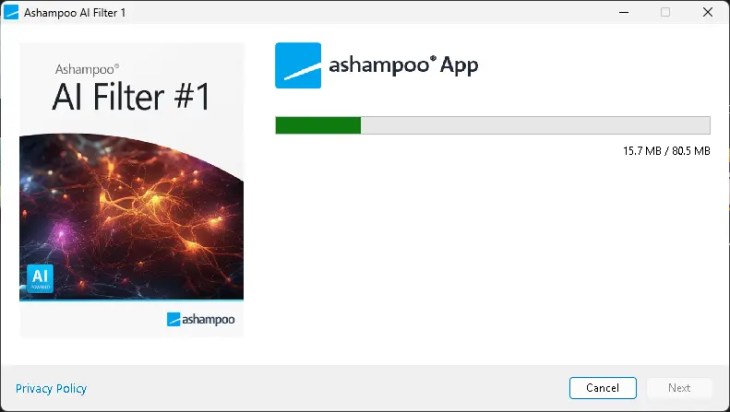
Open the official giveaway page and click the Download button. What comes down is the small Ashampoo App installer — the launcher that manages the offer and the download. Run it and let it finish; the full package weighs in at roughly 80 MB.

Step 2 — Log in or create a free account
When the Ashampoo App opens, it asks you to log in or register. Drop in your email and hit Next. First-timers get a quick account setup — no payment info, and it’s over in under a minute. Tip: a masked or alias email works fine here if you’d rather keep your main inbox clean.


Step 3 — Hit “Get” to add it to your collection
Once you’re signed in, the AI Filter #1 product page shows the price at £0 (−100%). Click the blue Get button. That adds the lifetime license to your account for keeps.


Step 4 — Install and grab your license key
Head to Your Collection, open AI Filter #1 and press Install. The same panel reveals your personal license key — copy it somewhere safe with the little clipboard icon, then let the install finish.

Step 5 — Launch and start training filters
Click Launch, load a photo, and you’re in. Drop a matching before/after pair into the training slots, hit Train AI network, and save the result to your filter database. That’s your first custom filter done.
💡 Pro tip: Your before and after images must line up pixel-for-pixel — same crop, same resolution. If the “after” was cropped or resized, the AI has a much harder time learning the edit.
How AI Filter #1 Works Once You’re In
The workspace puts your structure presets down the left, a live magnifier and comparison view up top, and the AI training panel on the right. Load your image, feed the “Before” and “After” training slots, and the Train AI network button does the heavy lifting. When it’s done, the new filter drops into your database ready to reuse.


Standard vs Professional — Don’t Get Them Confused
This giveaway is for AI Filter #1, not AI Filter #1 professional. Ashampoo sells the professional edition as a separate, pricier product with additional tools, so don’t assume claiming this offer unlocks the pro version. For most hobbyists and creators, the standard edition covers exactly what you need — but go in with the right expectation.
Who Should Claim It?
👍 Great for
- Hobbyist and RAW photographers
- Content creators processing photos in batches
- Anyone who recreates the same editing look again and again
- People who want to preserve a signature style as a filter
👎 Not for
- People wanting a full Photoshop replacement
- Users after generative AI image creation
- Anyone expecting a conventional preset/LUT editor
- Mac users — it’s Windows-only
🔗 More free photo & AI tools worth grabbing
- Ashampoo Photo Commander 18 Free License — the all-in-one editor and organiser, also free right now.
- UltraPic Pro+ AI Photo Editor Giveaway — background removal and generative fill, no install needed.
- Ashampoo Snap 17 Free License Key — capture, annotate and record your screen for free.
Browsing for more? See our full AI tools & giveaways hub for everything we’re tracking.
🏅 Final Verdict
At £0, AI Filter #1 is worth claiming if you regularly edit photos. Its standout feature isn’t the collection of built-in effects — it’s the ability to learn your own edits from a before-and-after pair and turn them into a reusable filter. The RAW support is broad and the filter library makes your best looks reusable across every future shoot.
It won’t replace Photoshop or your main editor, but it can save serious time when you keep applying the same look. The biggest reason to grab it now is simple: the normal product is a paid lifetime license, while the current Ashampoo App promotion makes the standard version available for £0. If you edit photos on Windows, claim the license first and decide later whether it earns a permanent spot in your workflow — because Ashampoo promos can close early.
Frequently Asked Questions
Is the Ashampoo AI Filter #1 giveaway really free?
Yes. The current Ashampoo App promotion hands eligible users a permanent full-version license at £0. All that’s required is a free Ashampoo account to unlock the key — no card details, no hidden fee.
What does the software actually do?
It compares a matching before and after version of a photo, learns the edit you made, and saves it as a reusable AI filter you can apply to any other image in a click.
Which Windows versions are supported?
Ashampoo’s current requirements list 64-bit Windows 11 and Windows 10. It recommends at least 4 GB RAM, an Intel i3 (or comparable AMD) processor, a DirectX-compatible graphics card and a 1600×900 display. There’s no Mac version.
Do I need to stay online to use it?
Activation needs an internet connection, and the license is re-verified at regular intervals. The actual editing runs locally on your PC.
How long does the giveaway last?
It’s a limited-time offer, and the £0 price can change without notice. Check the Ashampoo App before you try to claim it — if AI Filter #1 no longer shows £0, the promotion has likely ended.
Is the professional edition included?
No. The giveaway is the standard AI Filter #1 (v1.11). The “professional” edition is a separate, higher-priced product on the Ashampoo store.
Written by Ramakanth
Founder of Techno360, tracking Windows software giveaways and free tools since 2011. I tested this claim process myself and captured the screenshots throughout this guide firsthand. Every product detail — version, price, requirements and features — was cross-checked against Ashampoo’s official product page before publishing.