


Censorship and geo-restrictions are increasingly prevalent in the modern internet landscape. However, you can access blocked or restricted content using a virtual private network (VPN) tool, like ChrisPC Free VPN Connection.
What is a VPN and How Does it Work?
Do you wish there was a way to access all your favourite news networks, YouTube videos, and television shows from any location?
Would you like to find out how to get access websites and content blocked by censorship or geo-restrictions?
Are you interested in keeping your online identity secret and hiding your IP address? A virtual private network, or VPN, is essential if you responded yes to any of the above questions.
A virtual private network (VPN) encrypts your internet data and redirects it to a server in another nation, making it appear you are accessing information from that location.
Another advantage of VPNs is that they provide an additional layer of security by concealing your online identity and location through the masking of your actual IP address.
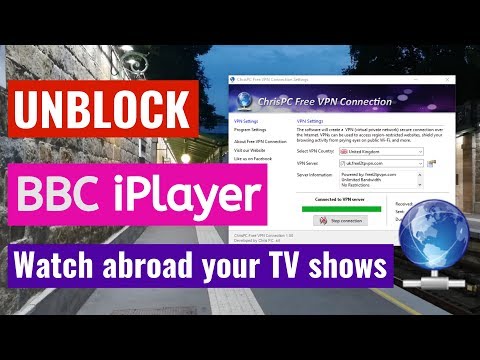
What is ChrisPC Free VPN Connection?
This small free app for Windows allows you to connect to free VPN servers from various countries, including the USA, UK, Germany, Canada, France, Russia, Singapore, the Netherlands, and many more (14 countries).
Easily access blocked or filtered websites and services using the app’s database, which contains over 90 free VPN servers.
Without sacrificing security or performance, the ChrisPC app grants you unfettered and unrestricted access to any content online.


Features:
- Unblock Geo-Restricted Websites: Access websites, news portals, social media sites, or streaming services restricted in your region.
- Enjoy Geo-Blocked Content: Watch TV series and movies blocked in your country by connecting to a server in another nation.
- Bypass Censorship: Using this VPN, you can get beyond censorship measures put in place by internet service providers (ISP).
- Enhanced Privacy: A higher level of anonymity when surfing the web is yours when you encrypt your traffic and mask your IP address.
How to Use ChrisPC Free VPN Connection?
- Get ChrisPC Free VPN Connection from the official website.
- After installing the software, double-click the app’s icon in the taskbar (Jump list menu) or launch it to get started.
- Once on the main window, select your desired VPN country and server from the drop-down menu. You can choose from 14 countries. You’ll also find server information, such as bandwidth and restrictions.
- Click the “Connect to VPN” button, then hit “Connect” in the popup window.
- The connection will take a few seconds to establish. If you encounter connection errors, try selecting another VPN server.
- A window confirming the connection will appear as soon as you establish a connection to the VPN server. Hit the “Continue” button.
- To switch servers, click the “Stop Connection” button and choose another country.


Enjoy unrestricted online access! Now you can browse any blocked, filtered, or restricted websites, videos, or content in your area.
Conclusion:
If you want to access any content online quickly and securely, then ChrisPC Free VPN Connection is the tool for you. It’s free, fast, and safe.
By connecting you to free VPN servers in different countries, this small tool allows you to bypass censorship and geo-restrictions.
Use this Windows program to surf the web privately and securely without sacrificing speed or freedom. Download it today and see for yourself.