


🎁 Limited-Time Giveaway
Coolmuster Screen Recorder Giveaway: Free 1-Year License (Windows)
Coolmuster is handing out a full 1-year license for its Screen Recorder — a tool that normally sells for $25.95. Record your Windows screen in HD, with no watermark and no time limit. Below I’ll show you exactly how I claimed mine.
Offer status: Active at the time of writing • Platform: Windows 11/10/8/7 • License term: 1 year from activation • Version tested: 1.1.68
⚡ Quick Read
- What you get: A free 1-year license for Coolmuster Screen Recorder (regular price $25.95).
- What it does: Records your full screen or a custom region as MP4 in HD, plus screenshots you can annotate.
- The catch: You share the page once (Facebook or X) to reveal the code. Audio is system or mic — not both together, and there’s no webcam capture.
- Time to claim: Around 3–4 minutes, start to finish.
If you make tutorials, record gameplay, or just need to send a colleague a quick screen walkthrough instead of a wall of text, a dependable screen recorder earns its keep fast. The trouble is that most of the free ones stamp a watermark across your video, cut you off after a few minutes, or bury the controls under ads.
That’s what makes this Coolmuster Screen Recorder Giveaway worth a look. Coolmuster has been building Windows and phone utilities for over two decades, and right now it’s giving away a one-year license for its Screen Recorder through the official giveaway page. I ran through the whole process on my own machine — installer, license, activation — and everything checked out, so here’s the honest walkthrough along with what the tool can and can’t do.


What is Coolmuster Screen Recorder?
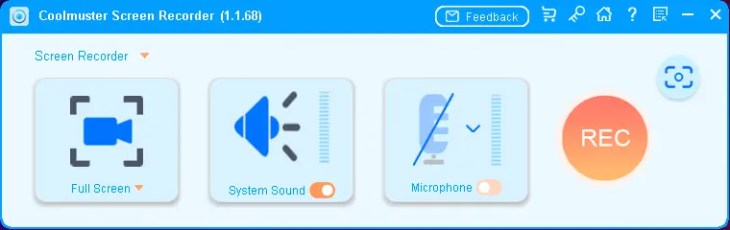
Coolmuster Screen Recorder is a lightweight, 2-in-1 capture tool for Windows. It records what’s happening on your screen as an MP4 video, and it also doubles as a screenshot tool with a small built-in editor. The interface is a single toolbar — you pick your recording area, decide on audio, and hit the big REC button. That’s the whole learning curve.
One thing I appreciated during testing: everything is processed locally. Your recordings and screenshots stay on your PC and aren’t uploaded anywhere, which matters if you’re capturing anything work-related or private.

Features worth knowing about
- Full screen or custom region: Drag to select any area with live pixel dimensions, or grab the whole desktop. Recordings save as MP4 in HD.
- No watermark, no time limit: Once you register with the giveaway code, the watermark disappears and recording sessions are unlimited.
- Pick your audio source: Record system sound (for gameplay or video playback), your microphone (for voiceovers), or neither for a silent demo.
- Screenshots with editing: Capture full screen or a region, then add boxes, circles, arrows, lines, or text before saving as PNG, JPG, or BMP.
- Draggable toolbar: The controls float and can be moved out of the way so they don’t sit in the middle of whatever you’re recording.
- Light on resources: It kept recording smoothly without turning my fans into a jet engine, even on a modest setup.
A couple of honest caveats
This is a straightforward recorder, not an all-in-one studio. You can’t capture system sound and microphone at the same time — it’s one or the other — and there’s no webcam overlay. If you need picture-in-picture or simultaneous audio tracks for editing, you’ll want something heavier. For plain, clean screen capture, though, it does the job without fuss.
How to claim your free Coolmuster Screen Recorder license
The process has two halves: grab the license code from the giveaway page, then activate it inside the app. Here’s each step exactly as I did it.
- Open the giveaway page. Head to the Coolmuster Screen Recorder giveaway page. Enter your name, a valid email address, and the captcha, then click Submit.
- Share to unlock. A pop-up asks you to share the giveaway on Facebook or X (Twitter). Pick either one — that’s what reveals the code.
- Copy your license code. Your unique code appears on screen. Copy it and save it somewhere safe along with the email you used — you’ll need both to register.
- Download and install the app. Grab the installer from Coolmuster’s official download link and run through the short setup.
- Register inside the app. Open Coolmuster Screen Recorder, click the key / Register icon at the top, paste in the same email address and your license code, then hit Register.
- Done. You’ll see a “registered successfully” confirmation. The About window will show your subscription running a full year — mine registered as valid for 365 days.


💡 Tip: Use the exact email address you typed on the giveaway page when you register in the app — the code is tied to it. And paste the code rather than typing it by hand; those long strings are easy to fat-finger.
Who should grab this?
If you record how-to videos, capture short gameplay clips, put together training material, or just want a no-nonsense recorder that won’t slap branding on your footage, this is an easy yes — especially at zero cost for a year. Anyone who needs simultaneous mic + system audio, webcam overlays, or a full editing timeline should treat it as a handy secondary tool rather than a main workhorse.
✅ The Verdict
Coolmuster Screen Recorder isn’t trying to be the flashiest tool in the room, and that’s exactly its appeal. It records clean HD video with no watermark, keeps everything on your own machine, and gets out of your way. The two-track audio and webcam gaps are real, but for straightforward screen capture it’s genuinely pleasant to use.
A one-year license for a $25.95 tool, in exchange for a single share and a few minutes? For the right person, that’s a very fair trade. Just don’t sit on it — giveaway windows like this close without much warning.
More screen recorder giveaways & guides
Hunting for the right capture tool? Start with our full screen recorder hub, then compare these recent picks:
- SurFlex Screen Recorder — Free License Key (Windows & Mac) — 4K capture with simultaneous mic + system audio.
- Fast Screen Recorder — Free 1-Year License (Windows) — a minimalist, quick-and-light option.
- iTop Screen Recorder Pro — Free License — includes a built-in video editor and hotkeys.
- AWZ Screen Recorder Pro — Free 1-Year License — webcam overlay and scheduled recording.
- EaseUS RecExperts Pro — Free License — a heavier all-rounder for creators.
Frequently asked questions
Is the Coolmuster Screen Recorder giveaway really free?
Yes. The license itself costs nothing through the official giveaway page. In return, Coolmuster asks you to share the page once on Facebook or X to reveal your code. The license is valid for one year.
Does the recording have a watermark?
Not after you register. The unregistered trial adds a watermark, but activating with your free giveaway code removes it and unlocks unlimited recording.
Can it record system sound and my microphone together?
No. Coolmuster Screen Recorder captures either system audio or your microphone — one source at a time — so you get clean, focused audio. If you need both tracks simultaneously, look at a more advanced recorder.
Which Windows versions are supported?
It runs on Windows 11, 10, 8, and 7. There’s no Mac build for this particular giveaway.
What happens after the one-year license expires?
After 12 months the software reverts to the trial version unless you renew. Your existing recordings and screenshots remain yours — they’re saved locally and aren’t affected.
Written by Ramakanth
Ramakanth is the lead writer and a co-founder of Techno360. He earned his degree at Anna University, spent several years in IT support, and has been covering Windows software, security, and freebies here since 2008. He personally installed Coolmuster Screen Recorder (v1.1.68), claimed the giveaway license, and tested activation before writing this guide.
Transparency note: This is an official promotional giveaway run by Coolmuster. Techno360 does not host cracked or pirated software. Giveaway terms, pricing, and availability are set by Coolmuster and can change at any time — always confirm on the official page.