
As a Mac user, you know how frustrating it can be to access files stored on a drive formatted with the NTFS file system. Windows uses NTFS by default, but macOS offers only read-only access to NTFS drives out of the box. That means you cannot copy, edit, or delete files on those drives without a third-party tool.
Donemax NTFS for Mac 3.1 is one of the best solutions available in 2026 to break this cross-platform barrier. In this post, we share a free license key so you can enjoy full read-write access to NTFS drives on your Mac at no cost.
Contents
What Is Donemax NTFS for Mac 3.1?
Donemax NTFS for Mac 3.1 is a lightweight, powerful NTFS driver for macOS that gives you complete read and write access to Windows-formatted NTFS drives. Whether you are using an external HDD, SSD, USB flash drive, or memory card, this tool makes it work seamlessly on your Mac — just like any native APFS or HFS+ drive.
Version 3.1 is the latest release and now fully supports macOS Tahoe 26, macOS Sequoia 15, macOS Sonoma, and all earlier versions down to macOS High Sierra. It also natively supports all Apple Silicon Macs — including M1, M2, M3, M4, and M5 chip models — as well as Intel-based Macs.
Key Features of Donemax NTFS for Mac 3.1
Here is a complete look at what makes Donemax NTFS for Mac 3.1 stand out from the competition:
- One-Click NTFS Read-Write Access: Simply connect your NTFS drive and click the “Enable Writable” button. No technical knowledge required.
- Full File Operations: Read, write, copy, cut, paste, edit, move, delete, and add files on NTFS drives without any restriction.
- Mount/Unmount NTFS Drives: Manage NTFS volumes directly from the menu bar with a single click.
- macOS Tahoe & Apple Silicon Support: Fully compatible with macOS Tahoe 26, macOS Sequoia, and all Apple Silicon chips (M1 through M5), as well as Intel Macs.
- Encrypted Drive Support: Works with BitLocker-encrypted drives and Boot Camp volumes.
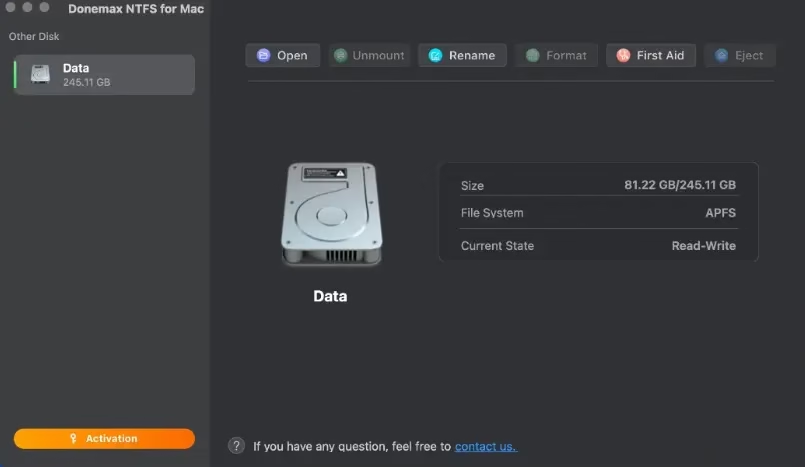
- Disk Management Tools: Format, rename, repair, and eject drives — making it an all-in-one disk manager for Mac.
- High-Speed Data Transfer: Optimized NTFS driver delivers fast file transfer speeds between Mac and NTFS storage devices.
- Broad Device Compatibility: Supports HDD, SSD, USB drives, and memory cards from brands like Seagate, Western Digital, Samsung, Toshiba, LaCie, SanDisk, and more.
- 100% Safe: No data loss risk; fully secure NTFS driver with 256-bit SSL and 30-day money-back guarantee.

Supported Operating Systems & Devices
Donemax NTFS for Mac 3.1 is compatible with a wide range of macOS versions and Mac hardware:
- macOS: Tahoe 26, Sequoia 15, Sonoma 14, Ventura 13, Monterey 12, Big Sur 11, Catalina 10.15, Mojave 10.14, High Sierra 10.13
- Mac Hardware: All Intel-based Macs, Macs with Apple T2 chip, and all Apple Silicon Macs (M1/M2/M3/M4/M5)
- File Systems: NTFS, NTFS+, FAT, exFAT, APFS, HFS, HFS+
- Devices: External/internal HDD, SSD, USB flash drives, SD cards, and memory cards
How to Use Donemax NTFS for Mac 3.1
Getting started with Donemax NTFS for Mac is straightforward. Follow these three steps:
- Download and install Donemax NTFS for Mac 3.1 on your Mac from the link below.
- Connect your NTFS drive to your Mac. The app will automatically detect it.
- Click “Enable Writable” in the app interface. Your NTFS drive is now fully read-write on macOS.

Get Donemax NTFS for Mac 3.1 Free License
You can download Donemax NTFS for Mac 3.1 for free using the official trial link below. After installation, activate it with the exclusive free license key provided here:
Download Link: https://www.donemax.com/freetrial/DonemaxNTFSforMac.dmg
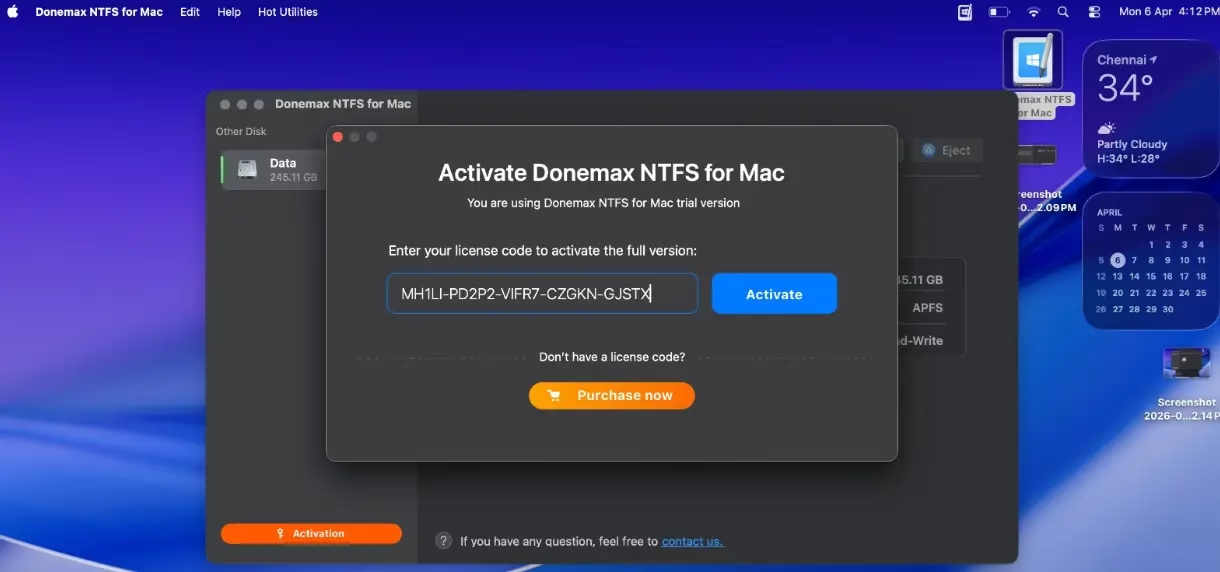
Install the app on your Mac and launch it from Launchpad. Click the “Activation” button within the app.
Enter the license key below to activate your free copy:
License Code: MH1LI-PD2P2-VIFR7-CZGKN-GJSTX
Once activated, you will have full access to all features of Donemax NTFS for Mac 3.1, including unlimited read-write access to all your NTFS drives on macOS.
Donemax NTFS for Mac 3.1 vs Competitors
Compared to other popular NTFS tools like Paragon NTFS for Mac and Tuxera NTFS, Donemax NTFS for Mac 3.1 offers a simpler one-click setup, broader macOS Tahoe and Apple Silicon support, and an all-in-one disk management feature set — all at a competitive price point of around $9.95 for a single-user license. With this giveaway, you can get it completely free.
Frequently Asked Questions
Is Donemax NTFS for Mac safe to use?
Yes. Donemax NTFS for Mac is 100% safe and does not risk your data. It uses a certified NTFS driver and has been reviewed by major tech sites including MacUpdate, Softonic, Softpedia, and CNET.
Does it work on Apple Silicon Macs (M1, M2, M3, M4, M5)?
Yes. Donemax NTFS for Mac 3.1 is fully compatible with all Apple Silicon Macs, including the latest M4 and M5 chip models.
Does it support macOS Tahoe 26?
Yes. Version 3.1 is the first release to officially support macOS Tahoe 26 (the latest macOS version as of 2026).
Can I use this on multiple Macs?
The free license key shared here is for single-user activation. For multiple Macs, you would need additional licenses from the Donemax website.


Discover more from Techno360
Subscribe to get the latest posts sent to your email.