


Is your PC acting suspicious? Before panicking, run Dr.Web CureIt — a free, portable on-demand malware scanner trusted by millions worldwide. Unlike full antivirus suites, Dr.Web CureIt requires no installation and leaves no footprint, making it the go-to emergency tool for fast, reliable malware removal in 2026.
What Is Dr.Web CureIt?

Dr.Web CureIt is a free, no-install antivirus scanner developed by Doctor Web, a cybersecurity company with over 30 years of experience. Unlike traditional real-time antivirus programs, CureIt is designed as an on-demand scanner — you run it manually whenever you suspect an infection or want a second-opinion scan alongside your existing security software.
The tool is updated daily with fresh virus database definitions, ensuring it can detect the newest malware strains, ransomware variants, and zero-day threats. As of 2026, Dr.Web CureIt’s virus database covers over 10 million malicious object signatures, including trojans, rootkits, spyware, adware, and ransomware.
Dr.Web CureIt: Main Interface & How It Works

The interface is refreshingly simple. A large “Start Scanning” button dominates the screen, making it accessible even to non-technical users. You can choose between three scan modes:
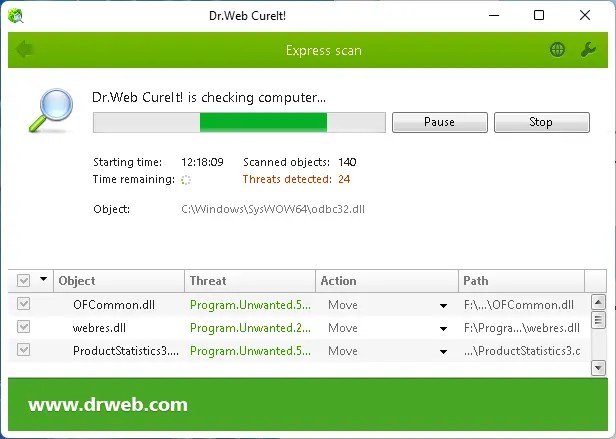
- Express Scan: Scans the most critical areas — running processes, startup items, boot sectors, and system folders. Best for quick checks when time is short.
- Full Scan: Scans every file on every connected drive. Ideal for deep cleaning a heavily infected machine. Takes longer but is the most thorough.
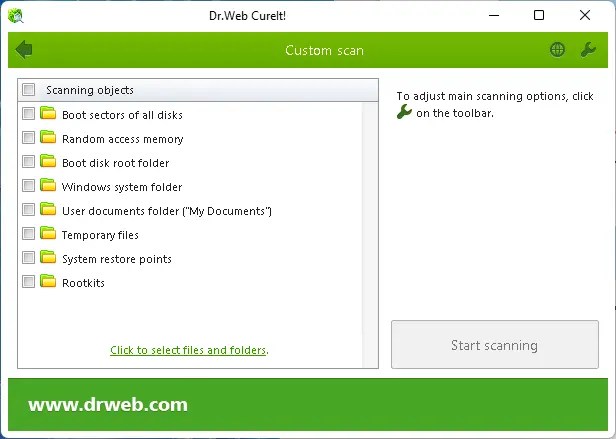
- Custom Scan: You manually select specific files, folders, or drives to scan. Perfect when you know exactly where a threat might be hiding.
During scanning, Dr.Web CureIt works at the Windows kernel level, bypassing user-mode hooks used by rootkits to hide themselves. This gives it exceptional capability to find threats that your primary antivirus might miss.
Key Features of Dr.Web CureIt (2026)
- Completely Portable: No installation needed. Download, run, scan. Works from a USB drive — perfect for cleaning infected PCs that can’t install new software.
- 100% Free for Personal Use: Dr.Web CureIt is free for home users. No registration, no subscription, no catch.
- Fresh Virus Databases Every Time: Each download comes bundled with the latest virus definitions (updated several times per day), so you always have current protection.
- Deep Rootkit Detection: Uses Dr.Web’s proprietary Origins Tracing technology to detect previously unknown malware by behavioral patterns, not just signatures.
- Minimal System Impact: Designed to scan efficiently without freezing your PC. You can continue working while a scan runs in the background.
- Quarantine & Neutralization: Detected threats can be quarantined (isolated), deleted, or skipped. You stay in control of every action taken.
- Works Alongside Any Antivirus: Since CureIt doesn’t install resident components, it never conflicts with existing security software like Windows Defender, Kaspersky, or Bitdefender.
- No Internet Connection Required: Once downloaded, it runs fully offline — ideal for air-gapped machines or isolated networks.
How to Use Dr.Web CureIt: Step-by-Step Guide
- Download the latest version from the official website. Since each build includes fresh virus databases, always download a new copy before scanning.
- Save it to your Desktop or a USB drive. No installation wizard, no setup screens.
- Run the executable (right-click and Run as Administrator for full system access).
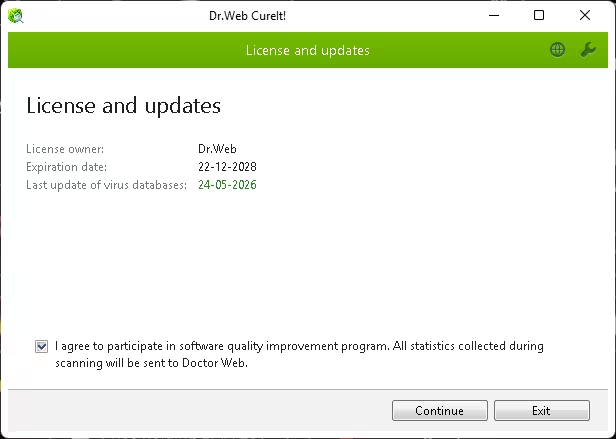
- Accept the license agreement and opt in or out of the statistics program on the welcome screen.
- Choose your scan type — Express for a quick check, Full for a thorough sweep, or Custom to target specific locations.
- Click “Start Scanning” and wait. CureIt will display detected threats in real time.
- Review and neutralize threats. For each detected item, choose to quarantine, delete, or ignore. Click “Neutralize All” to handle everything at once.
- Restart your PC if prompted to complete the removal of stubborn threats.
What Happens When Dr.Web CureIt Finds a Threat?
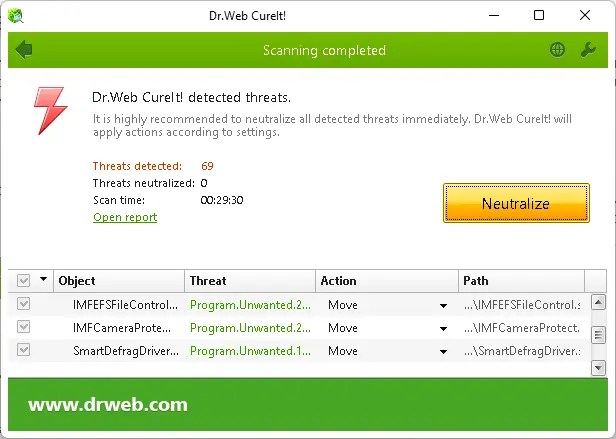
When Dr.Web CureIt detects a malicious file, it clearly displays the threat name, file path, and recommended action. You can:
- Quarantine: Moves the threat to a secure, isolated folder where it cannot cause harm. Useful if you are unsure and want to analyze the file later.
- Delete: Permanently removes the malicious file from your system.
- Ignore: Skip the item (useful for false positives on custom scripts or tools you trust).
Quarantined files are stored in a protected Dr.Web folder and can be restored or submitted to Doctor Web’s lab for further analysis. This is especially useful for enterprise IT admins dealing with targeted malware threats.
Why Use Dr.Web CureIt in 2026?
Cybersecurity threats have grown more sophisticated in 2026. Here is why CureIt remains relevant:
- Ransomware is still surging: Ransomware attacks increased by over 60% in 2025 according to cybersecurity reports. CureIt detects hundreds of ransomware families including LockBit, BlackCat/ALPHV, and newer variants.
- AI-powered malware: Cybercriminals now use AI to generate polymorphic malware that evades signature-based detection. Dr.Web’s behavioral detection layer helps catch these evolving threats.
- Second-opinion scanning: No single antivirus catches 100% of threats. Running CureIt alongside your main AV provides a valuable second layer of detection.
- Zero-cost protection for budget users: Not everyone can afford premium security suites. CureIt provides enterprise-grade scanning capability at absolutely zero cost.
- Emergency cleaning tool: When malware disables your installed antivirus, a portable scanner like CureIt run from USB can save the day.
Dr.Web CureIt vs. Other Free On-Demand Scanners
| Feature | Dr.Web CureIt | Malwarebytes Free | ESET Online Scanner |
|---|---|---|---|
| Installation Required | No | Yes | No |
| Runs from USB | Yes | No | No |
| Works Offline | Yes | No | No |
| Rootkit Detection | Yes (Deep) | Limited | Yes |
| Daily Database Updates | Yes | Yes | Yes |
| Completely Free | Yes | Limited Free | Yes |
System Requirements
- OS: Windows 7, 8, 8.1, 10, 11 (32-bit and 64-bit)
- RAM: 512 MB minimum (1 GB recommended)
- Disk Space: ~300 MB (for the tool + virus databases)
- Privileges: Administrator rights recommended for full system access
- Internet: Not required during scanning (download a fresh copy for updated databases)
Download Dr.Web CureIt Free
Always download Dr.Web CureIt from the official Doctor Web website to ensure you get the latest virus database and an unmodified, safe executable:
Download Dr.Web CureIt Free (Official)
Note: Do not download CureIt from third-party sites. Unofficial versions may be tampered with or bundled with the very malware you are trying to remove.
Frequently Asked Questions (FAQ)
Is Dr.Web CureIt completely free?
Yes, Dr.Web CureIt is 100% free for personal home use. Business or corporate use requires a commercial license.
Does Dr.Web CureIt replace my antivirus?
No. CureIt is an on-demand scanner, not a real-time protection tool. It should be used alongside a full antivirus solution like Windows Defender, Avast, or Bitdefender. Think of it as a second opinion doctor for your PC.
How often should I use Dr.Web CureIt?
Run it whenever you notice suspicious PC behavior such as unexpected slowdowns, strange pop-ups, or if your primary antivirus flags something but cannot remove it. Many security experts recommend a monthly scan as good practice.
Can I run Dr.Web CureIt from Safe Mode?
Yes, and this is actually recommended for heavily infected machines. Running CureIt in Windows Safe Mode prevents most malware from loading, making it easier to detect and remove persistent threats.
Does Dr.Web CureIt work on Windows 11?
Yes, Dr.Web CureIt fully supports Windows 11 (both 64-bit and 32-bit editions). The 2026 version has been optimized for Windows 11’s security architecture.
Conclusion
Dr.Web CureIt remains one of the best free malware removal tools available in 2026. Its portability, deep rootkit scanning, zero-install design, and completely free pricing make it an essential addition to any cybersecurity toolkit. Whether you are an IT professional cleaning infected workstations or a home user who suspects something is wrong, CureIt delivers thorough, reliable malware removal without the bloat.
Bottom line: Keep a fresh copy of Dr.Web CureIt on your USB drive. You will be glad you have it when you need it most.
Last updated: May 2026. Dr.Web CureIt is compatible with Windows 7 through Windows 11.


