

Easy Photo Denoise from SoftOrbits is a user-friendly software designed to reduce noise in your photographs, enhancing their clarity. With this Windows software, you can effectively remove noise from your photos, improving their quality and maintaining all the important visual details.
Various factors can cause digital noise in photos, such as shooting at high ISO settings or capturing images in low-light conditions.
Professionals in this field often rely on advanced photo editing tools like Photoshop to address these issues and enhance the quality of their work. Alternatively, you can consider using specialized noise removal apps like Soft Orbits Photo Denoise.
Eliminating noise is one of the most effective techniques to enhance the clarity of your photographs. This software uses intuitive algorithms, including AI technology, to remove noise without compromising the essential elements of your pictures.

This Softorbits software does noise reduction in the easiest way possible, and that’s because it has noise-cleaning presets that you can choose from. To see which one is best for your photo, try them all out and see which one gives you the best results. You can also play around with the radius and the noise reduction intensity.
The goal of this app is to let people who love photography make changes to their photos no matter what the lighting was like when they took them. As a result, the photographs appear more sharp and clear.
Get Easy Photo Denoise for Free:
Download the giveaway version installer from https://download.softorbits.com
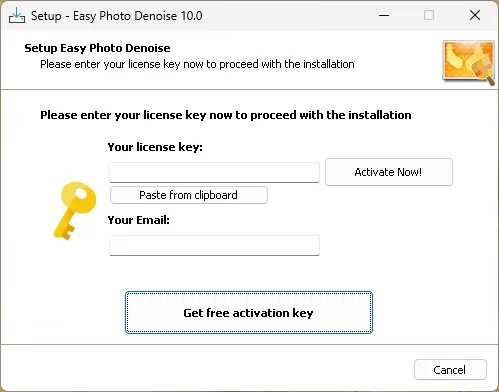
Run the installer, and you will notice an activation window similar to the one shown in the screenshot below.
Enter your email address and click the “Get free activation key” button.
This will launch the giveaway page in your PC’s default web browser
Fill out a minor form on that webpage with your first and last name, select your country, and click the “Done” button.
The giveaway page will display a license key. Copy the code.
Now, on the activation window, enter the license key you received and click the “Activate Now” button.


Discover more from Techno360
Subscribe to get the latest posts sent to your email.
You must be logged in to post a comment.