


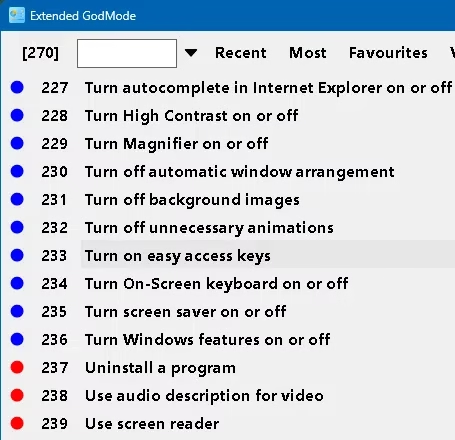
God Mode is a term you, as a user of Windows OS, may be familiar with. GodMode is a hidden feature of Windows that compiles all the system settings into a single location.
But GodMode has its flaws. It’s not always obvious where to find or how to turn it on, and it lacks some important customization options. Some configuration options, for instance, can only be accessed via the Admin Tools or Control Panel. That’s why you should check out Extended GodMode, a free program that enhances and expands God Mode’s functionality.


What is Extended GodMode?
This is a free utility created by for Windows-based PC users.
This portable program has a friendly interface that provides quick and simple access to advanced system options. It also incorporates Control Panel and Admin Tools features that were absent from GodMode.
It also has a robust search feature for quickly locating desired settings by name. We can save searches, favourites can be organized, and frequently used or most-used items can be viewed.
When launched, it presents a user interface with access to all of God Mode’s configuration options, as well as those of the Control Panel and Admin Tools.
It organized the various configuration options into tabs labelled with descriptive names, such as “System and Security,” “Network and Internet,” “Hardware and Sound,” etc.
The advanced search feature allows you to look for a specific option by name or keyword. We can quickly retrieve your filtered results and group preferences easily. The system tray icon menu allows you to manage your favourites, see the most used and recently used items, and access any setting.


Why Should You Make Use of Extended GodMode?
With all the advantages it provides, it is a must-have for advanced computer users and IT specialists.
Just a few ways the app improves Windows are :
- Quick and Convenient Access to Hundreds of System-Wide Preferences Without digging through multiple menus and settings, you can access 200+ of the most important system-wide preferences with a single click using Extended GodMode.
- Saving Time & Increasing Productivity: Thanks to flexible layout and potent search capabilities that can help you focus on the tasks at hand.
- Gain access to everything, including settings and options that aren’t readily available outside of God Mode, such as those in the Control Panel, Registry Editor, Group Policy Editor, and other locations.
- You can customize the appearance of the settings window to meet your specific requirements.
- It’s perfect for experts because it’s free, portable, straightforward, and reliable.


Download the Extended GodMode Software from the Developer page: https://www.wintools.info/Download/


