



GitMind by Apowersoft is a feature-rich mind mapping and brainstorming application available on both desktop and mobile platforms. This mind map tool is both fun and efficient.
With its many different themes and layout, users can quickly make mind maps, org charts, logic structure diagrams, tree diagrams, fishbone diagrams, and many other types of diagrams in a short time.


Besides, this tool lets you share your mind maps with as many friends or coworkers as you want. You can also work together on them. The mind maps you have made are automatically stored and saved in the cloud, so you can access them from any computer, tablet, or smartphone you have at home, at work, or on the go.
About Mind Mapping:
Mind mapping is a way to come up with ideas and make connections. When used correctly, it can be a very good way to come up with new ideas. Mind maps are one of the most common ways to think about how things should be put together.
It is a visual representation of the relationships that begins with a central issue and proceeds through other branches that are annotated with annotations, icons, images, and links, among other things. Additionally, it can assist you in organizing your thoughts and beliefs more effectively.
About GitMind:
This is an incredible mind map application that enables you to organize your thoughts and ideas by listing them in a diagram format one by one. Another good thing about this app is that it has an outline function that makes it easy to write an outline for an essay quickly and quickly.
Mind maps can be organized and summarized in a linear fashion. Additionally, with its collaboration feature, project planning and team building will be a breeze.


Features:
-
- Multi-Platform: Available for Windows, Mac, Linux, iOS, and Android. Sync and save data between devices.
- Mind Map Style: Create customized and visualize your maps through the use of icons, graphics, and color. With easy, structure complex thoughts.
- Outline Mode: Outline is easy to read, and a mind map is useful when you want to change it. Switch between an outline and a mind map with a single click.
- Common Use Cases: The app can be used for brainstorming, note-taking, project planning, idea management, and other tasks that are creative.
- Import & Export: Import and export your mind maps in a variety of formats, including JPG, PDF, and others. You can share your thoughts with anyone.
- Team Collaboration: Online collaboration in real-time simplifies mind mapping in a team, regardless of where you are.
- Built-in 70+ templates.
- Multiple layouts(org chart, fishbone, logic chart, tree chart).
- Unlimited maps and folders.
- Apply predefined themes.
Get GitMind VIP Free Activation Code:
Visit the GitMind and create an account.
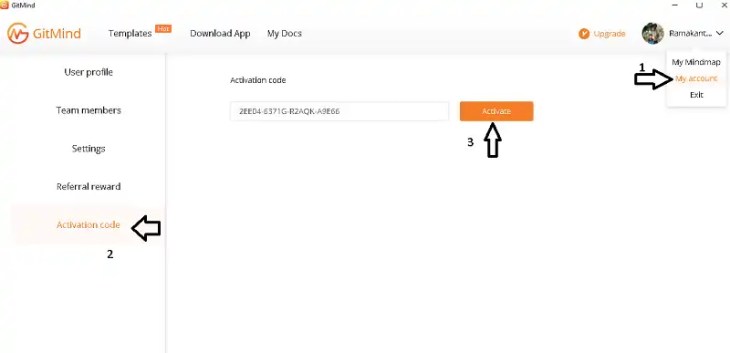
Login to your account, click on the “Profile pic” and in the drop-down menu select the “My Account” option.
As shown in the below screenshot, on the left side of the “My Account” section you can notice the ” Activation Code” option, click it and enter the below VIP code.
2 Year Activation Code:
2195C-1851J-N15QJ-7FCC6
1 Year Activation Code:
2EE04-6371G-R2AQK-A9E66
Click the “Activate” button to get 1 year VIP subscription for free.

Next, download the app for your device (desktop or mobile devices) from the developer page.
Install the app, launch the app, and log in to your account