
Have you ever sold an old laptop or handed over a used hard drive, only to later wonder if your personal files were truly gone? Here’s the uncomfortable truth: standard file deletion doesn’t actually erase your data. It simply removes the reference to the file, leaving the raw data sitting on your drive — fully recoverable by anyone with a basic data recovery tool.
Whether you’re a home user protecting personal photos and financial documents, a small business owner disposing of company hardware, or an IT professional preparing drives for reuse, iReaShare Data Wipe is the software that closes that security gap for good. In this review, we’ll cover everything you need to know — from its core features and erasure standards to pricing, system requirements, and how to get started.
iReaShare Data Wipe is a professional data destruction software for Windows PCs that permanently removes files, folders, and entire drives in a way that makes recovery completely impossible. Unlike simply sending files to the Recycle Bin or using the standard “Delete” key, this program actively overwrites your data using certified erasure methods, leaving nothing behind for recovery tools to find.
The software is built around three core modules — File Shredder, Drive Wiper, and Free Space Wiper—giving you complete coverage for every data exposure scenario, from individual sensitive documents to full hard drive wipes and external storage devices. It supports HDDs, SSDs, USB flash drives, SD cards, and any external storage connected to your Windows PC, making it a unified one-stop solution for all data destruction needs.
The interface is clean and intuitive, designed so that no technical expertise is required. Powerful, permanent data erasure is just a few clicks away — even for first-time users.
1. Thorough File and Folder Shredding
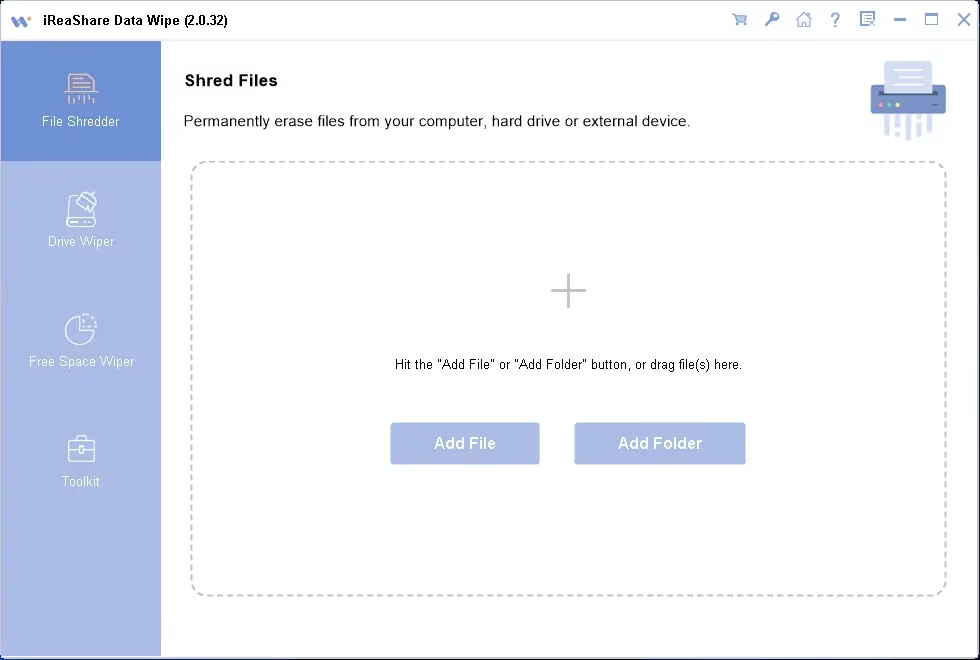
The File Shredder module lets you permanently destroy individual files and folders from your computer. You can select any file type—documents, photos, videos, archives — and the software will shred them so thoroughly that no data recovery software can bring them back. Adding files is effortless thanks to the built-in drag-and-drop support, and you receive instant on-screen confirmation once the process completes.
2. Complete Drive Cleaning
When you need to wipe an entire storage device — whether it’s an internal HDD, SSD, USB drive, or external hard disk — the Drive Wiper module takes care of it. It supports two powerful erasure modes:
- • Quick Erase: A fast and efficient option designed for everyday data erasure needs where speed matters. It strikes the right balance between performance and security for routine wiping tasks.
- • Deep Erase: Built for maximum security, this mode follows the US Department of Defense DoD 5220.22-M(E) military standard. It performs multiple overwriting passes using advanced algorithms, making it virtually impossible for even forensic-grade recovery tools to retrieve any data.
3. Enhanced Free Space Wiping
Here’s something most people overlook: even files you deleted months or years ago may leave behind invisible traces in the unallocated free space of your drive. The Free Space Wiper module addresses this by scanning all unallocated free space on your selected drive and overwriting it with random data patterns. This permanently eliminates ghost remnants of previously deleted files — a critical step before selling or recycling any device.
4. Military-Grade DoD 5220.22-M Standard
iReaShare Data Wipe employs the US DoD 5220.22-M data erasure standard during Deep Erase mode. This is the same benchmark used by government agencies and defense organizations to securely destroy classified data. With multi-pass overwriting, the erased data cannot be recovered by any currently available recovery or forensic tool.
5. Wide Device Compatibility
The software works with all major storage devices connected to your Windows PC, including internal hard disk drives (HDD), solid-state drives (SSD), USB flash drives, SD cards, cameras, and other external storage peripherals. Whatever device holds your sensitive data, iReaShare Data Wipe has it covered.
6. Custom Erasure Methods
Beyond Quick Erase and Deep Erase, iReaShare Data Wipe lets you choose a specific erasure method to match your exact security needs. This flexibility ensures you’re never over-engineering a simple wipe or under-protecting a critical one.
Getting started with iReaShare Data Wipe is straightforward. Here’s how to put it to work:
- 1. Download and Install: Visit the official iReaShare Data Wipe page and download the installer. Run it and follow the on-screen prompts. The software is compatible with Windows 7, 8, 10, and 11.
- 2. Choose Your Operation: Once launched, select a feature from the left-side panel—File Shredder, Drive Wiper, or Free Space Wiper.
- 3. Add Your Target Data: For file shredding, click “Add File” or “Add Folder,” or simply drag and drop your files into the designated area. For drive or free space wiping, select the target drive from the list.
- 4. Select an Erase Mode: Choose Quick Erase for speed-sensitive tasks or Deep Erase for maximum security using the DoD military standard.
- 5. Start the Process: Click “Erase Now” and confirm. iReaShare Data Wipe will handle the rest, displaying a clear confirmation message once the erasure is complete.
System Requirements
Before installing, please verify that your system meets the following specifications for optimal performance:
- • Operating System: Windows 7 / 8 / 10 / 11 (32-bit and 64-bit)
- • Processor: 1 GHz or faster CPU
- • RAM: Minimum 256 MB (512 MB or more recommended)
- • Storage: At least 100 MB of free disk space for installation
- • Internet: Required for activation and software updates
- • Permissions: Administrator-level access recommended for full drive wiping functionality
The current version is iReaShare Data Wipe 2.0.32, and the installer file size is approximately 5.9 MB — a compact footprint for a powerful security tool.
Pricing and License Options
iReaShare Data Wipe is available at a competitive price point with multiple licensing tiers to suit different needs and budgets:
- • 1-Month License (1 PC): $9.95 (regular price $19.95)
- • 1-Year License (1 PC): $14.95 (regular price $24.95)
- • Lifetime License (1 PC): $12.47 (regular price $34.95)
All licenses include instant delivery by email, a 30-day money-back guarantee, free lifetime software updates, and dedicated customer support with responses within one business day. Payments are processed securely through iReaShare’s encrypted transaction system.
The regular retail price sits at $24.95 for the standard version, which is reasonable for a dedicated data destruction tool with military-grade erasure capabilities.
Free Trial and Giveaway
Not ready to commit? iReaShare offers a free trial version that lets you test the software’s core erasure capabilities before purchasing. You can download it directly from the iReaShare website and experience the File Shredder, Drive Wiper, and Free Space Wiper firsthand.
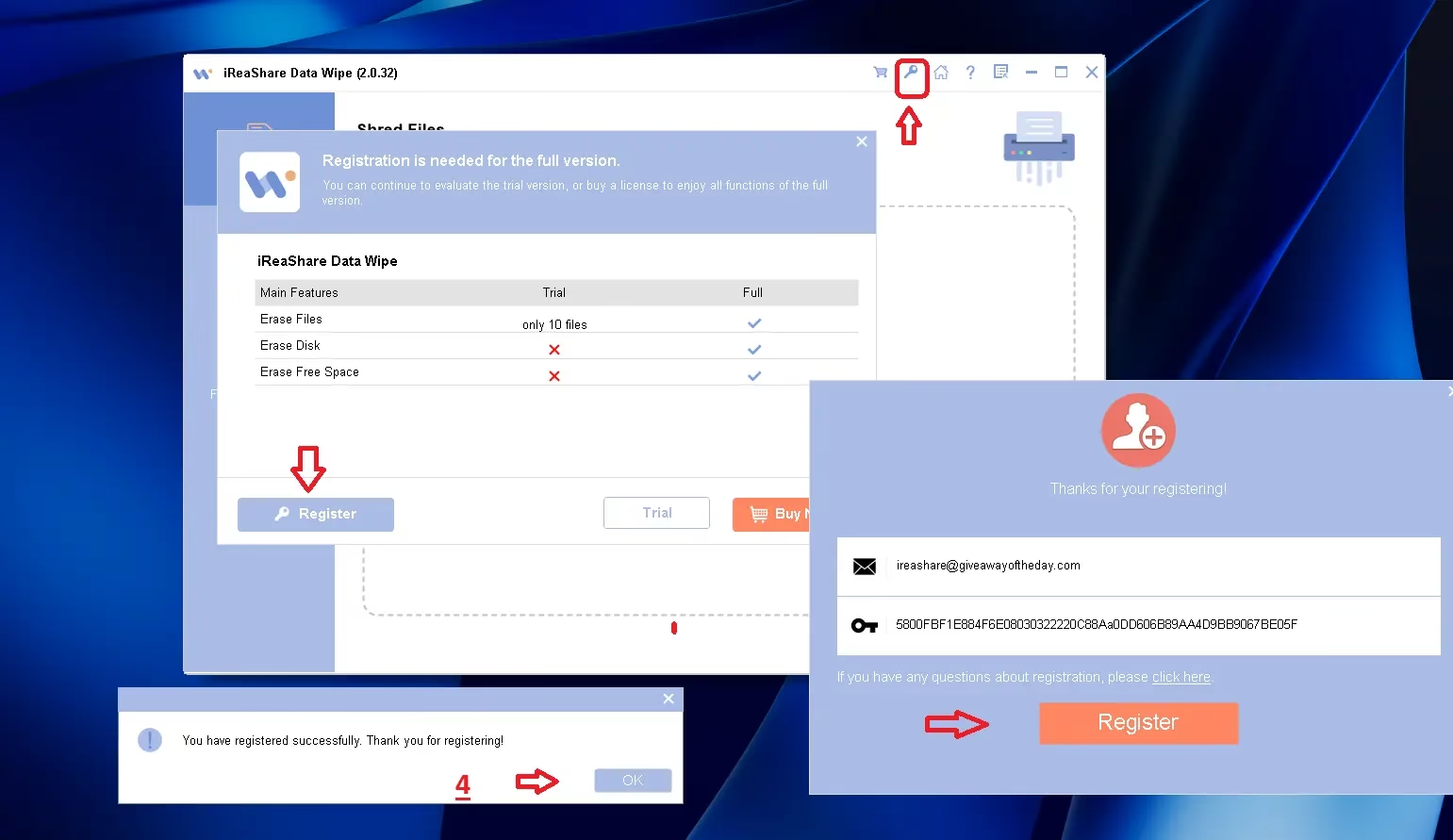
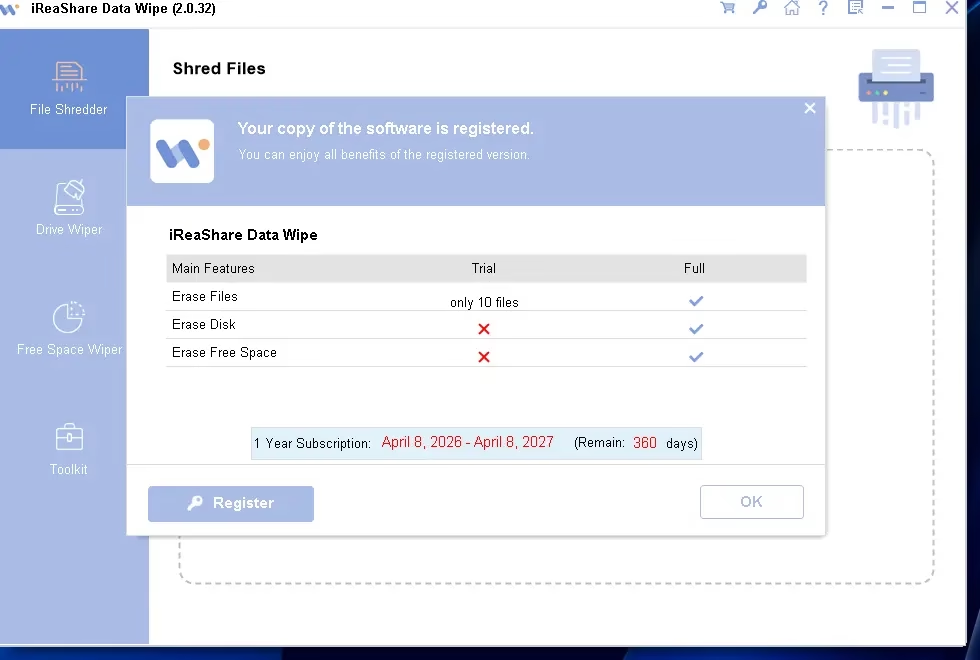
Additionally, you can currently download iReaShare Data Wipe 2.0.32 as a giveaway on the GOTD website, where you can get a time-limited free licensed version. GOTD users also receive an exclusive 50% discount coupon code (iReaShareGOTD) for future purchases.
Share this giveaway on any network. One click unlocks the download links and codes below.
A new tab opens to share this page. Come back here — your content unlocks automatically.
iReaShare Data Wipe is a practical solution for a wide range of users and scenarios:
- • Home users who want to permanently delete personal photos, financial records, or private documents before selling or giving away a computer.
- • Small business owners handling confidential client data who need to securely decommission laptops or desktops.
- • IT administrators responsible for preparing company devices for reuse, redeployment, or disposal in compliance with data privacy regulations.
- • Privacy-conscious individuals seeking peace of mind, knowing their deleted data truly cannot be recovered under any circumstances.
- • Anyone selling used hardware who wants to make sure no trace of their personal or professional data ends up in the wrong hands.
Pros and Cons
Pros
- • Military-grade DoD 5220.22-M erasure standard for maximum data security
- • Three comprehensive modules: File Shredder, Drive Wiper, and Free Space Wiper
- • Simple drag-and-drop interface suitable for non-technical users
- • Wide storage device compatibility — HDDs, SSDs, USB drives, SD cards, and more
- • Flexible Quick Erase and Deep Erase modes for different security needs
- • Compact installer (~5.9 MB) with minimal system requirements
- • Supports Windows 7, 8, 10, and 11
- • 30-day money-back guarantee and free lifetime updates
Cons
- • Windows-only — no macOS version currently available
- • Administrator access required for full drive-level wiping functionality
- • Internet connection needed for activation and updates
| Method | Recoverable? | Security Level |
|---|---|---|
| Delete (Recycle Bin) | Yes | ❌ Low |
| Format Drive | Yes (partially) | ⚠️ Medium |
| iReaShare Data Wipe | No | ✅ High |
In a world where data breaches, identity theft, and unauthorized data recovery are real and growing threats, simply deleting files is no longer enough. iReaShare Data Wipe delivers a thorough, reliable, and user-friendly solution that covers every angle of data security — from shredding individual files to wiping entire drives and cleaning up free space residue.
Its implementation of the DoD 5220.22-M military standard, combined with an approachable interface and flexible licensing options, makes it one of the most complete and trustworthy data destruction tools available for Windows users in 2026. Whether you’re protecting personal privacy, securing business data, or preparing a device for sale, iReaShare Data Wipe gives you complete confidence that your information is truly and permanently gone.
At a price starting from under $10, and with a free trial available, there’s no reason not to give it a try. Your data security is worth it.
Download iReaShare Data Wipe: https://www.ireashare.com/data-wipe.html
Disclaimer: This article is written for informational purposes. Always download software from official and trusted sources. Prices and availability mentioned are subject to change.