


Ever wished you could sound like a game character, disguise your voice on Discord, or add a professional voiceover tone to your YouTube videos — all without spending a rupee? Meet iTop Voicy, a free AI-powered real-time voice changer for Windows that is quickly becoming the go-to tool for gamers, streamers, and content creators worldwide. And today, Techno360 has an exclusive 6-month Pro licence giveaway for our readers — absolutely free, no strings attached!
What Is iTop Voicy?
iTop Voicy is a real-time AI voice changer developed by iTop Inc., the same company behind iTop VPN. Unlike traditional voice editors that need you to record first and modify later, Voicy processes your microphone input live — meaning your friends on Discord, your live stream audience, or your Zoom colleagues hear the transformed voice the moment you speak, with absolutely no lag or delay.
The software was launched globally in November 2025 and has already racked up thousands of downloads across Windows 10 and Windows 11 users. What sets it apart is the combination of AI-grade naturalness, a massive voice library, and a dead-simple interface that even a first-time user can get running in under two minutes.
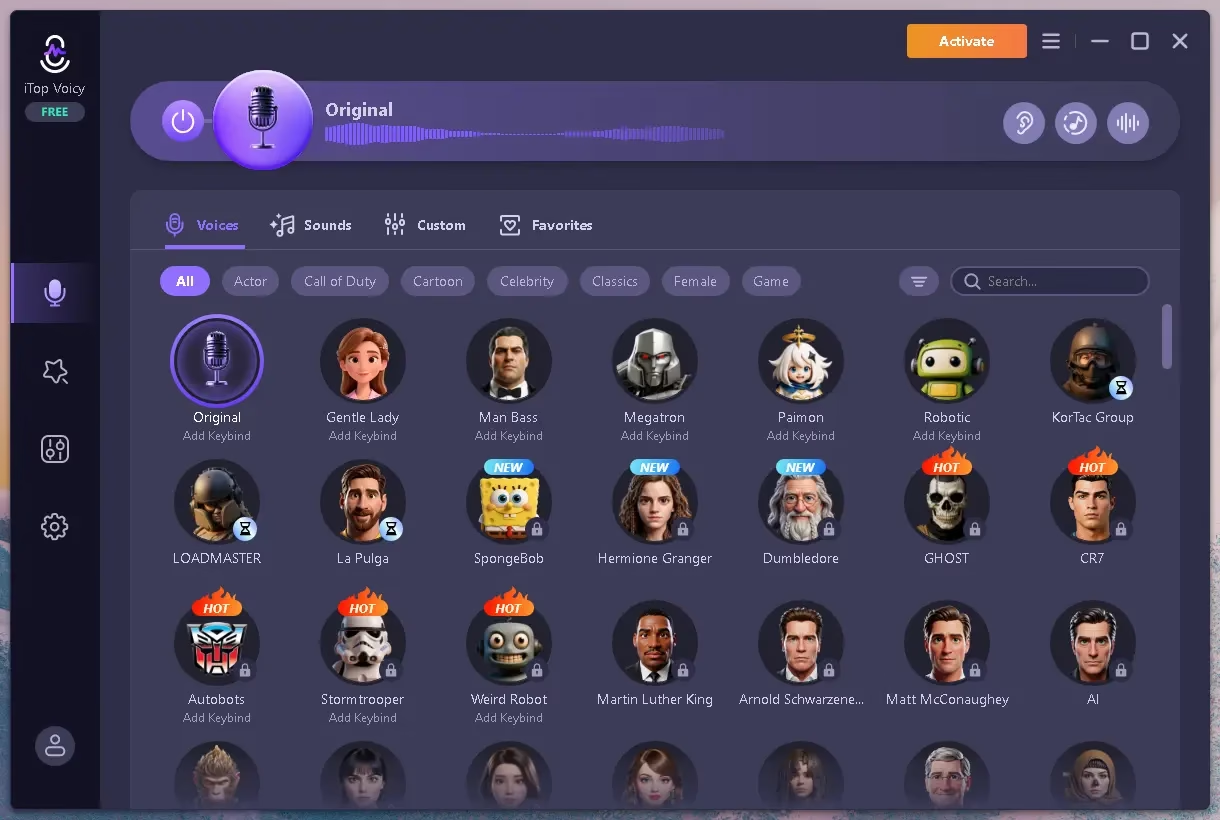

iTop Voicy — Key Features at a Glance
🎙️ Real-Time Voice Transformation with Zero Latency
The biggest pain point with older voice changers was the robotic, delayed output that killed immersion during live gaming. iTop Voicy uses advanced AI modulation algorithms to change your pitch, gender, age, and vocal style instantly — we’re talking millisecond-level processing. Whether you’re mid-match on BGMI or live on YouTube, there is no perceptible delay between what you say and what others hear.
🗣️ 100+ AI Voices and a Massive Sound Library
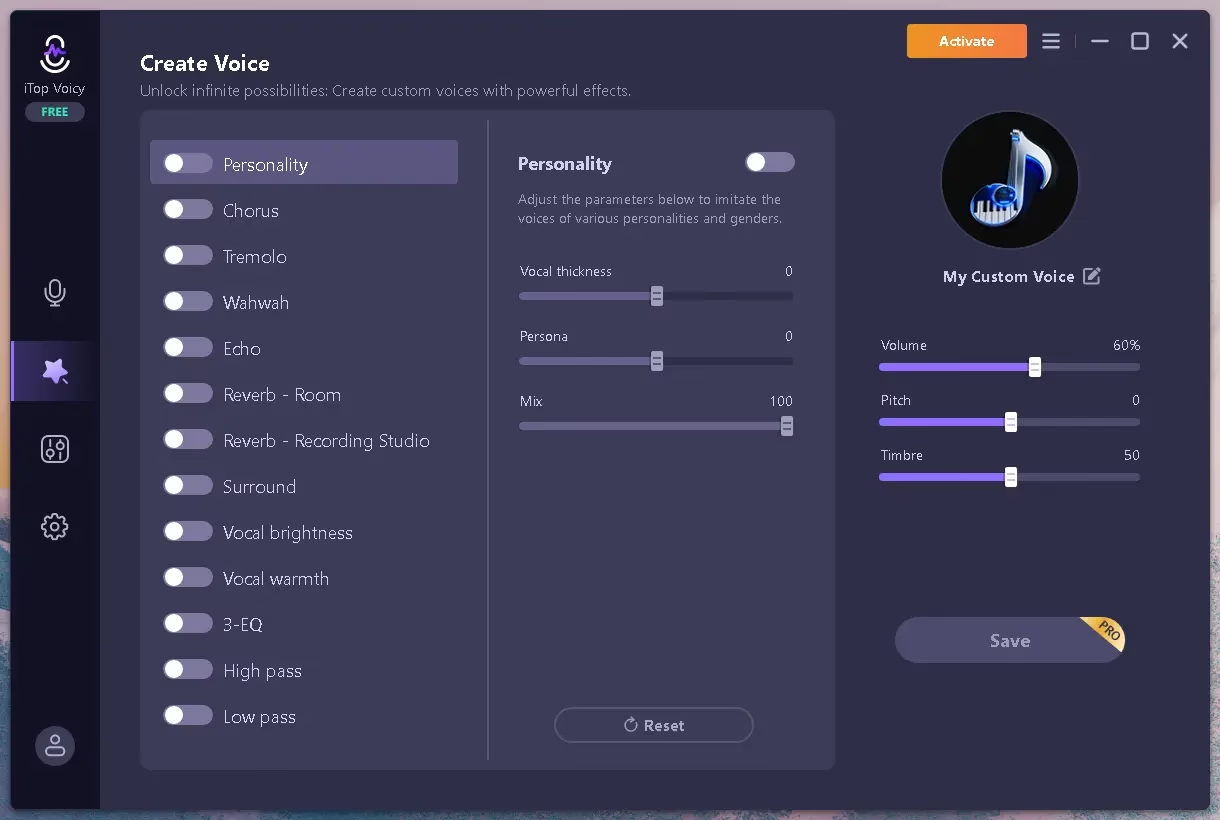
The built-in AI Voice Library ships with over 100 preset voices including male, female, kid, elderly, robot, monster, cartoon characters, and even celebrity-style voice profiles. Beyond presets, iTop Voicy offers a Voice Lab — a powerful customisation sandbox where you can tweak pitch, timbre, speed, formant, and emotional tone to build your own signature voice from scratch. Your custom profiles are saved and organised for quick access anytime.
🔇 Studio-Grade Noise Cancellation
If you work from home or live in a noisy Indian household (let’s be real — traffic, fans, and family are constants), the built-in AI noise reduction is a blessing. It automatically scrubs out background hums, keyboard clicks, microphone echo, and ambient sounds, giving your output a clean, professional-grade finish. Content creators recording podcasts or audiobooks will immediately notice the difference.
🎵 Built-In Soundboard with Effects
Beyond voice transformation, iTop Voicy bundles a soundboard packed with effects — applause, laughter, horror ambiance, game sounds, meme audio, and more. Streamers can trigger these mid-broadcast to boost audience engagement. Think of it as having a live SFX board built right into your voice changer.
📁 File Voice Conversion
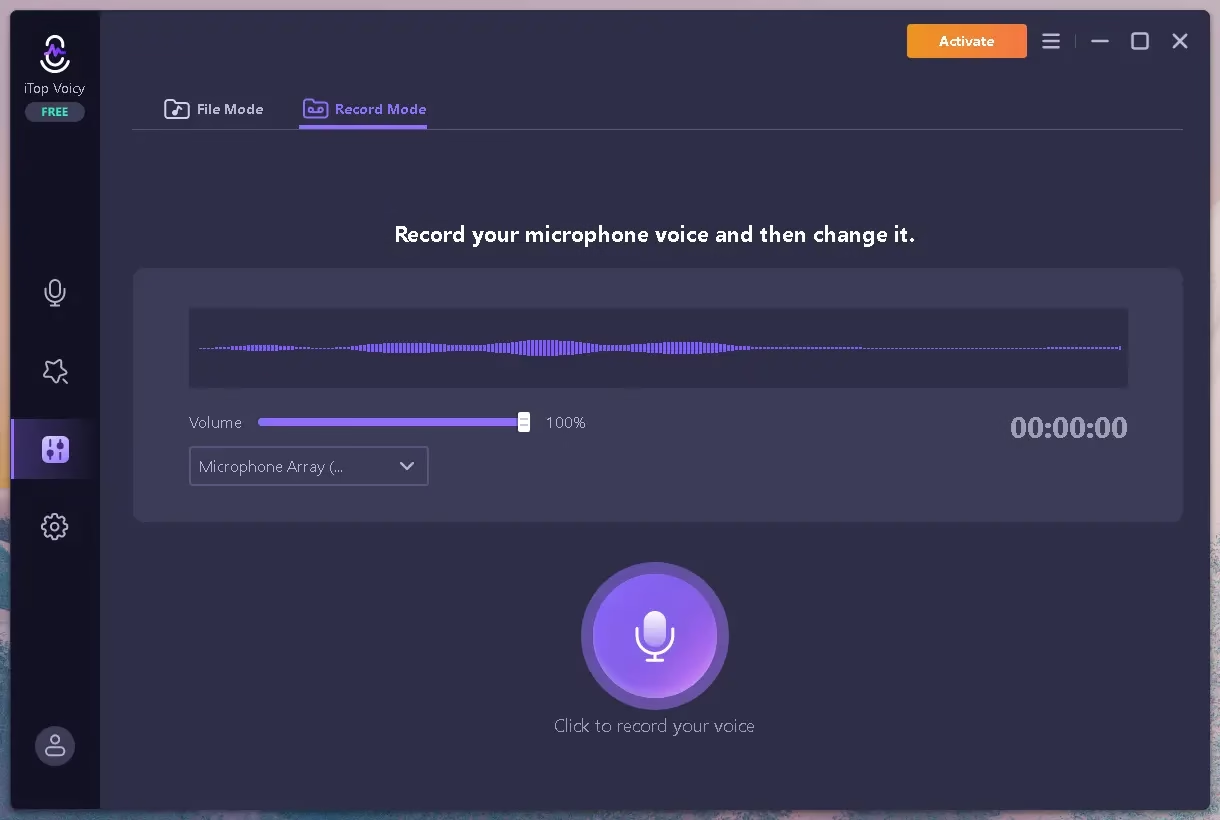
Not just live — you can also upload existing MP3 or MP4 files and swap the voice in post. This is incredibly useful for content creators who want to re-voice a video, dub over a recording, or create multiple character voices for a single project, all without re-recording.
🔗 Wide App Compatibility
iTop Voicy creates a virtual microphone driver on your Windows system. You select “iTop Voicy Virtual Audio” as the input device inside any app, and it works seamlessly with Discord, Zoom, Microsoft Teams, Skype, OBS Studio, and virtually all popular online games. Setup per-app takes about 30 seconds.
Who Is iTop Voicy Designed For?
- Gamers: Role-play as your character, pull off prank voices, or simply keep your real voice private in multiplayer lobbies.
- Live Streamers: Switch characters mid-stream, fire soundboard effects, and maintain a polished audio workflow on OBS.
- YouTubers & Content Creators: Generate natural-sounding voiceovers, dub videos in alternate voices, and produce cleaner audio without a dedicated mic setup.
- Podcast Hosts: Multi-character podcasts, interviews with altered guest voices, or simply a cleaner presenter voice.
- Privacy-Conscious Users: Mask your real voice in public forums, virtual conferences, or anonymous online calls.
- Educators & Trainers: Make e-learning content more engaging with different voice personas per module.
How to Set Up iTop Voicy — Step-by-Step
- Download iTop Voicy from the official link below and run the installer (approximately 64–90 MB).
- Launch the app. On first run, it will prompt you to select your physical microphone and headphones/speakers — configure these correctly for best results.
- Browse the AI Voice Library and click any preset to preview it instantly.
- Open Discord (or your app of choice), go to Settings → Voice & Video, and set the input device to “iTop Voicy Virtual Audio”.
- Start speaking — your voice transforms in real time. Optionally, add soundboard effects with a single click for extra flair.
- To change voices in an existing audio/video file, switch to the “File” tab, upload your file, pick a target voice, and export as WAV/MP4.
Pro Tip: For the smoothest real-time performance, keep pitch adjustments moderate and enable noise suppression from the settings panel. If you’re on a mid-range laptop, close background browser tabs before streaming.
iTop Voicy Free vs. Pro — What’s the Difference?
| Feature | Free | Pro |
|---|---|---|
| Real-Time Voice Changing | ✅ Basic | ✅ Full |
| AI Voice Library | Limited selection | 100+ voices unlocked |
| Voice Lab (Custom Voices) | ❌ | ✅ |
| Soundboard & SFX | Basic | Premium effects |
| File Voice Conversion | ❌ | ✅ (MP3/MP4) |
| Noise Cancellation | ✅ | ✅ Enhanced |
| App Compatibility | ✅ | ✅ All platforms |
| Priority Support | ❌ | ✅ |
For casual users, the free tier offers a solid taste of the product. But if you’re a serious streamer, YouTuber, or dedicated gamer, the Pro version is where the real value lies — especially when you can grab 6 months free right here on Techno360.
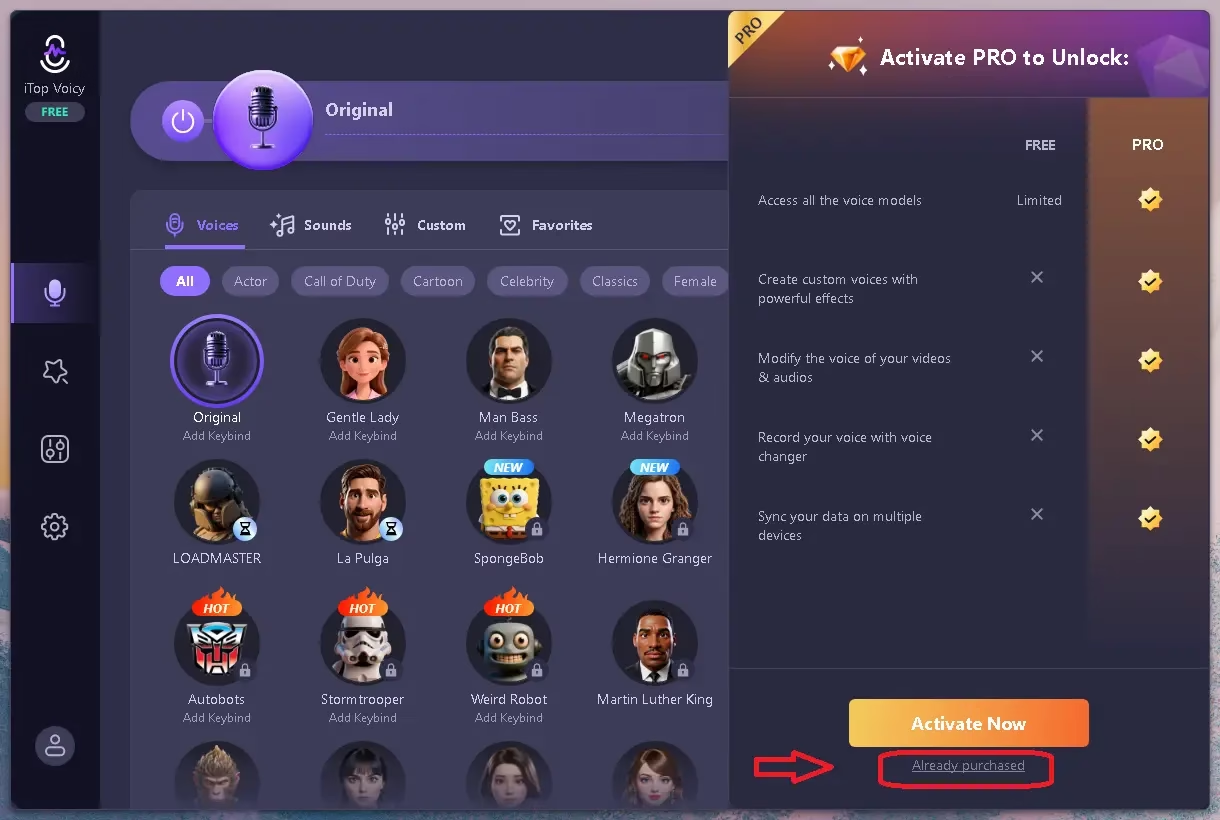
🎁 Exclusive iTop Voicy 6-Month Pro Giveaway
-
- Visit this giveaway page: https://www.itopvpn.com/itop-voicy
- A promotional form will be displayed on the product page. Input your email address, then click the ‘Claim Your Pro’ button to get your PRO license.
- Download the software from the iTop official page.
- Install and open the software on your Windows PC.
- On the app’s main inteface, point or hover your mouse on the “Activate” icon (top-right corner of the app), then click “Already Purchased”
- Select “Log In” and sign up/log in with the same email to activate your Pro subscription.
- Note: The giveaway ends on August 09, 2026.


Techno360 Verdict — Is iTop Voicy Worth It?
iTop Voicy delivers on its core promise: genuinely low-latency, AI-powered voice transformation that doesn’t sound robotic. The Voice Lab alone separates it from the crowded field of basic pitch-shifters. The noise cancellation is surprisingly effective even in a busy home environment, and the broad compatibility with Discord, OBS, and Zoom means you can drop it into your existing workflow without friction.
The free tier is honest — it’s a real taster, not a bait-and-switch. The Pro version, however, is where iTop Voicy becomes a compelling creative tool. At its normal pricing it offers solid value; with today’s free 6-month giveaway, there’s virtually zero reason not to try it.
Rating: 4.5 / 5 ⭐
Minus half a star only because it’s Windows-exclusive — Mac and mobile users miss out entirely.
🎙️ Download iTop Voicy Free — Claim Your 6-Month Pro Key
System Requirements
- OS: Windows 10 / Windows 11 (64-bit only)
- RAM: 4 GB minimum; 8 GB recommended for gaming simultaneously
- Storage: ~100 MB free disk space
- Audio: Any standard microphone; a headset with boom mic recommended
- Internet: Required for AI voice library and account login
Frequently Asked Questions
Is iTop Voicy completely free to use?
iTop Voicy has a functional free version for basic voice effects. The Pro tier unlocks the full AI voice library, Voice Lab, premium soundboard, and file conversion. Techno360 readers can access 6 months of Pro at no cost using the giveaway credentials above — valid until May 15, 2026.
Does iTop Voicy work on Mac or Linux?
No, iTop Voicy is currently a Windows-only application supporting Windows 10 and Windows 11 (64-bit). Mac and Linux users will need to explore alternative tools for now.
Which apps does iTop Voicy support?
It works with Discord, Zoom, Microsoft Teams, Skype, OBS Studio, and most popular online games. Simply set “iTop Voicy Virtual Audio” as the microphone input inside your chosen app’s audio settings.
Will iTop Voicy slow down my PC while gaming?
iTop Voicy is engineered for minimal CPU footprint and should not affect your FPS. For optimal performance during heavy gaming sessions, 8 GB of RAM is recommended.
How do I activate the iTop Voicy giveaway from Techno360?
Download iTop Voicy via the link in this post, open the app, click the User icon, and log in with the giveaway email (techno360@ivc.com) and password (EYpmMpcf). Pro features activate instantly — no credit card needed.
Liked this giveaway? Check out more free software offers on Techno360 Giveaways.