
Ever found yourself staring at a blank product key field right when you’re trying to reinstall Windows or Office? It’s one of those frustrating moments that hits at the worst possible time. Thankfully, Magic Recovery Key Pro exists—and right now, you can grab a free license that lets you recover and backup all your software licenses in just a few minutes.
We’ve been covering freebie software deals for years, and this one is genuinely useful. Whether you’ve lost your Windows product key, forgotten your Office license, or just want to back everything up before a system reinstall, this tool handles it all without any fuss.
What Is Magic Recovery Key Pro?
Magic Recovery Key Pro is a Windows utility developed by Amagicsoft. It’s built for one specific job: scanning your PC and recovering product keys for thousands of installed applications. Think Adobe Creative Suite, Microsoft Office, SQL Server, Windows Server, Windows OS, and over 10,000 other apps.
What makes it stand out from other key finder tools is the sheer range of what it can recover. It doesn’t just grab license keys—it also pulls saved passwords from popular web browsers like Chrome, Firefox, Microsoft Edge, and Internet Explorer. On top of that, it can scan external hard drives and USB flash devices for product keys saved there.
There’s also a BitLocker key recovery feature, which is a lifesaver if you’re dealing with an encrypted drive and need to unlock access to your PC.

How Does Magic Recovery Key Pro Work?
The process is simple enough that even non-technical users can get through it without any trouble:
- Scan & Retrieve: When you launch the app, it automatically scans your PC for installed applications and grabs their product keys. It also checks any external drives connected to your computer, so nothing gets missed.
- Backup & Export: Once the scan is complete, you can copy keys to your clipboard or save them to a text file for safekeeping. Having that backup before a system reinstall can save you hours of headaches later.
- Password Recovery: Beyond license keys, the tool also recovers saved passwords from popular browsers—handy if you’ve forgotten a login that was stored in Chrome or Edge.
- Wi-Fi Password Recovery: It can also retrieve saved Wi-Fi network passwords from your Windows system, which comes in surprisingly handy when you’re setting up a new device.
Key Features Worth Knowing
- Exceptional Compatibility: Recovers keys for Windows OS, Windows Server, SQL Server, and 10,000+ other applications. If it’s installed on your machine, Magic Recovery Key can almost certainly find its key.
- User-Friendly Interface: The layout is clean and straightforward—you don’t need to be a tech expert to use it. Everything is organized into clear categories on the left panel (Registry Keys, Browser Passwords, Wi-Fi Passwords, BitLocker, External Drives).
- Advanced Recovery Options: The software can recover keys even from a crashed system or a failing hard drive, which makes it useful for emergency data recovery situations.
- Browser & Wi-Fi Key Recovery: Covers Chrome, Edge, Firefox, and Internet Explorer for browser credentials, plus all saved Wi-Fi network passwords stored on your PC.
- External Drive Support: Plug in an old hard drive or USB stick and it’ll scan that too—useful if you’re migrating from an old machine.
- BitLocker Key Extraction: For encrypted drives, it can extract the BitLocker recovery key to help you regain access without losing data.
Why You Should Back Up Your License Keys Right Now
Most people only think about product key recovery after they’ve already lost them. Don’t be that person. Whether you’re planning a Windows reinstall, upgrading to a new PC, or just doing some spring cleaning on your system, taking 5 minutes to run Magic Recovery Key and save all your keys to a text file is time very well spent.
Losing a software license doesn’t just mean losing access to an app—it can mean buying the software again, spending time on vendor support calls, or worst case, losing access to critical work tools. This is especially common in business environments where licenses get tied to old machines that crash without warning.
If you’re also interested in recovering other types of lost data, check out our guide on how to recover deleted files on Windows 11 for free—it covers five reliable methods that work well alongside a key backup strategy.
For an alternative approach to key finding, the PC Trek Product Key Recovery Tool is another solid option worth bookmarking. And if browser and network password recovery is your main concern, the PCTrek Advanced Password Recovery Suite covers that angle in more depth.
How to Get Magic Recovery Key Pro for Free
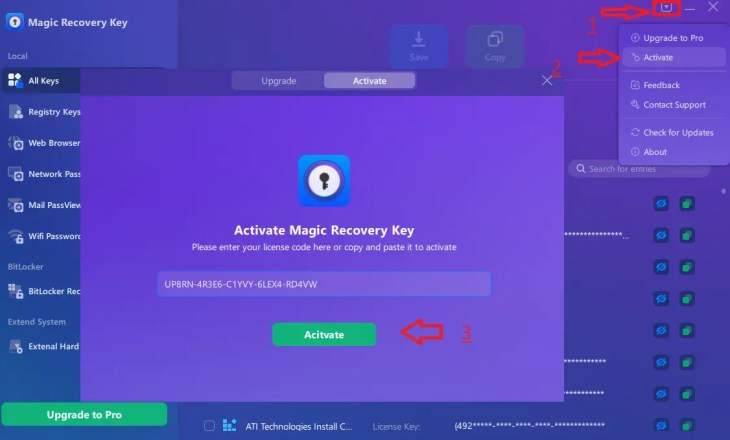
Here’s the step-by-step process to activate your free Pro license:
Share this giveaway on any network. One click unlocks the download links and codes below.
A new tab opens to share this page. Come back here — your content unlocks automatically.
Note: The giveaway key is valid till August 31,2026.
Is Magic Recovery Key Pro Worth It?
At free, there’s genuinely no reason to skip this one. The interface is clean, the scan completes quickly, and the export options are practical. It does a solid job recovering keys for all major apps, and the browser password recovery works exactly as advertised.
The BitLocker key recovery is a feature you hope you never need but will be very glad to have when you do. Same goes for the external drive scanning—if you’ve got old drives sitting around with software keys on them, this is one of the few tools that’ll actually look there.
If you’re comparing options, XenArmor All-In-One Key Finder Pro is another well-regarded choice that covers a similarly wide range of applications and also has a free version available.
And if keeping your credentials safe going forward is on your mind, pairing this tool with a solid password manager like RoboForm makes a lot of sense—so you’re not in this same situation again a year from now.
Quick Summary
| Developer | Amagicsoft |
| Platform | Windows |
| Apps Supported | 10,000+ |
| Free License Available | Yes (limited time) |
| Browser Password Recovery | Chrome, Edge, Firefox, IE |
| BitLocker Support | Yes |
| External Drive Scan | Yes |
| Wi-Fi Password Recovery | Yes |


