


Protecting your computer from vulnerabilities is more important than ever in this day and age when digital dangers are prevalent. Now meet the OPSWAT Security Score, a free tool that will analyze your system’s security posture like a surgeon. This tool goes beyond scanning; it provides you with the knowledge and ability to strengthen your digital defenses.
What is the OPSWAT Security Score?
This free software tool makes it easy to scan your PC for various security dangers. This scan can identify security risks, such as outdated software, apps without security patches, and other similar issues.


After that, the OPSWAT Security Score will give you a score that represents your Windows system’s overall security. The application also suggests ways to fix any problems it finds.
This is not your average security tool. It’s an all-inclusive scanner that checks your system on different levels:
- Security measures: Ensure that your anti-malware software, firewall, and phishing protection are all up-to-date.
- Patch Management: Checks the OS and any third-party apps for updates and notifies you if any are missing.
- Vulnerable Applications: The tool checks for programs with known security issues and recommends removing or updating them if necessary.
This tool’s charm lies in its simplicity. Users can identify vulnerabilities and take immediate action based on the clear and actionable security score it delivers.


Ease of Use: Simplicity for All
With the OPSWAT Security Score, even the most novice user can understand and implement basic security measures. This tool provides an easy way for people who might be afraid of system maintenance:
- User-Friendly Interface: With only a click, you can access any part of your system’s health report, which includes practical recommendations.
- Direct remediation: The application itself can apply a significant number of improvement ideas, expediting the system’s security process.
Beyond Malware: A Holistic Approach to Security
Security is about more than just preventing infections. The OPSWAT Security Score considers many factors:
- Firewall: Verifies the status of your firewall settings,
- Encryption and backups: Verifying the installation of these vital security measures.
- Network Discovery: It makes network management more efficient, identifies all devices on the network, and highlights security concerns.
- Tracking vulnerabilities: This tool keeps tabs on any security breaches that have occurred in the past and any threats that could affect your system.
- Operating System and Software Updates: Make sure your system is secure and performing at its best with the most recent updates.

Practical Features for Enhanced Security
- Patch Management: Find out whether there are any updates you haven’t installed and notify you about it. It also provides solutions for updates with just a click.
- AppRemover: An integrated tool that makes it easy to uninstall malicious or unnecessary programs, improving system hygiene and safety.

Who Benefits from OPSWAT?
Although OPSWAT’s insights may seem basic to seasoned IT workers, the tool is useful for:
- Home Users: Those who do not have extensive technological knowledge but yet require a simple method to maintain their computer’s security.
- Small Businesses: Organizations that prioritize security but have limited IT resources
- Educational Institutions: Equipping faculty and students with resources to keep school computers safe.
Working:
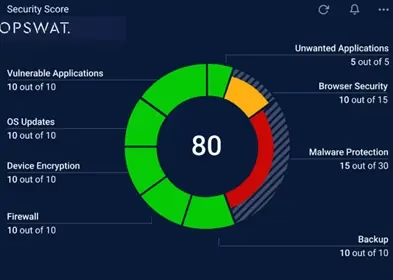
After a scan is complete, the main event, Security Controls, opens. A big ring-shaped pie chart with eight colorful sections—Anti-Malware, Backup, Browser Security, Device Encryption, Firewall, OS Updates, Unwanted Applications, and Vulnerable Applications—serves as the major feature. A massive number in the center represents your security score out of a possible 100.


The following options are available on the left side of the menu: AppRemover, IT Access, malware scan, network discovery, operating system updates, overview, patch management, secure download, security check, security controls, and vulnerable programs. The Overview displays a panel for each menu item.
Using Security Score is as simple as looking at the chart. The presence of green parts signifies optimal PC security. Clicking the segment will explain why you haven’t reached green and how to improve your score.
Download the OPSWAT Security Score from https://www.opswat.com/free-tools
Conclusion:
Installing antivirus software is essential, but occasionally testing its efficacy is wise. The free Opswat Security Score app examines antivirus protection and other security factors to give you a security score.
Raising that score improves safety overall. This tool should not replace your antivirus software. Put it away after running it and improving your score. You need a complete security suite for continuous protection.
