

Is Your Windows PC Actually Secure? PromScan Reveals the Truth in 60 Seconds
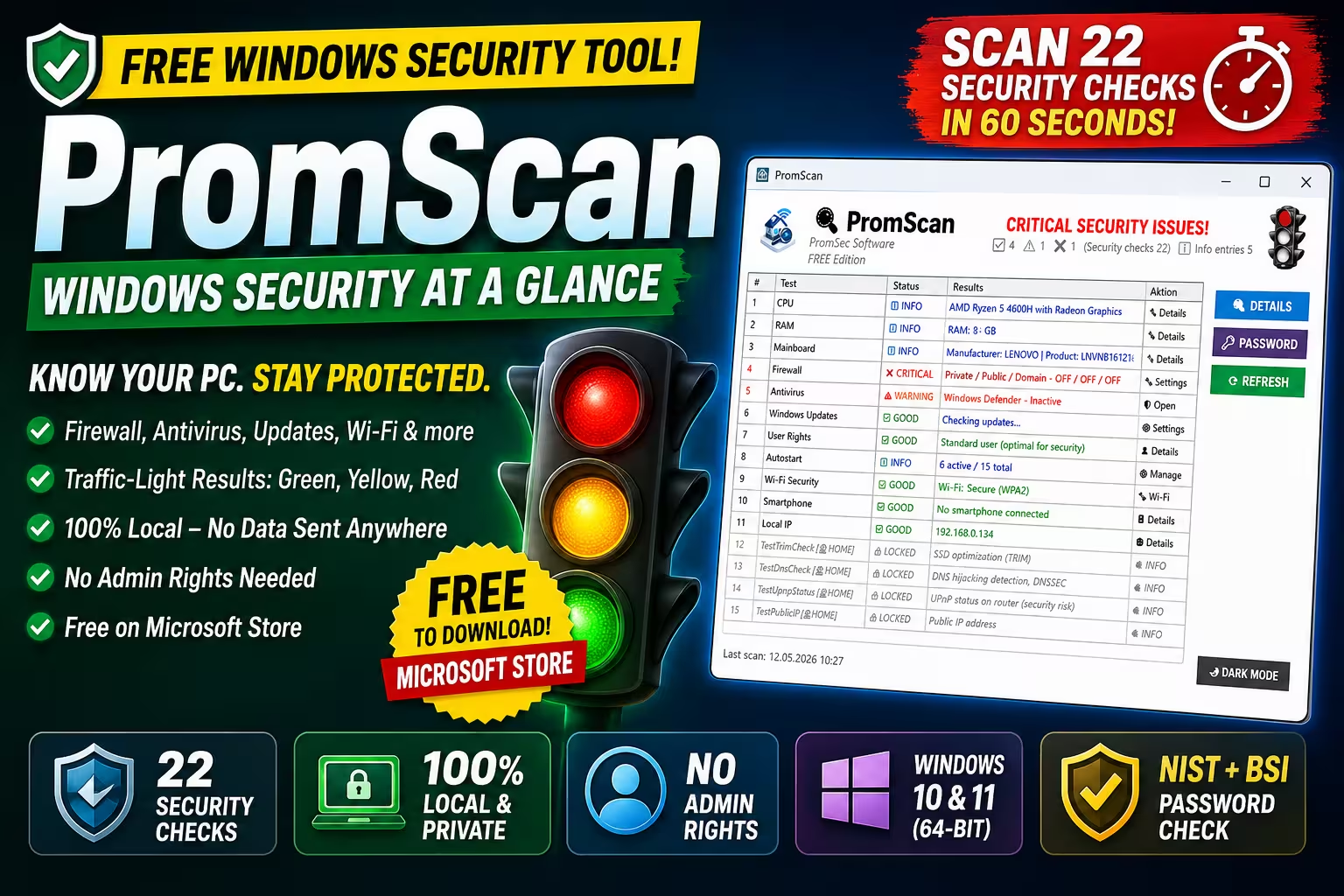
A traffic-light dashboard that audits 22 critical security points — firewall, antivirus, updates, Wi-Fi, startup apps, and more — without sending a single byte to the cloud. 100% local, free on the Microsoft Store.
✓ 100% Local
✓ No Admin Rights Needed
✓ Windows 10/11 (64-bit)
✓ NIST + BSI Password Check

Most of us have no idea how secure our Windows PC actually is until something goes wrong. Is the firewall on? When did Windows Defender last update? Are there suspicious startup programs eating away at boot time? Asking these questions one-by-one through Settings is a chore — and that’s exactly the gap PromScan fills.
It’s a free, lightweight Windows security scanner from German developer PromSec Software that runs through 22 security checks in seconds and shows you a clean, traffic-light dashboard of where you stand. Green, yellow, or red — no jargon, no scaremongering, just the facts.
I ran PromScan on my Lenovo Legion 5 to put it through its paces. Here’s the honest breakdown.
⚡ QUICK READ
2-minute summary
- What it is: A free local security analyzer for Windows 10/11 that checks 22 security points and shows results via a traffic-light dashboard.
- Best feature: No admin rights, no data sent to external servers — all scans happen on your device.
- What it checks: Firewall, antivirus, Windows updates, Wi-Fi security, startup apps, user rights, local IP, and more.
- Bonus tools: Built-in password strength checker using NIST and BSI guidelines.
- Catch: Advanced checks (DNS, UPnP, port scans, malware scan, router audit) are locked behind paid Home (€9.19) or Pro (€21.93) editions.
- Where to get it: Free download from the Microsoft Store.
What Is PromScan and Why Should You Care?
PromScan describes itself as “security at a glance — no expert knowledge required,” and that promise is the entire pitch. The app analyzes the most important security areas of your Windows PC and uses color coding to show you where action is needed. Green, yellow, or red — as simple as a traffic light.
That’s the entire appeal. You don’t need to dig through Windows Security, PowerShell, or Event Viewer. You launch PromScan, it runs the checks, and you see exactly which areas need attention.

Who Is It For?
PromScan is built for three audiences:
- Home users who want a quick peace-of-mind check without learning Windows internals.
- IT enthusiasts who like a clean overview before doing deeper work in HWiNFO, Process Explorer, or Wireshark.
- Administrators who need to verify firewall, antivirus, and update status across multiple systems quickly.
If you’ve ever wondered “is my PC really safe?” and didn’t know where to start, this app gives you a credible starting point in under a minute.
The PromScan Interface: Clean, Functional, Slightly Dated
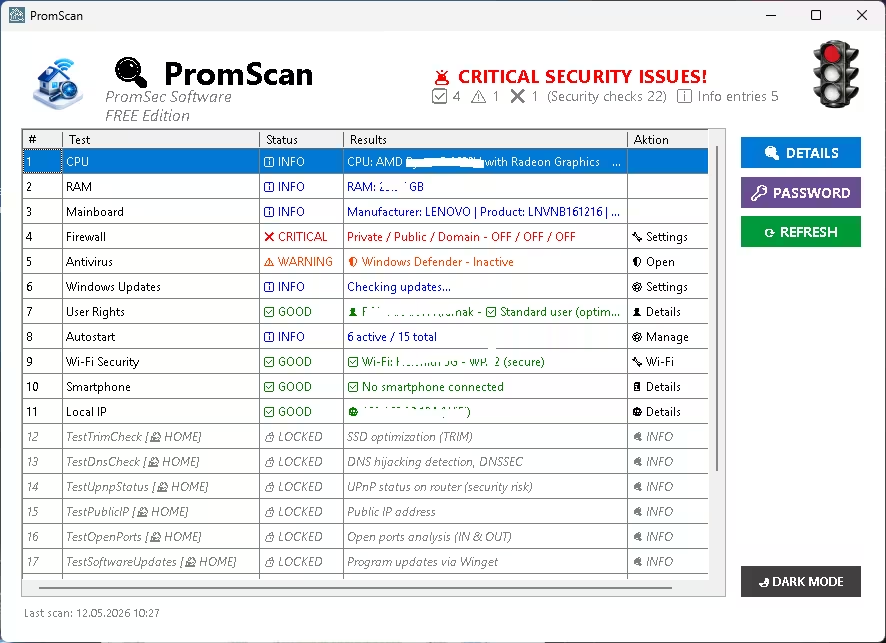
Open PromScan and you’re greeted by a tidy main window with a numbered list of checks down the middle and three big action buttons on the right: Details, Password, and Refresh. The big traffic light icon in the top-right corner gives you an instant overall verdict — red means at least one critical issue is open.
In my test, the red light fired immediately. Here’s the breakdown PromScan gave me:
- CPU, RAM, Mainboard: Information-only entries — useful for a quick hardware overview.
- Firewall: Critical ❌ — Windows Firewall was completely disabled across all profiles.
- Antivirus: Warning ⚠️ — Windows Defender real-time protection was off, but signatures were up-to-date.
- User Rights: Good ✅ — running as a standard user (the safest setup).
- Wi-Fi Security: Good ✅ — WPA2 connection.
- Autostart: Info — 6 active out of 15 total startup programs.
The visual hierarchy works. Critical issues jump out in red, warnings in amber, healthy items in green, and information-only entries are neutral.
The “Details” Tooltips Are Where It Wins
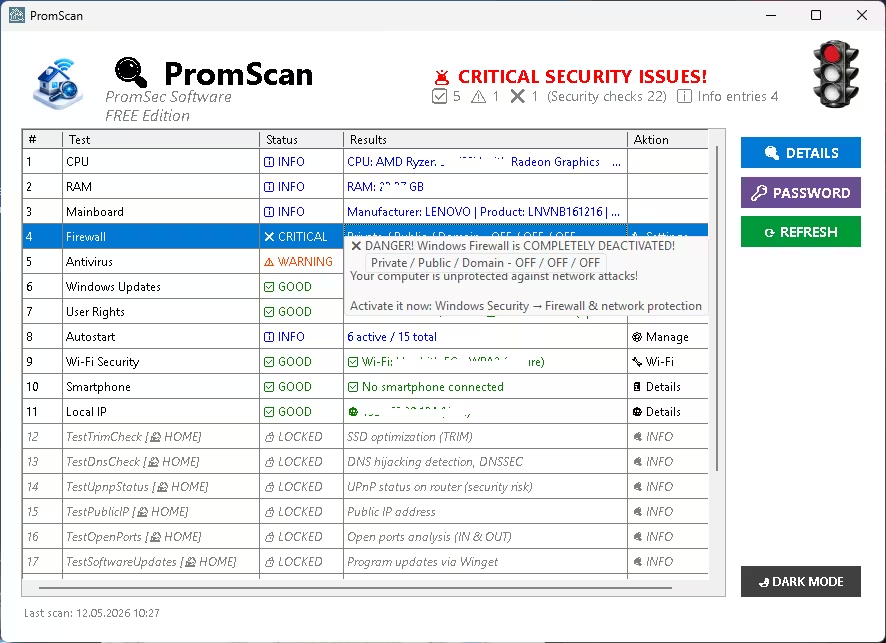
Click on any flagged entry and PromScan doesn’t just say “there’s a problem” — it explains what the problem is, why it matters, and where to go in Windows to fix it. For the firewall issue, it directed me to Windows Security → Firewall & Network Protection. That’s the kind of hand-holding casual users actually need.
The 22 Security Checks: What’s Included Free vs Paid
This section is where you need to read carefully. PromScan ships as a free edition, but several of the most interesting checks are locked until you buy a Home or Pro license. The locked rows appear in italics with a padlock icon—visible but not runnable.
✅ Free Edition Checks (Unlocked)
- CPU, RAM, Mainboard inventory
- Firewall status (Private / Public / Domain profiles)
- Antivirus detection and real-time protection check
- Windows Updates (important and optional, with size)
- User rights audit (admin vs standard)
- Autostart / Startup programs manager
- Wi-Fi security (WPA2 / WPA3 / WEP / Open)
- Smartphone connection check (warns about USB debugging risks)
- Local IP address
- Password strength checker (NIST + BSI standards, with entropy calculation)
- Exportable detailed system report
- Dark mode
🔒 Paid Edition Checks (Home €9.19 / Pro €21.93)
- SSD optimization (TRIM check)
- DNS hijacking detection and DNSSEC verification
- UPnP status on router (security risk audit)
- Public IP address lookup
- Open ports analysis (inbound & outbound)
- Program updates via Winget
- Router analysis
- Malware scan
- Windows Event Log analysis
- Network topology visualization
The free tier covers the basics every Windows user should care about. The paid tier is squarely aimed at power users and admins who want deeper network and event-log forensics.

The Password Checker: Solid, But Missing One Thing
The dedicated Password button opens a tool that scores any password you type against NIST 800-63B and BSI (Germany’s federal IT security agency) guidelines. It calculates entropy, flags reused or weak patterns, and tells you whether your password meets modern standards.
The one obvious miss: there’s no password generator built in. After the checker tells you your password is weak, you’re sent off to find a generator elsewhere. For an app that goes out of its way to hand-hold users, that’s a small but odd gap. Bitwarden’s free generator or KeePass would fill it nicely.
The Detailed System Information Export
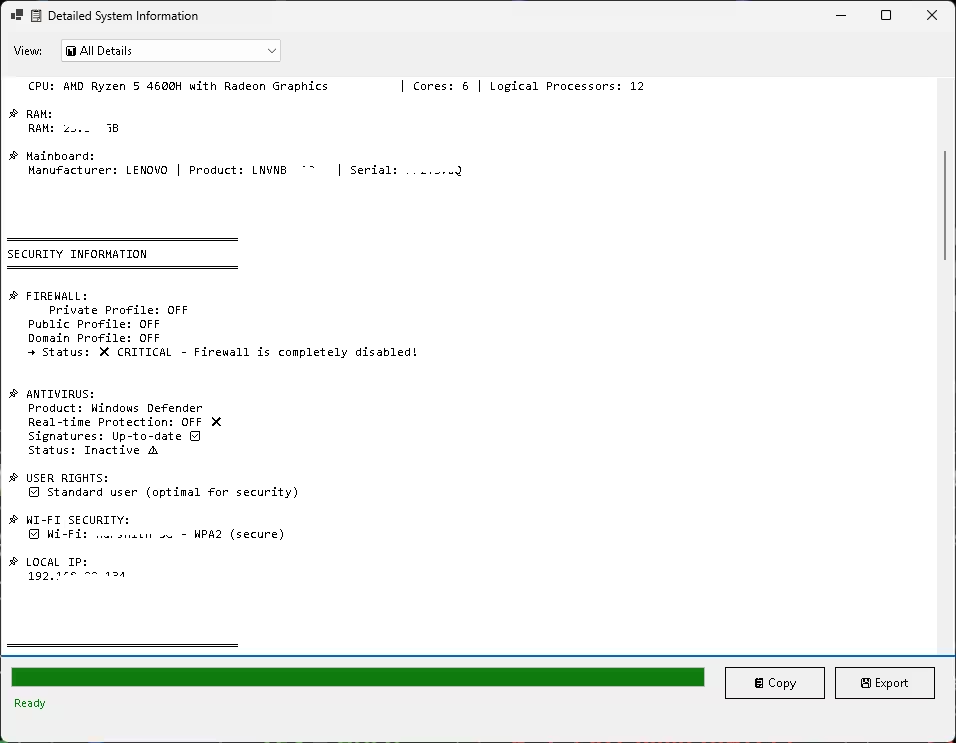
One feature I genuinely liked was the Detailed System Information window. It compiles every check result into a clean, scrollable text report—CPU details, RAM, mainboard serial, full security audit, Wi-Fi info, and local IP—all in one place. You can copy to the clipboard or export to a text file.
That’s incredibly useful when you’re helping a family member troubleshoot remotely or documenting the state of a system before/after a security change. It’s the kind of small touch that makes the app feel polished.
What Works Really Well
- Speed: Full 22-check scan completes in seconds.
- Privacy: Nothing leaves your machine. No telemetry, no cloud, no accounts.
- No admin rights required for the basic checks — you can run it on a locked-down work PC.
- Clear action steps: Every flagged issue comes with a tooltip explaining what to do next.
- Free for what most people need: The basic edition covers the security hygiene that matters for 90% of home users.
Where PromScan Falls Short
- Autostart view is cramped. If you have many startup programs, you can’t see the full list without scrolling—a tree view or expand/collapse would help.
- No password generator alongside the password checker.
- UI looks a bit dated in places. The dialog styling is functional but won’t win design awards.
- Some of the most interesting checks (DNS, UPnP, ports) are paid-only. It’s fair, but it’s worth knowing this before you download.
- PromScan does not remove malware — it only audits. You’ll still need Defender, Malwarebytes, or another scanner for actual cleanup.
How to Install PromScan
Installation is straightforward via the Microsoft Store:
- Open the Microsoft Store on Windows 10 or Windows 11 (64-bit).
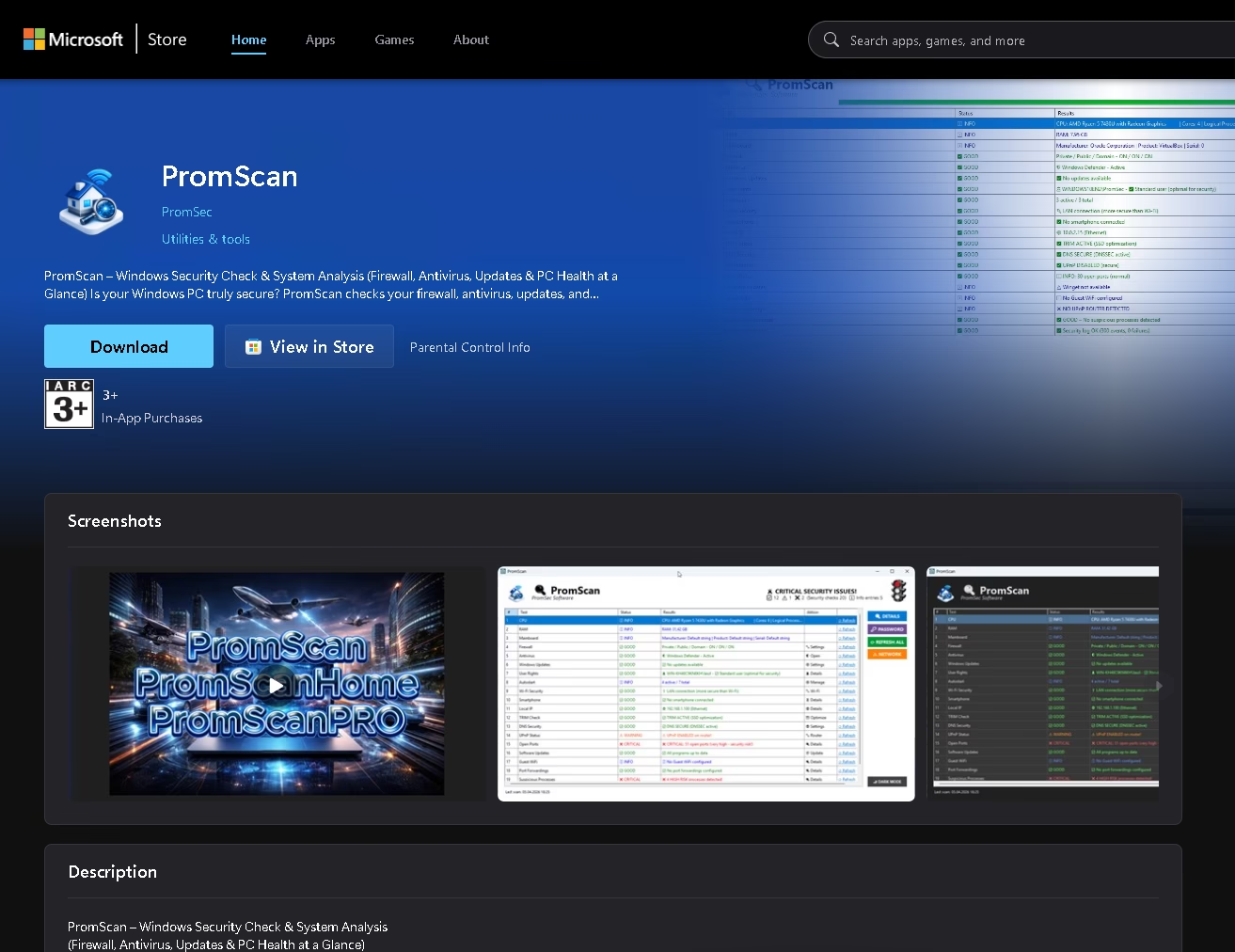
- Search for “PromScan” by PromSec Software, or use the direct link: apps.microsoft.com/detail/9nljjj66fsj1
- Click Get / Install (file size is approx. 175 MB).
- Launch the app — no setup wizard, no account creation.
- Click Refresh to run all checks and review the results.
If you decide to upgrade later, the Home (€9.19) and Pro (€21.93) editions are sold separately as a different installer through the developer’s site, lk-promsec.de.

PromScan vs Windows Security: Why Use It If Defender Already Exists?
Fair question. Windows Security (the built-in Defender hub) already shows you firewall status, virus protection, and account health. So why bother with PromScan?
Three reasons:
- Consolidated view. Windows Security is split across multiple panels. PromScan compresses everything into one table.
- Goes beyond Microsoft’s checks. Wi-Fi encryption type, password strength, smartphone debugging, and exportable reports are not included in Windows Security.
- Better explanations. Windows Security tells you something is off. PromScan tells you exactly where to click to fix it.
Think of PromScan as a second opinion that adds context to what Windows already shows you.
4.0 / 5
★★★★☆
A genuinely useful free security tool — with smart upsell limits
PromScan does exactly what it says: gives you a clear, instant, traffic-light overview of your Windows security posture. It’s fast, private, and free — and the actionable tooltips are a real differentiator over Windows Security alone. The UI feels a touch dated and some of the more interesting checks are gated behind a paid license, but for the price (zero), it earns a spot on every Windows user’s toolbelt.
✅ DOWNLOAD IF:
You want a fast, no-account, no-cloud security health check for your Windows PC — and don’t already use a paid endpoint security suite.
⚠️ SKIP IF:
You need malware removal (PromScan only audits) or you’re already running a comprehensive security suite like Bitdefender or ESET that covers all this ground.
Frequently Asked Questions
Is PromScan really free?
Yes. The basic edition with all the checks listed above is completely free from the Microsoft Store. The Home (€9.19) and Pro (€21.93) editions are optional upgrades that unlock advanced features like DNS hijacking detection, port scans, and event log analysis.
Does PromScan send my data anywhere?
No. All analyses happen locally on your device. PromScan does not send data to external servers — that’s one of its selling points, confirmed on both the Microsoft Store listing and the developer’s site.
Does PromScan remove viruses or malware?
No. PromScan is a security auditor, not a malware remover. It tells you whether your antivirus is active and properly configured, but it doesn’t scan for or remove infections. You still need Windows Defender, Malwarebytes, or another anti-malware tool for actual cleanup.
Do I need administrator rights to use PromScan?
No, the basic features run without administrator rights. Only some advanced features in the paid editions (like detailed update analysis) require elevation. This makes the free edition usable on locked-down work or school PCs.
Does PromScan work on Windows 7 or 8?
No. PromScan supports Windows 10 and Windows 11 (64-bit only). It will not install or run on older versions of Windows.
What’s the difference between PromScan Free, Home, and Pro?
The Free edition covers basic checks: firewall, antivirus, updates, Wi-Fi, user rights, autostart, and password strength. Home and Pro unlock advanced checks, including router analysis, DNS hijacking detection, UPnP audit, open port scans, public IP analysis, malware detection, Windows event log analysis, and network topology visualization.
Is PromScan a replacement for Windows Defender?
No. PromScan complements Windows Defender by auditing whether it’s correctly configured and active. It does not provide real-time protection or scanning. You should keep Defender (or another antivirus) running alongside PromScan.
How big is the PromScan download?
The installer is approximately 175 MB, downloaded directly through the Microsoft Store on Windows 10 or 11.


