


⚡ TL;DR — BEFORE YOU READ
Rufus is the fastest, most reliable free tool for creating Windows 11 bootable USB drives. The latest Rufus 4.14.2372 Beta brings game-changing “Quality of Life” improvements, including automated removal of Microsoft’s bloatware like Teams, Outlook, and Copilot during installation. Plus, it can bypass TPM 2.0 and Secure Boot requirements with ease. Read on to discover why this 2MB tool is trusted by millions worldwide.
If you’ve ever tried to install Windows 11 on unsupported hardware, you know the frustration. Microsoft’s strict requirements — TPM 2.0, Secure Boot, and specific hardware checks — have locked out millions of perfectly functional PCs. That’s where Rufus comes in. It’s not just a bootable USB creator; it’s a powerful workaround tool that puts you back in control.
The newly released Rufus 4.14.2372 Beta takes things even further. Developer Pete Batard has introduced advanced “Windows User Experience” enhancements that allow you to completely skip Microsoft’s forced applications during installation. Want to install Windows 11 without Teams, Outlook, or Copilot eating up system resources? Rufus makes it possible — and it only takes a few clicks.

What is Rufus 4.14.2372 Beta?
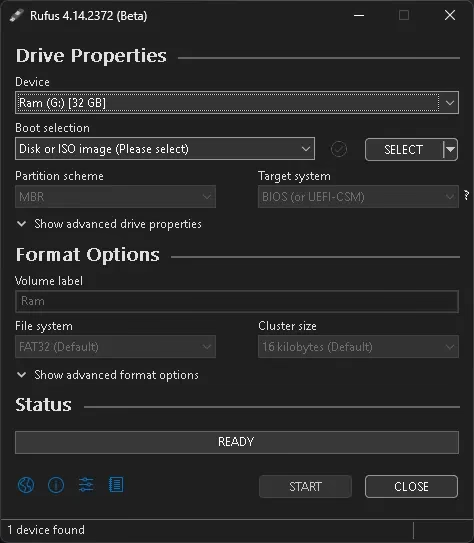
Rufus is a free, open-source Windows utility that allows you to quickly and easily create bootable USB drives from ISO images. Whether you need to install Windows 11 on an unsupported PC, create a Linux live USB, or repair a system, Rufus is the most reliable and efficient tool available. The Beta release introduces significant “Windows User Experience” enhancements designed for modern OS deployments.
Key New Features in Rufus 4.14 Beta
- “Quality of Life” Options: You can now automatically disable Microsoft “nuisances” like Teams, Outlook, and Copilot during the setup process.
- Silent Installation: A new option for fully unattended installs that proceeds without user prompts on the first detected disk. Perfect for IT professionals managing multiple machines.
- UEFI:NTFS Improvements: Better partition labeling to make the install media more explicit during disk partitioning, reducing user confusion.
- Bazzite & Fedora Support: Improved compatibility for Fedora-based distros like Bazzite that don’t follow standard EFI conventions.
- Bitdefender VHD Detection: Automatically detects and excludes the new Bitdefender hidden VHDs to prevent formatting errors.
- Bug Fixes: Resolves errors with local accounts containing whitespaces and fixes “Windows To Go” creation issues with newer bcdboot versions.
Download Rufus 4.14 Beta
| Developer | Version | File Size | License | Last Updated |
|---|---|---|---|---|
| Pete Batard | 4.14.2372 (Beta) | ~1.9 MB | Open Source (GPL v3) | April 21, 2026 |
⬇ Download Rufus 4.14 Beta here | GitHub Releases
How to Create a Windows 11 Bootable USB (Step-by-Step)
Here’s the exact process to create a custom Windows 11 installer with all bloatware removed:
- Download the Rufus 4.14 Beta executable from the official site and run it (no installation required).
- Insert your USB drive (8GB+ recommended). Rufus will auto-detect it.
- Select your Windows 11 ISO file by clicking the “SELECT” button.
- Customize Windows User Experience:
- Check “Remove requirement for 4GB+ RAM, Secure Boot and TPM 2.0”
- Check “Disable data collection (Skip privacy questions)”
- NEW: Check “Remove Microsoft forced features (Teams, Outlook, Copilot)”
- Optionally: Check “Create a local account with username” to bypass Microsoft Account requirement
- Click START: Rufus will format the drive and create your fully customized Windows 11 installer. The process typically takes 5-10 minutes.
Rufus vs. The Alternatives
| Feature | Rufus | Ventoy | Etcher | MediaCreationTool |
|---|---|---|---|---|
| Speed | Ultra Fast | Fast | Moderate | Slow |
| Win 11 Bypass | Yes (Advanced) | Yes | No | No |
| Portable | Yes | Yes | No | No |
| Remove Bloatware | Yes (NEW) | No | No | No |
| Open Source | Yes | Yes | Yes | No |
Rufus clearly stands out with its combination of speed, portability, and advanced customization options that no other tool offers.
Is Rufus Safe to Use?
Absolutely. Rufus is 100% open-source and has been audited by millions of users worldwide. The source code is publicly available on GitHub, and every release is digitally signed by the developer. Windows Defender might flag it as potentially unwanted software (PUA) because it modifies system installation files — but this is a false positive that affects all bootable USB creators.
⚡ QUICK VERDICT (9.5/10)
⭐ HIGHLY RECOMMENDED
Rufus 4.14 Beta is a must-have tool for anyone installing Windows 11. The new “Quality of Life” options alone make it worth using, as they save hours of manual debloating work post-installation.
👍 PROS:
- ✓ Unmatched speed (2x faster than Windows Media Creation Tool)
- ✓ Deep Windows 11 customization (remove bloatware, bypass TPM/Secure Boot)
- ✓ Portable — no installation required
- ✓ 100% free and open-source
- ✓ Silent installation mode for IT professionals
- ✓ Active development with regular updates
👎 CONS:
- ✗ Beta versions might have minor bugs (though rare)
- ✗ Requires admin rights to run
- ✗ Windows Defender false positives