


Simply Good Pictures 6 is a fully automated image enhancement software for Windows users.
You can use this straightforward program to automatically optimise and repair your images by getting rid of unwanted artefacts and lowering the amount of background noise.
How many of your vacation photos have yet to be edited? Make the best presentation you can of your photographs. Don’t let poorly taken pictures ruin your precious memories; use the most up-to-date optimisation techniques instead. With just one click, this straightforward program will enhance and correct your images.

About Simply Good Pictures 6:
This software analyzes photos accurately and improves their visual quality. It makes photos look more realistic by using a series of complex methods based on visual perception and mathematics.
Meanwhile, selective object recognition makes certain that only the relevant parts of the image are enhanced, which boosts the overall impression.
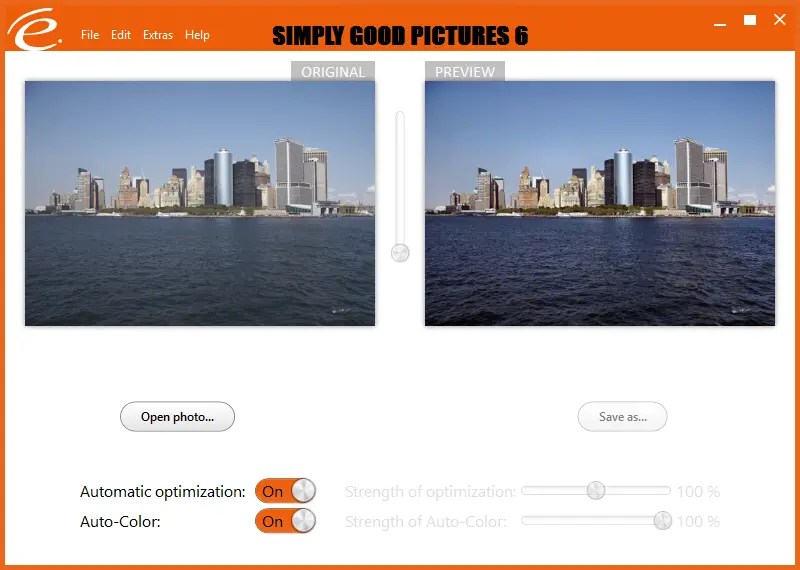
The Good Pictures app has a simple and easy-to-use interface. You can see the original image on the left side of the main window and the preview on the right. The tools for optimising and repairing images are located at the bottom.
The software supports all common image formats like JPG, BMP, TIFF, and RAW, as well as extremely high-resolution images (over 40 megapixels) with no problems.

Simply Good Pictures 6 Features:
- Automatic object recognition: manipulates only those image parts that help optimise the overall impression!
- Automatic adjustment of the tonal values
- Completely hands-free sharpening
- Automatic contrast optimisation
- Image enhancement through higher resolution
- Color-intensive photos through the resharpening of matte colors.
- Manipulation of colours to get more cheerful images
- It makes automatic saturation and hue adjustments.
- Fully automatic system for white balance.
- Fully automatic system for bright/dark correction.
- Elimination of fog and other weather influences.
- Elimination of undesired colour casts.
Simply Good Pictures 6 Giveaway:
Grab the license code by visitng this giveaway page: https://pnlm.de/r/get/simply_good_pictures_6-1752273464/
[OR]
Download the giveaway version of the software from https://downloadcluster.engelmann.com/
After installing the program, launch it to see a screen where you can request a free license key that unlocks all features.
On the Activation Screen (see screenshots below), enter your email address, select the option to subscribe to the newsletter, and click the “Request Serial Number” button.
In a few minutes, you’ll receive a confirmation email from Engelmann Software (respond@engelmann.com).
Check your email inbox and click the confirmation link to see the license code or serial number, and copy the code.
On your desktop, go to the activation screen, click “Enter License Key,” type in your serial number, and then click “Check and Activate the License Key.”
That’s it, go ahead and restart the program.

