


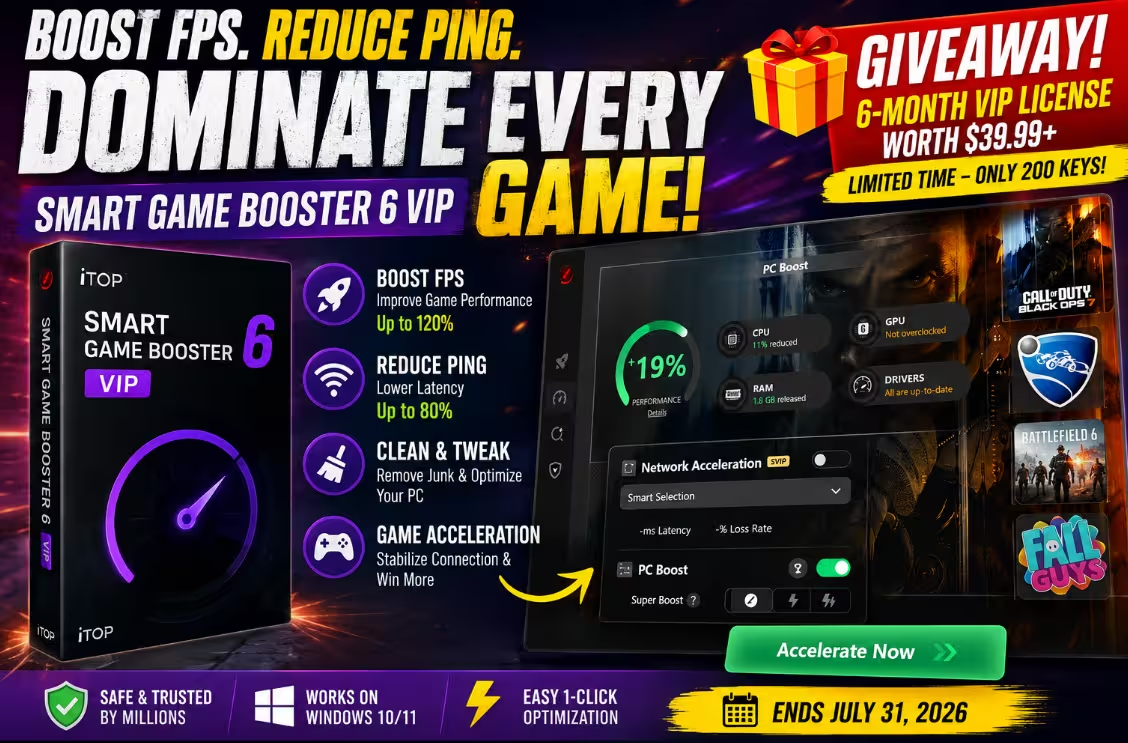

Smart Game Booster 6 — claim a free 6-month VIP license this July.

Every gamer knows that sinking feeling. You line up the perfect shot in Valorant, and the frame rate tanks. You’re one lap from victory in Rocket League, and your ping triples. A 2025 Liquid Web survey found that roughly 78% of players have rage-quit a game over lag and stutter — which honestly feels like an undercount if you’ve ever played ranked on a mid-range PC.
That’s exactly the problem Smart Game Booster 6 sets out to solve, and it attacks it from two directions at once: squeezing more frames out of your hardware while smoothing out your connection through a global network of 500+ acceleration servers. This is a genuinely big release for iTop — the software has crossed 10 million installs since 2019, and version 6 is its most ambitious update yet.
Below you’ll find our hands-on impressions, what’s new in version 6, and the exact steps to grab your key before they run out.
- What: Free 6-month Smart Game Booster 6 VIP license (normally a paid upgrade from $39.99+/year).
- Who’s it from: iTop Inc. — the team behind iTop VPN and iTop Screen Recorder.
- Why bother: One-click FPS boost (up to 120% claimed), ping reduction up to 80% via 500+ global servers, GPU/VRAM overclocking, driver updates, and a game compatibility checker covering 160,000+ titles.
- Our test result: +19% performance score on an older Intel i7-6700 rig, with 1.8 GB of RAM freed instantly.
- Catch: Only 200 activations, one entry per IP, and the offer closes on October 09, 2026. Works with v6 only.
- How: Enter your email on the giveaway page → install → sign in with the same email. Done.
What Is Smart Game Booster 6?
Smart Game Booster started life back in 2019 as a straightforward one-click optimizer — the kind of tool that shuts down background clutter before you launch a game. Version 6, released on June 22, 2026, turns it into something broader: a full gaming toolkit that handles system tuning, hardware overclocking, connection routing, compatibility checks, and even account security under one roof.
The headline change is the Network Acceleration service. Instead of just cleaning up your PC, the app can now route your game traffic through dedicated gaming lines spread across 500+ servers in North America, South America, Europe, the Middle East, Asia, Oceania, and Africa. iTop claims ping reductions of up to 80% in supported scenarios, along with protection against packet loss and peak-hour congestion. It also helps sidestep ISP throttling and strict NAT types — a common headache if you play international titles from regions with restrictive routing.

The redesigned library auto-detected our installed games, including Counter-Strike 2, Fortnite, GTA V Enhanced, Battlefield 6, and Call of Duty: Black Ops 7.

At launch, the acceleration network covers popular online games like Call of Duty, Counter-Strike 2, Battlefield, Fortnite, GTA V, Rocket League, Fall Guys, and Valorant, with more titles being added through cloud updates. You can also add local games manually if something isn’t auto-detected.
Key Specs at a Glance
| Software | Smart Game Booster 6 (build 6.0.0.1146) |
| Developer | iTop Inc. |
| Released | June 22, 2026 |
| Download Size | ~88 MB |
| OS Support | Windows 11, 10, 8.1, 8, 7 |
| License | Freeware with VIP/SVIP paid tiers (Pro from $39.99) |
| Giveaway | 6-month VIP · 200 activations · ends July 31, 2026 |
What’s New in Version 6 — The Standout Features
🌐 Network Acceleration
500+ dedicated gaming servers worldwide cut latency, curb packet loss, and dodge peak-hour congestion. Also bypasses regional blocks and restrictive NAT types.
🚀 One-Click PC Boost
Instantly disables unnecessary background apps and services, freeing CPU cycles and RAM the moment you launch a game.
⚡ Super Boost Overclocking
Pushes GPU and VRAM performance, with iTop claiming system efficiency gains of up to 30%. Three intensity levels let you stay conservative or go all-in.
🎮 Can I Run It
A compatibility engine spanning 160,000+ games, 3,000+ GPUs, and 9,000+ CPUs. It benchmarks your rig and tells you what it can actually handle.
🔧 Performance Suite
System Clean, System Tweak, Driver Update, and Game Defrag bundled together — junk removal, registry-level tweaks, and driver refreshes in one pass.
📊 In-Game HUD & Monitor
A real-time overlay shows FPS, hardware temperatures, and resource usage while you play, with overheating alerts. A built-in recorder captures highlights too.
Hands-On: How It Performed on Our Test PC
We installed Smart Game Booster 6 on a deliberately modest machine — an Intel Core i7-6700 (3.4 GHz) with integrated Intel HD Graphics 530, 32 GB of RAM, running Windows 10 Pro 64-bit. If a booster is going to prove its worth anywhere, it’s on ageing hardware like this, not on an RTX 5090 rig that doesn’t need help.
The first Performance scan flagged 1,108 junk items totalling 1.4 GB and suggested 47 system tweaks. Drivers were already current, and no game fragments were found — the scan took under a minute and everything was clearly itemized before we hit Fix, which we appreciate. Nothing gets changed blindly.

Our scan surfaced 1,108 cleanable items (1.4 GB) and 47 tweakable settings — all reviewable before applying.
The real test was PC Boost with Call of Duty: Black Ops 7 in the library. One click later, the app reported a +19% performance improvement, having trimmed CPU load by 11% and released 1.8 GB of RAM. There’s a Restore button right next to Launch Game, so every change is reversible — a small design touch that makes the whole thing feel trustworthy rather than pushy.

One click, +19% on the performance meter: CPU load down 11%, 1.8 GB of RAM released, drivers verified.
Network Acceleration sits in the same game panel with a Smart Selection mode that picks the best route automatically, displaying live latency and loss-rate figures once active. Worth knowing: this feature carries an SVIP tag in the app, so it belongs to iTop’s higher subscription tier. The boost, overclock, HUD, and performance tools are where the VIP license you’re claiming today does its work — check the claim popup for the exact tier details of your prize.

Acceleration spins up in seconds, with per-game routing and live latency stats.
We also ran the upgraded Can I Run It tool, which read our CPU, GPU, memory, and OS correctly and let us check compatibility against trending titles like Black Myth: Wukong and Fortnite. For anyone shopping Steam sales on an older PC, this alone is a handy sanity check before buying.
How to Claim Your Free 6-Month VIP License
- Head to the official Smart Game Booster giveaway page and enter your email address in the “Giveaway Time!” popup, then hit Claim Your VIP/SVIP.
- Download and install Smart Game Booster 6 on your Windows PC using the free download link on the same page (~88 MB, takes a minute).
- Open the app and sign up or log in with the exact same email before the event ends—this activates your 6-month VIP. Skip this step and the prize lapses, so don’t put it off.
Terms: First-come, first-served · valid for Smart Game Booster v6 only · one entry per IP address · iTop states your email is used solely for this event and never shared or sold.

The claim popup you’ll see on the giveaway page — three steps and you’re in.

Pros and Cons After Testing
👍 What We Liked
- Genuine, measurable gains on older hardware (+19% on our test rig)
- Every optimization is itemized and fully reversible via Restore
- Network acceleration and PC tuning finally live in one app
- Can I Run It is genuinely useful before game purchases
- Clean, gamer-friendly redesigned interface
- Free tier covers overclocking, basic boost, and driver updates
👎 What Could Be Better
- Network Acceleration is gated behind the top SVIP tier
- Headline figures (120% FPS, 80% ping cut) are best-case claims
- High-end PCs will see smaller optimization gains
- Auto boost and auto driver updates need a paid plan after the giveaway
Frequently Asked Questions
Is Smart Game Booster 6 free to use?
Yes — the base app is freeware and includes PC overclocking, basic system boost, and graphics/audio driver updates. Paid VIP/SVIP tiers (from $39.99) unlock extras like automatic boosting at game launch, idle-time driver updates, auto defrag, and the network acceleration service. This giveaway hands you six months of VIP at no cost.
Is Smart Game Booster safe to install?
It’s a legitimate application from iTop Inc., the developer behind iTop VPN and iTop Screen Recorder, with over 10 million installs since 2019. Always download it from the official iTop website — never from third-party “pre-activated” sources, which are common malware vectors for popular tools like this.
Does it really increase FPS?
On systems slowed by background processes, yes — our older i7-6700 test PC gained a reported 19% after one click, with 1.8 GB of RAM freed. The advertised “up to 120%” is a ceiling figure; real-world results depend on how cluttered your system is. Well-maintained high-end PCs will notice less.
How do I activate the 6-month VIP giveaway?
Enter your email on the giveaway page, download and install Smart Game Booster 6, then sign up or log in inside the app using that same email before July 31, 2026. Activation must happen during the event window, or the license is forfeited.
Which games does the network acceleration support?
At launch it covers major online titles including Call of Duty, Counter-Strike 2, Battlefield, Fortnite, GTA V, Rocket League, Fall Guys, and Valorant, with more games rolling out through real-time cloud updates. Note that network acceleration sits in the SVIP tier.
Which Windows versions are supported?
Smart Game Booster 6 runs on Windows 11, 10, 8.1, 8, and 7 (the installer is roughly 88 MB). There’s no macOS or Linux version.
★ 4.3 / 5 — Great Value, Especially Free
Smart Game Booster 6 is the most complete version of this tool yet. The one-click boost delivered real, reversible gains on our ageing test PC, the Can I Run It database is a quietly brilliant addition, and folding network routing into the same app makes sense for online-first gamers. Our reservations are the usual ones for this category — treat the marketing percentages as ceilings, and note that the flashiest new feature (network acceleration) sits in the priciest tier.
But here’s the thing: with a free 6-month VIP license on the table, there’s simply no downside to trying it yourself. If your PC stutters, your RAM is perpetually full, or you just want a temperature HUD while you play, claim a key before the 200 run out.
Claimed your key? Tell us in the comments what FPS gain you saw on your rig — we love comparing numbers across different hardware. And if you’re hunting for more free licenses, keep an eye on our giveaways section, where we post fresh promos like this every month.


