


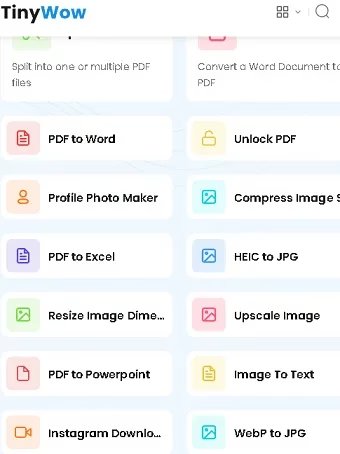
TinyWow is one of the largest free online toolkits on the web — over 200 tools spanning PDF editing, image editing, AI writing, video conversion, and file conversion, all usable without creating an account. In this 2026 update, we cover every major TinyWow category, what’s genuinely useful, its pricing and limits, and how it compares to other free tools we recommend on Techno360.
What Is TinyWow?
TinyWow is a browser-based platform offering free utilities for everyday file tasks: converting, compressing, editing, and generating content. It requires no software installation and no sign-up for basic use — you upload a file (or paste text), the tool processes it in your browser, and you download the result. TinyWow reports over 1 million active users and 200+ tools as of 2026.
You can visit the site directly here: tinywow.com.


TinyWow’s Main Tool Categories (2026)
1. PDF Tools (45+ tools)
This remains TinyWow’s most popular category. It covers merging and splitting PDFs, compressing large files, converting PDFs to Word/Excel/JPG and back, adding watermarks or page numbers, e-signing documents, and unlocking password-protected files. If you work with PDFs regularly on Windows, see our Ultimate Guide to PDF Tools for Windows (2026) for a full breakdown of editors, converters, and security tools — including desktop alternatives if you outgrow browser-based tools like TinyWow.
2. Image Tools (30+ tools)
TinyWow’s image suite has grown significantly and now leans heavily on AI: background removal, AI object removal, old photo restoration, AI image upscaling, and even basic AI image generation. Format conversion (HEIC, JPG, PNG, PDF, WebP, SVG, EPS), compression, cropping, and pixelation are also included.
3. AI Writing Tools (10+ tools)
A newer addition to TinyWow: AI essay writers, paragraph generators, sentence rewriters, summarizers, and grammar/content improvement tools. These are useful for quick drafts but, like most free AI writers, need human editing before publishing.
4. Video Tools (10+ tools)
Video compression, format conversion (MP4, AVI, MOV, and more), audio extraction (MP4 to MP3), video-to-GIF, and downloaders for platforms like YouTube, TikTok, and Instagram, plus AI transcription for generating captions or transcripts.


5. File Conversion & Other Tools (15+ tools)
Excel, CSV, XML, JSON, and ebook (EPUB/MOBI) conversions, plus a grab-bag of utilities: a meme generator, QR code generator, lorem ipsum generator, and random text generator.
Is TinyWow Still Free in 2026?
Yes. Every core tool remains free with no account required. Free users do see occasional CAPTCHA checks and can hit processing queues during peak hours. TinyWow now offers an optional Pro subscription (roughly $15–20/month) that removes ads and CAPTCHAs and speeds up processing — but it’s entirely optional; the free tier covers what most people need. Uploaded files are automatically deleted from TinyWow’s servers after about 60 minutes, and OCR and most conversions require no sign-up at all.
Pros and Cons
Pros:
- 200+ tools in one place — no need to bookmark a dozen separate sites
- No installation, no account required for most tools
- Genuinely free tier with real functionality, not just a trial
- Regularly adds new AI-powered image and writing tools
- Files auto-delete after an hour, which is good for privacy
Cons:
- CAPTCHAs and ads on the free tier can slow down repeat use
- Large files or batch processing benefit from a desktop tool instead
- AI writing output still needs human editing
TinyWow vs. Desktop Alternatives
For occasional, single-file tasks, TinyWow is hard to beat — it’s fast and free. But if you handle PDFs or images daily, a dedicated desktop app can be faster and work offline. We’ve rounded up genuinely free, watermark-free options in 7 Best Truly Free PDF Editors for Windows and our broader 35 Best Free PC Programs in 2026 list, which covers tools beyond just PDFs.
Frequently Asked Questions
Is TinyWow safe to use?
TinyWow processes files on its servers and deletes them after roughly an hour. Avoid uploading highly sensitive documents to any free online tool, TinyWow included, and use offline software for confidential files.
Do I need to sign up to use TinyWow?
No. Most tools, including OCR and file conversion, work without creating an account. An account is only useful if you upgrade to Pro.
What’s the best alternative to TinyWow?
For PDFs specifically, check our PDF tools guide for both free online and offline options depending on what you need.
Bottom Line
TinyWow remains one of the best free, all-in-one online toolkits in 2026 — especially if you need a quick PDF, image, or video fix without installing software. For heavier or recurring workloads, pair it with a desktop tool from our PDF Tools Guide.