
Toolstone Photo Finder Pro – Free for a Whole Year
Find duplicate and near-identical photos, review the matches side by side, and remove the copies you don’t need from your Windows PC. The Pro edition is normally a paid subscription; this promotion gives you a 12-month activation code.
✔ Windows 7 – 11
✔ Tested by Techno360
This is a limited promotion, so the offer may change or end without notice.
⚡ Quick Read
- What it is: A Windows tool that spots exact copies and look-alike shots (burst photos, re-saves, resized copies) by comparing what’s actually in the picture.
- The deal: A 1-year Pro code through Softwarezirkel’s CHIP CZ promotion. When we checked, Toolstone listed its regular three-month license at about €24.
- What you need: A working email address and 5 minutes. The signup pages are in German, but the steps below walk you through every click.
- Our test: On an old Nikon camera folder it found 25 similar photos in 12 groups, around 71.5 MB of repeats.
- Heads-up: Toolstone warns that photos removed through the app can’t be recovered. Back up first.
Why Your Photo Folder Keeps Getting Fatter
Here’s a pattern I see on almost every PC I’ve helped clean up over the years. Phone photos get synced to OneDrive. The same photos get copied off the phone “just in case.” Then there’s the camera memory card you dumped onto an external drive — twice, because you weren’t sure the first copy finished. Add a WhatsApp export or two, and suddenly one birthday party exists in four places.
Plain duplicates are the easy part. The real space-eaters are the near-duplicates: ten frames of your kid blowing out candles, shot in two seconds, each 3 MB. A normal file finder can’t catch those because every file is technically different. That’s exactly the gap Toolstone Photo Finder is built to fill.
What Is Toolstone Photo Finder?
Toolstone Photo Finder is a Windows app from Toolstone, a PohlMedia Distribution brand based in Germany. The company also publishes Toolstone SystemCare, DriverUpdater and Privacy Manager. Rather than matching file names or sizes, it looks at the image content itself, then groups matches side by side so you decide what stays and what goes.
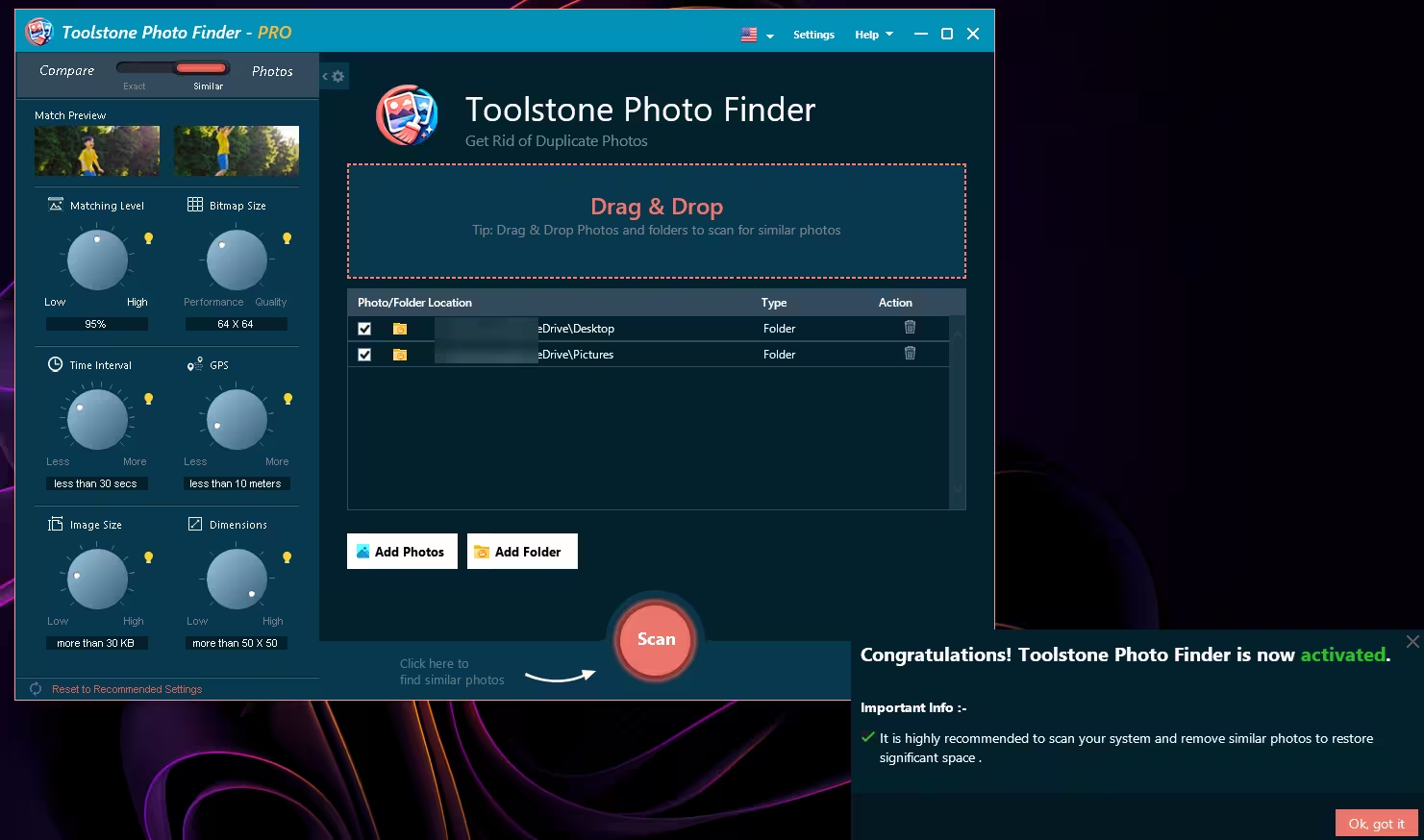
You get two comparison modes, switched by a slider at the top left:
- Exact – catches byte-for-byte copies, the classic “I copied this folder twice” problem.
- Similar – catches shots that look nearly the same: burst frames, edited versions, resized or re-compressed copies.
The Dials That Actually Matter
The left panel looks like a mixing desk, and honestly, that’s the fun part. Each dial narrows down what counts as a “match.” These are the defaults I saw after installing:
| Setting | Default | What it does for you |
|---|---|---|
| Matching Level | 95% | How alike two photos must be. Lower it and you’ll catch more, but expect some false alarms. |
| Bitmap Size | 64 × 64 | Sets how much image detail is used for each comparison. The dial runs from Performance to Quality; move it toward Quality for trickier collections. |
| Time Interval | Less than 30 secs | Limits matching to photos whose capture times fall within the selected interval, which suits burst shots. |
| GPS | Less than 10 meters | Uses location data so two similar beach shots from different trips don’t get lumped together. |
| Image Size | More than 30 KB | Skips tiny icons and thumbnails. |
| Dimensions | More than 50 × 50 | Ignores very small images like web graphics. |
My tip: leave everything at default for your first run. If the results feel thin, drop Matching Level a notch or widen the Time Interval. There’s a “Reset to Recommended Settings” link at the bottom if you get lost.
I Ran It on a Real Camera Folder — Here’s What Happened
I pointed it at an old Nikon memory card dump (the 100NIKON folder most Coolpix owners will recognise) plus my Desktop and Pictures folders. You can drag folders straight into the drop zone or use Add Folder / Add Photos, then hit the big orange Scan button.
The scan finished in well under a minute and came back with 25 similar photos sorted into 12 groups, totalling 71.51 MB. Not a huge haul, but this was a small folder — and every group made sense: two nearly identical crescent-moon shots taken seconds apart, back-to-back portraits of my son against the same wall, and a pair of night-sky frames.
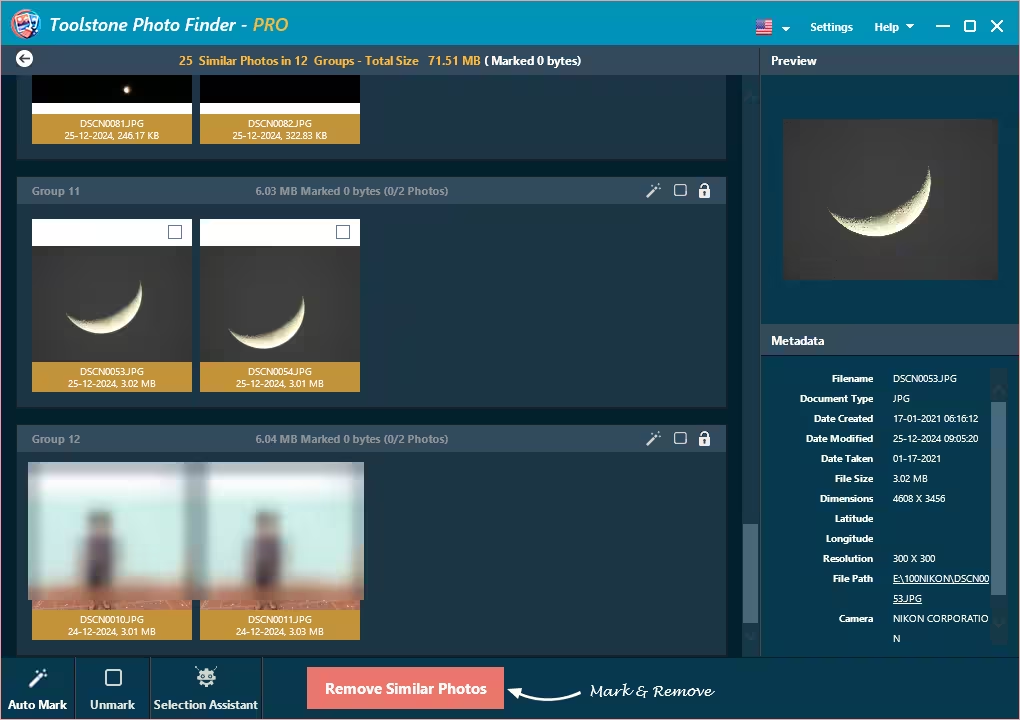
📊 My test result: 25 similar photos found across 12 groups, adding up to 71.51 MB. A bigger library with years of phone backups could turn up far more.
Two things I liked here. First, the right-hand panel shows proper metadata — date taken, dimensions, file size, file path, even the camera maker — so you can keep the higher-resolution original and bin the re-save. Second, each group has a small lock icon, which protects that group from any bulk selection. Handy for the photos you never want touched.
When you’re ready to clean up, you’ve got three ways to pick files:
- Auto Mark – lets the app select the extras in every group for you.
- Selection Assistant – gives you rules-based control over what gets marked.
- Manual ticks – click the checkbox on each thumbnail yourself.
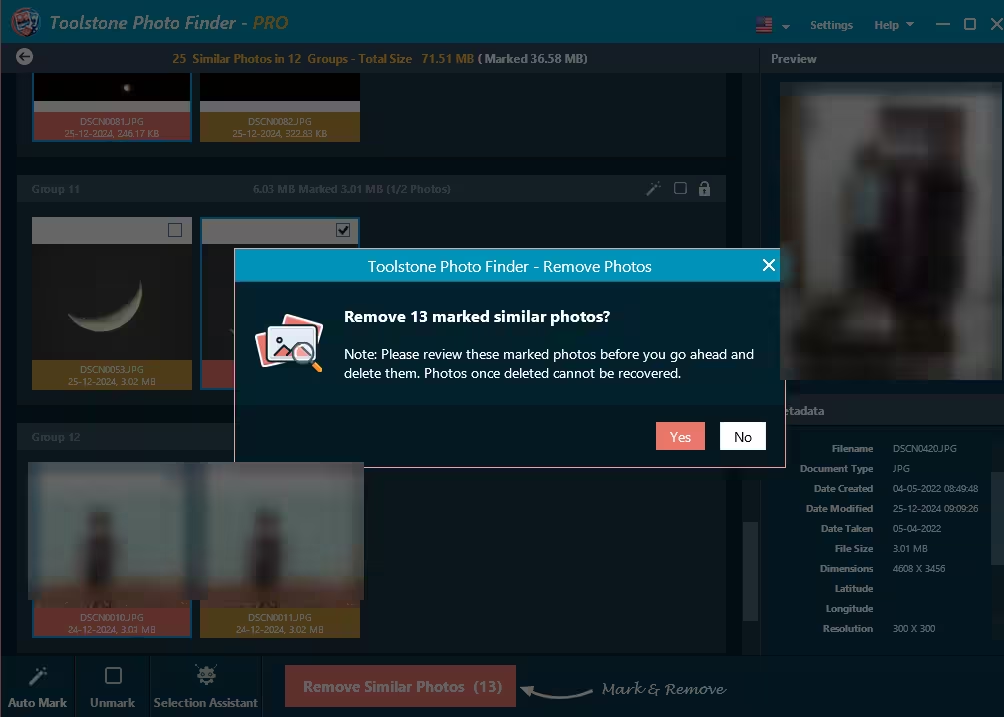
⚠️ Read this before clicking “Yes”: Toolstone warns that photos deleted through the app can’t be recovered, so review your selections carefully. In my testing, Auto Mark picked 13 photos in one go — always scroll through every group before confirming. Better still, copy the folder to an external drive first. Family photos don’t get a second chance.
How to Get Your Free Toolstone Photo Finder Pro License
The giveaway runs through Softwarezirkel, a German license portal, as part of a CHIP CZ promotion. The pages are in German — if you use Chrome or Edge, right-click and choose Translate to English. Here’s the full walkthrough:
Step 1: Request your code
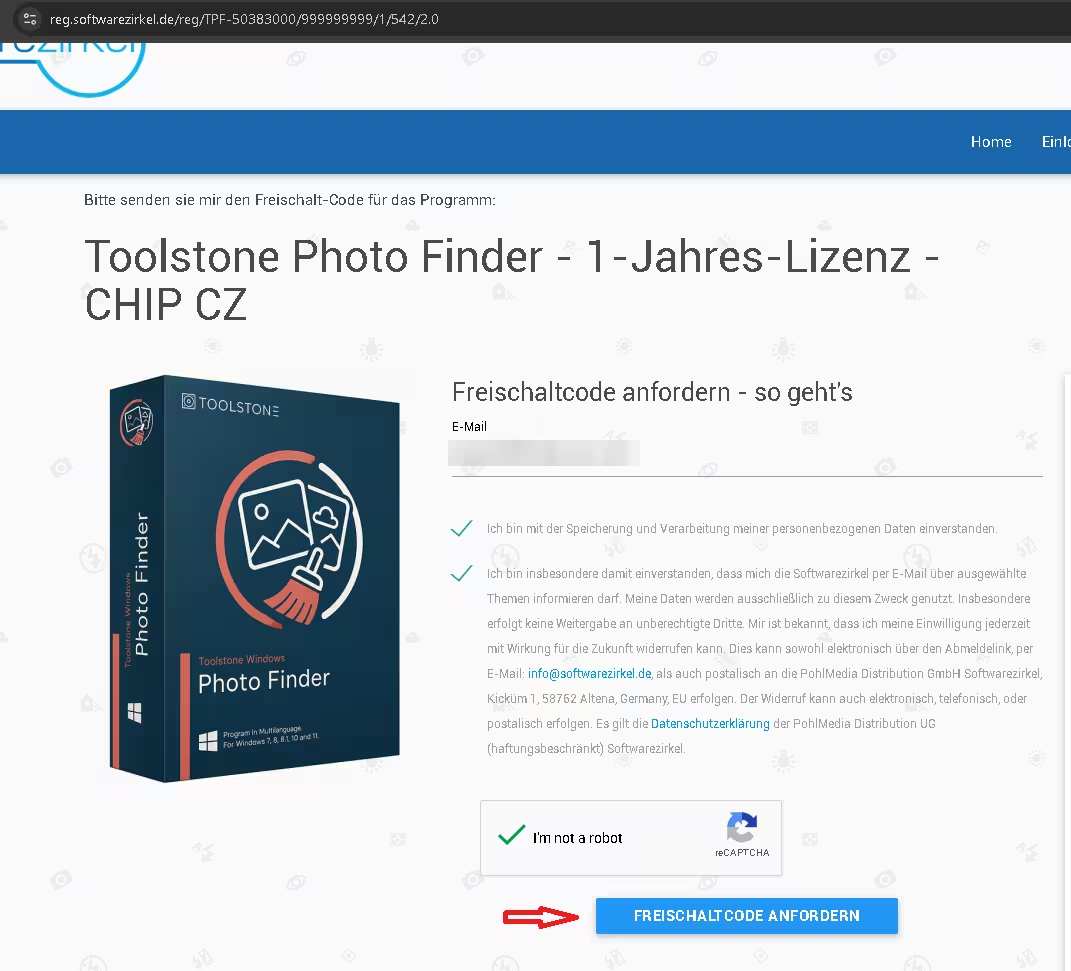
Open the Toolstone Photo Finder giveaway page. Type your email address, tick the two consent boxes (storage of your data, plus newsletter consent), solve the reCAPTCHA, and press the blue FREISCHALTCODE ANFORDERN button — that’s German for “Request activation code.”
Step 2: Confirm your email
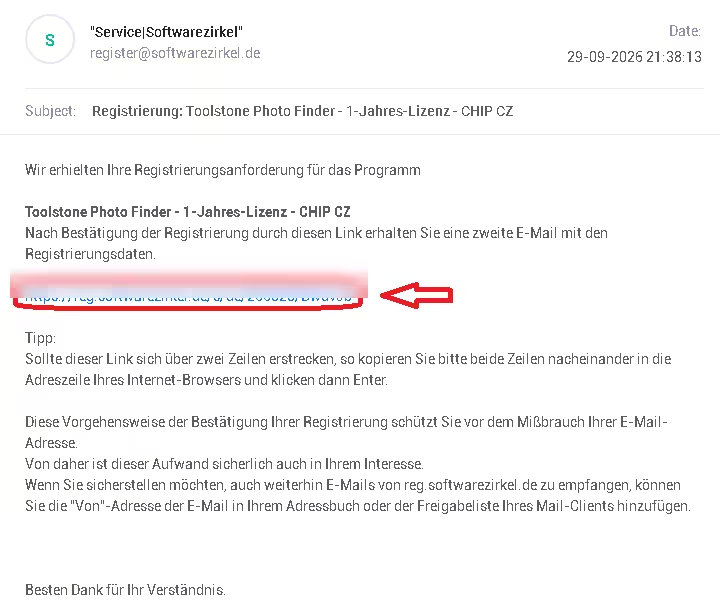
Check your inbox for a message from register@softwarezirkel.de with the subject “Registrierung: Toolstone Photo Finder – 1-Jahres-Lizenz – CHIP CZ.” It arrived within a minute for me. Click the confirmation link inside. Not there? Look in Spam or Promotions.
Step 3: Copy your serial and grab the installer
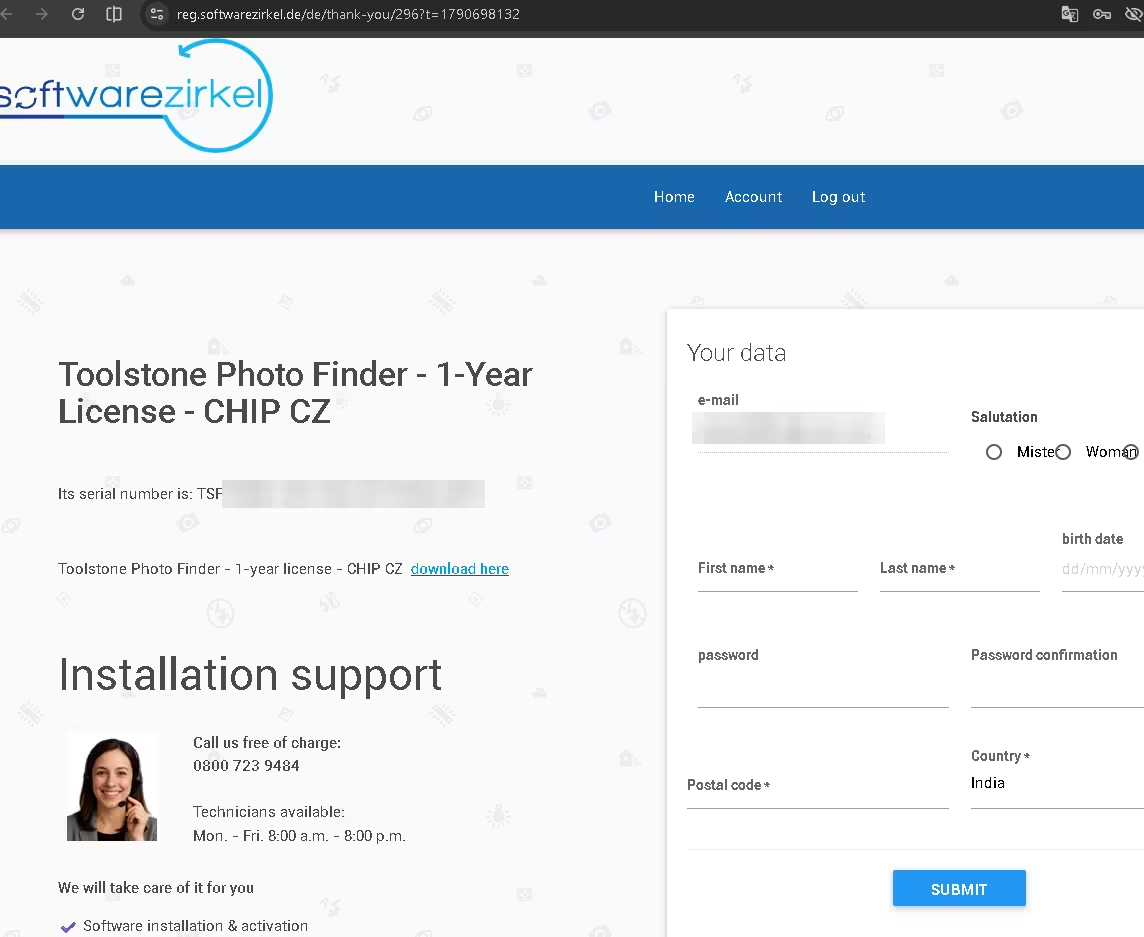
The link opens a thank-you page showing your serial number (it starts with TSPF-) and a download link. Copy the serial somewhere safe. The “Your data” form on the right side of that page is for creating a Softwarezirkel account — you don’t need it to use the license. You can also download the setup file directly: toolstone_pf_setup.zip.
Step 4: Install and activate
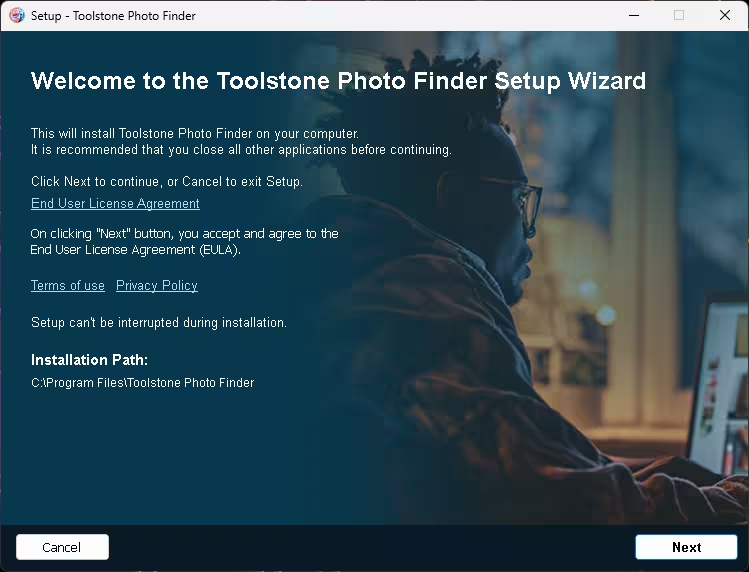
- Unzip the download and run the setup file. Clicking Next accepts the End User License Agreement (worth a quick read). Keep the default path,
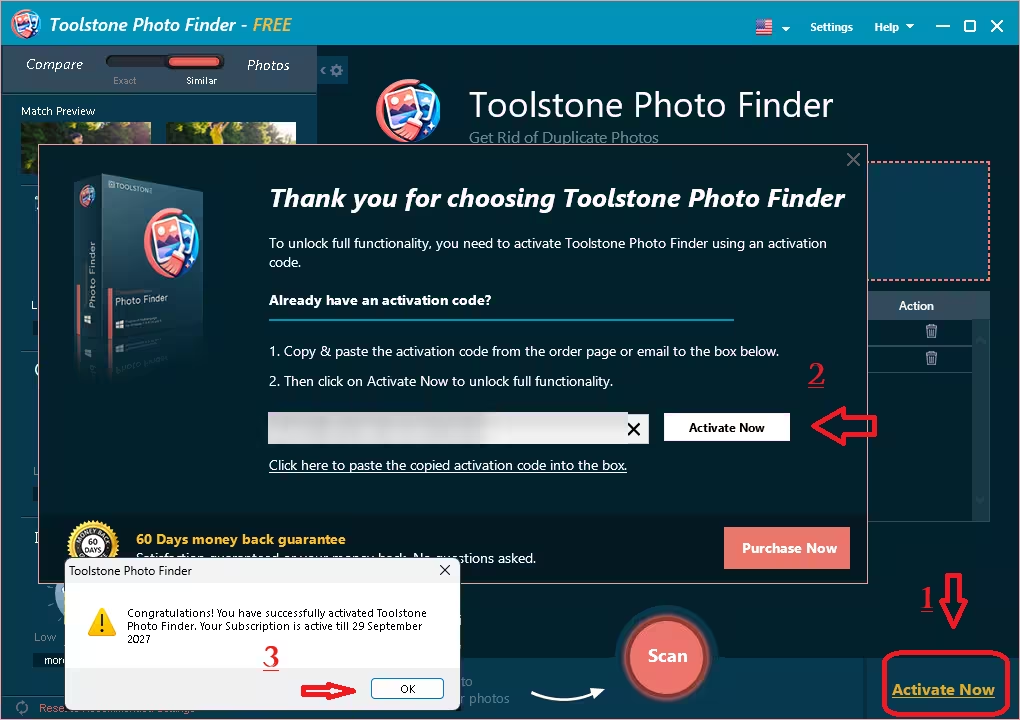
C:\Program Files\Toolstone Photo Finder, unless you have a reason to change it. - Open the app. Click Activate Now in the bottom-right corner.
- Paste your serial into the box and click the Activate Now button next to it.
- A popup confirms the activation along with your expiry date. Click OK. The title bar switches from “FREE” to “PRO.”
Giveaway vs. Paid Version
| This giveaway | Regular purchase | |
|---|---|---|
| Price | Free | About €24 (listed with a 40% discount when we checked on 29 September 2026) |
| Duration | 12 months | 3 months |
| Features | Pro edition | Pro edition, up to 3 PCs, updates, support |
| Activation shown | Active until 29 Sept 2027 (our test) | Based on the plan purchased |
Pricing is taken from Toolstone’s official German product page and may change. Giveaway codes are typically for personal use and may not include free upgrades beyond the license period.
Who Should Grab This?
- Phone photographers with years of burst shots and screenshot clutter synced to OneDrive or Google Photos backups.
- Camera owners who’ve imported the same memory card more than once.
- Laptop users on a small SSD who keep seeing the red “low disk space” bar.
- Anyone organising family photos before moving them to a new PC or external drive.
If you mainly need to clear duplicate documents, music and videos too, a general-purpose tool is the better fit — take a look at our write-up on Wise Duplicate Finder Pro or the lightweight DupInOut Duplicate Finder. And if you want a second opinion on image-only cleanup, we’ve also covered Duplicate Photo Finder Plus.
Techno360 Verdict
Hands-on tested
In my testing, Toolstone Photo Finder handled its core job of finding similar photos well. The dial-based controls look playful, but the time and GPS filters give you extra ways to narrow down how photos are matched. Grouped results with full metadata make picking the best shot easy. My main gripe is that removals can’t be undone from within the app; a “move to folder” option would make it safer. The one-year promotion gives you plenty of time to try it on a large photo library without paying for a license.
- Finds look-alike shots, not just copies
- Time and GPS filters to narrow down matches
- Group lock, Auto Mark and Selection Assistant
- Clean metadata panel for every photo
- No in-app undo for removed photos
- Signup pages are only in German
- Built for photos, not general file cleanup
Frequently Asked Questions
Does the Toolstone Photo Finder Pro giveaway work?
I tested the promotion on 29 September 2026 and activated the code without problems. The app confirmed a Pro subscription running until 29 September 2027. The code is issued through Softwarezirkel, which belongs to PohlMedia Distribution, the company behind Toolstone.
Which versions of Windows does it support?
Windows 7, 8, 8.1, 10 and 11. The interface is available in multiple languages; you can switch using the flag icon in the top bar.
What’s the difference between Exact and Similar mode?
Exact mode finds identical copies of the same file. Similar mode finds photos that look almost the same, such as burst frames, edited copies or resized versions.
Can I recover photos after deleting them?
Toolstone warns that removed photos can’t be recovered, so review every group carefully and keep a backup before you clean up.
What happens when the license expires?
The promotion gives you a 12-month Pro activation; in our test it runs until 29 September 2027. Toolstone doesn’t spell out what happens at expiry on the giveaway page, so check the license terms or contact support@toolstonesoftware.com before then.
I didn’t get the confirmation email. What now?
Give it a few minutes, then check Spam, Junk or Promotions for a message from register@softwarezirkel.de. If it still doesn’t show up, request the code again with the same address.
About the author: Ramakanth is the lead writer and co-founder of Techno360. After years in IT support, he’s been testing and writing about Windows software since 2008. Every giveaway on Techno360 is claimed, installed and activated on his own PC before it’s published — including this one, tested on 29 September 2026.
Looking for more freebies? Browse our full collection of free software giveaways and deals.