


Top Data Protector Pro is a powerful folder lock software for Windows that lets you password-protect, hide, and secure your important files and folders — all without any technical know-how. If you have private photos, sensitive documents, or confidential work files on your PC, this tool keeps them locked away from anyone who shouldn’t see them.
Right now, you can grab a free Pro license for Top Data Protector Pro — valid until August 25, 2026. Read on to find out how to claim it and what you get with the Pro version.
What Is Top Data Protector Pro?
Top Data Protector Pro is developed by iTop Inc. — the same team behind iTop VPN. It’s designed for everyday Windows users who want a simple, no-fuss way to lock down their private files.
Unlike complex encryption tools, this software works on a drag-and-drop system. You just drop a file or folder into the app, set a password, and it’s locked. Nobody can open, modify, or even see that file without the correct password.
It’s compatible with Windows 11, 10, 8, 7, XP, and Vista, and works with all file types — documents, photos, videos, PDFs, and more.
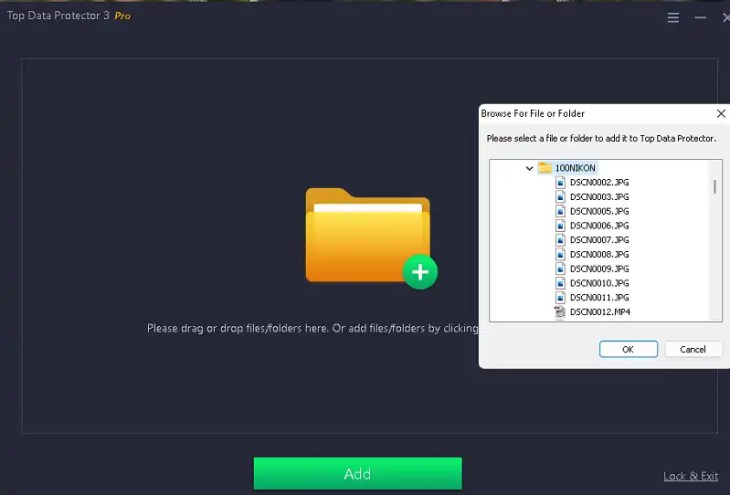
Top Data Protector Pro’s main interface — drag and drop files or folders to lock them instantly.

Key Features of Top Data Protector Pro
Here’s what makes this tool stand out from basic folder-lock options on Windows:
- Password-protect files and folders — Set a master password; no one can access protected items without it.
- Hide files completely — Locked files become invisible in File Explorer and all other programs, not just locked.
- Deny Read / Write access — Fine-tune protection: allow viewing but block editing, or block everything.
- Ransomware protection — Even if ransomware lands on your PC, it cannot encrypt or touch your locked files.
- Protect against deletion and modification — Shared PC users or accidental clicks won’t be able to delete or change protected files.
- Supports all file formats — Photos, videos, documents, PDFs, screen recordings — every format works.
- Real-time monitoring — Pro version continuously watches for suspicious activity on protected data.
- Unlimited file locking — The Pro version removes the 10-file limit found in the free version.
- Automatic updates — Stay protected with the latest version without manually checking.
- 24/7 premium support — Pro users get priority technical support.
Top Data Protector Pro vs Free — What’s the Difference?
The free version limits you to locking up to 10 files and has a file size cap. The Pro version gives you unlimited file locking, unlimited file size support, real-time monitoring, automatic updates, and priority support. Normally priced at $29.99 per year for 3 PCs, the Pro version is a solid value — and right now you can get it free with the license code below.
Who Should Use This Software?
- Individuals — Lock personal photos, financial documents, and private records on a shared family PC.
- Remote workers — Keep work files secure when using a laptop in public spaces or at home.
- Small business owners — Protect client data, financial records, and intellectual property on office computers.
- Students — Keep personal files private on a shared hostel or college computer.
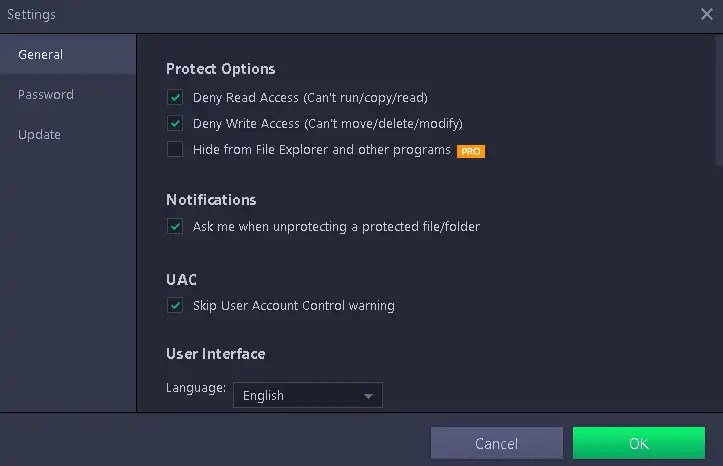
Top Data Protector Pro’s settings panel — customize deny read, deny write, and hide options for each protected item.

How to Get Top Data Protector Pro Free License
Follow these steps to activate the free Pro subscription:
- Download the software from the official developer’s page.
- Install and launch the application.
- Click “Create account” and sign up with your email address and password.
- In the app’s main window, click “Activate Now” and then select “Enter License.”
- Copy and paste the license code below, then click “Register.”
Free License Code:
81295-33FD7-D17B4-9D6B3-227B3
Note: This license code gives you a complimentary Pro subscription valid until August 25, 2026. Grab it before it expires!

Enter the license code in the “Activate Now” section to unlock the full Pro version for free.

Is Top Data Protector Pro Safe to Use?
Yes. Top Data Protector Pro is developed by iTop Inc., a well-known software company. The tool does not encrypt your files in a way that risks data loss — your files are simply hidden and password-locked within the software’s vault. You can unlock them anytime using your master password. It is listed on major software repositories like FileHorse and Softonic, and has been around since 2022 with regular updates.
Frequently Asked Questions
Can I use this on multiple PCs?
The Pro license (at $29.99/year) covers 3 PCs. The free giveaway code may be limited to a single account activation — check the developer’s terms.
What happens when the free license expires on August 25, 2026?
Your protected files remain safe and accessible, but you’ll need to either renew to a paid plan or use the free version, which limits you to 10 locked files.
Does it work on Windows 11?
Yes, Top Data Protector Pro is fully compatible with Windows 11, 10, 8, 7, XP, and Vista.
Can ransomware bypass the protection?
Files that are already locked and hidden through Top Data Protector cannot be accessed or encrypted by ransomware, since the ransomware itself cannot see or reach those files.
Is there a Mac version?
No. Top Data Protector is a Windows-only application as of now.


