


The Vovsoft Batch Image Converter is an easy-to-use program for batch conversions of graphic files. It makes it simple to extract the format of your choice from a folder full of images of all kinds. Thanks to the VOVSOFT weekly giveaway, you can get a $19 lifetime license of this software for free for a limited time.
The latest campaign is live right now: it runs from August 16, 2026 to August 23, 2026 and covers the newest release, Batch Image Converter v2.4. Grab your key before the countdown ends, because Vovsoft rotates its giveaways every week.
Vovsoft Batch Image Converter Giveaway Details (August 2026)
- Software: Vovsoft Batch Image Converter v2.4
- Regular price: $19 (100% off during the giveaway)
- License key: RXT6P-ZY8F5-RNWFM
- Campaign start: August 16, 2026
- Campaign end: August 23, 2026
- License type: Lifetime license (no free updates)
- Giveaway page: vovsoft.com
About Vovsoft Batch Image Converter
Converting photographs in bulk is a breeze with Vovsoft Batch Image Converter, a straightforward program with just one function. The app’s purpose is pretty plain, so its interface is simple too. It is quite easy to use since it displays the list of files queued for conversion in a tidy table.
With Vovsoft Batch Image Converter, you can convert photographs to various formats one at a time, but it also has the advantage of processing multiple pictures at once.
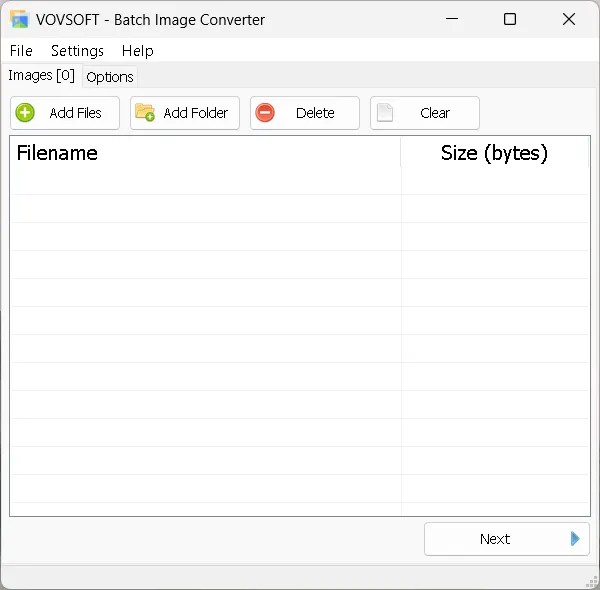

To clarify, you have the option to choose an entire folder, and the software will search for images within, subsequently adding them to the input list. You can simply click a button to remove, add, or clear any item on the list.
To begin the picture conversion, go to the “Options” section and choose the output format and destination directory. Then, hit the “Process” button. The time required to convert the files is proportional to the number of input photographs. The program operates swiftly and displays a message upon completion of the conversion.
Key Features of Batch Image Converter v2.4
- Convert hundreds of pictures in one go instead of saving them one by one
- Drop in a whole folder and let the app collect every supported image inside it
- Pick any output folder, or simply keep the original one as the default
- Lightweight 17.4 MB installer that runs happily on older, low-end PCs
- Single-window interface with practically no learning curve
- Portable edition available if you would rather not install anything
- On-screen notification as soon as the batch conversion is finished
Supported Image Formats
The most widely used graphic formats are all compatible with the converter: PNG, WEBP, JPEG, JFIF, TIFF, BMP, GIF, ICO and WMP. That means everyday jobs such as PNG to JPG, WEBP to PNG, JPG to WEBP or PNG to ICO take only a couple of clicks, and you have no difficulty changing the default output folder, which is the same as the original.
System Requirements
- Windows 11, Windows 10, and Windows 8/8.1 (64-bit)
- Roughly 17.4 MB of free disk space
- No internet connection needed after activation
How to Get the Vovsoft Batch Image Converter Free License
- Visit the Vovsoft giveaway page.
- On the giveaway page, you will see a license code. Copy it.
- Download the installer from here and the portable version from here.
- Once you’ve installed the software, launch it. You will see an activation window similar to the one in the screenshot below.
- Go to the “Enter License Key” area and type in the code.
RXT6P-ZY8F5-RNWFM
Press the “OK” button. That’s it!


Giveaway Terms and Conditions
- You must download, install and activate the software before the offer ends on August 23, 2026.
- The key unlocks a lifetime license for version 2.4.
- No free updates are included; updating the giveaway build may leave it unregistered.
- The license may not be resold.
Frequently Asked Questions
Is Vovsoft Batch Image Converter really free?
Yes. The full edition normally sells for $19, but during this campaign you can activate it at no cost with the license key listed above.
When does the giveaway end?
The campaign ends on August 23, 2026. After that date, the key will no longer activate new installations, so it is best to register the software today.
Do I get free updates with the giveaway license?
No. The free license covers version 2.4 only. If you install a newer build later on, the program may ask for a license again. Buy the full edition if you want lifetime updates.
Does it work on Windows 11?
Yes, the 64-bit build supports Windows 11, Windows 10 and Windows 8/8.1.
Is there a portable version?
Yes, Vovsoft offers a portable ZIP package that you can run from a USB drive without installing anything.
Final Thoughts
If you regularly juggle screenshots, camera photos and web graphics, the Vovsoft Batch Image Converter saves a lot of repetitive work. It does one job, does it quickly, and the current giveaway makes a $19 lifetime license completely free until August 23, 2026, which is hard to argue with.