


When looking for email backup software, Vovsoft Download Inbox Emails is a great option because it can download all of your messages from your inbox.
Whether you use Gmail, Hotmail, Yahoo Mail, or any private email account, this program makes it simple to back up and restore your messages to a portable device so you can access them offline.
About Vovsoft Download Mailbox Emails:
To guarantee the security of important email message data, it may be necessary to save it in an offline method.
Downloading all email messages from your account, though, can be a time-consuming and laborious process.

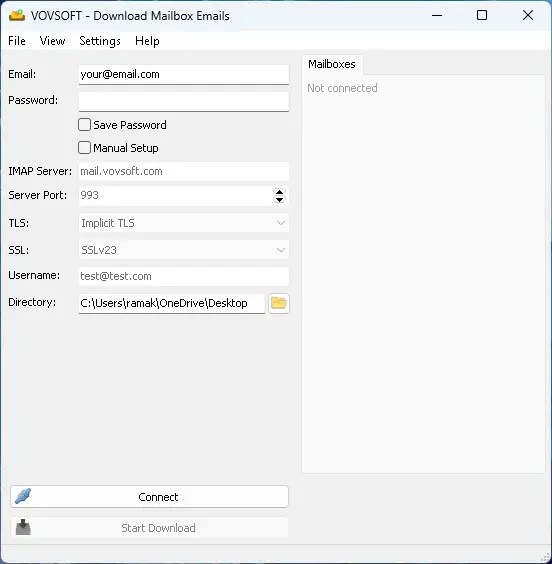
With its minimalistic style, the app provides the barest minimum needed to connect to your email account, choose and download messages, and more. The program will save all of your emails to the location you specified as an EML file.
Those who aren’t familiar with or don’t want to deal with the technical parts of email account settings will appreciate the clean design.
Anyone can use the app to access their email from any of the supported providers; all they have to do is enter their credentials and choose which folders to download. Users with enormous data volumes in their mail folders may find the application’s lack of individual message selection challenging.


The software also has a manual setup option for users who are using dedicated servers for custom email accounts; this allows them to provide the necessary information for setting up the connection, such as the IMAP server and TLS.
If you’re looking for an easy way to backup your email messages for offline use and don’t want to get too bogged down in technical specifics, Download Mailbox Emails could be a tremendous help.
Giveaway:
Vovsoft Download Mailbox Emails is a free download for the time being. This license is normally $19, but it’s yours for free.
- To get your free license key, please visit the Vovsoft giveaway page by clicking here.
- The giveaway page contains license details and a download link for the software.
- You can also get the installer right here: a desktop installer or a portable edition.
- Launch the software after it has finished installing.
- The activation prompt will appear. The “Enter License Key” button should be clicked.
- After entering the license key, click the “OK” button.
- This license requires the following activation code: MF4XZ-GF7LC-GV352
- Please be aware that the end date for this giveaway is December 8, 2024.


