


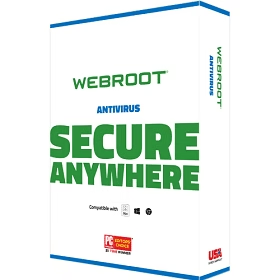
Webroot SecureAnywhere AntiVirus is one of the most lightweight and powerful antivirus solutions available for Windows and Mac in 2026. Unlike traditional antivirus programs, Webroot uses a cloud-based architecture that minimizes system resource usage, ensuring it won’t slow down your PC while effectively protecting you from viruses, ransomware, spyware, and zero-day threats.
What is Webroot SecureAnywhere AntiVirus?
Webroot SecureAnywhere AntiVirus is a security software developed by OpenText Cybersecurity (formerly Webroot Inc.). It leverages its proprietary BrightCloud Threat Intelligence Platform, which processes data from over 95 million endpoints and uses sixth-generation machine learning to detect and neutralize threats in real time.
Instead of downloading heavy signature databases like most antivirus programs, Webroot offloads threat analysis to the cloud — resulting in lightning-fast scans that complete in under 2 minutes, with minimal impact on your system performance.
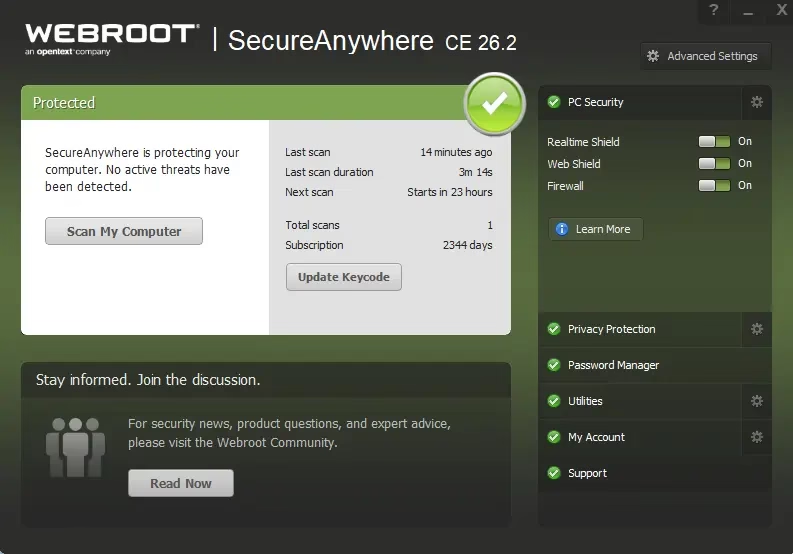

Key Features of Webroot SecureAnywhere AntiVirus (2026)
- Cloud-Based Threat Detection: Analyzes files via Webroot’s cloud intelligence platform — no bulky local database updates needed.
- Real-Time Shield: Continuously monitors your system for suspicious behavior using behavioral analysis, not just known malware signatures.
- Identity Protection: Blocks keyloggers, screen scrapers, and spyware from stealing your passwords and financial data.
- Web Threat Shield: Checks every website you visit against a cloud database of over 200 million known malicious domains and IPs in real time.
- Ransomware Rollback Technology: Journals all activity of unknown processes — if later identified as malicious, it automatically reverses every system change made.
- Firewall & Network Monitor: Monitors inbound and outbound network traffic to block unauthorized connections.
- Phishing Shield: Detects and blocks phishing websites before they can steal your credentials.
- Lightning-Fast Scans: Completes a full system scan up to 60x faster than competing antivirus products.
- Automatic Daily Scans: Schedules scans at the time of installation so they never disrupt your work, gaming, or streaming.
- Minimal System Footprint: Uses less than 2MB of disk space — ideal for older PCs and gaming rigs alike.


How Webroot SecureAnywhere Works
When Webroot encounters a file, its local agent sends file metadata to the BrightCloud Threat Intelligence Platform for instant cloud-side analysis. Files that aren’t immediately classified undergo behavioral monitoring — all their activities are journaled. If the file is later determined to be malicious, Webroot automatically rolls back every change it made, restoring your system to its clean state. This makes it highly effective against ransomware and zero-day attacks.
Automatic Daily Scans
The antivirus scans for threats every day, at the time you installed SecureAnywhere. These scans run silently in the background and won’t disrupt your work, gaming, or movie-watching. The default deep scan surveys your entire computer for rootkits, trojans, ransomware, and other threats — scanning drives, files, and system memory. Detected threats are instantly moved to quarantine, preventing them from harming your system or stealing your personal data.
Webroot SecureAnywhere AntiVirus – System Requirements (2026)
- OS: Windows 7 SP1, 8, 8.1, 10, 11 / macOS 10.14 (Mojave) and later
- Processor: 1 GHz or faster
- RAM: 128 MB minimum
- Disk Space: Under 2 MB
- Internet: Required for cloud-based threat intelligence


Webroot SecureAnywhere AntiVirus Pricing (2026)
Webroot offers flexible pricing plans to suit different needs:
- Webroot Essentials (1 Device): $29.99/year (regular $49.99)
- Webroot Essentials (3 Devices): $41.99/year
- Webroot Essentials (5 Devices): $53.99/year
- Webroot AntiVirus for PC Gamers: $23.99/year (first year)
- Webroot Premium (5 Devices): $129.99/year — includes VPN, Password Manager, and Identity Protection
You can also start with a free 14-day trial—no credit card is required— directly from the Webroot official website.
Get Webroot SecureAnywhere AntiVirus Free for 180 Days
Want to try Webroot SecureAnywhere AntiVirus for free? You can get a 180-day (6-month) free license using the giveaway installer below. This is the full version with all core protection features — no credit card needed.
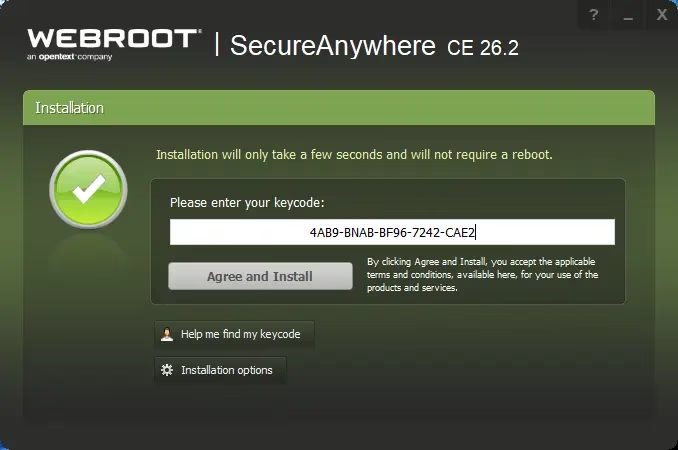
How to activate the 180-day free license:
- Download the giveaway installer: wsanabtrav.exe
- Run the installer on your Windows PC.
- When the activation screen appears, enter the license code below.
- Click “Agree and Install” to complete the setup.
License Code: 4AB9-BNAB-BF96-7242-CAE
Terms: This license is valid for 180 days from the date of installation. For personal/home use only. Free updates are included during the license period. Technical support is not included.

Webroot SecureAnywhere vs. Competitors (2026)
Here’s how Webroot SecureAnywhere stacks up against other leading antivirus solutions in 2026:
- Webroot vs. Norton: Webroot is lighter and faster; Norton offers more comprehensive parental controls and VPN.
- Webroot vs. Bitdefender: Bitdefender scores higher in independent lab tests; Webroot excels in speed and system resource usage.
- Webroot vs. Windows Defender: Webroot provides superior cloud intelligence, identity protection, and ransomware rollbacks— features not found in Windows Defender.
- Webroot vs. Malwarebytes: Webroot offers full real-time protection out of the box; Malwarebytes free version only does on-demand scans.
Is Webroot SecureAnywhere AntiVirus Worth It in 2026?
Webroot SecureAnywhere AntiVirus remains a strong choice in 2026, especially for users who want fast, lightweight protection without sacrificing security. Its cloud-based engine, ransomware rollback, identity protection, and real-time web filtering make it ideal for everyday Windows users, remote workers, and PC gamers. The free 180-day giveaway is an excellent opportunity to experience full premium protection at no cost.