
🎁 AOMEI GIVEAWAY · OCTOBER 2026 · WORTH $39.95
Back up, clone and restore your whole Windows PC — Pro features free for a year
The October 2026 build of AOMEI Backupper Professional 8.4 is free through CHIP: system, disk and file backups, OS migration to SSD, real-time sync, ransomware protection and a bootable rescue disk. You get a fresh 1-year key inside the download — but it must be activated before the month ends.
Windows 11/10/8/7
Version 8.4
1-year Pro key
⏳ Activate by Oct 31, 2026

⚡ Quick Read
- What: AOMEI Backupper Professional 8.4 — a full backup, clone, sync and restore suite for Windows that normally costs $39.95 a year.
- Giveaway: a 1-year Pro activation code, delivered in a text file inside the CHIP download (“AOMEI Backupper For CHIP” build).
- Best bits: system/disk/file backup, OS migration to SSD, real-time & two-way sync, Ransomware Protection (added in 8.3), Universal Restore and bootable rescue media.
- Catch: the code is valid only for the month you download it — the October code must be activated by October 31, 2026. The download page and readme are in German.
- Deadline: CHIP refreshes the code each month, but there’s no guarantee it continues. Jump to the claim steps ↓
What is AOMEI Backupper Pro 8.4?
Data protection isn’t optional any more. A dead SSD, a ransomware attack, a botched Windows update or one wrong click can wipe out years of photos, documents and projects in seconds — and the only real fix is a backup you made before it happened.
AOMEI Backupper Professional is one of the most popular backup tools for Windows. Developed by AOMEI Technology, it combines system backup, disk and partition imaging, file backup, disk cloning, file sync and full disaster recovery in one clean interface. The free Standard edition covers the basics; Pro adds OS migration to SSD, real-time and two-way sync, automatic backup cleanup, dissimilar-hardware restore and more.
Version 8.4 is the current major build, and through German tech portal CHIP you can unlock the Professional edition free with one year of updates — normally a $39.95 (€40) yearly subscription.
What’s new in AOMEI Backupper 8.x (2025–2026)
AOMEI has shipped four feature updates since late 2025. Here’s what changed, according to the official changelog:
| Version | Released | Highlights |
|---|---|---|
| 8.4.0 | June 18, 2026 | SID reset during system/disk clone and restore; live transfer speed and time-remaining display; auto-sizing columns; fixes for an extra full-backup run and UI freezes during task creation |
| 8.3.0 | April 22, 2026 | New Ransomware Protection — detects and blocks unauthorised changes to protected files in real time |
| 8.2.0 | March 20, 2026 | Clearer Select Source / Select Destination windows; explore partition images with large sector sizes; dual-monitor and Korean text fixes |
| 8.1.0 | December 15, 2025 | Support for partitions with sector sizes above 512 bytes; fast incremental backup for NTFS; Korean language; FAT32/exFAT/dynamic-volume fixes |
The headline additions for home users are Ransomware Protection and the SID reset option, which gives a cloned or restored Windows installation a fresh security identifier — handy when you deploy one image to several PCs.
Key features of AOMEI Backupper Professional 8.4

1. Every kind of backup
- System Backup: images Windows, installed apps and boot files so you can roll back after a failed update or infection.
- Disk/Partition Backup: copies entire drives or single partitions.
- File Backup: protects only the folders you choose — documents, photos, projects. See our backup software archive for more options.
- Outlook Backup (Pro): saves emails, contacts and calendars.
- Incremental & differential backups with schedules (daily, weekly, monthly, event-triggered) and automatic cleanup of old versions (Pro), so your backup drive doesn’t fill up.
2. Cloning and SSD migration
- System Clone (Pro): moves only Windows to a new SSD or HDD — no reinstall needed.
- Disk Clone (Pro): clones a whole disk, ideal for upgrading to a bigger drive.
- Intelligent Sector Clone: copies only used sectors, so you can move to a smaller SSD as long as your data fits.
- SID reset (new in 8.4): gives the cloned system a unique identifier.

3. Four sync modes
- Basic Sync: one-way sync on demand or on a schedule.
- Real-Time Sync (Pro): copies changes the moment they happen.
- Mirror Sync (Pro): keeps the destination an exact copy of the source.
- Two-Way Sync (Pro): keeps two locations identical whichever side changes.
4. Security: encryption, app lock and ransomware protection
- Backup encryption keeps image files private if a USB drive is lost or stolen.
- App lock asks for a password every time the program opens.
- Ransomware Protection (new in 8.3): watches the file types, folders and apps you choose and blocks unauthorised changes in real time.
5. Disaster recovery tools
- Bootable rescue media (WinPE on USB or CD/DVD) restores your PC even when Windows won’t start.
- Recovery environment in the boot menu (Pro): start a restore without any USB stick.
- Universal Restore (Pro): restores a system image to a PC with different hardware.
- Disk Wipe (Pro): securely erases a drive before you sell or recycle it.

AOMEI Backupper Standard (free) vs Pro (giveaway)
The free Standard edition is fine for basic backups. This giveaway unlocks everything in the right-hand column:
| Feature | Standard (free) | Professional (giveaway) |
|---|---|---|
| System, disk, partition & file backup | ✅ | ✅ |
| Scheduled incremental backups | ✅ | ✅ |
| Bootable rescue media | ✅ | ✅ |
| Migrate only the OS to SSD/HDD | ❌ | ✅ |
| Clone a full system disk | ❌ | ✅ |
| Outlook backup | ❌ | ✅ |
| Real-time, mirror & two-way sync | ❌ | ✅ |
| Automatic cleanup of old backups | ❌ | ✅ |
| Universal Restore (dissimilar hardware) | ❌ | ✅ |
| Recovery environment in boot menu | ❌ | ✅ |
| Disk wipe | ❌ | ✅ |
| Priority technical support | ❌ | ✅ |
| Price | Free | $39.95/year (€40 at CHIP) — free this month |
Giveaway terms at a glance
| Software | AOMEI Backupper Professional 8.4 (“AOMEI Backupper For CHIP”) |
| Normal price | $39.95/year (AOMEI); €40/year (CHIP) |
| Giveaway licence | 1-year Pro activation code with one year of updates, in a text file inside the ZIP |
| Activation deadline | October 31, 2026 — the code can’t be activated after the last day of the month |
| After the year | CHIP says you can keep using AOMEI Backupper Pro after the year of included updates ends |
| Download | ZIP file, about 208 MB (installer + Aktivierungsanleitung.txt) |
| System | Windows 11, 10, 8.1, 8 and 7 (CHIP also lists XP and Vista) |
| Account needed? | No — no email or sign-up required |
How to get AOMEI Backupper Pro 8.4 for free
It takes about five minutes. The CHIP page is in German — Chrome’s built-in translate makes it easy to follow, and our screenshots show exactly where to click.
Step 1: Open the CHIP giveaway page
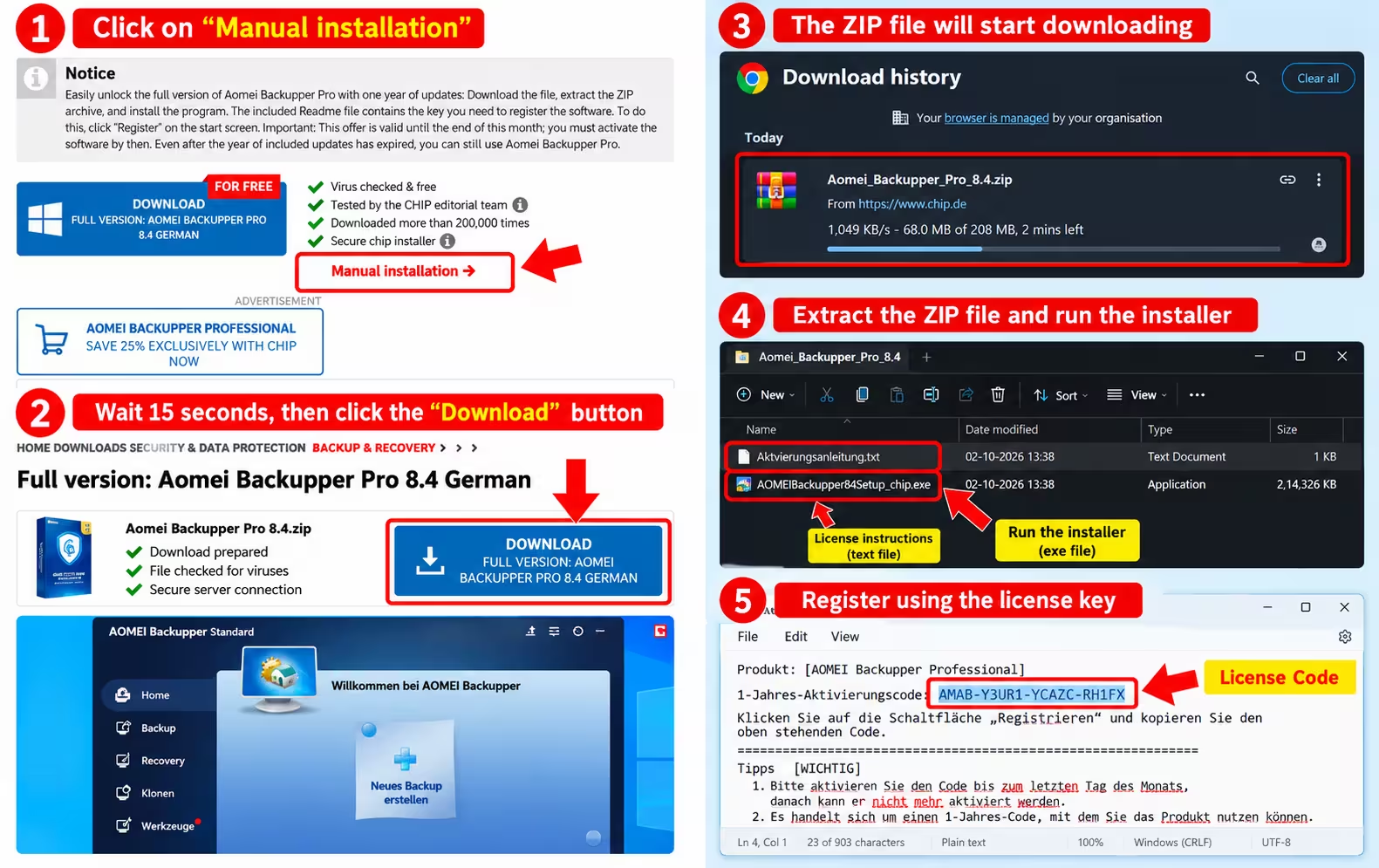
Open the official CHIP page below and click Manuelle Installation (“Manual installation”) under the green ticks. This gives you the plain ZIP file instead of CHIP’s download-manager installer.
🎁 Open the AOMEI Backupper Pro giveaway page
Step 2: Download the ZIP file
On the next page, wait about 15 seconds and click Download. The file Aomei_Backupper_Pro_8.4.zip (about 208 MB) starts downloading.
Step 3: Extract and install
Right-click the ZIP and choose Extract All. Inside you’ll find two files: AOMEIBackupper84Setup_chip.exe (the installer) and Aktivierungsanleitung.txt (activation instructions). Run the installer and follow the on-screen steps.
Step 4: Copy your 1-year activation code
Open Aktivierungsanleitung.txt. Your key is on the line “1-Jahres-Aktivierungscode” and starts with AMAB-. Copy it with Ctrl+C — don’t type it, and don’t use the code visible in our screenshots.
Step 5: Activate AOMEI Backupper Pro
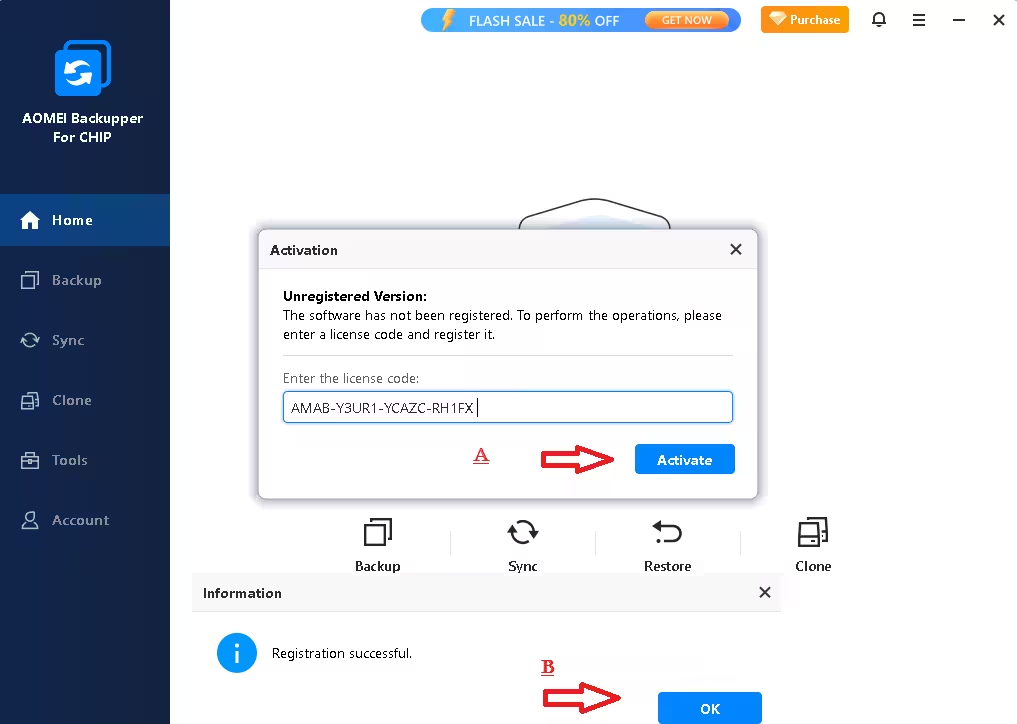
Launch the program. The Activation window appears (or click Register on the home screen). Paste the code, click Activate, and you’ll see “Registration successful”. All Professional features are now unlocked.
⚠️ Code not working? This is the #1 question in our comments. The codes are monthly: a code from an older ZIP (or from someone else’s screenshot) stops activating once its month ends. Download the ZIP again this month and use the code from your text file. Copy it without spaces, and activate it in the CHIP build (“AOMEI Backupper For CHIP”) installed from the same ZIP.
Set up your first backup in 3 minutes
A licence only helps if a backup actually runs. Do these three things right after activating:
- Create a scheduled system backup. Go to Backup → System Backup, pick an external drive or NAS as the destination, open Schedule Backup and choose weekly incremental. Turn on Backup Scheme so old versions are cleaned up automatically.
- Make rescue media. Open Tools → Create Bootable Media, plug in a spare USB stick and build the WinPE rescue disk. Label it and keep it safe.
- Switch on Ransomware Protection and add your Documents and Pictures folders, then test a restore of one small file so you know your backups work.
AOMEI Backupper vs Acronis vs Macrium Reflect
How does it compare with the other big names in Windows imaging?
| AOMEI Backupper Pro | Acronis True Image | Macrium Reflect | |
|---|---|---|---|
| Free edition | Yes (Standard) | No (trial only) | Free edition discontinued in 2024 |
| Ease of use | Beginner-friendly wizards | Polished, many extras | Powerful but more technical |
| Cloning to SSD | ✅ | ✅ | ✅ |
| Built-in anti-ransomware | ✅ (since 8.3) | ✅ | Image Guardian (protects backups) |
| Pricing | From $39.95/year, or lifetime licence | Subscription-based | Paid licence only |
Choose AOMEI if you want an easy all-rounder that also handles sync. If you prefer a free alternative from another vendor, look at our O&O DiskImage 21 Premium giveaway or Ashampoo Backup Pro 26.
Pros and cons
👍 Pros
- Clean, beginner-friendly interface with guided wizards
- Backup, clone, sync and restore in one program
- OS migration to a smaller SSD with intelligent sector clone
- New Ransomware Protection and SID reset in the 8.x updates
- Bootable rescue media plus a recovery entry in the boot menu
- No account or email needed to claim this giveaway
👎 Cons
- Windows only
- Monthly code — must be activated before the month ends
- Giveaway page and readme are in German
- In-app promo banners (Flash Sale, Purchase)
- No phone or live-chat support
📊 Techno360 Verdict: the backup giveaway to grab this month
AOMEI Backupper Pro 8.4 covers everything a home or small-office PC needs: scheduled images, file backups, SSD migration, real-time sync and a rescue disk for the worst day. The 8.x updates add ransomware protection on top. It normally costs $39.95 a year — this month it’s free, with no account required.
- Best for: anyone upgrading to an SSD, or anyone with no backup routine yet
- Watch out for: activate before October 31, 2026; German download page
- Rating: Must-grab giveaway
Frequently asked questions
Is AOMEI Backupper Pro really free?
Yes, for one year. CHIP’s October 2026 offer gives you a 1-year AOMEI Backupper Professional 8.4 activation code with one year of updates, at no cost and without creating an account.
Until when can I claim and activate the code?
The code inside the CHIP download is valid for the current month only. The October 2026 code must be activated by October 31, 2026; after that it can no longer be activated.
Why doesn’t my AOMEI Backupper code work?
Most failures come from expired monthly codes or codes copied from screenshots. Download the ZIP again this month, copy the code from your own Aktivierungsanleitung.txt without spaces, and activate it in the CHIP installer from the same ZIP.
What happens after the one year ends?
The included year covers updates. According to CHIP, you can continue to use AOMEI Backupper Pro after that year has expired; you just won’t receive new versions.
What is the difference between AOMEI Backupper Standard and Pro?
Standard is free and handles basic system, disk and file backups. Pro adds OS migration to SSD, full system disk cloning, Outlook backup, real-time, mirror and two-way sync, automatic backup cleanup, Universal Restore, disk wipe and priority support.
Can AOMEI Backupper clone a hard drive to a smaller SSD?
Yes. AOMEI Backupper Pro can clone a disk or migrate only the operating system to an SSD, even a smaller one, as long as the used space fits on the target drive.
Does AOMEI Backupper Pro 8.4 support Windows 11?
Yes. AOMEI Backupper Pro 8.4 supports Windows 11, 10, 8.1, 8 and 7, on both 32-bit and 64-bit systems, with UEFI/GPT and BIOS/MBR disks.
Can I restore my PC if Windows won’t boot?
Yes. Create WinPE bootable rescue media on a USB drive or CD/DVD from the Tools menu, or add a recovery environment to the Windows boot menu, then restore your system image from there.
Protect more of your PC for free: grab Donemax Disk Clone for drive upgrades, CBackup Professional for cloud backups, and Abelssoft SSD Fresh to keep your new SSD healthy. Still on an older Windows build? Read our Windows 11 24H2 end-of-support guide — and back up first. More backup tools live in our Backup section, and new free licences land every week in the Techno360 Free Stuff hub.
Know someone who still has no backup? Share this giveaway with them before October 31.


