
🎁 ASCOMP GIVEAWAY · OCTOBER 2026 · WORTH $19.90
Turn your photos into a 4K video slideshow with music — no watermark, no cost
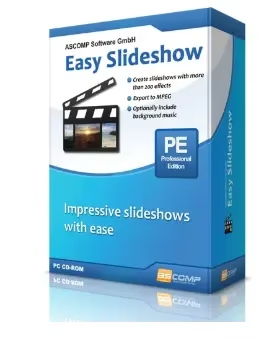
ASCOMP is giving away the Professional Edition of Easy Slideshow — a three-step Windows slideshow maker with 200+ transitions, MP3 soundtracks, captions and MP4 export in Full HD or 4K. The licence key is pre-filled; you only add your name and email.
⚡ Quick Read
- What: ASCOMP Easy Slideshow Professional (v2.104, August 2026), a photo-to-video slideshow maker for Windows — normally $19.90.
- Giveaway: a lifetime private licence, registered to your free ASCOMP customer account.
- Best bits: 200+ transitions, multiple MP3 tracks, captions and subtitles, MP4/MPEG export in Full HD or 4K, no watermark.
- Catch: personal use only, 30 days of free updates and support, and you agree to receive ASCOMP’s newsletter.
- Deadline: the promo key has a limited number of uses — claim it today. Jump to the claim steps ↓
What is ASCOMP Easy Slideshow?
Your phone is full of holiday trips, birthdays and family get-togethers that nobody ever looks at again. A slideshow with music turns those folders into something people actually watch — on the TV, in a WhatsApp group or on YouTube. The problem is that most video editors are overkill for the job, and free slideshow tools stamp a watermark across every frame.
ASCOMP Easy Slideshow is a lightweight Windows program built for exactly this. You pick your photos, choose transitions and music, and it renders a finished video file — no timeline, no learning curve. The free Standard Edition puts a watermark on exported videos; the Professional Edition you can claim today removes it and unlocks a licence normally sold for $19.90.
What’s new in Easy Slideshow 2
This giveaway is for the current version 2.104, released on 3 August 2026. If you claimed an older 1.x copy, the 2.x series is a big step up. According to ASCOMP’s official changelog, the main additions are:
- Multiple music tracks per slideshow, with an option to loop the music.
- Apply an effect to all images in one click instead of setting each slide by hand.
- Native 64-bit build and high-DPI support for sharp text on 4K and laptop displays (v2.100–2.102).
- Large project support with faster image loading, plus enlarged views for thumbnails, ordering and the selected image.
- Start new project and save-project buttons, a resizable/maximisable window, and improved licence checking.
- Bug fixes for preview transitions, rendering in folders with special characters (umlauts) and a new helpdesk link (v2.103–2.104).
Key features of Easy Slideshow Professional
1. 200+ transition effects
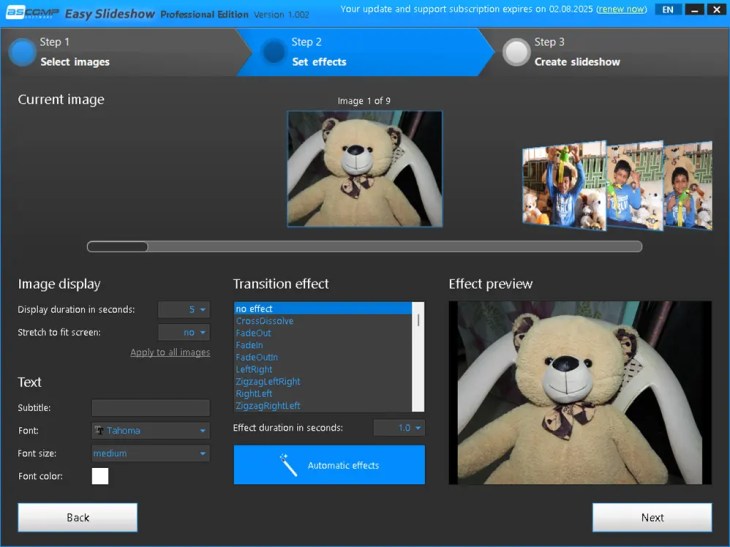
Choose from more than 200 transitions — soft cross-dissolves, fades, zooms, zig-zag wipes and slide animations. Pick one per photo, set the effect duration, or let Automatic effects mix them for you.
2. Background music from your MP3s
Add one or several MP3 tracks to set the mood, and loop them so the music never cuts out before the last photo.
3. Drag-and-drop photo ordering
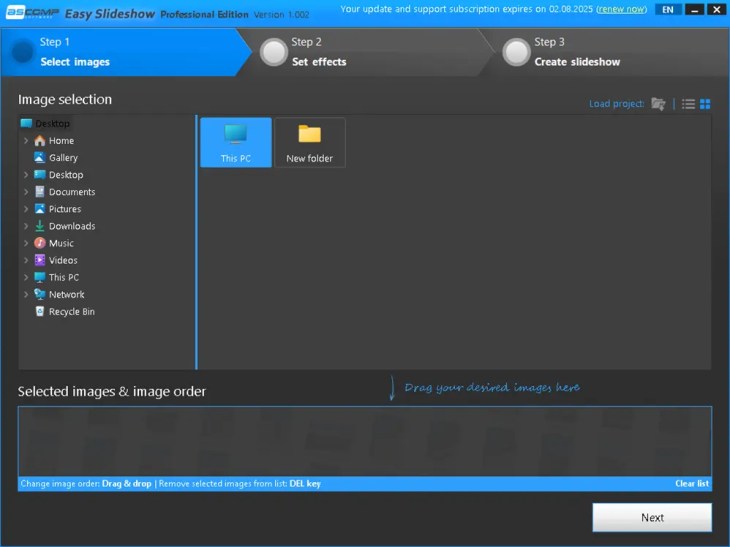
Drop your images into the order list and drag them around until the story flows. Remove a photo with the Delete key.
4. Per-slide display time
Set how long each photo stays on screen, stretch images to fit the frame, and preview the result before you render.
5. Captions and subtitles
Add names, dates, places or short explanations to any slide, with your choice of font, size and colour.
6. MP4 and MPEG export in Full HD, 4K or custom size
Render a standard video file that plays on phones, smart TVs, YouTube, Instagram or WhatsApp. Efficient MPEG compression keeps file sizes small without visible quality loss.
7. No watermark
The Professional Edition exports clean videos. The free Standard Edition adds a watermark — the main reason to grab this licence.
Free Standard vs Professional Edition
| Feature | Standard (free) | Professional (giveaway) |
|---|---|---|
| Price | Free | $19.90 — free today |
| Watermark on exported video | Yes | No |
| 200+ transitions, music, captions | Yes | Yes |
| MP4/MPEG export, Full HD and 4K | Yes | Yes |
| Licence type | Personal use and evaluation | Private licence, unlimited validity |
Giveaway terms at a glance
| Software | ASCOMP Easy Slideshow Professional, v2.104 |
| Normal price | $19.90 (ASCOMP’s listed price) |
| Giveaway licence | Full version, private licence, unlimited validity |
| Updates and support | Free for 30 days after registration |
| Condition | Register with name, email and country; you agree to ASCOMP’s newsletter |
| System requirements | Windows 11/10/8.1/8/7 or Server 2012–2025; Intel-compatible or ARM CPU; 2 GB RAM (4 GB recommended); 50 MB disk space |
| Deadline | Limited number of key activations — the offer can end without notice |
How to get Easy Slideshow Pro for free
It takes about three minutes. Tip: use a real email address you can open right away — ASCOMP sends your confirmation link and customer ID there.
Share this giveaway on any network. One click unlocks the download links and codes below.
A new tab opens to share this page. Come back here — your content unlocks automatically.
⚠️ Form rejects the key? Open the page only through the button above so the key stays pre-filled, and don’t edit it. If ASCOMP says the key is invalid or used up, this round of the giveaway has ended.
Make your first slideshow in 3 steps
- Select images. Browse to a photo folder in the left pane and drag the pictures you want into Selected images & image order. Drag again to reorder, then click Next.
- Set effects. Set the display time, add a caption, and choose a transition — or click Automatic effects and use Apply to all images to save time. Click Next.
- Create the slideshow. Add your MP3 music, choose MP4 or MPEG and a resolution (Full HD for sharing, 4K for big screens), and render the video.
Who should grab it (and who can skip it)
👍 Worth it if you want quick memory videos for birthdays, weddings, trips or school events, you share photo stories on WhatsApp, YouTube or a smart TV, or you’ve been put off by watermarks in free slideshow apps. Pair it with Ashampoo Photo Optimizer 10 to fix your photos first, or batch-shrink large files with Vovsoft Batch Image Resizer.
👎 Skip it if you need a real video editor with a timeline, video clips, voice-over or keyframes, or you make slideshows for paying clients (the giveaway licence is private use only). For full video editing, see our Nero Video 2026 SE giveaway.
📊 Techno360 Verdict: the fastest way to turn photo folders into shareable videos
Easy Slideshow does one job and does it simply: three steps from a folder of photos to a watermark-free MP4 with music and captions. Version 2 adds multiple music tracks, apply-to-all effects and native 64-bit speed. For a $19.90 licence that costs nothing today, it’s an easy keep.
- Best for: families, teachers and casual creators who want slideshows without learning a video editor
- Watch out for: photos only (no video clips), private-use licence, 30 days of free updates
- Rating: Grab it — useful, simple and free today
Frequently asked questions
Is the ASCOMP Easy Slideshow Pro giveaway really free?
Yes. The giveaway link opens ASCOMP’s official registration form with a promo licence key already filled in. Enter your name, email and country, confirm your email, and the Professional Edition is added to your ASCOMP customer account at no cost.
Is this the full Professional Edition or a trial?
It’s the full Professional Edition (private licence) with unlimited validity. It removes the watermark that the free Standard Edition adds to exported videos.
Do I get free updates?
ASCOMP includes free updates and technical support for 30 days from registration. After that the software keeps working forever; you just stay on the version you have unless you pay to extend the update period.
Where do I find my customer ID?
It’s shown at the top of the ASCOMP customer menu after you click the confirmation link in your email, and it’s also emailed to you. Easy Slideshow asks for this 10-digit number to unlock the Professional Edition.
Can I use the free licence for business or YouTube monetisation?
The giveaway gives a private licence, which is meant for personal, non-commercial use. If you make slideshows for clients or your business, buy a business licence from ASCOMP.
Which video formats and resolutions can Easy Slideshow export?
Slideshows export as MPEG or MP4 video in Full HD, 4K or a custom resolution, so they play on phones, TVs, YouTube and social media.
Does Easy Slideshow work on Windows 11 and ARM PCs?
Yes. ASCOMP lists Windows 11, 10, 8.1, 8 and 7, Windows Server 2012 to 2025, Intel-compatible processors and Windows on ARM. Version 2.100 added native 64-bit support.
The registration form says the licence key is invalid. What now?
Use the exact giveaway link from this page so the key is pre-filled, and don’t add spaces. If ASCOMP still rejects it, the promo key has run out, and the giveaway has ended. Check our Free Stuff page for the next one.
More free ASCOMP licences: Screencapt Pro for screen recording, BackUp Maker Pro to back up those photos, and KeyCtrl Pro for custom hotkeys. New giveaways land every day in the Techno360 Free Stuff hub.
Know someone with thousands of unsorted photos? Share this giveaway with them before the keys run out.