


Coins in a drawer, comics in a box, LEGO sets on a shelf, a spreadsheet you gave up on in 2021 — this tool pulls it all into one tidy, searchable catalogue. Normally a paid app, it’s free right now.
- What: Ashampoo Collector — a catalogue and inventory app for any kind of collection
- Normal price: $20 on Ashampoo’s US store (£15 in the UK) — free via ComputerBild
- Works on: Windows 11 and Windows 10 (64-bit) · English & German
- How: Install the free Ashampoo App → sign in → click Get. No key to type.
- Time needed: About 3–4 minutes
- Catch: You need a free Ashampoo account. No card details asked.
I’ll be honest — when this one landed in my inbox, my first thought was “who needs software to count their coins?” Then I looked at the corner of my study: an old biscuit tin of foreign coins from relatives’ trips, a shelf of books I keep buying twice, and a drawer of cables nobody can explain. That’s exactly the kind of mess Ashampoo Collector is built for.
I installed the giveaway copy on my Windows 11 machine, built a few test collections, and poked at every menu. Here’s what it does well, where it’s thin, and the exact steps to claim it for free.
What Is Ashampoo Collector?
It’s a desktop catalogue for things you own. Most collection apps are locked to one hobby — a book app knows about ISBNs but falls apart when you try to log vinyl, and a coin app has no idea what a LEGO set number is. Ashampoo Collector skips the pre-built templates. You decide what each collection should record, and the app builds its forms around that.
So a coin collection can store mint year, metal and condition. A book shelf can store author, genre and a “finished reading” tick box. A workshop inventory can store purchase date and who borrowed the drill. Same app, completely different setups.

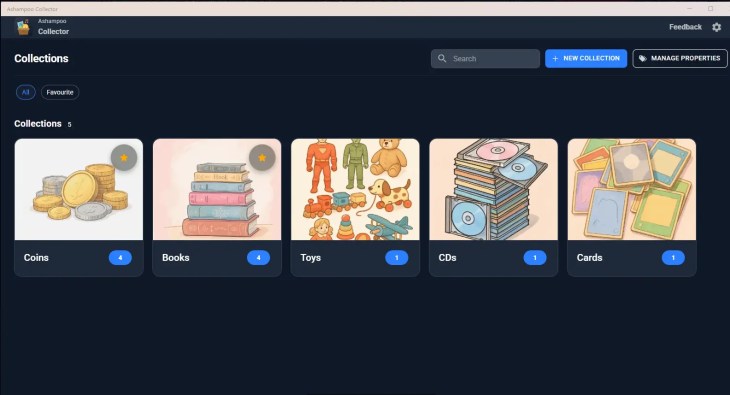
What You Can Actually Do With It
Design your own fields
This is the heart of the app. When you create a collection you add “properties”, and each one can be one of six types:
- Text — author, artist, publisher, notes
- Number — price paid, page count, set number
- Date — release date, purchase date
- Checkbox — read / unread, boxed / loose
- Rating — stars for how much you love it (or its condition)
- Drop-down menu — fixed choices like Mint / Good / Worn, with multi-select allowed
Handy touch: a property you create once can be reused in other collections, so you’re not rebuilding “Condition” for every hobby.
Add photos to everything
Each collection gets a cover image (there’s a set of illustrated ones built in, or upload your own), and every single item can carry its own photo — the actual book cover, the back of the coin, the card in its sleeve. Scrolling a visual grid beats reading a spreadsheet row by row.
Track who borrowed what
There’s a lending tracker with borrower names and due dates. If you’ve ever lent a book or a game and never seen it again, you’ll appreciate this more than any other feature.
Find things fast
A search bar sits at the top of the main screen, and the Favourite filter narrows the view to starred collections. You can also filter by property data type or collection and edit details straight from the item view.
Back up with a JSON file
Click the gear icon, hit Export, and your whole catalogue goes into a single JSON file. Import in the same dialog brings it back. Since JSON is an open format, your data isn’t trapped inside Ashampoo’s app forever — a detail I always check before trusting a tool with years of records.
How to Get Ashampoo Collector Free (Step by Step)
This giveaway runs through ComputerBild, but the download is really a small installer for the Ashampoo App, which then fetches Collector and ties the license to your account.
- Open the giveaway page: head to the ComputerBild Ashampoo Collector page and click the Download button. The page is in German, but the button is easy to spot.
- Run the installer: it sets up the free Ashampoo App first (default folder:
C:\Program Files\Ashampoo\Ashampoo App). Click Next.

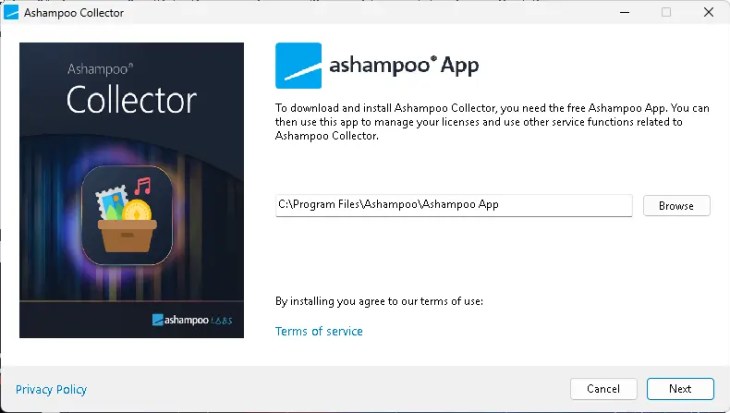
- Sign in or register: when the Ashampoo App opens, type your email and click Next. Existing Ashampoo users just log in; new users create a free account. No payment details are requested.


- Click “Get”: the Collector store page should show the price crossed out and 0 with a –100% tag. Click Get. If it doesn’t appear right away, look under Your Collection in the left sidebar.
- Launch and start cataloguing: Collector installs in one click and is already unlocked. The app may display a license key — you can ignore it. There’s nothing to paste anywhere.


Your First Collection in Under Two Minutes
Creating a collection is a short four-screen wizard. Here’s how I set up a coin catalogue:
- Click New Collection at the top right and type a name — I used “Coins”.
- Pick a cover with Change Cover. Use one of the built-in illustrations or add your own picture.
- Add properties with New Property — for coins I went with Country (text), Year (number), Metal (drop-down) and Condition (rating).
- Check the preview and hit Create collection.
Then open the collection and click New Item. Adding an item follows the same rhythm: name, photo, fill the fields, review, save. Collection names and covers can be changed later, and a stats view shows how many items and properties each collection holds — unused properties can be dropped with a click.
Who Should Grab This?
- Hobby collectors — coins, stamps, trading cards (Pokémon, Yu-Gi-Oh!), comics, vinyl, CDs, video games, LEGO
- Book lovers who keep buying the same paperback twice
- Small workshops and offices that need a simple tool and equipment register
- Households wanting a home inventory for insurance or moving day
Who should skip it: if you want barcode scanning, automatic cover lookup from online databases, or a companion phone app, this isn’t that. Every entry is typed in by you. For a modest collection that’s fine; for 3,000 books it’s a weekend project.
More Free Ashampoo Software on Techno360
If you’ve set up the Ashampoo App for this, you might as well use it. These are live right now:
- Ashampoo Folder Styler full version free — colour-code and restyle your Windows folders
- Ashampoo Snap 17 free license — screenshots, screen recording and OCR in one tool
- Ashampoo Privacy Inspector 2 giveaway — see (and wipe) the usage traces Windows keeps
For everything else we’ve rounded up, browse the full Techno360 Free Stuff hub.
✅ Techno360 Verdict: Worth Grabbing
Ashampoo Collector is simple in the best way. Custom fields mean it bends to whatever you collect, the photo grid makes browsing enjoyable, and the lending tracker plus JSON export cover the practical stuff. It won’t fill in details for you, but for free it replaces a messy spreadsheet in minutes.
- Fields you design yourself
- Photos for every item
- Lending tracker with due dates
- Open JSON backup
- No barcode scan or online lookup
- Needs the Ashampoo App + account
- Windows only, 64-bit
Score: 8/10 for hobby collectors and home inventory · Claim it free →
FAQ
Is Ashampoo Collector really free?
Yes. ComputerBild is offering it as a free full version. Inside the Ashampoo App the price shows as zero and the license lands on your account automatically.
Do I need to enter a license key?
No. The app might show a key, but activation is linked to your Ashampoo account. Nothing to copy, nothing to paste.
What can I catalogue with it?
Pretty much anything: books, CDs, coins, stamps, LEGO sets, trading cards, video games, toys, tools, household items. You build the fields using text, number, date, checkbox, rating and drop-down types.
Which Windows versions are supported?
Windows 11 and Windows 10, 64-bit. The interface is available in English and German.
Can I back up my collections?
Yes — gear icon → Export saves a JSON file; Import restores it on the same or a different PC.