


Ashampoo WinOptimizer 28 Free License Key: Claimed, Installed and Tested
Yes, WinOptimizer 28 is free right now through an official Ashampoo promotion. You get a full-version license key for version 28.00.20, not a time-limited trial. I claimed a key, installed the official build on my Windows 11 laptop, and ran the main cleaning, optimization and system-analysis modules before writing this. The promotion is time-limited, so it can close without notice.
Installer: ~39 MB
Modules: 35
Platform: Windows 10/11, 64-bit
🧪 Version tested: 28.00.20
✅ Promotion status: Active when checked (35-day countdown shown)
⚡ Quick Read
- Is it really free? Yes. The key comes from Ashampoo’s own registration page. In return, you agree to receive Ashampoo’s product emails, and you can opt out later.
- What you get: A full-version license for WinOptimizer 28. My activated copy showed no trial countdown.
- How long: The promo page showed 35 days left on September 27, 2026, so expect it to close in early November.
- My test result: 2,858 items and about 7.9 GB of removable data on a Windows 11 laptop I clean fairly often.
- Best new feature: Firewall Manager, which makes Windows Firewall rules readable for normal people.
- One issue I hit: The defrag panel labelled my mechanical-drive partitions as SSD. More on that below.
Most people don’t notice their PC slowing down. It happens a few seconds at a time: a boot that takes a bit longer, a browser that’s slower to open, a C: drive that’s somehow full again. None of it comes from one big mistake. Update leftovers, browser caches, startup entries from apps you tried once, and services you never asked for all pile up quietly.
You can clean all of that by hand if you know where Windows hides it. Most of us don’t have the patience. That’s the job Ashampoo WinOptimizer 28 does, and during this giveaway you can get it free with a legitimate license key. I got it, installed it, and tested it. Here’s exactly what happened, what I’d skip, and how to claim yours before the offer closes.
In this post
What Is Ashampoo WinOptimizer 28?
Ashampoo is a German software developer, and WinOptimizer has been part of its Windows utility lineup for many years. I’ve covered it on Techno360 since at least version 16. It isn’t a single cleaner. It’s a set of 35 premium modules behind one dashboard, organised into six tool groups:
- Maintain system: junk file cleanup, free-space tools, Registry cleaning, browser and privacy trace removal, drive defragmentation.
- Improve performance: Windows services, the boot process, internet connection tuning, running processes, an uninstaller, and an SSD settings wizard.
- Customize Windows: system settings, privacy settings, right-click menus, browser extensions, and firewall rules.
- Analyze system: hardware info, resource hogs, a speed benchmark, drive health (SMART), and Windows error reports.
- File tools: secure file deletion, encryption and file splitting, file recovery, a duplicate finder, and hidden ADS stream management.
- Administrative tools: restore points, icon layout backup, user rights, power plans, and scheduled maintenance.


If you’re new to it, you don’t need most of that. The System analysis tab is a one-button scan covering browser traces, junk files, Registry entries, privacy traces, broken shortcuts, needless services, and settings worth changing. You review the results and decide what goes.
WinOptimizer 28 at a Glance
| Developer | Ashampoo GmbH & Co. KG (Germany) |
| Version tested | 28.00.20 |
| Platform | Windows 10 / 11, 64-bit |
| Modules | 35 |
| Installer size | ~39 MB |
| License | Promotional full-version license for version 28 |
| Activation | Free Ashampoo account + license key; internet required |
| Tested by | Ramakanth, Techno360 |
Don’t mix it up with WinOptimizer 2026. That’s a cut-down 19-module edition Ashampoo gave away earlier this year, and it’s covered in our WinOptimizer 2026 giveaway post. This page is about the full WinOptimizer 28 suite.
Came here looking for WinOptimizer 27? Version 28 replaces it and adds everything listed below, so this is the one to claim. Ashampoo’s older WinOptimizer 27 registration page was still loading when I checked on September 27, 2026, but it no longer shows an offer countdown.
What’s New in WinOptimizer 28
Ashampoo’s claimed improvements over version 27, according to its product page:
- Firewall Manager (new). A friendly front end for Windows Firewall, with basic, standard, and advanced views. It shows which apps are allowed to send or receive data, flags disabled or broken rules, and lets you block an app or create rules for specific ports and protocols.
- Registry Optimizer 2. Ashampoo says it scans up to 100× faster. It also adds an optional “Super-Safe Mode” that only touches the lowest-risk entries.
- Faster cleaners. The cleaner modules are rated up to 50% quicker, and each now shows a stat bar of what it removed.
- System Information 2. Clearer navigation through CPU, RAM, GPU, drivers, Wi-Fi, Bluetooth, and monitor details.
- Better Crash Analyzer. It turns more cryptic Windows error codes into plain English, so you can tell which program keeps crashing.
- New Extended tile. Deeper cleanup options (old Windows installs, update caches, shader cache, shellbags) are now on the start page.
- More privacy tweaks in the Privacy Manager.
Longtime favourites are still here too: Boot Center for startup analysis, Live-Tuner for faster app launches, Profile Booster (formerly Game Booster), a one-click GodMode shortcut, and a Backup Manager that can roll back changes the program makes.
Note: the speed figures above (“100× faster”, “50% faster”) come from Ashampoo. I didn’t benchmark them, and I’m not going to pretend I did.
My Hands-On Test (Real Numbers, Real Laptop)
I tested the giveaway build on my everyday laptop. It isn’t a neglected machine, because I clean it regularly with the built-in Windows tools. Here’s the setup:
🖥 My Test System
| OS | Windows 11 |
| CPU | AMD Ryzen 5 4600H |
| GPU | AMD Radeon integrated graphics |
| System drive | SK Hynix 256 GB NVMe SSD (C:) |
| Data drive | WD Blue 1 TB HDD, WD10SPZX (D:, E:, F:) |
| WinOptimizer | 28.00.20 (giveaway key) |
1. First system analysis: 2,858 items, 7.9 GB
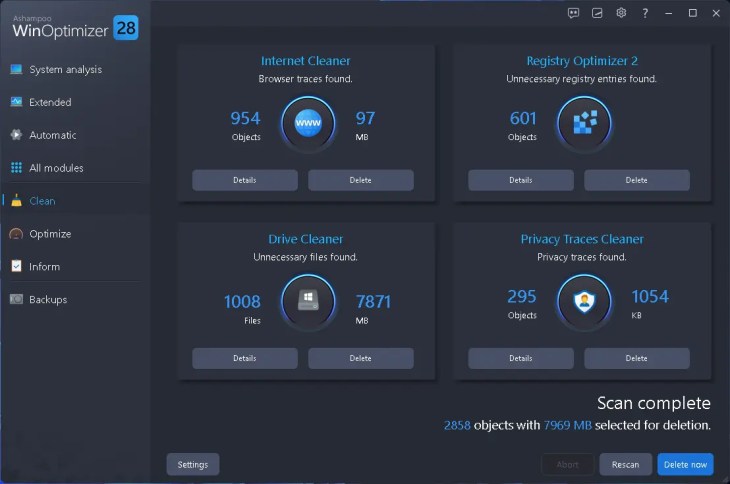
One click on Analyze took under a minute. The result was 2,858 objects totalling 7,969 MB. The breakdown was more interesting than the total:
| Cleaner | Items found | Space |
|---|---|---|
| Drive Cleaner (junk files) | 1,008 files | 7,871 MB |
| Internet Cleaner (browser traces) | 954 objects | 97 MB |
| Registry Optimizer 2 | 601 entries | — |
| Privacy Traces Cleaner | 295 objects | 1,054 KB |
Almost all the space was in plain junk files, which is the category worth cleaning. The 601 Registry entries add up to almost nothing in size. Broken shortcuts, needless services, settings and the Recycle Bin all came back green, meaning nothing needed fixing.

2. Extended analysis: the hidden Windows clutter
The new Extended tab checks areas the normal scan leaves alone. On my PC it found 230 MB of Windows Update cache and old updates, about 9.5 MB of Delivery Optimization files, 4 MB of Explorer thumbnail cache, 3 MB of DirectX shader cache, and 726 shellbags. Shellbags are the Registry entries where Explorer remembers each folder’s size, position and view. It found no leftover old-Windows files and no stale Prefetch data.
Each item comes with an honest one-line warning. For example, clearing the shader cache means games take a little longer to load the first time. I like that it tells you.

3. Optimize tab: boot, drives and privacy
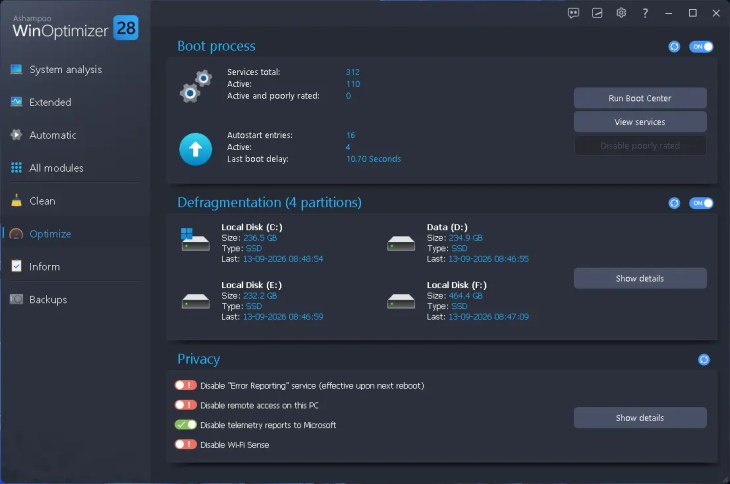
The Optimize dashboard showed 312 services in total, 110 running, and zero flagged as poorly rated. My last boot delay was 10.70 seconds, with 4 of 16 autostart entries active. There wasn’t much startup fat to trim, and WinOptimizer didn’t invent problems to make itself look useful. That’s a good sign.
The Privacy panel has four quick toggles. Telemetry to Microsoft was already off. Error Reporting, Remote Access and Wi-Fi Sense were still on, and switching them off takes one click each.
⚠️ One issue I found: check drive types before you defragment
The Defragmentation panel labelled all four of my partitions as SSD, including D:, E: and F:. Those three live on a WD Blue mechanical drive, and the Inform tab correctly identified that disk as a WDC WD10SPZX. I didn’t run defrag from this panel because of the mismatch. If your PC has both an SSD and a hard drive, open Show details and confirm each drive type before running it.
4. The modules I’d actually use weekly
- Drive Cleaner, because this is where the real space comes back.
- Boot Center, which breaks startup down better than Task Manager’s Startup tab.
- Firewall Manager. It’s worth a look just to see how many old rules Windows keeps for apps you removed ages ago.
- Drive health (SMART) gives a quick early warning before a disk fails. My HDD showed 39 °C, which is fine.
- Crash Analyzer. If an app keeps crashing silently, this tells you which one.
Is Ashampoo WinOptimizer 28 Really Free?
Yes, but it helps to know exactly what “free” means here:
- The license costs nothing. You pay no money and don’t enter a card.
- You need a free Ashampoo account and a working email address.
- You agree to marketing emails. That condition is printed under the email box on the promo page, and you can object to it later.
- The promotion is time-limited. It showed a 35-day countdown on September 27, 2026.
- It isn’t presented as a trial. My activated copy had no trial countdown.
- The license covers version 28. Don’t expect it to unlock version 29 when that arrives.
- Activation needs the internet. Ashampoo’s requirements say the license is also re-verified online at regular intervals.
Ashampoo WinOptimizer 28 System Requirements
| Requirement | Details |
|---|---|
| Operating system | Windows 11, Windows 10 |
| Architecture | 64-bit (x64) |
| ARM processors | Not supported |
| Screen resolution | 1280 × 768 minimum (1920 × 1080 recommended) |
| Permissions | Full administrator rights |
| Internet | Required for activation and periodic license checks |
Source: Ashampoo’s official WinOptimizer 28 product page, checked September 27, 2026.
How to Get the WinOptimizer 28 Free License Key
It took me about five minutes from start to activated. Here’s the exact process:
- Open the giveaway page: Ashampoo WinOptimizer 28 free-key promotion.
- Type your email and click Request full version key.
- New to Ashampoo? Confirm your email from the message they send, then set a password to create your free account.
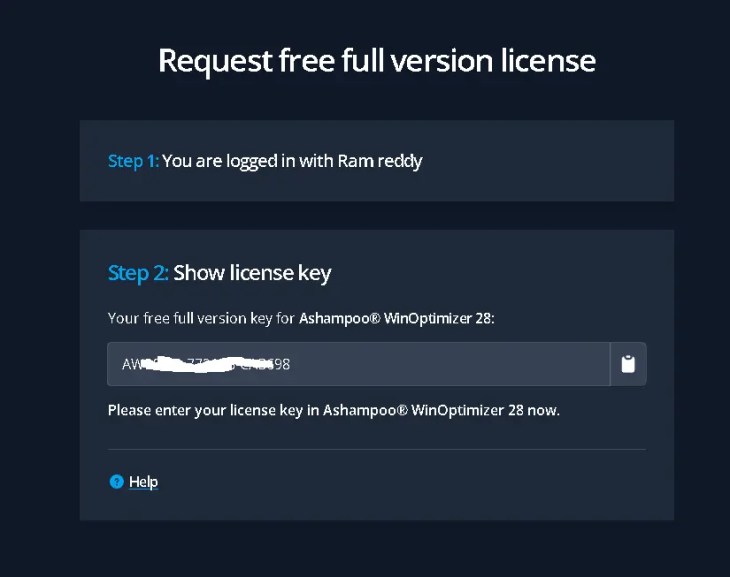
- Sign in. The page now says you’re logged in and shows your key under Step 2: Show license key. Click the clipboard icon to copy it.


- Download the installer from the official WinOptimizer 28 page, or use Ashampoo’s direct CDN link for v28.00.20 (about 39 MB).
- Run setup and click Agree & Proceed.
- Paste your key into the license box and click Activate now! A green line confirms the key is valid.
- Click Next and finish the install. To confirm you’re on 28.00.20, open the About box from the “?” icon.


Before You Press “Optimize”: What to Know
A cleaner isn’t the same thing as a hardware upgrade. Removing junk gets storage back, and trimming startup items can shorten boot times. Privacy tweaks change how Windows behaves, and some caches you delete will simply rebuild themselves later. Keep that in mind, then follow these five rules:
- Make a restore point first. WinOptimizer has its own Backup Manager and System Restore Manager. Use one before your first big cleanup.
- Check cookies in the Internet Cleaner. If you skip this, it signs you out of every website. Open “Details” and exclude cookies for sites you use daily.
- Don’t expect the Registry cleaner to speed things up. Removing 601 dead entries is housekeeping, not a performance boost. Turn on Super-Safe Mode if you’re cautious.
- Leave shellbags alone unless privacy is your goal, because deleting them resets every Explorer folder’s custom view.
- Check drive types before defragmenting, as explained in the warning above.
Ashampoo WinOptimizer 28 Alternatives
WinOptimizer isn’t the only way to keep Windows tidy. Here’s how it compares to the other options I’d consider:
| Tool | Best suited for |
|---|---|
| Ashampoo WinOptimizer 28 | All-in-one maintenance with privacy, firewall and admin tools in one place |
| Wise Care 365 Pro 8 | A lighter cleaner and tune-up suite, also free right now |
| Ashampoo UnInstaller 15 | Removing stubborn programs along with their leftover files and Registry entries |
| Windows built-in tools | Basic cleanup (Storage Sense, Disk Cleanup, Task Manager) with no extra software |
For more legit licenses like this one, browse our Free Stuff hub. We only list official promotions.
My Verdict: Worth Claiming for a Broad Windows Maintenance Toolkit
WinOptimizer 28 won’t turn an ageing laptop into new hardware. What it does well is bring cleaning, privacy, startup, system information, firewall management and administrative tools together in one interface, with a warning and an undo option for most actions. My test recovered 7.9 GB of removable data, and the scan honestly reported that several categories needed no action. The HDD/SSD labelling issue I ran into is worth knowing about before you touch the defrag tools.
If you want an all-in-one Windows maintenance suite, this promotion makes WinOptimizer 28 worth claiming. Just review each action rather than running every optimization blindly.
My score reflects cleanup results, safety features, ease of use and value, based on my own testing of v28.00.20.
👍 Liked
- Honest warnings on every cleanup item
- Firewall Manager is genuinely new and handy
- Built-in backups and restore points
- Didn’t inflate “issues” on a clean PC
👎 Didn’t like
- Mislabelled my HDD partitions as SSD
- Newsletter opt-in is the price of the key
- License covers version 28 only
- Needs periodic online license checks
Frequently Asked Questions
Is the Ashampoo WinOptimizer 28 free license key legitimate?
Yes. Ashampoo issues the key on its own registration page (ashampoo.com), and you activate it in the official installer from Ashampoo’s CDN. No crack, patch or third-party site is involved.
Does the free license expire?
The promo page calls it a “free full version key,” and my activated copy showed no trial countdown. The promotion is time-limited, though, and showed 35 days remaining on September 27, 2026. The license also needs an internet connection for activation and periodic checks.
Does WinOptimizer 28 work on Windows 11?
Yes. Ashampoo lists Windows 11 and Windows 10 (64-bit only, no ARM), and I ran it on Windows 11 without any problems.
Is it safe to clean the Registry with WinOptimizer 28?
It’s as safe as these tools get. It backs up before making changes and offers a Super-Safe Mode. Just don’t expect a speed boost, because Registry cleaning is mostly housekeeping.
What’s the difference between WinOptimizer 28 and WinOptimizer 2026?
WinOptimizer 2026 was a cut-down edition with 19 modules. WinOptimizer 28 is the full suite with 35 modules, including Firewall Manager and the complete set of admin and file tools.
Will I get free upgrades to WinOptimizer 29?
Don’t count on it. The giveaway key is for version 28, and Ashampoo normally sells major upgrades separately.


Tested by Ramakanth
I personally claimed the promotional license, installed WinOptimizer 28.00.20 on my Windows 11 laptop, ran the main cleaning and optimization modules, recorded the scan results and captured every screenshot in this article. I’ve covered Windows software, security tools and legit giveaways on Techno360 since 2008. Links and promotion status were checked on September 27, 2026.