

Your Android phone knows more about you than most people do. It holds your bank logins, private photos, work emails, and years of personal messages. Yet most users leave it protected by nothing more than a screen lock. In 2026, that is no longer enough.
Android’s open ecosystem—the very thing that makes it so flexible—is also a prime target. Malware-laced APKs, phishing links disguised as OTP messages, rogue apps harvesting permissions silently in the background — these are everyday threats on Indian networks, not hypothetical ones.
The good news? You do not need to spend a rupee on building a solid security layer. This guide covers the 12 best free security apps for Android in 2026, each tested for real-world effectiveness, battery impact, and how genuinely “free” the free tier actually is.
Contents
- 1 What Makes a Security App Worth Installing?
- 2 1. Sophos Intercept X for Mobile — Best Completely Free Premium-Level Security
- 3 2. AhnLab V3 Mobile Security — Best Underrated Asian Security Engine
- 4 3. Bitdefender Antivirus Free — Best Lightweight Malware Scanner
- 5 4. AVG AntiVirus Free — Most Feature-Rich Free Security Suite
- 6 5. Malwarebytes for Android — Best for Targeted Malware Removal
- 7 6. Google Play Protect — Your Always-On Baseline (Already on Your Phone)
- 8 7. Bitwarden — Best Free Password Manager for Android
- 9 8. Signal — Best Free Secure Messaging App
- 10 9. 2FAS Authenticator — Best Free Two-Factor Authentication App
- 11 10. NetGuard — Best Free Firewall for Android (No Root Required)
- 12 11. Avast Mobile Security — Best Free Android Security with Anti-Theft
- 13 12. DuckDuckGo Privacy Browser — Best Free Private Browser for Android
- 14 Quick Comparison Table
- 15 The Recommended Starter Stack (3 Apps, Maximum Protection)
- 16 Frequently Asked Questions
- 16.1 Do I really need a security app if I have Google Play Protect?
- 16.2 Are free antivirus apps safe to use?
- 16.3 Is Sophos Intercept X really completely free?
- 16.4 Will these apps slow down my Android phone?
- 16.5 Is it safe to use multiple security apps simultaneously?
- 16.6 Which is the best free password manager for Android in India?
- 16.7 What is the safest messaging app in 2026?
- 17 Final Thoughts
What Makes a Security App Worth Installing?
Before diving into the list, here is the criteria used to evaluate each app:
- Detection rate — Does it catch real malware, not just flag random files?
- Free tier depth—Are the core protections genuinely free, or merely a 7-day trial?
- Battery & RAM impact — A security app that drains your phone in 4 hours helps no one.
- Privacy of the app itself—Ironic as it sounds, some “security” apps collect and sell your data.
- Ease of use on Android devices—Works reliably on mid-range phones running Android 10–14.

1. Sophos Intercept X for Mobile — Best Completely Free Premium-Level Security
Category: Antivirus + Privacy Advisor + 2FA | Free Tier: 100% free, zero ads, zero upsells
Sophos Intercept X is the rare white whale of the free security app world: it offers a feature set that rivals paid competitors, with absolutely no advertisements and no persistent prompts to upgrade. Originally engineered for enterprise environments, Sophos brings professional-grade mobile defense to everyday Android users at no cost whatsoever—not even the “free but limited” kind.

The app has historically achieved 100% detection rates in AV-Test evaluations, and its enterprise lineage shows in the breadth of features packed into a single, zero-cost install.
One standout capability that sets Sophos apart from every other app on this list is the built-in authenticator for two-factor authentication—meaning it can replace a separate 2FA app like 2FAS if you want to consolidate your security tools.
The Secure QR Code Scanner deserves special mention too. Before opening any QR code URL, Sophos checks the destination for threats—a genuinely useful feature in India, where QR-based payment scams are on the rise.
The Privacy Advisor audits every installed app on your device and flags those requesting excessive permissions, giving you a clear picture of what each app can actually access.
The only real trade-off is a slightly complex interface — it feels more like an enterprise dashboard than a consumer app. Give it ten minutes and it clicks into place.
Key Features:
- ☑️ Real-time malware and ransomware protection
- ☑️ Web filtering to block malicious and phishing sites
- ☑️ Link Checker for SMS and messaging apps
- ☑️ Privacy Advisor — audits app permissions across your device
- ☑️ Secure QR Code Scanner that checks URLs before opening
- ☑️ Built-in authenticator for two-factor authentication
- ☑️ Scheduled file and folder scans
- ☑️ Anti-theft (remote locate, alarm, lock)
Downside: Interface is less intuitive than competitors; takes some initial exploration to navigate confidently.
Verdict: The best truly ad-free security app on Android. If zero interruptions and a built-in 2FA authenticator matter to you, Sophos is exceptional. No other free app delivers this much without asking for anything in return.
🔗 Download Sophos Intercept X on Google Play
2. AhnLab V3 Mobile Security — Best Underrated Asian Security Engine
Category: Antivirus + Privacy Advisor | Free Tier: Core scanner, lightweight
AhnLab may not be a household name outside Asia, but this South Korean cybersecurity company has been building enterprise-level threat detection since 1995. Its Android app is one of the most underrated security tools available on the Play Store, delivering detection rates that rival the biggest global names while maintaining a noticeably light footprint on mid-range devices. In AV-Test evaluations the app scored 99.99% detection rates.
The app’s virtual engine technology stands out technically: it analyzes apps in an isolated environment, observing their behaviour before they ever interact with your device.
This behavioral approach catches zero-day threats and polymorphic malware that signature-based scanners can miss entirely. AhnLab’s clean, well-organized UI makes all core features accessible from the main screen without requiring a user manual.

The Privacy Report feature identifies apps collecting more personal data than their function justifies—useful for auditing the collection of budget apps popular on Indian mid-range phones.
A hidden gallery provides password-protected storage for sensitive photos, and a privacy cleaner securely wipes browsing data, preventing forensic recovery.
Key Features:
- ☑️ High detection rates with very low false positives
- ☑️ Virtual engine behavioural analysis (isolates apps before execution)
- ☑️ Privacy Advisor — audits installed apps for data collection
- ☑️ Hidden Gallery for sensitive photos
- ☑️ Privacy Cleaner for secure browsing data removal
- ☑️ Performance booster for slower devices
- ☑️ Clean, intuitive UI
Missing Feature: AhnLab V3 does not include anti-theft functionality (remote lock, wipe, or locate). If device theft protection is a priority, pair it with Google’s built-in Find My Device.
Verdict: A hidden gem from one of Asia’s most respected security labs. If you want a lightweight, ad-minimal scanner with behavioural analysis and strong privacy auditing, AhnLab V3 deserves a place on your phone—even if most people outside South Korea have never heard of it.
🔗 Download AhnLab V3 Mobile Security on Google Play
3. Bitdefender Antivirus Free — Best Lightweight Malware Scanner
Category: Antivirus | Free Tier: Full scanner, no time limit
If you want a no-nonsense malware scanner that does not eat your battery or beg you to upgrade every 10 minutes, Bitdefender Antivirus Free is the answer. It runs a cloud-based scanning engine, meaning the heavy lifting happens on Bitdefender’s servers rather than on your phone—making it exceptionally light on resources.
The free version scans your installed apps and storage against Bitdefender’s continuously updated threat database. It consistently scores near-perfect detection rates in independent AV-Test evaluations. There are no push notifications forcing upgrades, no annoying ads mid-scan, and no fake “performance boost” features stuffed in.

What the free version includes:
- On-demand virus and malware scanning
- App scanning on install
- Cloud-based detection engine
What requires upgrading:
- VPN (200 MB/day limit on paid)
- App Lock
- Web protection
Verdict: The purest free antivirus on Android. Install it, scan once a week, and forget it exists.
🔗 Download Bitdefender Antivirus Free on Google Play
4. AVG AntiVirus Free — Most Feature-Rich Free Security Suite
Category: Antivirus + Anti-Theft + App Lock | Free Tier: Broad, ad-supported
AVG punches well above its weight for a free app. While most antivirus apps gate useful features behind paywalls, AVG’s free tier includes ransomware, spyware, and adware protection; a built-in anti-theft phone tracker; a Wi-Fi security scanner; an app lock; and a photo vault. It scored a perfect 6.0 across all categories in AV-TEST’s Android assessments.
The trade-off is occasional ads and a persistent nudge towards the premium plan. On mid-range phones with 4 GB RAM, background scanning is noticeable but tolerable.

What the free version includes:
- Real-time malware protection
- Wi-Fi network security check
- App Lock with PIN/fingerprint
- Anti-theft tracker
- App permission auditor
- Photo Vault (password-protected)
Verdict: The most complete free security app on Android. If you only install one app from this list, make it AVG.
🔗 Download AVG AntiVirus Free on Google Play
5. Malwarebytes for Android — Best for Targeted Malware Removal
Category: Anti-Malware | Free Tier: On-demand scan only (no real-time)
Malwarebytes is the app you reach for when something already feels wrong—the battery draining quickly, data usage spiking, strange ads appearing in the notification bar. Its free version performs deep, targeted scans that catch adware, stalkerware, and Potentially Unwanted Programs (PUPs) that traditional antivirus apps often miss.
It does not offer real-time protection for free, but it is an excellent second-opinion scanner to run alongside Bitdefender or AVG. Lightweight, clean interface, zero ads.

What the free version includes:
- On-demand malware and adware scan
- PUP detection
- Audit of app permissions
Verdict: Keep this installed as a second-opinion scanner. Run it once a month or whenever something feels off.
🔗 Download Malwarebytes on Google Play
6. Google Play Protect — Your Always-On Baseline (Already on Your Phone)
Category: Built-in Antivirus | Free Tier: Completely free, pre-installed
Play Protect comes baked into every Android phone with the Google Play Store. It continuously scans installed apps in the background, checks apps from the Play Store before download, and alerts you about apps with dangerous permissions. In 2026, Google has significantly improved its detection engine following years of criticism from AV-Test labs.
Play Protect will not replace a dedicated antivirus, but it is a useful baseline that requires zero effort on your part. Make sure it is enabled: Open the Google Play Store app. On the app’s main screen in the top right, tap the profile icon, and in the menu, tap Play Protect → Settings → Turn Scan apps with Play Protect On

What it includes (all free):
- Background scan of all installed apps
- Pre-download app safety check on the Play Store
- Dangerous permission alerts
- Find My Device integration
Verdict: Not a complete solution, but a free, effortless safety net that every Android user should have enabled.
7. Bitwarden — Best Free Password Manager for Android
Category: Password Manager | Free Tier: Unlimited passwords, fully functional
Reusing passwords is still the most common way accounts get compromised. Bitwarden solves this issue completely, for free, without any meaningful catch. Its individual free tier gives you unlimited password storage, cross-device sync, autofill in Chrome and Firefox, and secure notes—all encrypted locally with AES-256 before anything touches Bitwarden’s servers.
Bitwarden is fully open source, meaning its code has been independently audited and anyone can inspect it. That transparency puts it in a different league from closed-source alternatives.
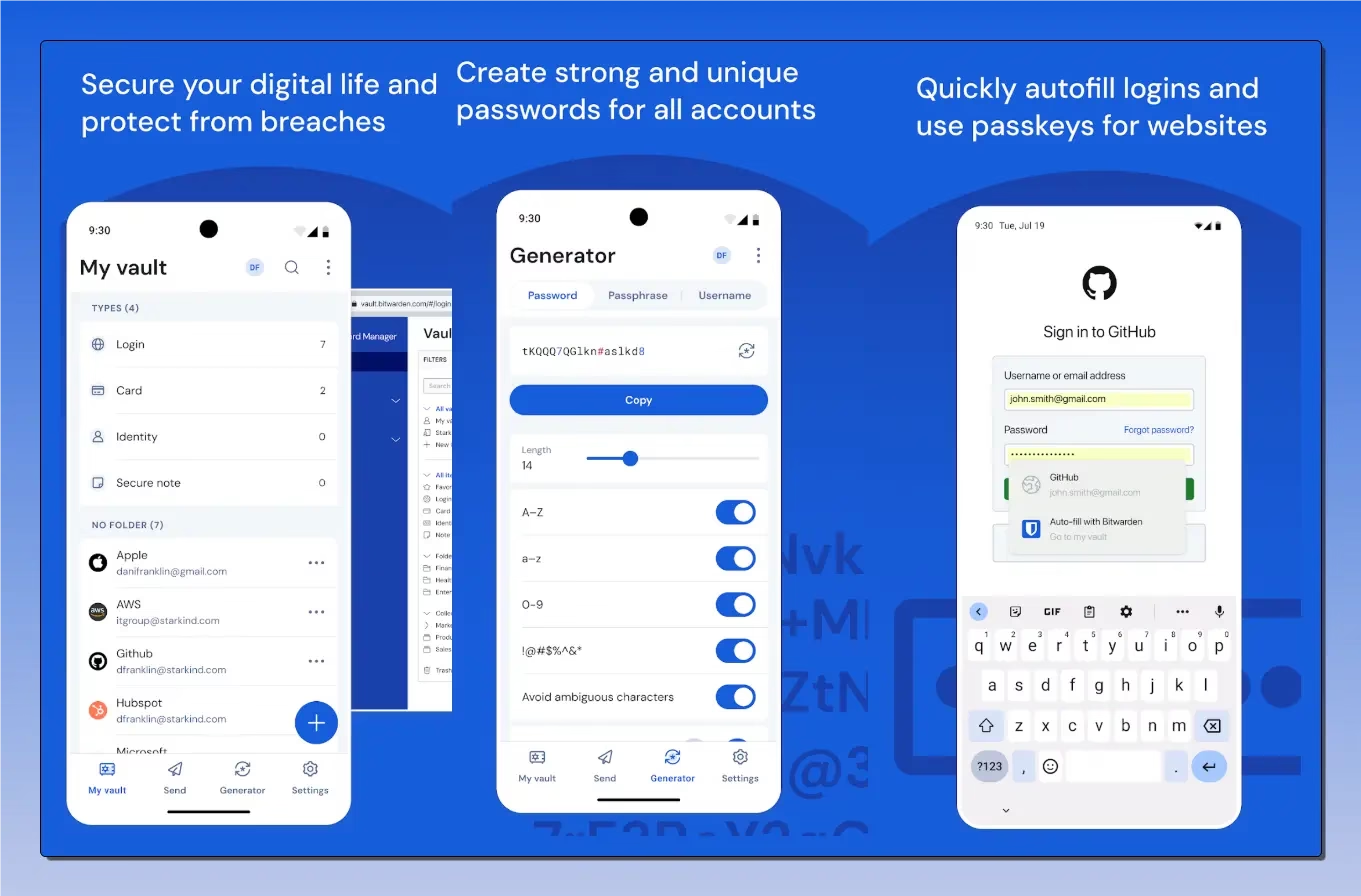
What the free version includes:
- Unlimited logins, credit cards, identities, and notes
- AES-256 local encryption
- Auto-fill in browsers and apps
- Cross-device sync
- Android fingerprint unlock
Verdict: The single most impactful security upgrade you can make on your phone. Strong, unique passwords for every account — stored and auto-filled for free.
🔗 Download Bitwarden on Google Play
8. Signal — Best Free Secure Messaging App
Category: Encrypted Messaging | Free Tier: Fully free, forever
If you share sensitive information—business discussions, financial details, and personal conversations— over WhatsApp, you are trusting Meta’s servers with that data. Signal changes that equation entirely. Every message, call, and file sent through Signal is end-to-end encrypted using the Signal Protocol, the same cryptographic standard now adopted by WhatsApp and Telegram’s secret chats.
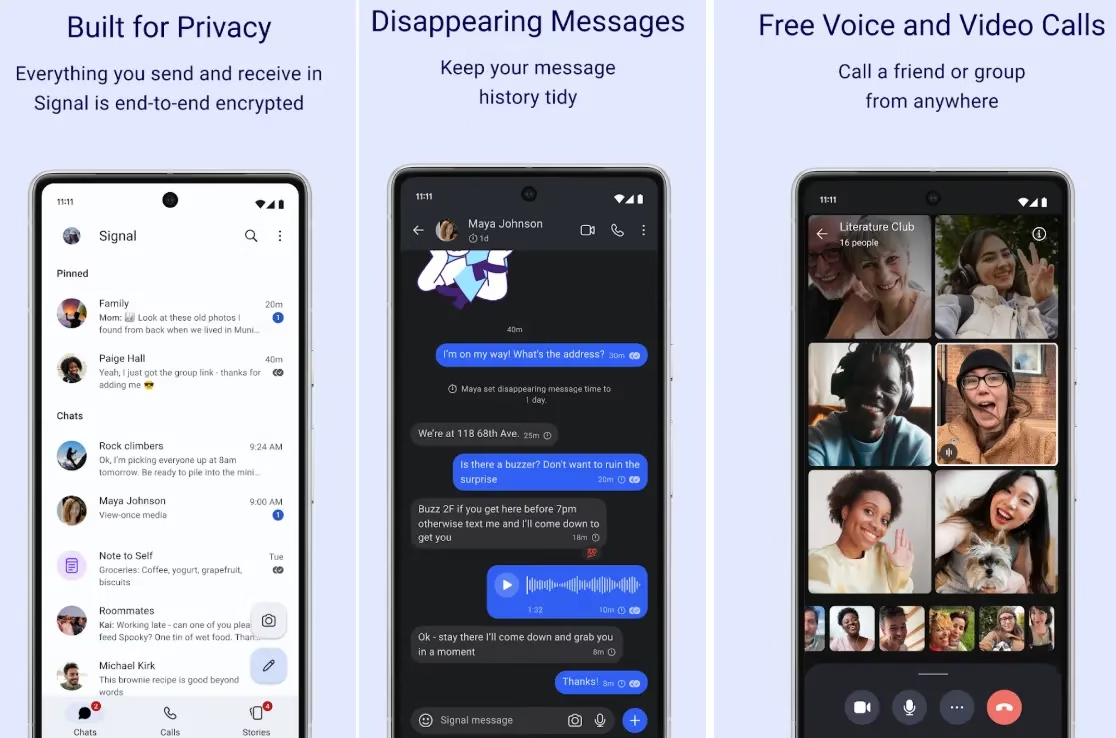
Signal is developed by a nonprofit foundation, collects virtually no metadata, and is completely free—no ads, no subscription, and no data harvesting. It supports disappearing messages, note-to-self, group calls, and even story-style updates.
What the free version includes:
- End-to-end encrypted messages and calls
- Group chats and voice/video calls
- Disappearing messages
- No ads, no data collection, ever
Verdict: Make this your default messaging app for conversations that matter. Your contacts only need to install it too.
🔗 Download Signal on Google Play
9. 2FAS Authenticator — Best Free Two-Factor Authentication App
Category: 2FA / Authentication | Free Tier: Fully free, no account needed
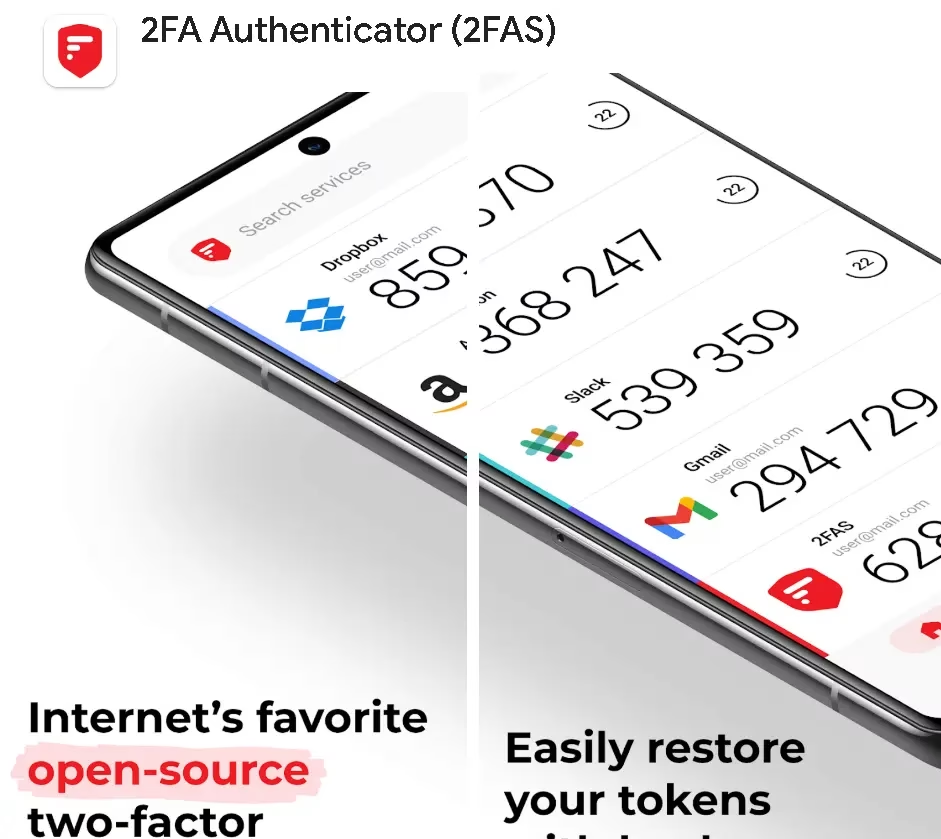
Two-factor authentication (2FA) is the single most effective way to prevent account takeovers. Even if a hacker has your password, they cannot log in without the 6-digit code that changes every 30 seconds. 2FAS is the cleanest, most privacy-respecting authenticator on Android — it requires no account, generates codes locally on your device, and supports iCloud and Google Drive backup.
It supports TOTP (time-based one-time passwords) for virtually every major service—Gmail, Instagram, Zerodha, HDFC Bank, and hundreds more.
What the free version includes:
- TOTP code generation (works offline)
- No account required
- Encrypted cloud backup support
- Import from Google Authenticator
- Widgets and browser extensions
Verdict: Enable 2FA on your bank, email, and trading accounts immediately. 2FAS is the easiest way to manage all those codes.
🔗 Download 2FAS on Google Play
10. NetGuard — Best Free Firewall for Android (No Root Required)
Category: Firewall / Data Control | Free Tier: Core firewall, fully functional
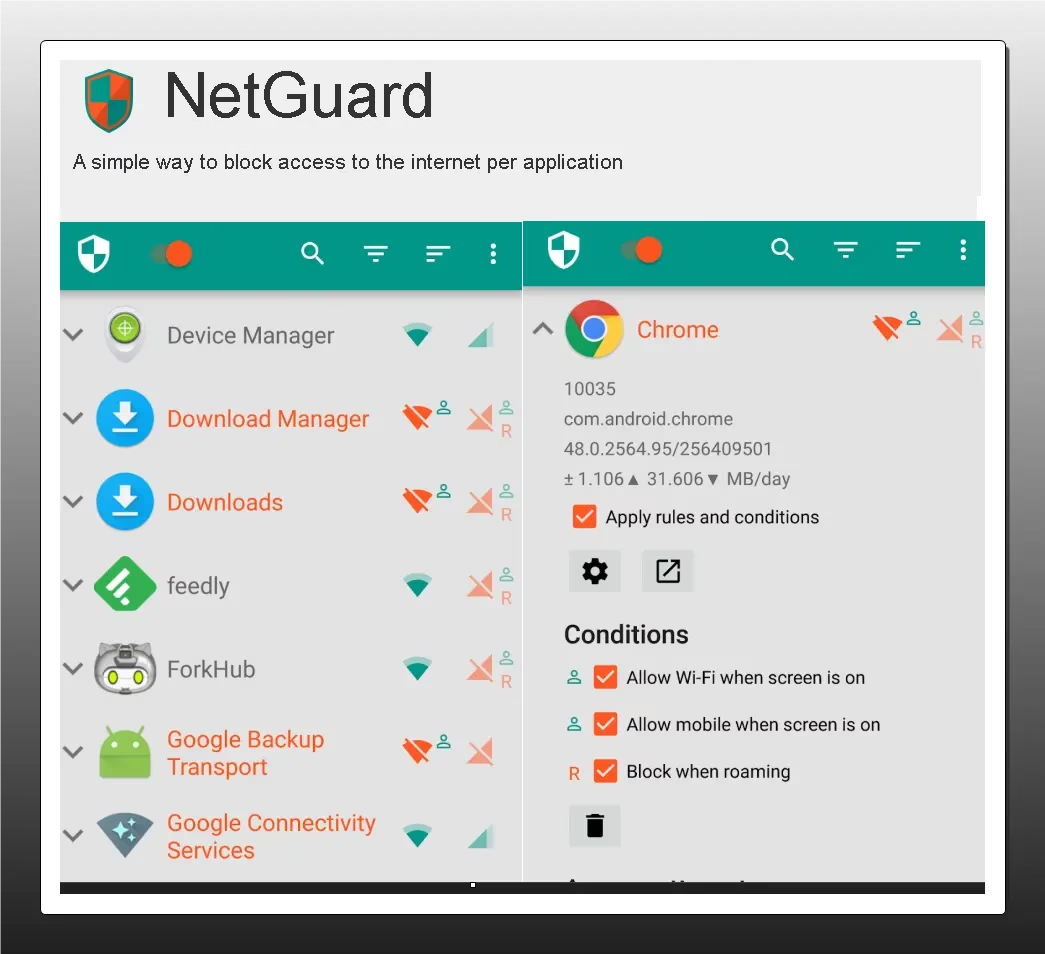
Most apps on your phone communicate with dozens of external servers — ad networks, analytics platforms, and data brokers — without your knowledge. NetGuard lets you block internet access per app, without requiring root access, using Android’s built-in VPN interface locally on your device (no traffic is sent to any external server).
You decide exactly which apps can access Wi-Fi and mobile data. Block that flashlight app from phoning home. Prevent that free game from talking to 40 ad SDKs. It is one of the most powerful privacy tools available on unrooted Android.
What the free version includes:
- Per-app internet blocking (Wi-Fi and mobile data separately)
- No root required
- Works completely locally (no VPN server involved)
- Open source
Verdict: Technical users will love this. It gives you control over your network that no other free app offers.
🔗 Download NetGuard on Google Play
11. Avast Mobile Security — Best Free Android Security with Anti-Theft
Category: Antivirus + Anti-Theft | Free Tier: Broad, ad-supported
Avast has one of the most comprehensive free security suites on Android, with malware protection, a Wi-Fi scanner, App Lock, and a robust anti-theft toolkit that lets you remotely locate, lock, or wipe your device. Like AVG (which is owned by the same parent company), the free version is ad-supported and frequently nudges premium, but the protection itself is solid.

What the free version includes:
- Real-time malware protection
- Wi-Fi security scanner
- App Lock
- Anti-theft: locate, alarm, lock, wipe remotely
- RAM and junk cleaner
Verdict: A capable alternative to AVG. If you prefer Avast’s interface, the free tier delivers comparable protection.
🔗 Download Avast Mobile Security on Google Play
12. DuckDuckGo Privacy Browser — Best Free Private Browser for Android
Category: Private Browser + Tracker Blocker | Free Tier: Fully free
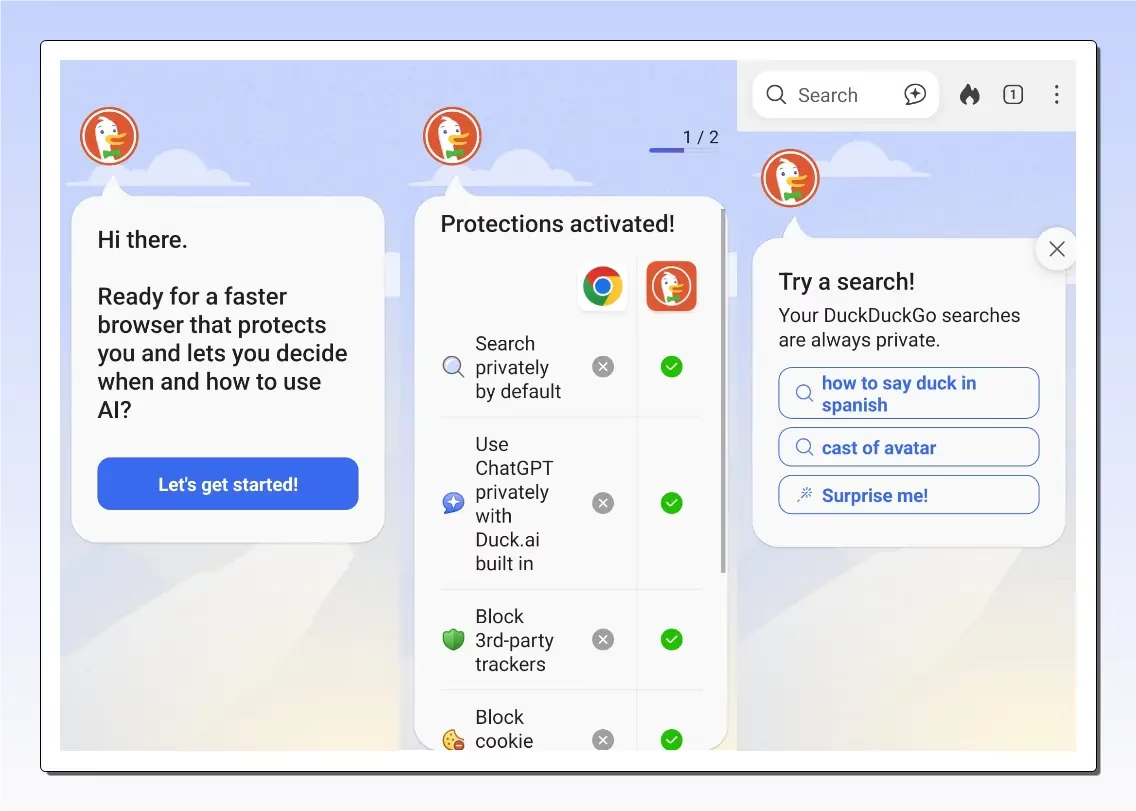
Your browser is one of the biggest security and privacy vulnerabilities on your phone. DuckDuckGo’s Android browser blocks third-party trackers on every website by default, forces HTTPS connections wherever possible, grades each site’s privacy practices (A through F), and includes a Fire Button that wipes all tabs and browsing data with one tap.
Unlike Firefox (which requires manual add-on setup to achieve similar protection), DuckDuckGo does all of these tasks out of the box — zero configuration needed.
What the free version includes:
- Automatic tracker blocking
- Forced HTTPS upgrades
- Site Privacy Grade (A–F)
- Fire Button (instant data wipe)
- Email Protection (masks your real email address)
- No account required
Verdict: Replace Chrome as your default browser on Android. Instant privacy gains, zero setup, no cost.
🔗 Download DuckDuckGo on Google Play
Quick Comparison Table
| App | Category | Real-Time Protection | 100% Free | Ads-Free |
|---|---|---|---|---|
| Bitdefender Antivirus Free | Antivirus | ✅ | ✅ | ✅ |
| AVG AntiVirus Free | Antivirus + Suite | ✅ | ✅ | ❌ (ads) |
| Malwarebytes | Anti-Malware | ❌ (paid) | ✅ (on-demand) | ✅ |
| Google Play Protect | Antivirus | ✅ | ✅ | ✅ |
| Bitwarden | Password Manager | N/A | ✅ | ✅ |
| Signal | Secure Messaging | N/A | ✅ | ✅ |
| 2FAS | 2FA Authenticator | N/A | ✅ | ✅ |
| NetGuard | Firewall | ✅ | ✅ | ✅ |
| Avast Mobile Security | Antivirus + Suite | ✅ | ✅ | ❌ (ads) |
| DuckDuckGo | Private Browser | N/A | ✅ | ✅ |
| Sophos Intercept X | AV + Privacy + 2FA | ✅ | ✅ | ✅ |
| AhnLab V3 Mobile | Antivirus + Privacy | ✅ | ✅ | ❌ (ads) |
The Recommended Starter Stack (3 Apps, Maximum Protection)
Start with this combination:
- Sophos Intercept X — enterprise-grade antivirus, built-in 2FA, privacy advisor, and zero ads. One app to rule them all.
- Bitwarden—strong, unique passwords for every account—your biggest vulnerability, solved
- DuckDuckGo Browser—replace Chrome and block trackers on every site, instantly
Prefer the AVG route? Swap Sophos for AVG AntiVirus Free if you want a more consumer-friendly interface and don’t mind occasional ads.
These three apps together cover the three most exploited attack vectors on Android: malicious apps, stolen passwords, and browser-level tracking.
Frequently Asked Questions
Do I really need a security app if I have Google Play Protect?
Play Protect provides a useful baseline but has consistently underperformed dedicated antivirus apps in independent lab tests. For everyday users who only install apps from the Play Store and browse carefully, Play Protect plus Bitwarden and 2FAS is sufficient. For heavier users, add a dedicated antivirus.
Are free antivirus apps safe to use?
The apps in this list — Bitdefender, AVG, Avast, Sophos, AhnLab, and Malwarebytes — are from established security companies with long track records. Avoid unknown “cleaner + antivirus” apps from the Play Store with fewer than 10,000 reviews; many of those are adware in disguise.
Is Sophos Intercept X really completely free?
Yes. Sophos Intercept X for Mobile is 100% free on Android, with no ads, no in-app purchases, and no premium tier to push you toward. Sophos monetizes through enterprise products, so the consumer Android app is genuinely a no-strings-attached offering.
Will these apps slow down my Android phone?
Bitdefender and Malwarebytes have minimal performance impact due to cloud-based or on-demand scanning. AVG and Avast have a slightly larger footprint but remain usable on phones with 3 GB RAM or more.
Is it safe to use multiple security apps simultaneously?
Having two real-time antivirus apps running at the same time can cause conflicts and battery drain. Use one antivirus (Sophos or Bitdefender) and complement it with non-conflicting tools like Bitwarden, 2FAS, and NetGuard.
Which is the best free password manager for Android in India?
Bitwarden is the top recommendation. It is open source, AES-256 encrypted, completely free for individuals, and works seamlessly with Indian bank and UPI app logins via Android’s autofill framework.
What is the safest messaging app in 2026?
Signal remains the gold standard for end-to-end encrypted communication. It is non-profit, open source, and collects virtually no user metadata.
Final Thoughts
Securing your Android phone in 2026 does not require an expensive subscription. The twelve apps in this guide — from enterprise-grade tools like Sophos Intercept X to the quietly powerful AhnLab V3 — cover the full spectrum of mobile threats faced by Android users.
Whether it is malware slipping through a sideloaded APK, a phishing link in a WhatsApp forward, or an app silently harvesting your location data, there is a free solution here for every threat.
Start with the three-app starter stack, explore the rest at your own pace, and share this guide with anyone still running their phone completely unprotected.
Did we miss your favourite free security app? Drop it in the comments below.
For more Android tips and app reviews, follow Techno360 on YouTube at Techno360In.


Discover more from Techno360
Subscribe to get the latest posts sent to your email.