
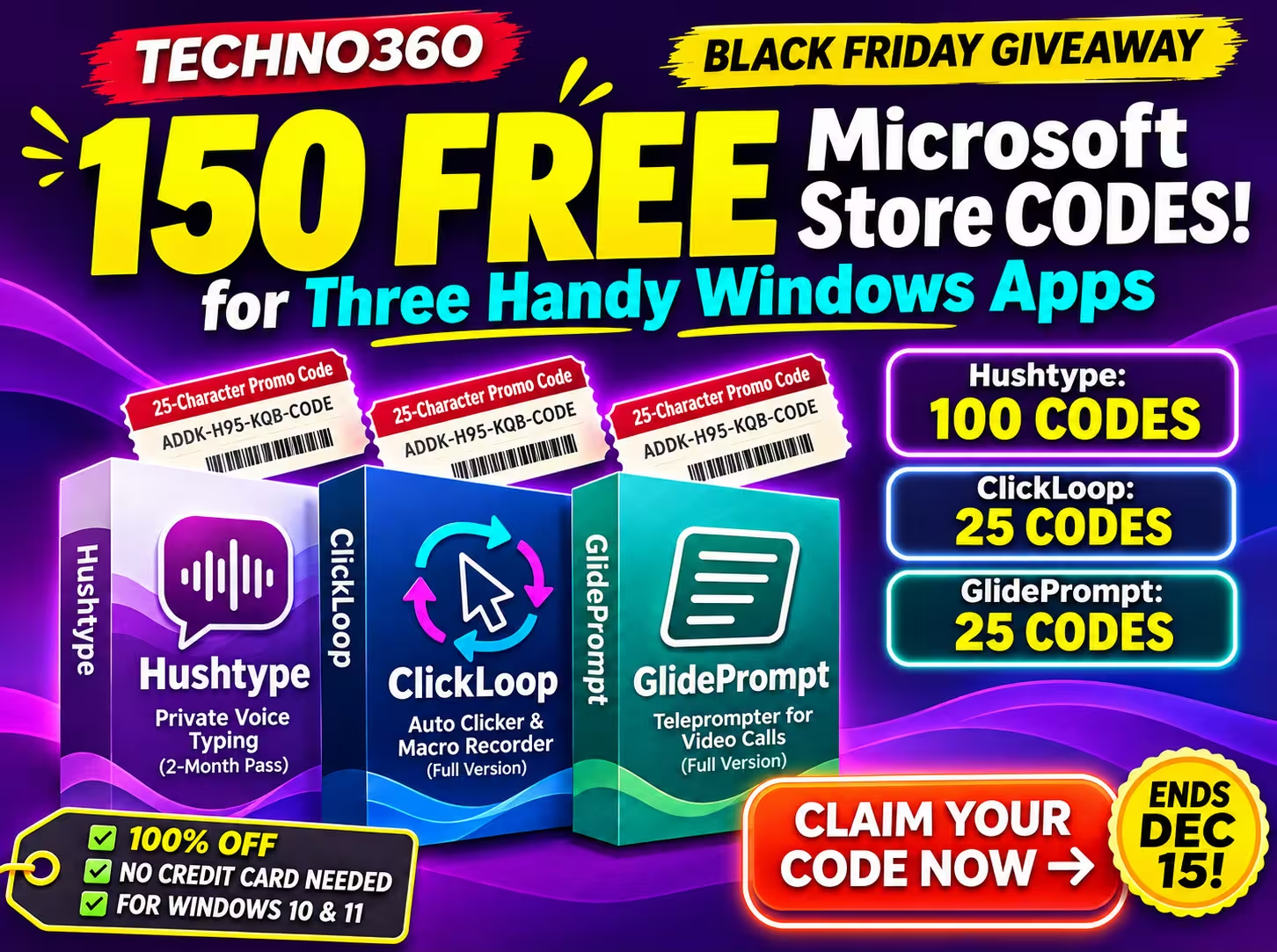
🎁 Hushtype giveaway: 150 free Microsoft Store codes for three handy Windows apps
For Black Friday, Intently Labs is giving Techno360 readers 100 codes for 2 months of Hushtype Pro (private voice typing), plus 25 full copies each of ClickLoop (normally $4.99) and GlidePrompt (normally $9.99). Claim your codes by 15 December 2026 and redeem them by 31 December 2026.
Windows 11/10Microsoft Store150 codesEnds 15 Dec 2026
⚡ Quick Read
- What: Three Windows apps from Intently Labs. Hushtype types what you say, ClickLoop clicks and types for you, and GlidePrompt is a teleprompter for video calls and recordings.
- Giveaway: 100 codes for 2 months of Hushtype Pro, 25 full copies of ClickLoop and 25 full copies of GlidePrompt.
- How: Enter your email in the form for the app you want. We email you a code, and you redeem it in the Microsoft Store.
- Catch: Codes are limited and first come, first served. Hushtype Pro lasts 2 months, not forever (no card needed, and it never auto-renews). Each code works once.
- Deadline: Claim by 15 December 2026 and redeem by 31 December 2026. Jump to the steps →
What’s in this giveaway?
Intently Labs is a small, independent software studio that sells its Windows apps through the Microsoft Store. For Black Friday, it has given Techno360 150 Store codes to share with readers.
All three apps work offline, with no ads and no account, according to Intently Labs. Because they come from the Microsoft Store, Windows installs and updates them for you.
| App | What it does | What the code gives you | Codes |
|---|---|---|---|
| Hushtype – Private Voice Typing | Speak and it types for you, in almost any app | 2 months of Hushtype Pro | 100 |
| ClickLoop – Auto Clicker & Macro Recorder | Clicks, presses keys and replays macros | Full app (normally $4.99, one-time) | 25 |
| GlidePrompt – Teleprompter for Windows | Shows your script under your webcam | Full app (normally $9.99, one-time) | 25 |
Prices are Intently Labs’ US dollar prices; the Store shows them in your local currency. When we checked on 25 November 2026, the Store had a Black Friday sale on: ClickLoop at $2.99 (40% off) and GlidePrompt at $7.99 (20% off). Hushtype is a free download with Pro as an in-app subscription.
Hushtype: private voice typing for Windows
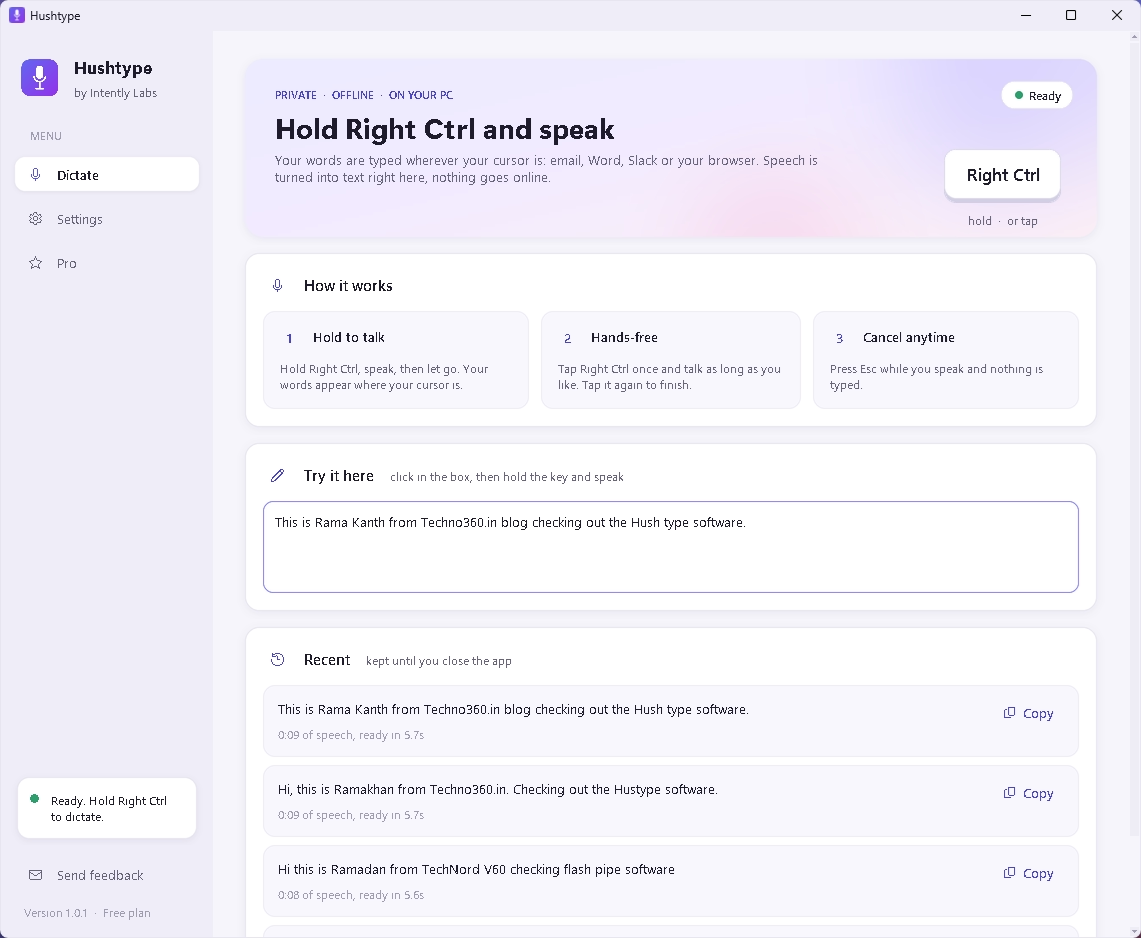
Hushtype turns your speech into text and types it wherever your cursor is: Word, Outlook, Gmail, Google Docs, Slack, Teams, WhatsApp, Notion, your browser and most other apps.
The big selling point is privacy. Intently Labs says speech recognition runs on your PC using OpenAI’s Whisper model, so your voice is never uploaded. Its privacy policy says recordings are never saved to disk, and the microphone is only used while you dictate.
- Hold to talk. Hold Right Ctrl, speak, and let go. The text appears at your cursor.
- Hands-free mode. Tap the key once to start dictating and tap again to stop.
- Cancel any time. Press Esc and nothing is typed.
- Clipboard-friendly. Hushtype puts back whatever you had copied, and keeps dictations out of clipboard history.
- Works offline. Intently Labs says dictation needs no internet. The optional “Best accuracy” speech model is a one-time download from Hugging Face.
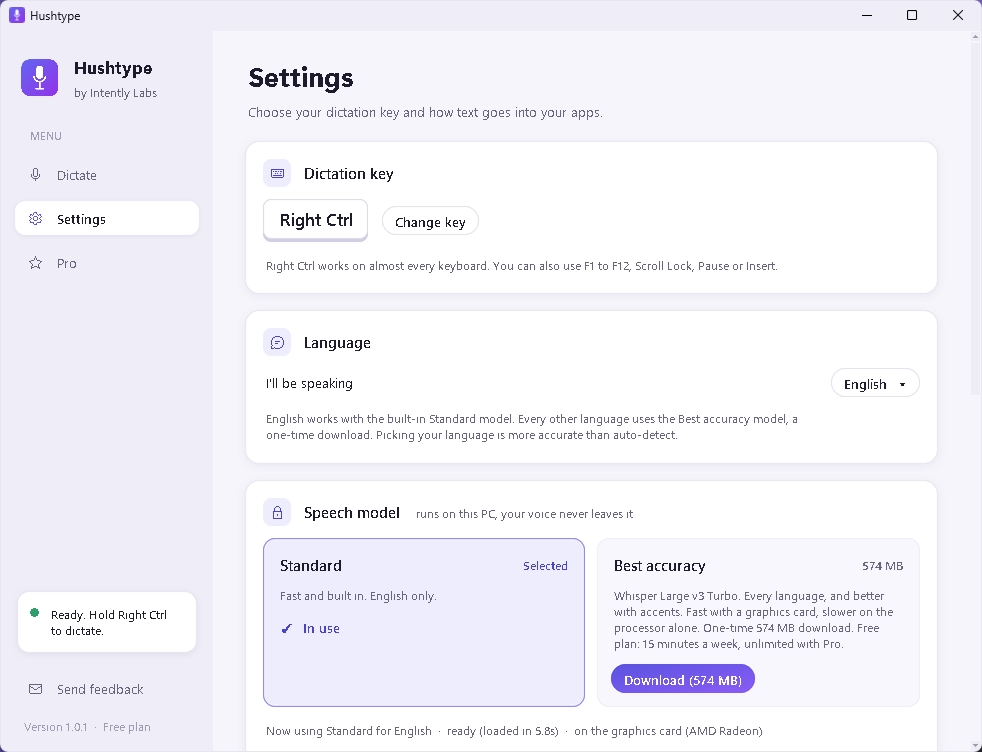
Two speech models. The built-in Standard model handles English only and needs no download. Best accuracy uses Whisper Large v3 Turbo, a one-time 574 MB download that covers every language and copes better with accents. Hushtype says it’s fast with a graphics card and slower on the processor alone.
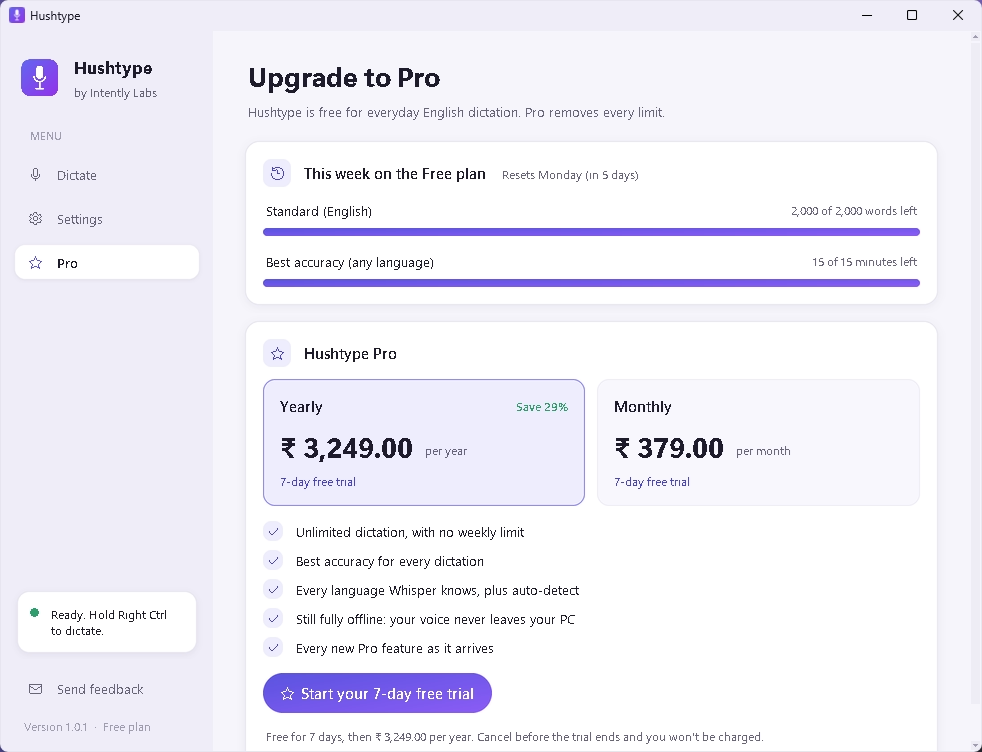
Free vs Pro. The free plan gives you 2,000 words of Standard (English) dictation and 15 minutes of Best accuracy each week, resetting every Monday. Pro removes those limits, uses Best accuracy for every dictation, and gives unlimited use of every language Whisper knows, plus auto-detect. In India, the Store lists Pro at ₹379 a month or ₹3,249 a year, with a 7-day free trial. Your giveaway code covers 2 months.
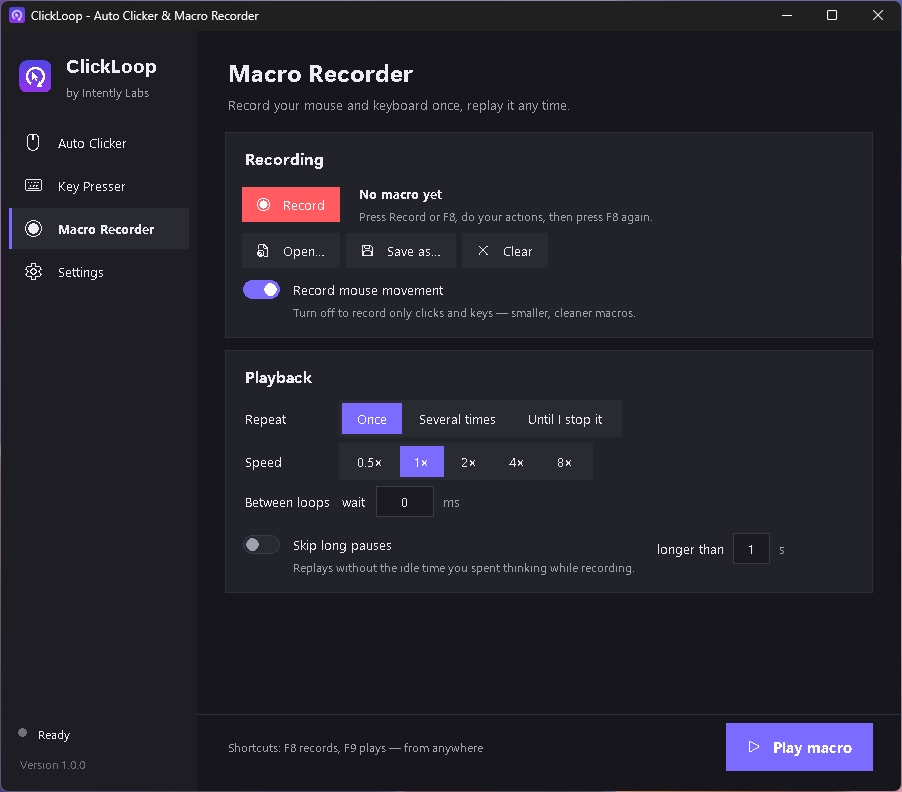
ClickLoop: auto clicker, key presser and macro recorder
ClickLoop takes over repetitive clicking and typing. It’s three tools in one app, and the safety controls are better than most free auto clickers.
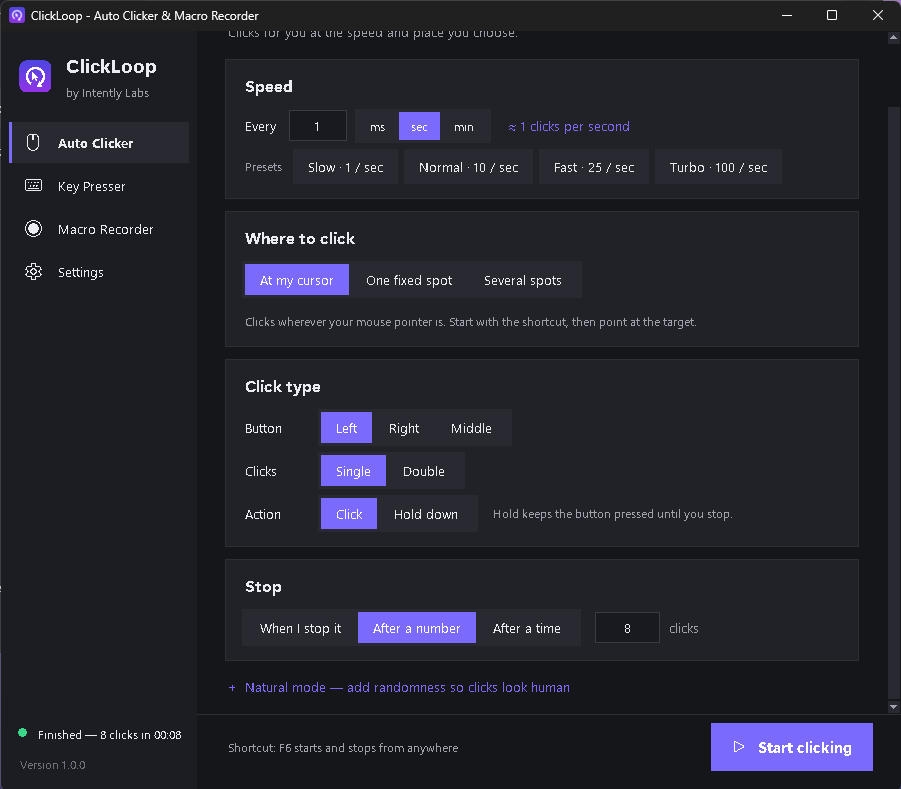
- Click one spot or a sequence. Click at your cursor, at one fixed point, or at several points in order. Numbered markers show where each click will land.
- Any speed. From one click every few minutes to one every millisecond, with Slow (1 per second), Normal (10), Fast (25) and Turbo (100) presets.
- Any button. Left, right or middle; single, double or press-and-hold.
- Natural mode. Adds small random changes to timing and position so clicks don’t land at exactly the same moment and pixel.
- Key presser. Press or hold any key on a timer, for a set number of presses or a set time.
- Macro recorder. Records mouse movement, clicks, scrolling and keys, then replays them at 0.5× to 8× speed, once or on a loop.
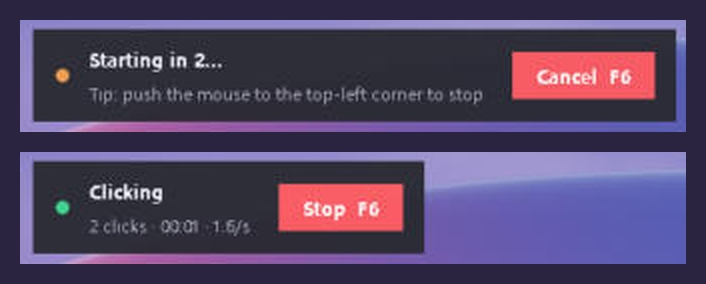
- Easy to stop. A floating mini bar shows the live count and a Stop button. Push the mouse into the top-left corner to stop everything.
Default shortcuts are F6 for the clicker, F7 for the key presser, F8 to record and F9 to play. You can change them in Settings, where you’ll also find an optional 3-second countdown (off by default) and the emergency corner stop (on by default).
GlidePrompt: a teleprompter that floats over Zoom and Teams
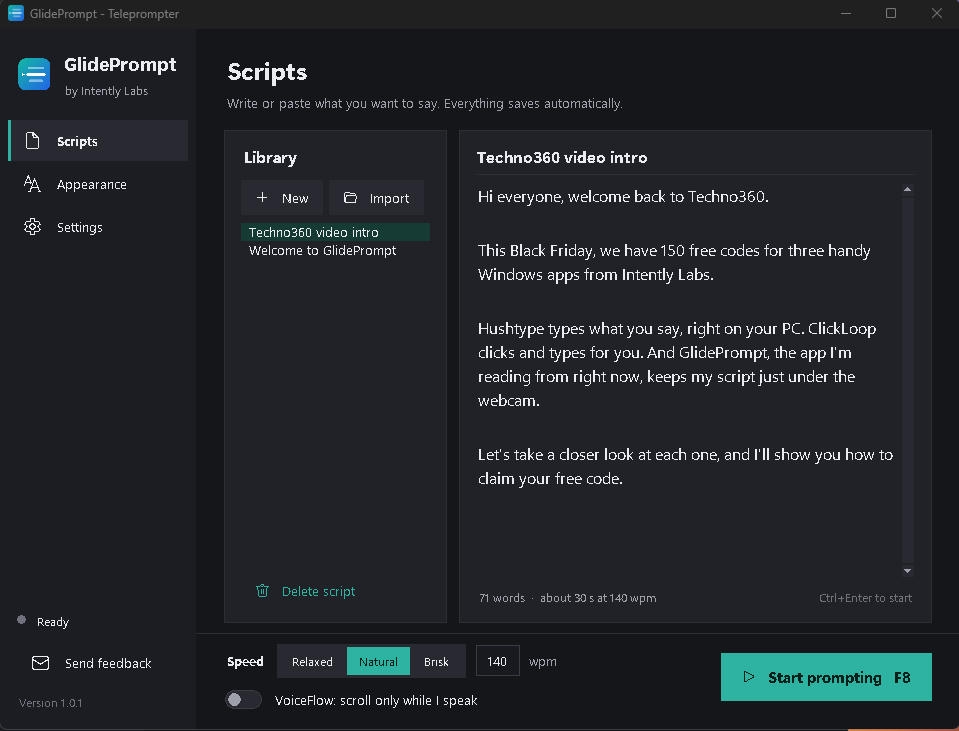
GlidePrompt puts your script right under your webcam, so you can read while still looking at the camera. It’s made for video calls, presentations, webinars, YouTube videos, courses and job interviews.
- Stays on top. Floats over Zoom, Teams, Google Meet, OBS, PowerPoint and your browser.
- Hidden from screen sharing. Intently Labs says the prompter is left out of screen shares, screenshots and recordings, so only you see it. This needs Windows 10 version 2004 or later.
- VoiceFlow. The text scrolls only while you speak and waits when you pause. It checks how loud your microphone is; nothing is recorded or transcribed.
- Shortcuts from any app. F8 starts and pauses, F7 and F9 change speed, and F6 jumps back a few lines.
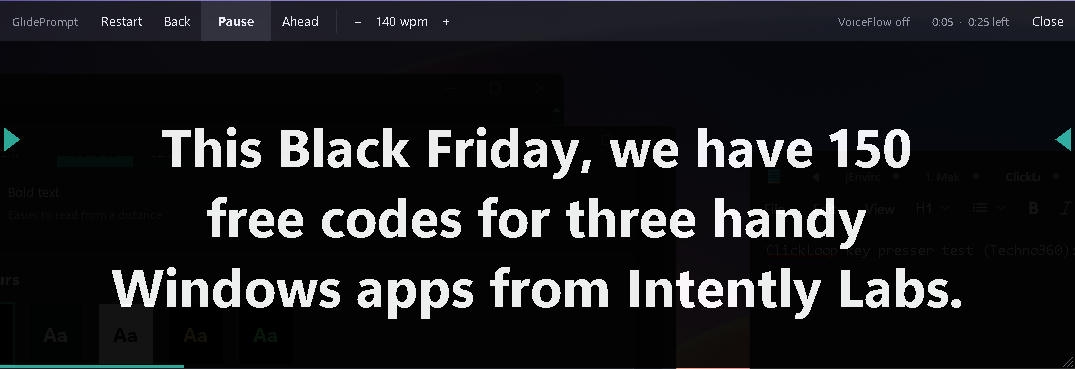
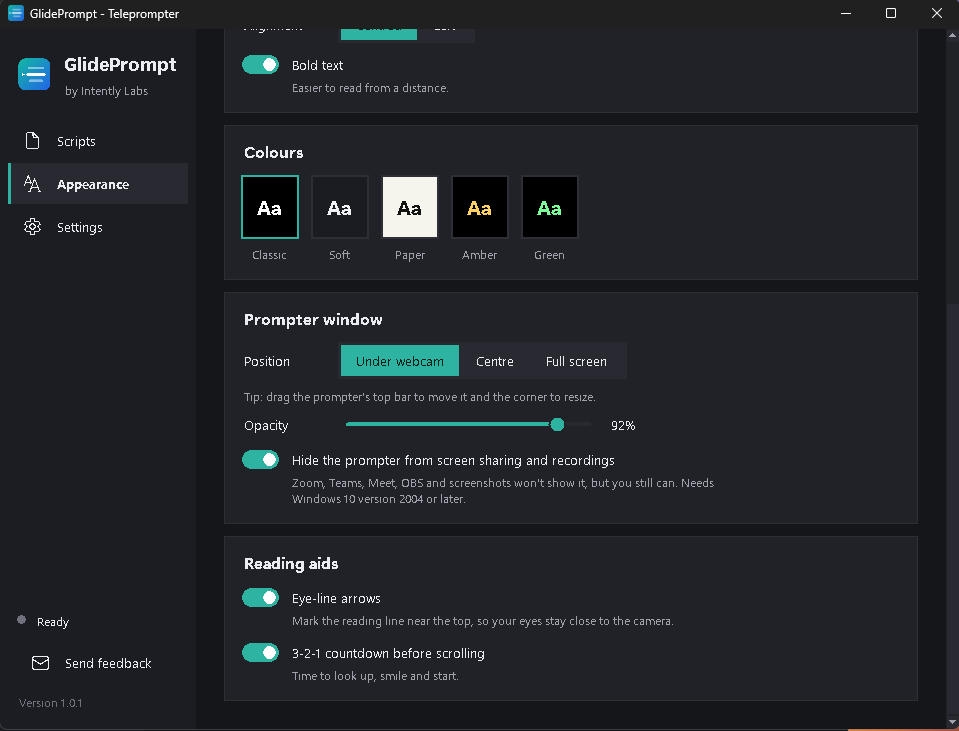
- Easy to read. Adjustable font size, margins and opacity, five high-contrast colour themes, eye-line arrows and a 3-2-1 countdown.
- Script library. Write, paste or import a text file. It saves automatically and shows the word count and read time at your chosen words per minute.
⚠️ Getting both ClickLoop and GlidePrompt?
Both apps use F6 to F9 as global shortcuts by default. If you run them at the same time, change the shortcuts in one app’s Settings so a key press doesn’t start the auto clicker in the middle of your video call.
Giveaway terms
| Offered by | Intently Labs, exclusively for Techno360 readers |
|---|---|
| Codes | Hushtype Pro: 100 · ClickLoop: 25 · GlidePrompt: 25 |
| Claim by | 15 December 2026, or until the codes run out |
| Redeem by | 31 December 2026 (codes stop working after this date) |
| ClickLoop and GlidePrompt | Full app, yours to keep, with Store updates |
| Hushtype | A one-time “Hushtype Pro – 2-Month Pass”: no card needed, never renews or charges. After 60 days it goes back to the free plan. |
| Limit | One code per email for each app; each code works once |
| Needs | Windows 10 or 11 and a Microsoft account signed in to the Store |
| Regions | Works with Microsoft accounts in the UK, US, India and every other country where the apps are in the Microsoft Store |
How to get your free codes
- Pick the app you want below and enter your email address in its form. You can claim one code for each app.
- Check your inbox for an email from giveaway@techno360.in with your code. Look in Spam or Promotions if it’s not there after a few minutes.
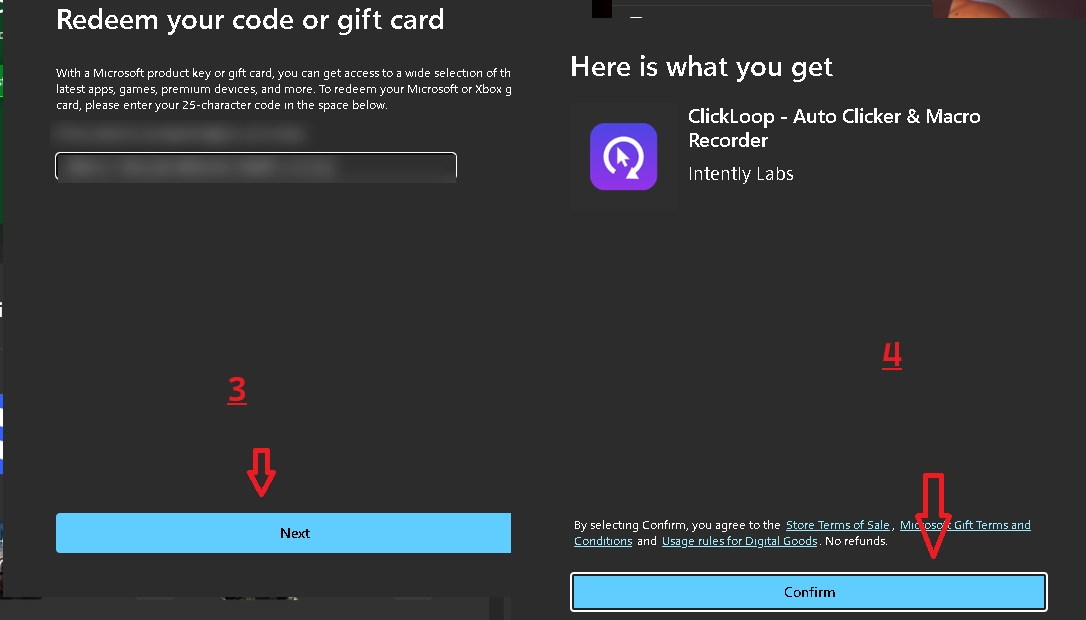
- Open the Microsoft Store app on Windows 10 or 11 and make sure you’re signed in to your Microsoft account.
- Click your profile icon at the top and choose Redeem code or gift cards. You can also go to microsoft.com/redeem in your browser.
- Paste the code and click Next. Check that the right app is shown under “Here is what you get”, then click Confirm. ClickLoop and GlidePrompt are then yours as the full app.
- For Hushtype, install the free app from the Store first, then redeem the code. Pro unlocks within a few minutes; closing and reopening Hushtype helps.
🎙️ Hushtype Pro (2 months) · 100 codes
Install the free app first, then redeem your code.
🎁 Free giveaway
Get your Hushtype Pro (2 months) code
26 Nov – 15 Dec 2026, 11:59 PM IST · 91 codes left
🖱️ ClickLoop full version · 25 codes
🎁 Free giveaway
Get your ClickLoop code
26 Nov – 15 Dec 2026, 11:59 PM IST · 13 codes left
📜 GlidePrompt full version · 25 codes
🎁 Free giveaway
Get your GlidePrompt code
26 Nov – 15 Dec 2026, 11:59 PM IST · 18 codes left
Copy and paste your code into the Store. Don’t type it, as one wrong character will make it fail.
🛠️ If something goes wrong
- “This code has already been used”: each code works once, so it may already have been redeemed on another account.
- Hushtype still shows Free: wait a few minutes, then close Hushtype fully and open it again.
- The form says codes have run out: all codes for that app have been claimed. Try one of the other two apps.
- Still stuck: leave a comment below with the app name and the error. We’ll pass it to Intently Labs.
Our hands-on test
We installed all three apps from the Microsoft Store on a Windows 11 PC with an AMD Radeon graphics card, and redeemed test codes from Intently Labs for ClickLoop and GlidePrompt. Here is what we found.
Hushtype
We tested Hushtype 1.0.1 (a 107 MB download) on the free plan. On first use, Windows asked for microphone permission. The Standard model loaded in 5.8 seconds on our graphics card.
Speed was good: clips of 8 to 18 seconds were ready in 5.6 to 5.7 seconds. Everyday words came out right and with punctuation, but names were hit and miss. “Ramakanth” became “Ramakhan” and “Rama Kanth”, and “Hushtype” became “Hustype” and once “flash pipe”. That’s the Standard model; the Best accuracy model may handle names and accents better.
ClickLoop
We tested ClickLoop 1.0.0. With the 3-second countdown turned on, a bar showed “Starting in 2…” with a Cancel button and a reminder about the corner stop. While clicking, the main window hid and a small bar showed the live count, time and a Stop button.
Set to 1 click a second and “stop after 8 clicks”, it stopped at exactly 8 clicks in 8 seconds. We then started a 30-click run and pushed the mouse into the top-left corner. Clicking stopped at once and the window said “Emergency stop: mouse moved to the corner.”
Picking spots and setting a key both wait for a real mouse click or key press from you. That’s sensible for an auto clicker, but remote-control and automation tools can’t set them up for you.
We didn’t time Turbo speed or build long macros. The Several spots mode, macro recorder and key presser are described here as Intently Labs lists them.
As Intently Labs warns, Windows doesn’t let a normal app click inside an app running as administrator, such as Task Manager. Run ClickLoop as administrator if you need that.
GlidePrompt
We tested GlidePrompt 1.0.1 with a short Techno360 video intro. The prompter opened under the webcam position at the top of the screen, counted down 3-2-1 and scrolled smoothly at 140 words per minute. The toolbar also has Restart, Back, Ahead, speed buttons and a time-left counter.
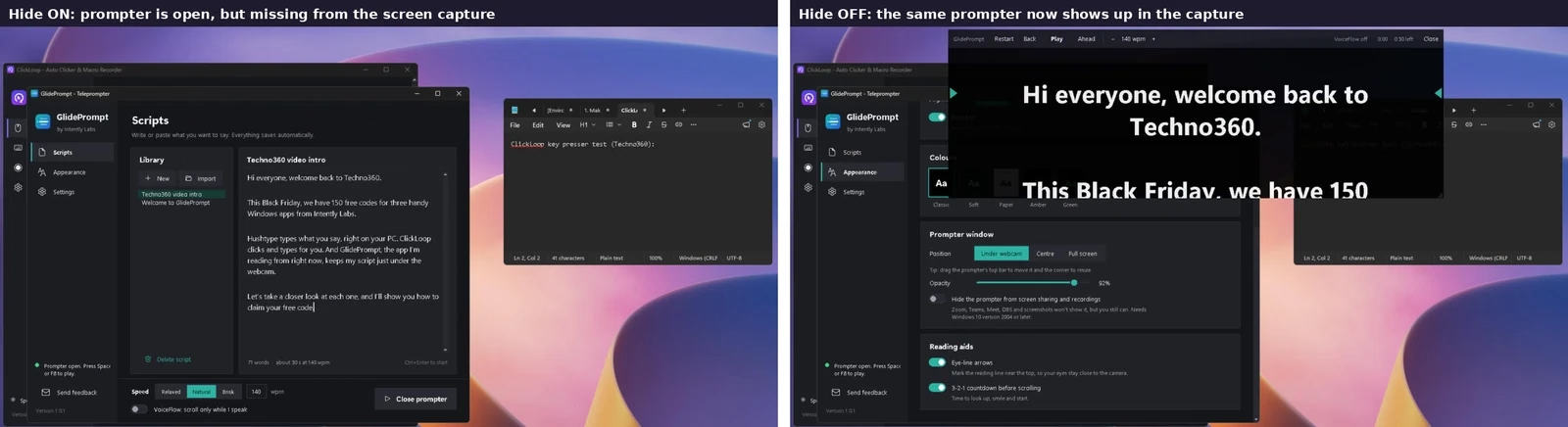
Next, we checked the privacy feature. With “Hide the prompter from screen sharing and recordings” turned on, the prompter was open on screen but completely missing from our screen capture. When we turned the option off, the same prompter appeared in the capture straight away.
We checked the hiding with a screen capture rather than a live Zoom or Teams call, and we didn’t try VoiceFlow. Intently Labs says VoiceFlow only measures how loud your microphone is and never records your voice.
Are these apps safe?
All three apps come from the Microsoft Store, which checks every app before listing it and handles installs and updates. You don’t download a setup file from a website.
Intently Labs’ privacy policies say Hushtype, ClickLoop and GlidePrompt have no accounts, ads, analytics or tracking. Hushtype only goes online to download an optional speech model and to check your Pro status with the Store. ClickLoop only records keystrokes while you’re recording a macro, and the recordings stay on your PC.
Auto clickers can break the rules of some online games and services. Check their rules before you use ClickLoop with them.
Who should grab them, and who can skip them
🎙️ Hushtype
Grab it if you write a lot of emails, notes or messages and would rather talk than type, especially if you don’t want your voice sent to a cloud service.
Skip it if Windows’ built-in voice typing (Win + H) already works well for you.
🖱️ ClickLoop
Grab it if you do repetitive data entry, form filling or software testing.
Skip it if you only need a simple clicker once in a while.
📜 GlidePrompt
Grab it if you present on Zoom or Teams, record YouTube videos or courses, or have a video interview coming up.
Skip it if you never speak on camera.
More free Windows tools on Techno360
- Vovsoft Speech to Text Converter giveaway for turning audio files into text
- Ashampoo Action Click free licence, another Windows macro tool
- Vovsoft Auto Mouse Clicker free licence
- Donemax Recorder free licence, a screen recorder with AI auto-zoom
- Screencapt Pro free licence, a watermark-free screen recorder
- All giveaways on Techno360
✅ Verdict
Three small, focused apps with no ads, no accounts and no cloud uploads. Hushtype is the one most people will use every day, ClickLoop is a safer and more capable auto clicker than most free ones, and GlidePrompt fixes the “looking down at my notes” problem on video calls. In our test, ClickLoop stopped exactly when told and GlidePrompt really did vanish from screen captures. Hushtype was quick, but check names after dictating. With only 25 codes each for ClickLoop and GlidePrompt, claim early.
Pros
- Simple Microsoft Store redemption, with automatic updates
- ClickLoop and GlidePrompt are full apps you keep
- Offline, privacy-first design across all three apps
Cons
- Hushtype Pro lasts only 2 months, and the Standard model struggled with names
- Only 25 codes each for ClickLoop and GlidePrompt
- Windows only, and codes must be redeemed by 31 December 2026
FAQ
Do the codes work outside India?
Yes. Intently Labs says they work with Microsoft accounts in the UK, US and every other country where Hushtype, ClickLoop and GlidePrompt are available in the Microsoft Store.
Can I claim all three apps?
Yes. Each app has its own form, and you can claim one code for each app with the same email.
When do the codes expire?
You can claim codes until 15 December 2026, while they last. Every code must be redeemed in the Microsoft Store by 31 December 2026.
What happens when Hushtype Pro ends?
Nothing to cancel. Intently Labs confirmed the code unlocks a one-time “Hushtype Pro – 2-Month Pass” that needs no card and never renews or charges you. After 60 days, Hushtype goes back to the free plan with its weekly allowance, and you can keep using it for free. The subscription mentioned in Hushtype’s privacy policy only applies if you buy Pro yourself.
Do ClickLoop and GlidePrompt expire?
No. Once you redeem the code, the full app stays in your Microsoft account library, and you can reinstall it on your PCs from the Store.
Does Hushtype work without the internet?
Intently Labs says dictation works fully offline, because speech recognition runs on your PC. It only goes online to download the optional Best accuracy model and to check your Pro status.
Can people on my Zoom call see GlidePrompt?
Intently Labs says no: with the default “Hide from screen sharing and recordings” setting on, Windows leaves the prompter out of screen shares. It needs Windows 10 version 2004 or later. In our test, the open prompter was missing from screen captures with the option on, and appeared when we turned it off.