

🎁 Free 1-Year Licence · Worth $14.95
Your PC’s 24/7 “doctor” – cleaning, tweaks, driver updates and malware protection in one app, free for a year
BitsDuJour is giving away Kerish PC Doctor licence keys for one day only. The key works with the brand-new version 5.00, released on 8 November 2026.
⚡ Quick Read
What: Kerish PC Doctor 5.00, an all-in-one Windows maintenance, optimisation and protection tool.
Giveaway: Free 1-year licence key via BitsDuJour (normally $14.95).
How: Free BitsDuJour checkout, key arrives by email, activate inside the app.
Catch: Stops working after 12 months, one PC only, personal use only, cannot extend an existing licence.
Deadline: Around midnight Pacific time on 24 November 2026 (about 1:30 PM IST / 8:00 AM GMT). Jump to the steps ↓
What is Kerish PC Doctor?
Kerish PC Doctor (often just called Kerish Doctor) is a Windows utility that looks after your computer in the background. It cleans junk files, fixes registry and system errors, tunes Windows settings, keeps an eye on hardware temperatures and adds a layer of malware protection.
The developer, Kerish Products, has sold it for more than 17 years and says it has passed 75 million downloads. Its pitch is simple: instead of installing a separate cleaner, tweaker, driver updater and monitor, you install one app and let it run unattended.
The official price is $14.95 for a 1-year key, rising to $24.95 for 3 years. A free 15-day trial is also available from the developer’s site.
What’s new in Kerish PC Doctor 5.00
Version 5.00 landed on 8 November 2026, so today’s giveaway key gets you a fresh major release rather than an old build. According to the developer’s release notes, the main changes are:
- Invisible Folders: a new tool for hiding folders.
- Installed Software now lists Microsoft Store apps as well as desktop programs.
- Driver Manager can restore drivers from backups.
- Hardware Monitor upgrade with better SSD detection.
- File recovery is faster on NTFS drives and now supports FAT32 and exFAT, useful for USB sticks and SD cards.
- Faster junk cleanup, plus DNS cache clearing and USB device history removal for privacy.
- 50 new tweaks and 20 new recommendations for Windows 10 and 11.
- Search inside the detected-problems list and the settings window.
- An improved antivirus script analyser and bug fixes.
Existing users get 5.00 automatically, because the app updates itself by default.
Key features of Kerish PC Doctor
- Real-time crash prevention: watches for Windows errors and fixes them before they cause trouble.
- Junk and registry cleaning: removes temp files, outdated app caches, broken shortcuts and invalid registry entries.
- Hardware monitoring: tracks CPU, GPU and disk temperatures and load, plus laptop battery wear, and warns you if something goes wrong.
- Smart defragmentation: defrags hard drives when the PC is idle and skips SSDs.
- Driver updates: a database of over 100,000 devices, updated monthly.
- Malware protection: scans for threats and checks security-sensitive Windows settings and software vulnerabilities.
- Game acceleration: frees system resources while you play.
- One-click troubleshooting: pick a common PC problem from a list and fix it.
- Extra tools: data recovery, file shredder, startup manager and hidden Windows settings.
- Smart Update: keeps the app’s databases current every day.
Kerish PC Doctor giveaway terms
| Version | 5.00 (latest, released 8 November 2026) |
|---|---|
| Licence length | 1 year (12 months), then the app stops working unless you renew |
| Normal price | $14.95 |
| Devices | 1 PC; the key cannot be moved to another computer |
| Use | Personal use only |
| Updates | Free updates while the licence is active |
| Support | Included while the licence is active |
| Activation | Online activation tied to your PC’s hardware |
| Existing users | Cannot be used to extend or upgrade a current licence |
| Supported Windows | Windows 11, 10, 8.1, 8 and 7 (32-bit and 64-bit) |
| Deadline | About midnight PT, 24 November 2026 (around 1:30 PM IST) |
⚠️ Know the limits before you claim
This is a time-limited licence, not a lifetime one. After 12 months the program stops working. The key is locked to one PC, and you can’t use it to extend a key you already own. BitsDuJour also offers paid 2-year and 3-year keys on the same page; you don’t need them for the free licence.
How to get a Kerish PC Doctor free licence key

- Open the BitsDuJour Kerish PC Doctor giveaway page.
- Click Get It For Free and pick Kerish Doctor (License key for 1 year). Leave the paid 2-year and 3-year options unselected.
- Log in to BitsDuJour or create a free account, then finish the $0 checkout.
- Check your inbox (and spam folder) for the email with your licence key.
- Download Kerish PC Doctor 5.00 from the official site and install it.
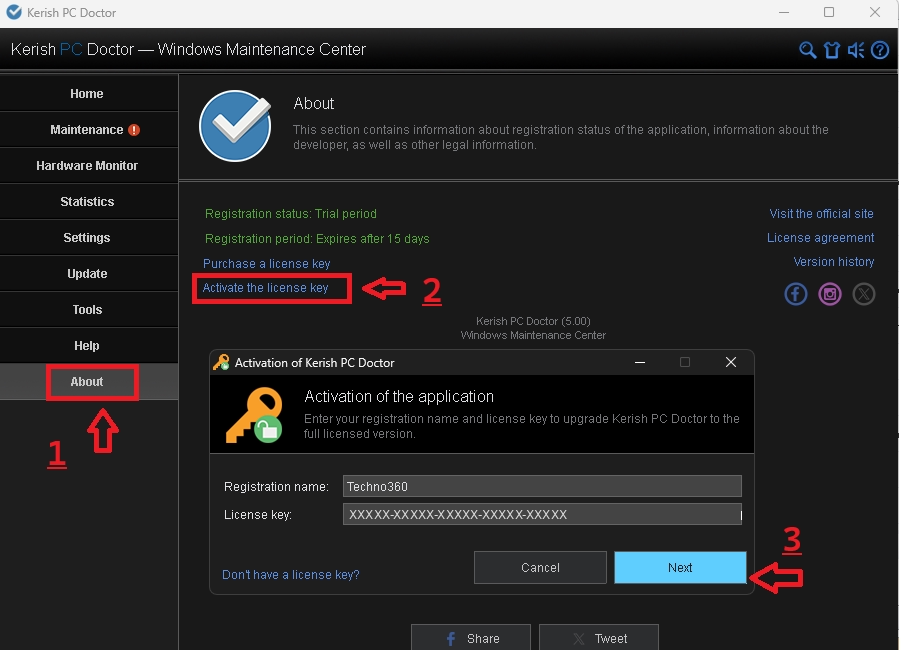
- Open the app, click About in the main window, then Activate the license key.
- Enter your registration name, copy and paste the licence key from the email (don’t type it), and click Next.
🎁 Claim Free LicenceDownload Kerish PC Doctor 5.00
⚠️ Troubleshooting
- No email? Check spam and promotions folders, then look in your BitsDuJour account’s order history.
- Activation fails? Activation is online, so make sure you’re connected and that your firewall isn’t blocking the app.
- Already a Kerish user? The giveaway key can’t extend an active licence.
- Missed the deadline? Use the 15-day trial, or check our free apps and software page for the next giveaway.
Hands-on: Kerish PC Doctor 5.00 in our test
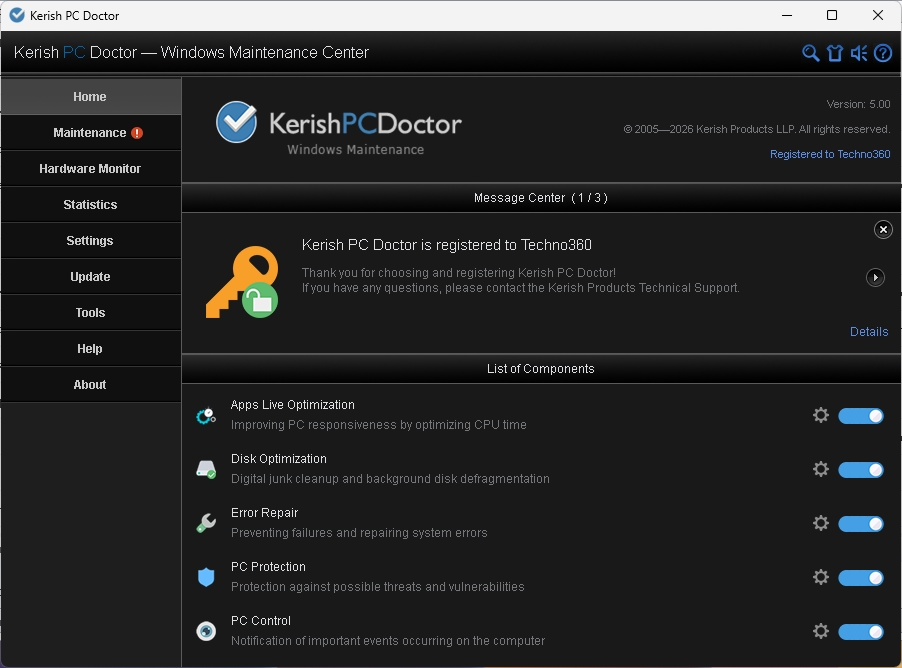
We installed version 5.00 on a Lenovo laptop with an AMD Ryzen 5 4600H, a GeForce GTX 1650, an SK Hynix SSD and a WD hard drive, then activated it with a key from this giveaway. Before activation the About screen showed a 15-day trial; after entering the key, the home screen read “Registered to Techno360”.
First-run setup: real-time or classic mode
Right after installation, a Welcome window asks how you want the app to work. Real-time mode (the recommended option) starts Kerish with Windows and runs in the background. Classic mode only runs when you open it yourself. You also choose the interface language, one of four themes, sound notifications and Windows context-menu integration.
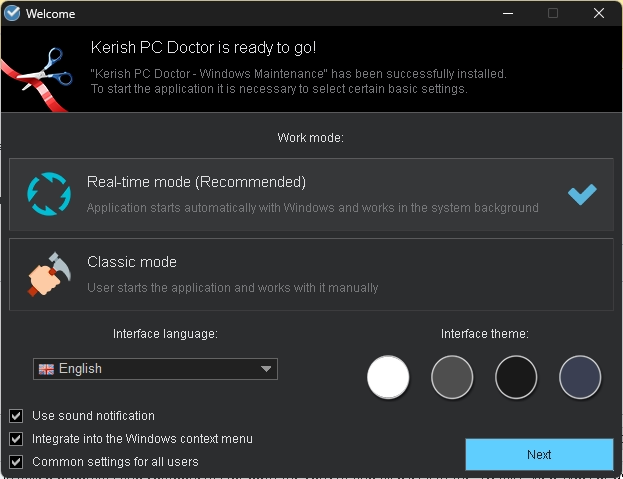
If you already have a lot running at startup, Classic mode is the lighter choice. You can still run scans and tools whenever you like.
Background components
In real-time mode, the home screen lists five components you can switch on or off: Apps Live Optimization (CPU time for responsiveness), Disk Optimization (junk cleanup and background defrag), Error Repair, PC Protection and PC Control (alerts for important events). Each has its own settings gear.
Hardware Monitor
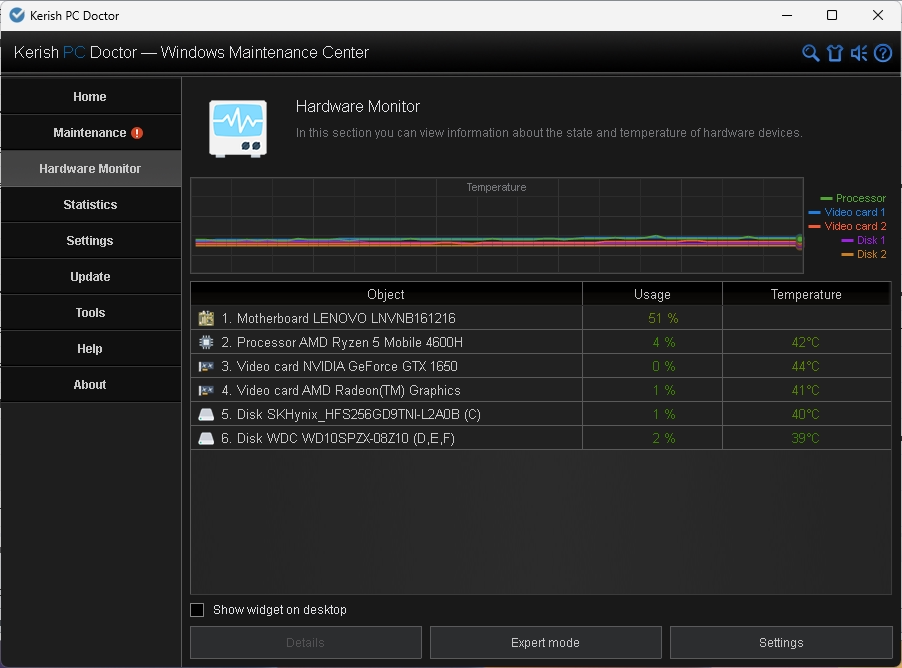
The Hardware Monitor picked up every component on our laptop, including both graphics chips and both drives. It showed live usage and temperatures, with the CPU at 42°C, the GTX 1650 at 44°C and the SSD at 40°C under light load. You can also pin a temperature widget to the desktop or switch to Expert mode for more detail.
Maintenance tools
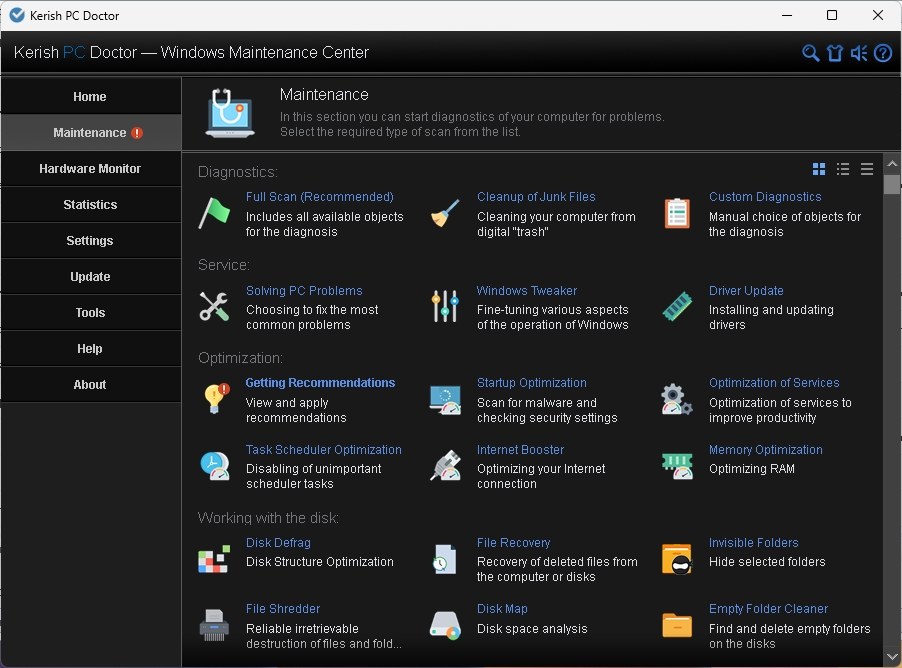
The Maintenance section is where most of the work happens. The first screen alone shows 18 tools, grouped into diagnostics (Full Scan, Junk Cleanup, Custom Diagnostics), service (Solving PC Problems, Windows Tweaker, Driver Update), optimisation (Recommendations, Startup, Services, Task Scheduler, Internet Booster, Memory) and disk tools (Defrag, File Recovery, File Shredder, Disk Map, Empty Folder Cleaner). The new Invisible Folders tool from 5.00 sits here too.
Is Kerish PC Doctor safe?
We downloaded the official installer on 23 November 2026. The file (Kerish_PC_Doctor_5.00.exe, 46.7 MB) reports version 5.00 and Kerish Products LLP as the publisher, matching the developer’s own listing.
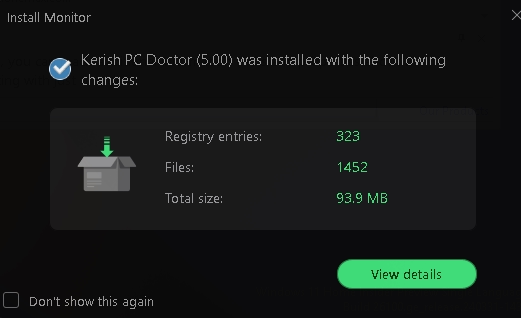
Our install monitor logged what setup added: 1,452 files, 323 registry entries and 93.9 MB on disk.
Kerish Products has been around since 2005, and BitsDuJour links a virus scan from the giveaway page. As with any tool that tweaks Windows and the registry, create a restore point before you apply a large batch of fixes, and review the list instead of accepting everything at once.
Who should grab it, and who can skip it
👍 Grab it if you want one hands-off tool that cleans, tweaks, updates drivers and watches hardware temperatures, especially on an older laptop or a family PC.
👎 Skip it if you already run a full antivirus suite plus a cleaner you trust, or you prefer free, permanent tools over a licence that runs out in a year.
More free PC optimisation tools on Techno360
- Kerish Disk Health free licence key: monitor HDD and SSD health
- Wise Care 365 Pro 8 giveaway with a lifetime licence
- Ashampoo WinOptimizer 28 free licence key
- Advanced SystemCare 20 Pro free licence key
- Driver Booster 14 free 6-month Pro licence
- 7 best free driver updaters for Windows 11
📊 Our Verdict
In our test, Kerish PC Doctor 5.00 installed cleanly, activated first time with the giveaway key and detected all our hardware. It is a solid set-and-forget maintenance suite, and a free year of the newest version is worth claiming if you want automatic cleaning, tweaks and hardware alerts without juggling several apps. Just remember the licence expires after 12 months.
👍 Pros
- Latest 5.00 release with 50 new tweaks and faster cleanup
- Runs unattended in the background
- Hardware Monitor detected every CPU, GPU and drive in our test
- Choice of real-time or manual Classic mode
- Updates and support included during the licence
👎 Cons
- Stops working after one year
- One PC, personal use only, no transfers
- Its malware protection isn’t a replacement for a full antivirus
Frequently asked questions
Is the Kerish PC Doctor giveaway really free?
Yes. The 1-year licence costs $0 at BitsDuJour checkout until the deal ends around midnight Pacific time on 24 November 2026. You only need a free BitsDuJour account.
Which version does the free licence key work with?
It works with Kerish PC Doctor 5.00, the latest version released on 8 November 2026. Updates are free while the licence is active.
What happens after the 1-year licence ends?
BitsDuJour’s terms say the program will no longer work after 12 months unless you renew. You can uninstall it or buy a renewal from Kerish Products.
Can I use the key on more than one PC?
No. Each key activates one computer and cannot be transferred. Activation is online and tied to your PC’s hardware.
Does Kerish PC Doctor work on Windows 11?
Yes. The developer lists support for Windows 11, 10, 8.1, 8 and 7, with one installer for 32-bit and 64-bit systems.
Is Kerish PC Doctor the same as Kerish Doctor?
Yes. The app was long sold as Kerish Doctor; the developer now calls it Kerish PC Doctor. The BitsDuJour checkout still lists it as “Kerish Doctor (License key for 1 year)”.