
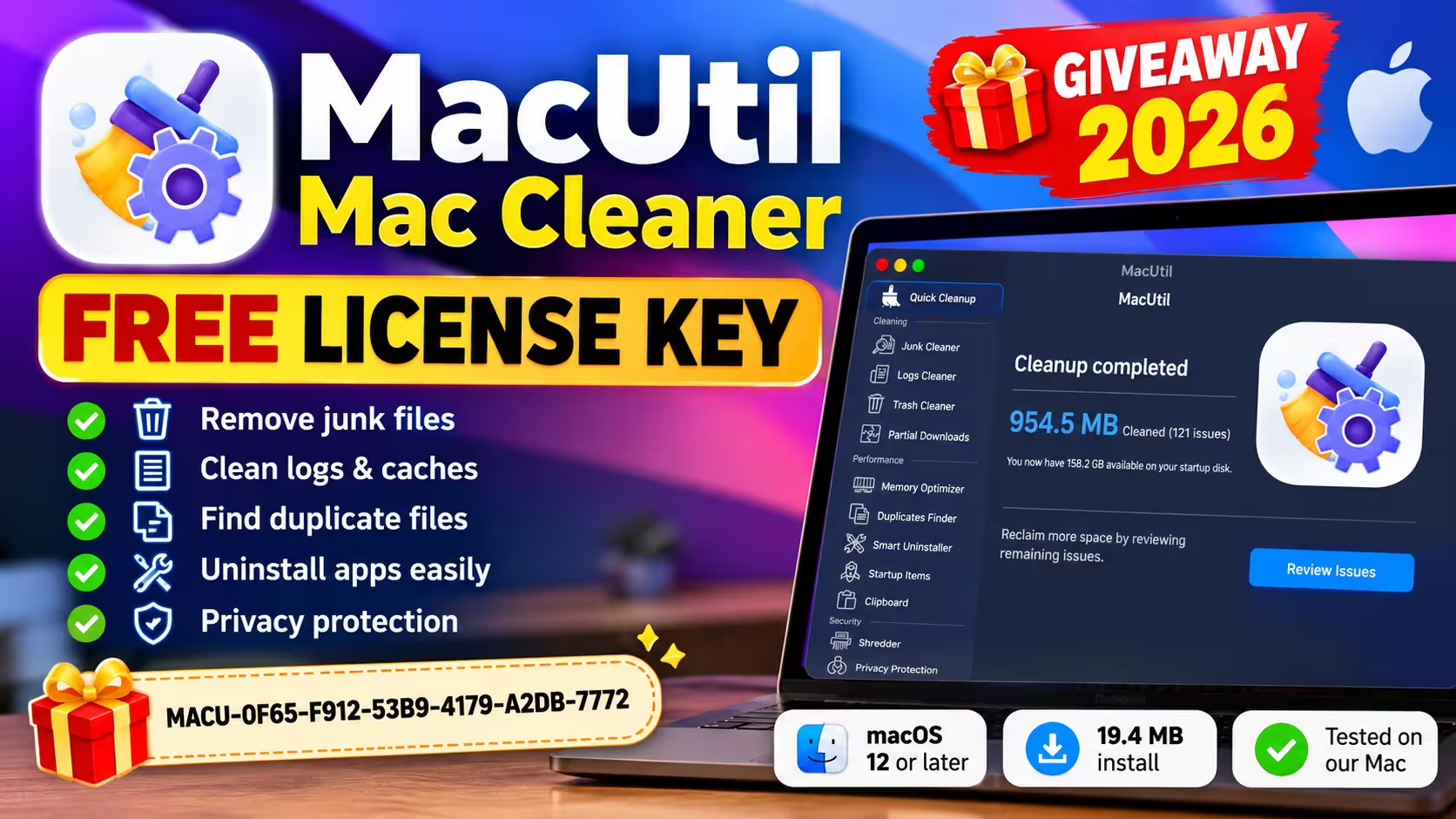
🎁 MAC GIVEAWAY · TESTED ON OUR MAC · 19 OCT 2026
Free MacUtil license key: try the paid Mac cleaner at no cost
MacUtil from iSolve Software is normally a paid subscription. This page gives you a promotional key, the official download and the exact activation steps I followed on my own Mac.
The key worked on my Mac on 19 October 2026. The developer hasn’t said how long it stays valid or whether the activated license expires.
macOS 12 or later19.4 MB installKey activated ✔
⚡ QUICK READ
- What it is: an all-in-one Mac cleanup app with a one-click scan, an uninstaller, a duplicate finder, an app locker and a file shredder.
- What you get: a giveaway key that activated the paid features on my Mac, so the “Clean Now” button actually deleted things.
- How long it lasts: not disclosed by the developer. The key worked during my test on 19 October 2026.
- My result: MacUtil reported 954.5 MB of caches and logs cleaned on a Mac that I already keep fairly tidy.
- Worth it? Yes as a free tool. I wouldn’t pay a subscription for it, and the scare-style warnings need ignoring.
Getting the MacUtil license key
Here’s the giveaway code again. Copy it exactly, including the dashes. It’s a single shared promotional key, so it may stop working if the developer ends the promotion. If it fails for you, leave a comment and I’ll check it again.
MACUTIL GIVEAWAY KEY
MACU-0F65-F912-53B9-4179-A2DB-7772
⬇ Download MacUtil (.pkg) Developer website
The download comes straight from the developer. If the page loads but nothing downloads, the same page has a manual download link a little further down.
What MacUtil actually does
MacUtil is made by iSolve Software Services Ltd, a company based in Jaipur, India. It’s the kind of tool you’d compare with CleanMyMac or IObit’s MacBooster: one window, a sidebar of modules, and a big round button in the middle.
After activation, the sidebar on my copy was split into four groups:
| Group | Modules |
|---|---|
| Cleaning | Junk Cleaner, Logs Cleaner, Trash Cleaner, Partial Downloads (all four run together as Quick Cleanup) |
| Performance | Memory Optimizer, Duplicates Finder, Smart Uninstaller, Startup Items, Clipboard |
| Security | Shredder, Privacy Protection (browser history, cookies, caches), LockMyApps (password-locks chosen apps) |
| Safe Cleaning | Large Files |
The developer lists macOS 12 Monterey or newer as the requirement. The installer itself only asked for 19.4 MB of disk space. The developer says the app is notarized by Apple, meaning Apple’s automated service checked it for known malicious content. That’s a useful security check, but it isn’t App Store review and it doesn’t guarantee an app is free of every problem. The developer points this out on its own site, which I appreciated.
How I installed and activated it (step by step)
I did this on my own MacBook on the evening of 19 October 2026. These steps follow what happened on screen, not a press release.
1. Run the installer
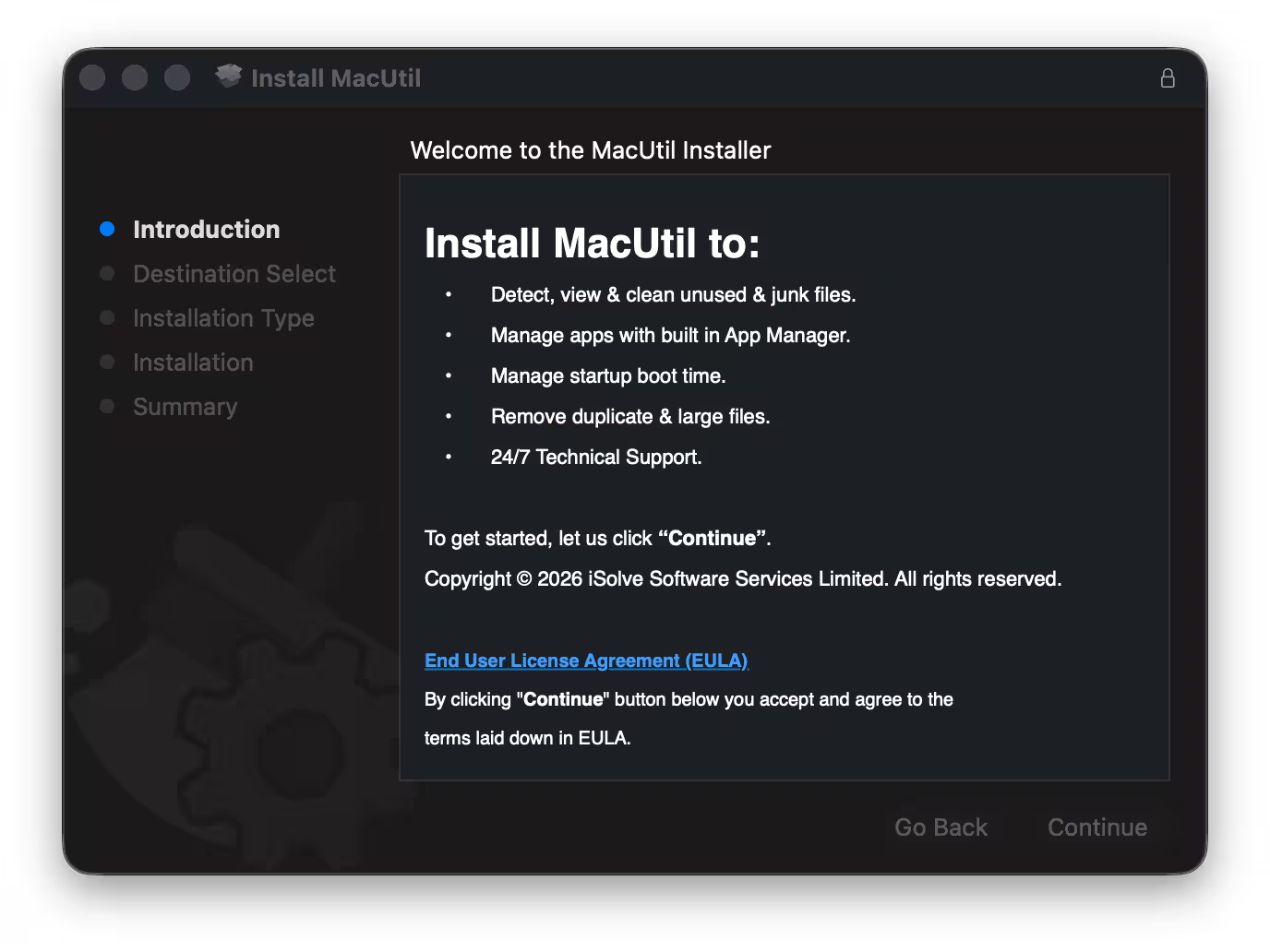
Open the downloaded macutil.pkg. The standard macOS installer walks you through five stages: Introduction, Destination Select, Installation Type, Installation and Summary. Clicking Continue on the first screen means you accept the EULA, so give it a glance if that matters to you. Then click Install and enter your Mac password.
2. Decide on Full Disk Access
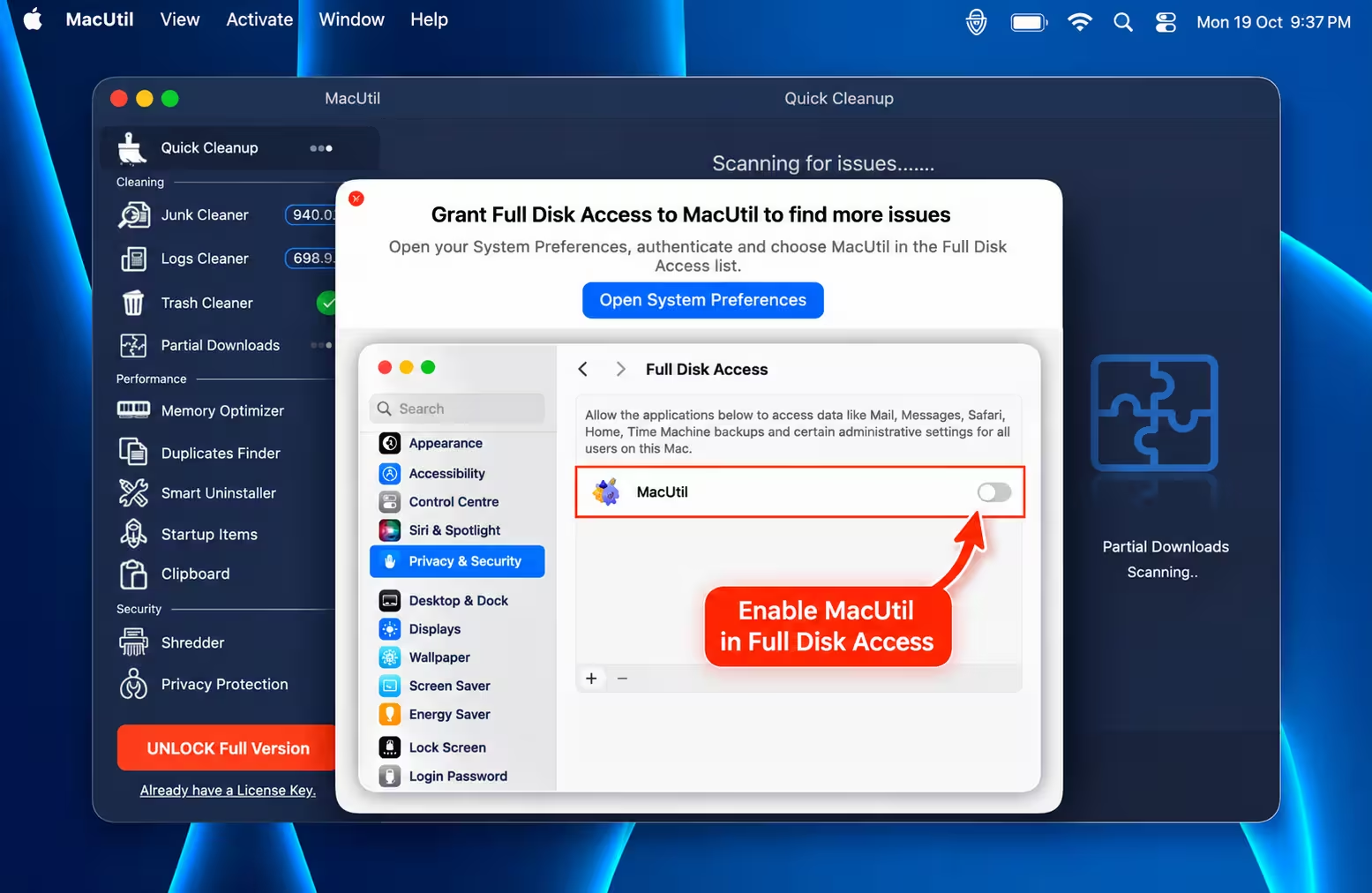
MacUtil starts scanning the moment it opens, and almost straight away it asks for Full Disk Access. You’ll also see a macOS notice that software from “I Solve Software Services Limited” can run in the background.
Full Disk Access is a big permission. In Apple’s own words on that settings screen, it lets an app reach data such as Mail, Messages, Safari, Home and Time Machine backups, plus certain administrative settings, that macOS normally keeps off-limits. A cleaner wants it to reach more caches, but grant it only if you’re comfortable with that, and you don’t have to say yes. Close the prompt and the app still works, it just finds less. I granted it for this test and switched it off afterwards in System Settings → Privacy & Security → Full Disk Access.
3. Paste the key
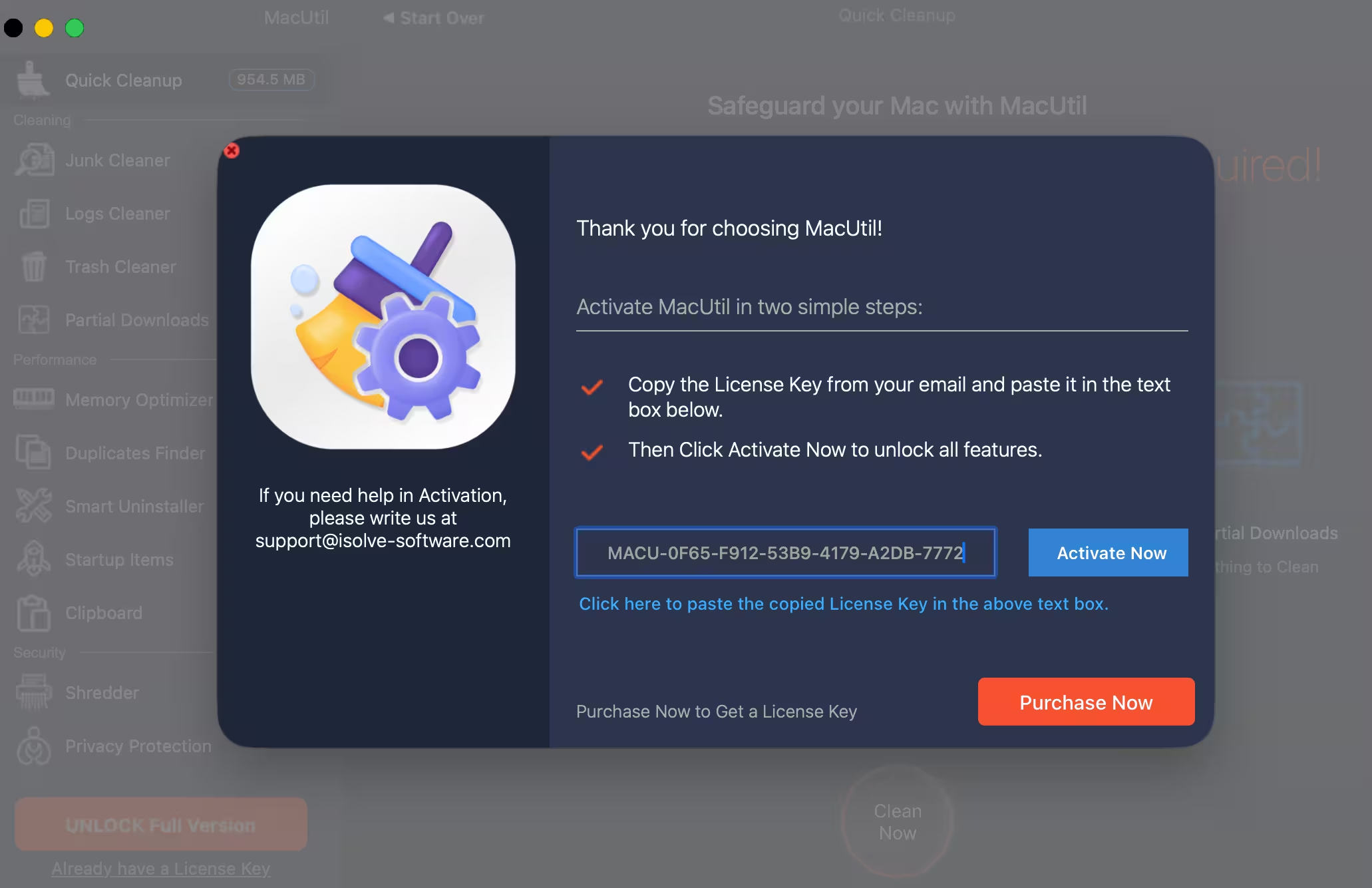
Click Already have a License Key under the orange unlock button at the bottom left, or use the Activate menu at the top of the screen. Paste the code (there’s a link under the box that pastes it for you) and hit Activate Now. On my Mac it went through on the first attempt, no account or email needed.
4. Clean
Back on Quick Cleanup, press Clean Now. Before activation that button only leads to the purchase page. After activation it really deletes the selected items.
My test results: 954.5 MB cleaned
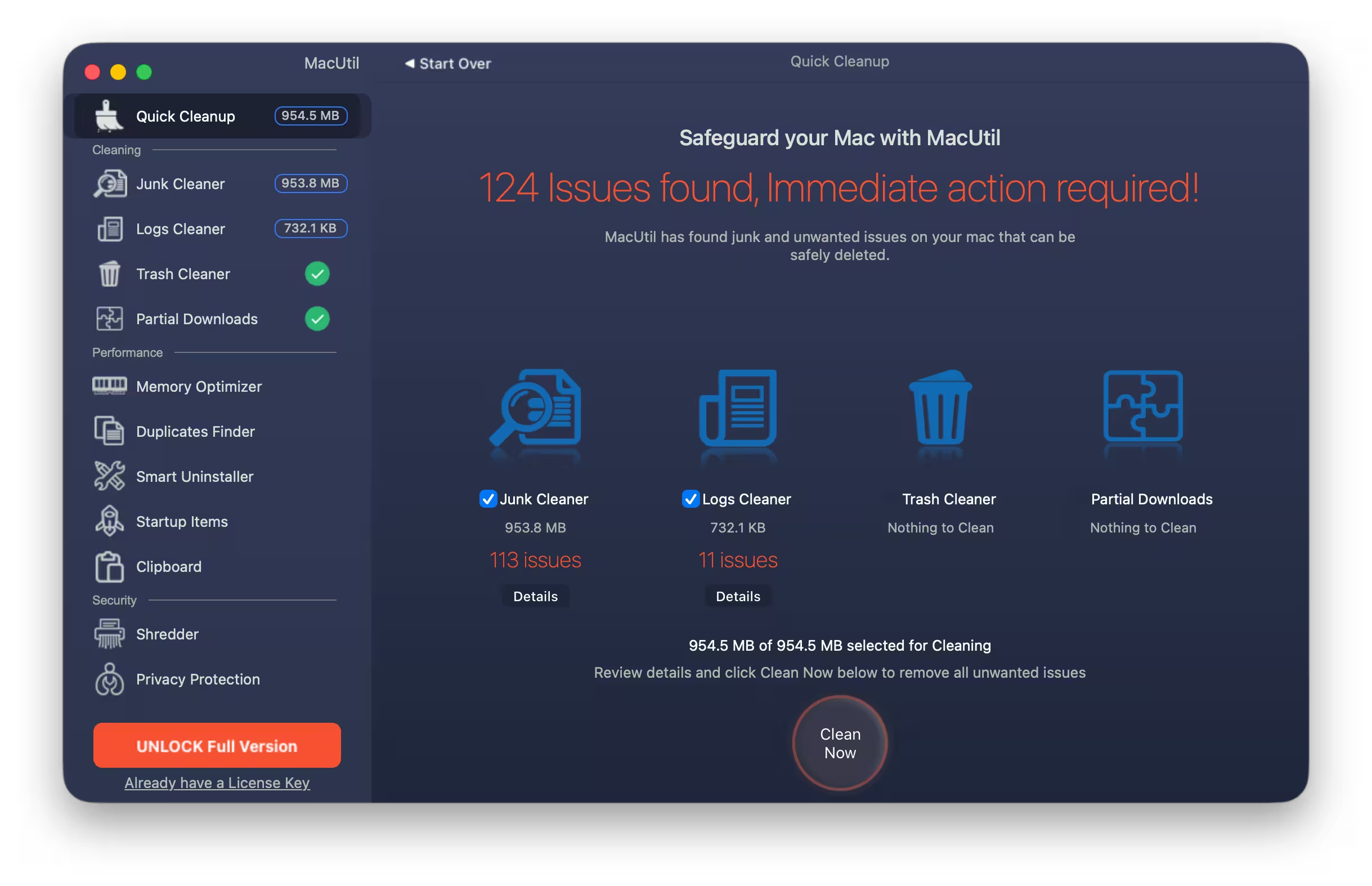
The first scan reported 124 items. Nearly all of it was junk (953.8 MB across 113 items), with 732.1 KB of old logs. My Trash and unfinished downloads were already empty, and the app correctly said there was nothing to clean there.
After I pressed Clean Now, MacUtil reported 954.5 MB cleaned (121 issues) and showed 158.2 GB free on my startup disk. The issue count dropped from 124 to 121 between scan and clean. The app didn’t explain why. My guess is that a few cache files had already changed in the meantime, but I can’t confirm that. Keep in mind that 954.5 MB is MacUtil’s own reported total. I didn’t measure free space independently before and after.
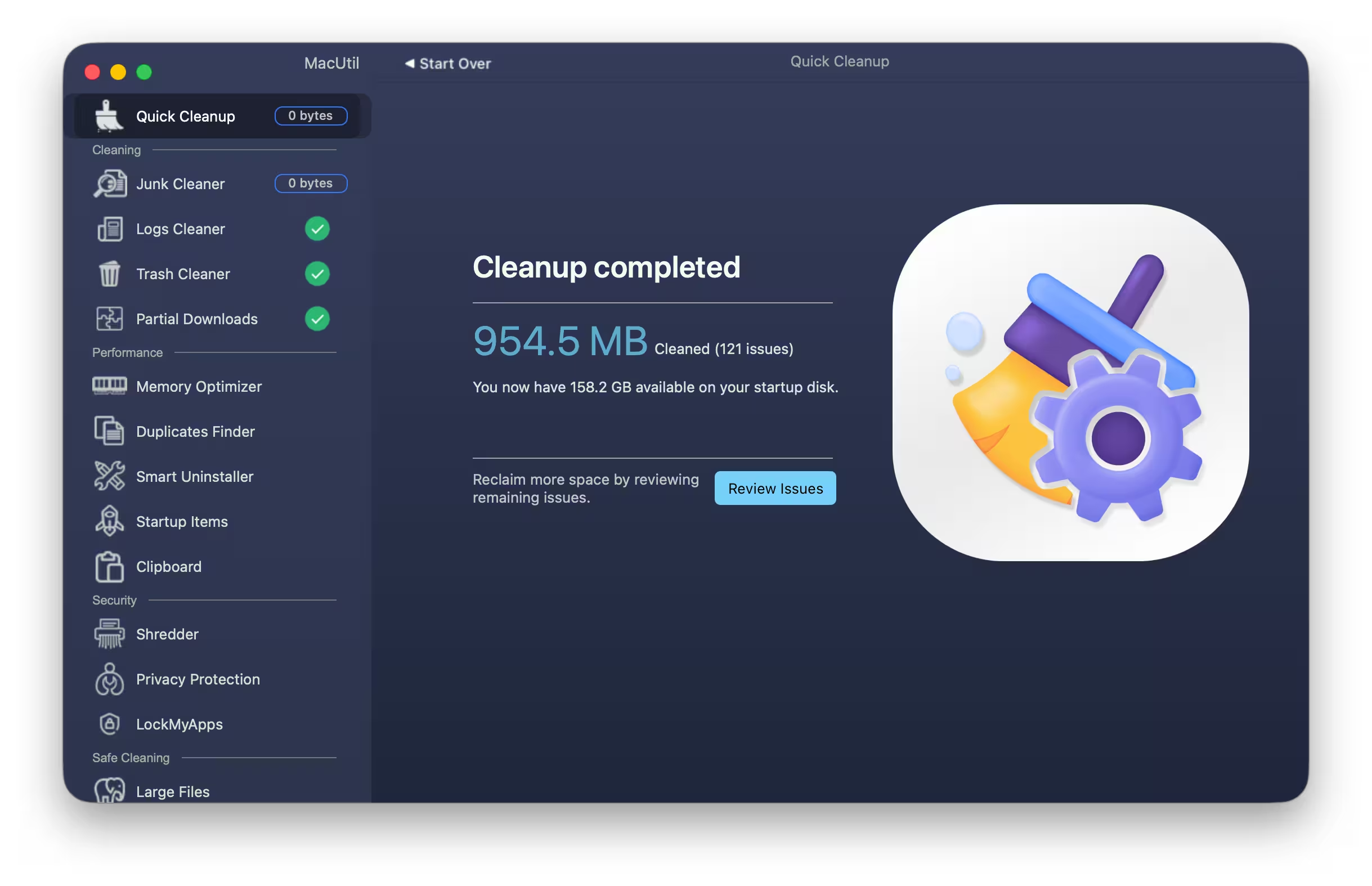
To be fair about what that number means: almost a gigabyte of caches on a Mac that’s in daily use is completely normal. Apps rebuild many of these files within days. You get the space back, but it isn’t a hidden problem being fixed. I didn’t run speed benchmarks, so I’m not going to tell you your Mac will boot faster or launch apps quicker. The developer makes those claims; I haven’t measured them.
What I liked, and what bugged me
👍 The good bits
- The layout is clean and easy to read. Every module is one click away in the sidebar.
- Each result has a Details button, so you can see what’s being removed before you delete it.
- Activation is instant and needs no sign-up.
- LockMyApps and the Shredder are handy extras you don’t usually find in free cleaners.
- The developer publishes uninstall instructions, which isn’t always the case with this kind of app.
👎 The not-so-good bits
- The big red “Immediate action required!” headline over ordinary cache files is pure scareware styling. Nothing on my Mac needed urgent action.
- The Privacy Protection screen says it scans “your entire PC”. A small thing, but it reads like text copied from a Windows product.
- Memory optimizers do little on modern macOS. The system manages RAM well on its own, and any “freed” memory fills up again quickly.
- The regular price is a recurring subscription, not a one-time purchase. On the Indian site I saw ₹599.97 (marked down from ₹999.95), and the international page shows $24.99. That’s steep next to the free tools already built into macOS.
⚠️ Before you clean anything: have a recent Time Machine backup, review the Details list before pressing Clean Now, and be extra careful with the Shredder. Shredded files can’t be recovered.
Free alternatives already on your Mac
You don’t strictly need a third-party cleaner. macOS has its own storage tool under System Settings → General → Storage, which lists big files, old downloads and apps you rarely open. Where MacUtil earns its place is speed and convenience: one scan pulls caches, logs and leftovers together instead of making you dig through Finder.
If you want to compare, we’ve also covered Magoshare AweCleaner for Mac and rounded up the 25 best free Mac apps of 2026. For more Mac giveaways and macOS tips, see our Mac section.
📊 TECHNO360 VERDICT
Worth grabbing while the key works: 3.5 / 5
MacUtil did what it promised on my Mac. It found close to a gigabyte of junk, showed me what it was, and reported removing it without breaking anything. The interface is tidy and activation took seconds. I’d knock points off for the alarmist warnings, the Windows-flavoured text and a price that’s hard to justify. For free, though, it’s a convenient one-click cleanup tool to keep around.
- Get it if: you want a quick, visual way to clear caches, leftovers and duplicates.
- Skip it if: you’re happy with macOS Storage settings or don’t want to grant Full Disk Access.
Frequently asked questions
Is the MacUtil giveaway key free and legal?
It costs nothing, and you aren’t using a crack or a modified build: the installer comes straight from the developer’s own website, and the key goes into MacUtil’s built-in activation window. It activated the paid features on my Mac on 19 October 2026. The developer hasn’t published terms for this particular promotional key, so I can’t tell you how widely it’s meant to be shared or how long it will keep working.
How long does the free MacUtil license last?
The developer hasn’t disclosed how long the giveaway key stays valid or whether the activated license expires. All I can confirm is that it activated the paid features on my Mac on 19 October 2026.
Does MacUtil work on Apple Silicon Macs?
The developer lists macOS 12 or later as the only requirement and doesn’t mention chip limits. My test ran without any problems, but I didn’t test on an Intel Mac.
Is MacUtil safe to use?
Here’s what I saw myself: macOS identified the app as coming from I Solve Software Services Limited, and on my Mac it removed only caches and logs, with nothing breaking afterwards. The developer says the app is notarized by Apple, but notarization is an automated malware check, not a guarantee. As with any cleaner, review the Details list before you delete anything and keep a backup.
Do I have to give MacUtil Full Disk Access?
No. Without it the scan finds less, but the app still works. If you grant access for a deep clean, you can switch it off again in System Settings → Privacy & Security → Full Disk Access.
How do I uninstall MacUtil?
Quit the app, including its menu bar icon, and move it from Applications to the Trash. The developer also publishes an uninstall guide on its website for removing the leftovers.
How we tested: I downloaded MacUtil from the developer’s site, installed it on my own MacBook and activated the giveaway key on 19 October 2026. All the numbers in this post come from that one cleanup run. Pricing and requirements are from macutil.com on the same day. Techno360 isn’t paid by iSolve Software for this post. — Ramakanth, Techno360