

Are you looking to securely erase your Android device before selling it or giving it away? Do you want to ensure that your old phone or tablet’s stored information, such as photos, videos, messages, contacts, and more, remains secure? If so, try an efficient and trustworthy app like MobiKin Eraser for Android.
MobiKin Eraser for Android is a reliable and professional data-erasing application for Android users. You can permanently delete everything on your Android device with just one click, making it the best option for privacy-conscious users.
Contents
A quick rundown of the MobiKin Eraser for Android:
We store a tremendous deal of sensitive information on our mobile devices, including our contacts, call logs, messages, photos, videos, browsing history, passwords, and more.
You shouldn’t want your personal information to fall into the wrong hands when it’s time to get a new device or pass on the one you have.
With the right software, you can recover data from a device even if you’ve deleted it. This is where MobiKin Eraser for Android becomes useful.
When used as intended, this potent tool can completely and irretrievably wipe all data from Android devices. It works with all versions of Android. This software can permanently erase all existing and deleted private data, system settings, etc. on Android phones and tablets.

How to Use MobiKin Eraser for Android?
It’s very simple to operate. Start up the program while simultaneously linking your Android device to your computer via USB or Wi-Fi.
Allow USB debugging by following the on-screen prompts. This also sets up the Mobikin Assistant app on your Android device.
Once this is done, the Mobikin app’s main window on your PC will show your Android device next to a “Erase” button.
Click the “Erase” button
You should then handpick the desired level of security. Select from “low,” “medium,” or “high” security to delete data as needed.
Type “delete” in the box and click “Erase.” It will then search for and erase everything on your device, including files you had already gotten rid of.
Once the erasing process is complete, MobiKin Eraser will reboot your device and restore it to its original factory settings.
Once you erase all your personal data from your device, it will return to its original state. There is no risk to your privacy if you sell or donate this.

Get MobiKin Eraser for Android for Free:
Download the Mobikin Eraser from the developer page.
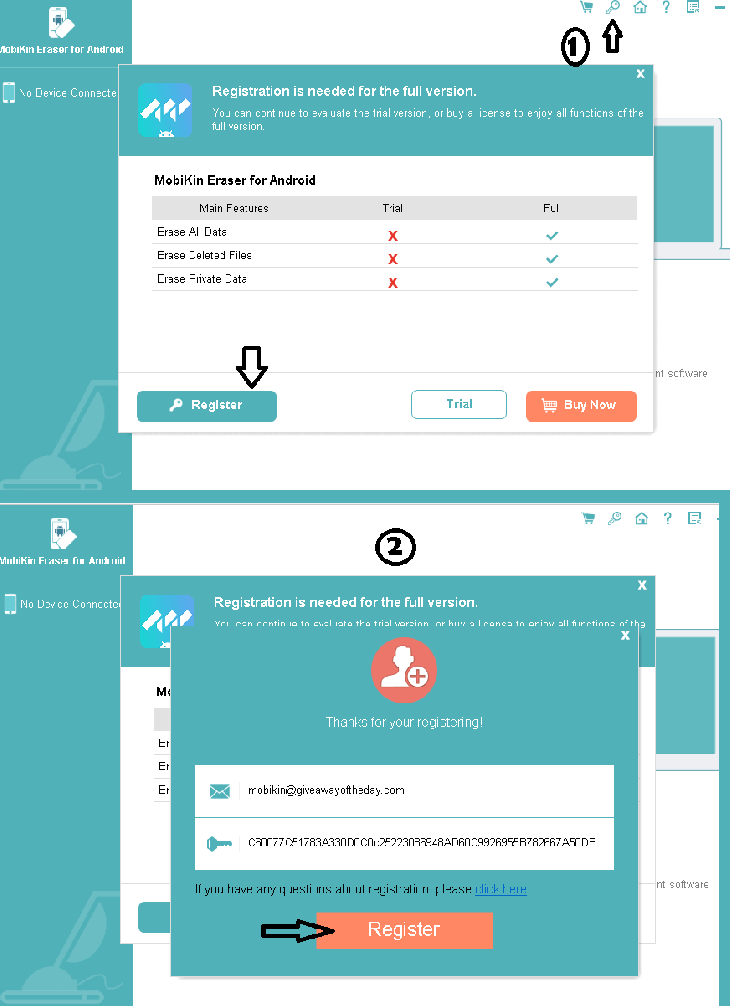
Install the software, launch the app, and then click the “Key” icon at the top of the main window.
This will open an activation window; click “Register” and enter the activation information listed below.
Email ID: mobikin@giveawayoftheday.com
License code:
4300264C4082460021C0b21220185A70AD60CB996955B782B67A509B
Hit the “Register” button and unlock the full version.


Discover more from Techno360
Subscribe to get the latest posts sent to your email.
You must be logged in to post a comment.