
By Ramakanth · Techno360 · Updated November 12, 2026 · Retested on version 2.19.0
💧 Updated review · version 2.19.0
Seven weeks later, Rain Cleaner is a bigger and better program — and it now has a paid tier
I first reviewed Rain Cleaner 2.7.1 in September, when everything in it was free. I have now retested it on version 2.19.0. The cleaning is still careful and clearly explained, the interface is easier to read, and there are new tools. The main change is that Pro has launched, and one-click driver installs have moved into it.
⬇ Download Rain Cleaner (Free)
Disclosure: The developer, Where2Go LTD, gave me a Pro key for this retest and 200 Pro keys for a reader giveaway. They set no conditions on what I write. The findings below are from my own test.
⚡ Quick Read
- What it is: a Windows 10 and 11 cleaner with a driver updater, game booster, hardware reader and ransomware decoy guard.
- Version tested: 2.19.0, a 63 MB installer, on a Windows 11 laptop on November 10, 2026.
- Cleaning result: it found 3.1 GB, pre-selected 1.1 GB of safe items, and freed that 1.1 GB (261 items).
- Biggest change since 2.7.1: Pro has launched. Cleaning by hand is still free, but installing driver updates from inside the app now needs Pro.
- Price: free version with no account. Pro costs €5.99 a month, €34.99 a year or €74.99 once. Pro Plus costs more and adds Turbo Mode.
- One false alarm: the ransomware check flagged a harmless readme.txt as a ransom note.
- Verdict: 4.4 out of 5. The free version is enough for basic needs; Pro suits advanced users.
What changed between 2.7.1 and 2.19.0
I installed 2.19.0 on the same Lenovo laptop that still had 2.7.1 on it from September, so I could compare the two directly. This is what I saw.
| Area | Version 2.7.1 (September) | Version 2.19.0 (now) |
|---|---|---|
| Price | Everything free; Pro marked “coming soon” | Free, Pro and Pro Plus tiers |
| Home screen | Dashboard with four cards | Overview with the same four cards plus a PC health score out of 100 |
| Progress display | Spinners | A progress bar with a real percentage. Where a step cannot be measured, it says so |
| Installing driver updates | Free | Pro (“Install selected” and “Update Everything”) |
| New screens | — | Pro, Performance Lab, Recovery Link, History |
| Windows version shown | Showed “Windows 10” on my Windows 11 laptop | Correctly shows Windows 11 |
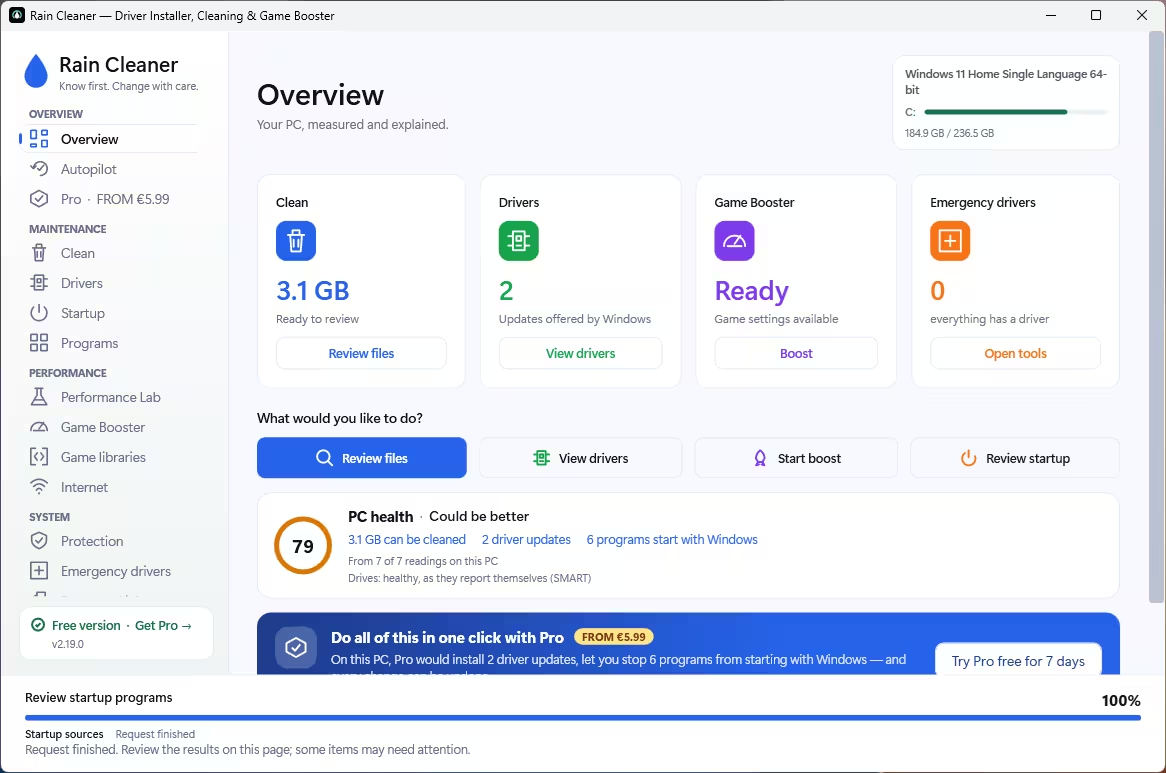
The new Overview in the free version: four cards, a PC health score, and a Pro offer at the bottom.
The developer told me the new look “replaces the old spinners with real percentages”. That matched what I saw. Finished steps show 100%, and during a driver check the bar said the step “cannot be measured” instead of showing an invented number.
How I tested it
- PC: Lenovo 82B5 laptop, AMD Ryzen 5 4600H, 24 GB RAM, NVIDIA GTX 1650, Windows 11 Home (an Insider Preview build).
- When: one evening session on November 10, 2026. This was shorter than the week I spent with 2.7.1.
- Order: I used the free version first, then activated the Pro key and ran the Pro tools.
- Not retested this time: the DNS tester, a real gaming session with Game Booster, and the phone-based Recovery Link.
Installation
The installer is a 63 MB MSI file with three screens: a welcome page, a language choice and an install confirmation. I saw no bundled software and no pre-ticked extras. Windows showed “Verified publisher: Where2Go LTD” when the program asked for administrator rights.
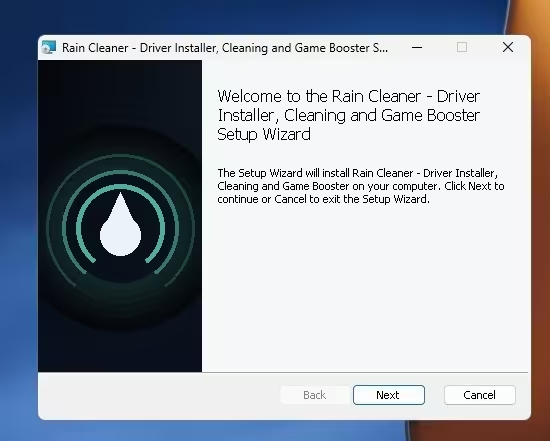
The setup wizard. It asks for a language and nothing else.
Cleaning: still the best part
The Clean screen works the way I liked in September. Each item shows its location, its size, a Safe or Mild label and a “What changes?” link. Safe items are ticked for you and Mild items are left for you to decide. It is the same read-before-you-delete approach as FluentCleaner for Windows 11.
On my laptop the scan found 3.1 GB:
- Ticked (Safe), 1.1 GB in total: Windows temporary files, user temporary files, the thumbnail cache, and setup and servicing logs.
- Not ticked (Mild): browser cache at 1.7 GB and the Windows Update store at 243 MB.
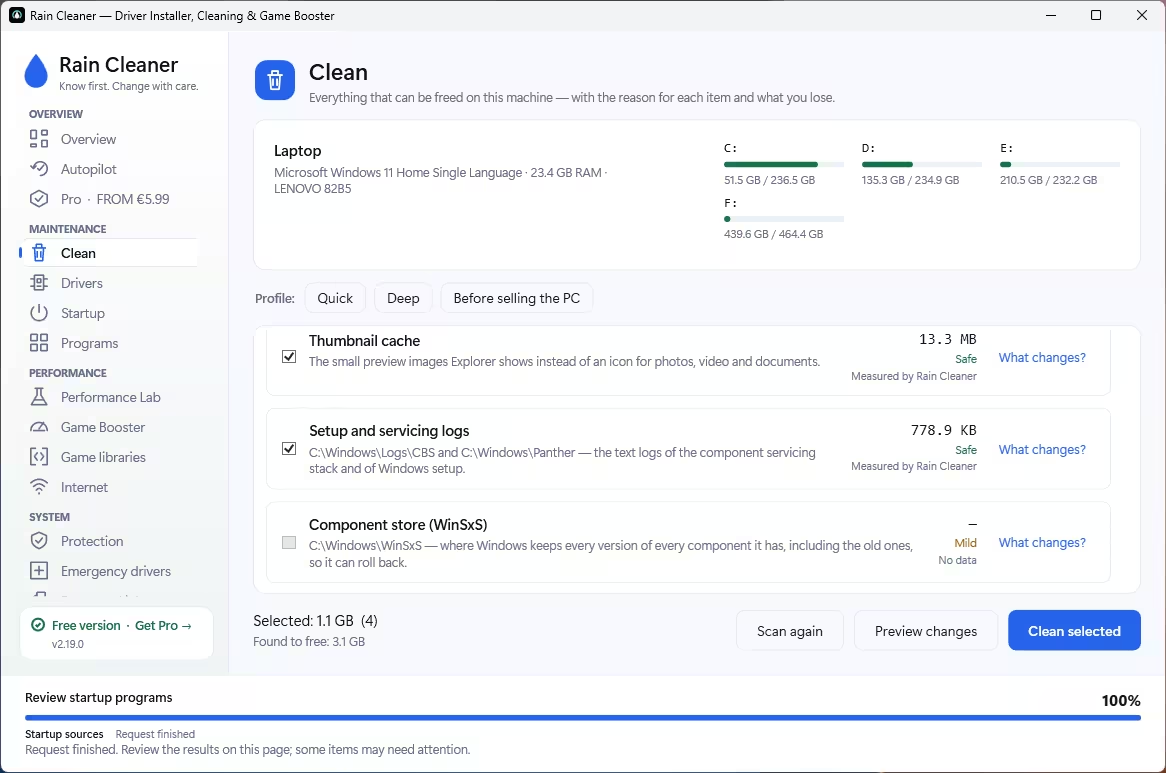
Every item has a size, a safety label and a “What changes?” link.
I cleaned only the ticked items. A confirmation box listed the four items first, then the program reported “You just freed 1.1 GB by hand”. Its own health report later recorded the clean as 1.1 GB and 261 items, and free space on the C: drive went from 51.5 GB to 52.5 GB. Windows and my usual programs worked normally afterwards.
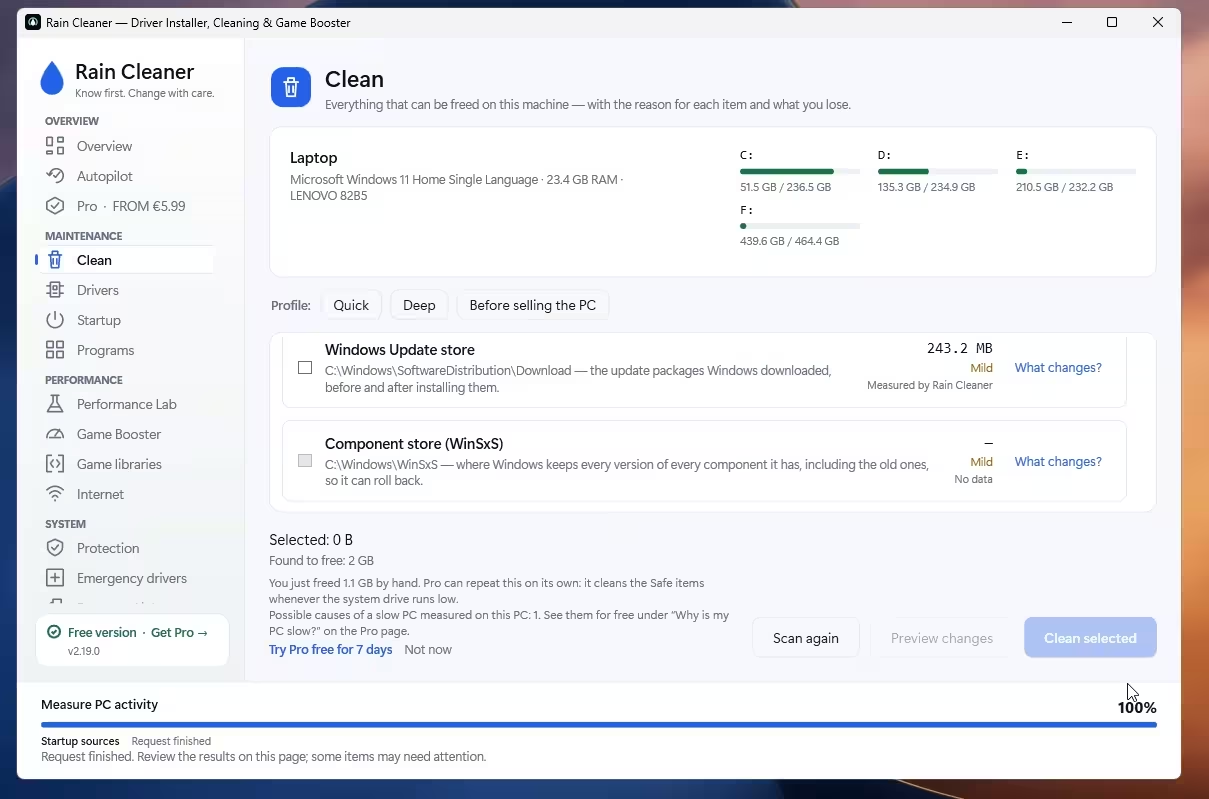
After the clean: 1.1 GB freed, with the Mild items still waiting for a decision.
There are also three cleaning profiles (Quick, Deep, and Before selling the PC) and a Preview changes button. I did not test the Deep or selling profiles.
Autopilot
Autopilot is the one-button option. “Check everything” looks at the whole machine and reports back; “Check and clean the safe part” also does the safe cleaning. After my manual clean, Check everything reported 2 GB still reviewable, 2 driver updates, no devices without a driver and no missing game runtimes.
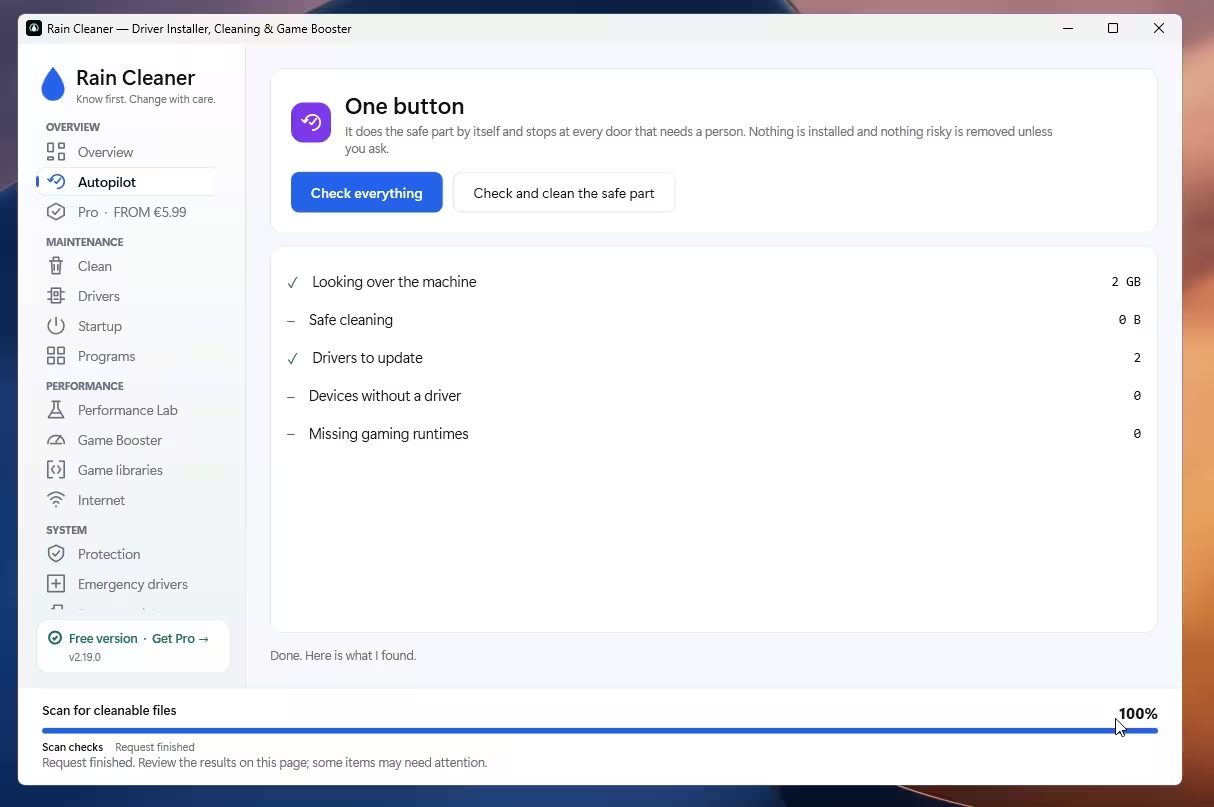
Autopilot’s report after checking everything.
Drivers: the part that moved to Pro
The Drivers screen still separates updates offered through Windows Update from links to the manufacturer’s own page (AMD, NVIDIA and Lenovo on my laptop). It listed 227 drivers and marked 43 as worth reviewing. Checking for updates and backing up drivers are free.
Installing is now a Pro feature. In 2.7.1 I could install the offered drivers for free. In 2.19.0 the “Install selected” button carries a Pro label. Free users can still see what is available and get the same drivers through Windows Update itself.
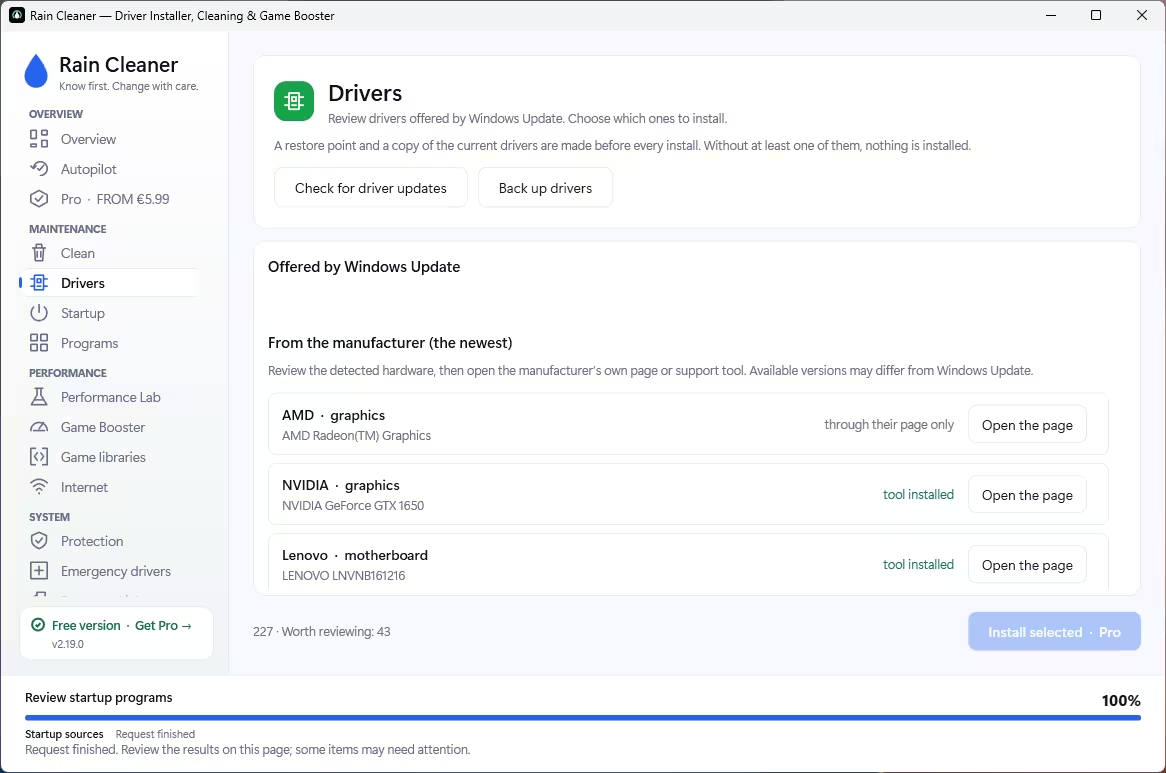
The Drivers screen in the free version. The install button is marked Pro.
With Pro active, I ran “Update Everything”. It warned me that it would create a restore point and back up the current drivers first. It then installed 2 of 2 drivers. It did not ask for a restart, and the display, Wi-Fi and sound all worked normally afterwards.
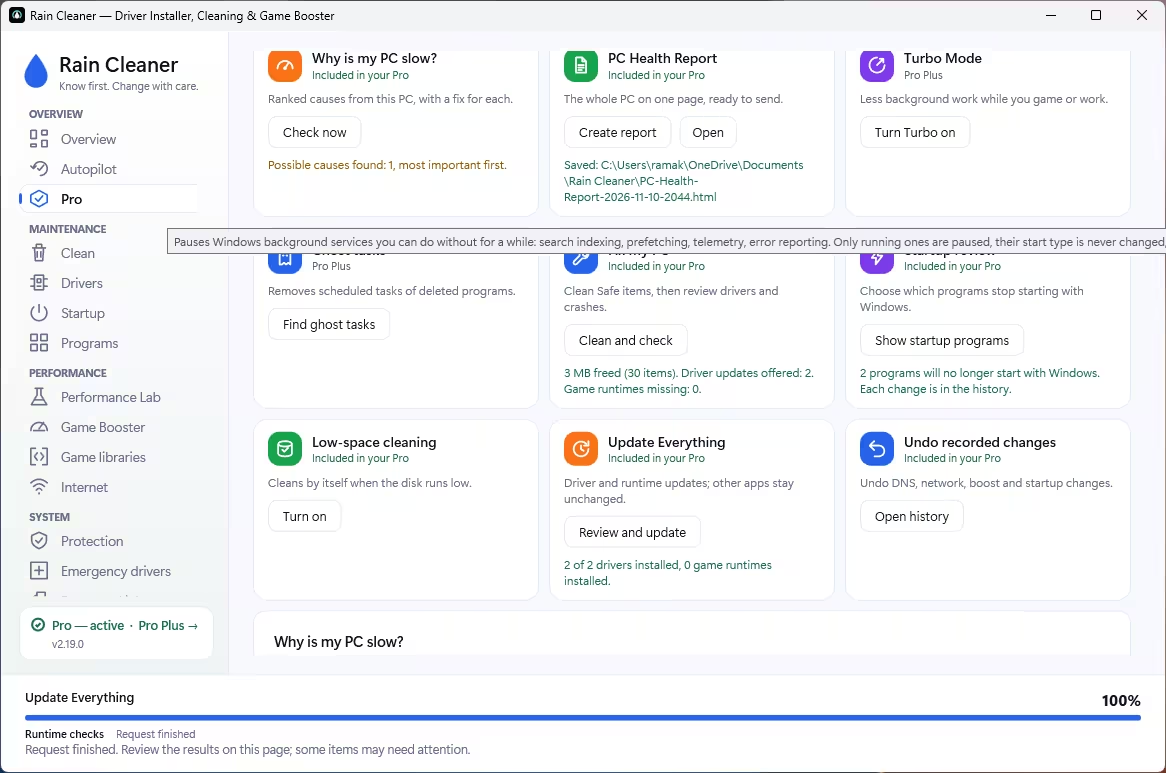
Update Everything finished with 2 of 2 drivers installed.
The new tools
Performance Lab
This screen reads your hardware: processor, memory, graphics, drive and screen. It has tabs for disk health, games and a new Eco view, plus two advisor tabs that need Pro. A line at the bottom says everything was read on the PC and stays on it.
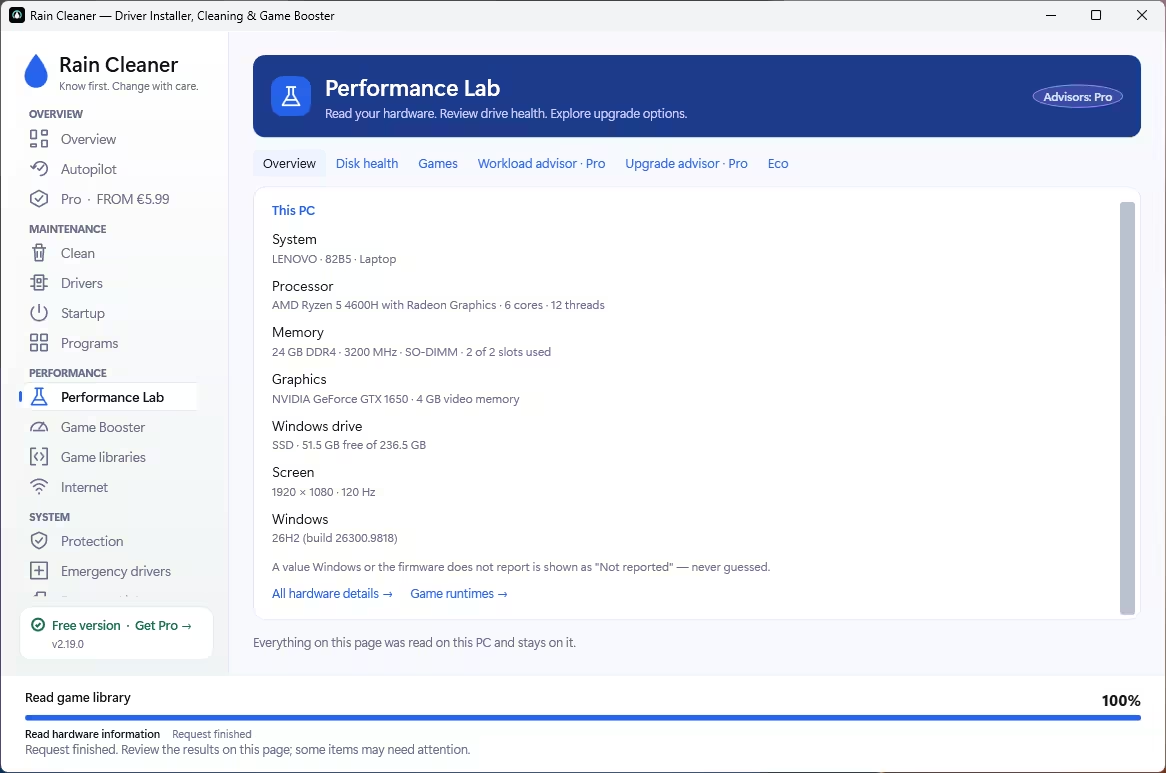
Performance Lab’s hardware summary.
Game Booster and Game libraries
Game Booster describes the same reversible changes as before: the power plan, Windows’ game scheduling and background programs. I opened it but did not test it in a game this time. Game libraries checks five runtimes that games often need, such as Visual C++ and DirectX, and installs missing ones through Microsoft’s winget. All five were already on my laptop.
Recovery Link and Emergency drivers
Emergency drivers is unchanged: it can build a USB rescue kit for a PC with no network driver. Recovery Link is new. It pairs an Android phone with the PC so the phone can help recover it if Windows stops starting. I did not test it.
Protection, and one false alarm
The Protection screen places decoy files in your folders and watches for programs that start encrypting them. I found three of these decoys in my Downloads folder, each clearly labelled as belonging to Rain Cleaner.
The check gave me a false alarm. It listed “A ransom note” at a file called readme.txt in my Documents folder. I opened it. It is an ordinary install guide from a software giveaway in 2022. It looks as if the check reacts to the file name, which ransomware often uses, and not to the contents.
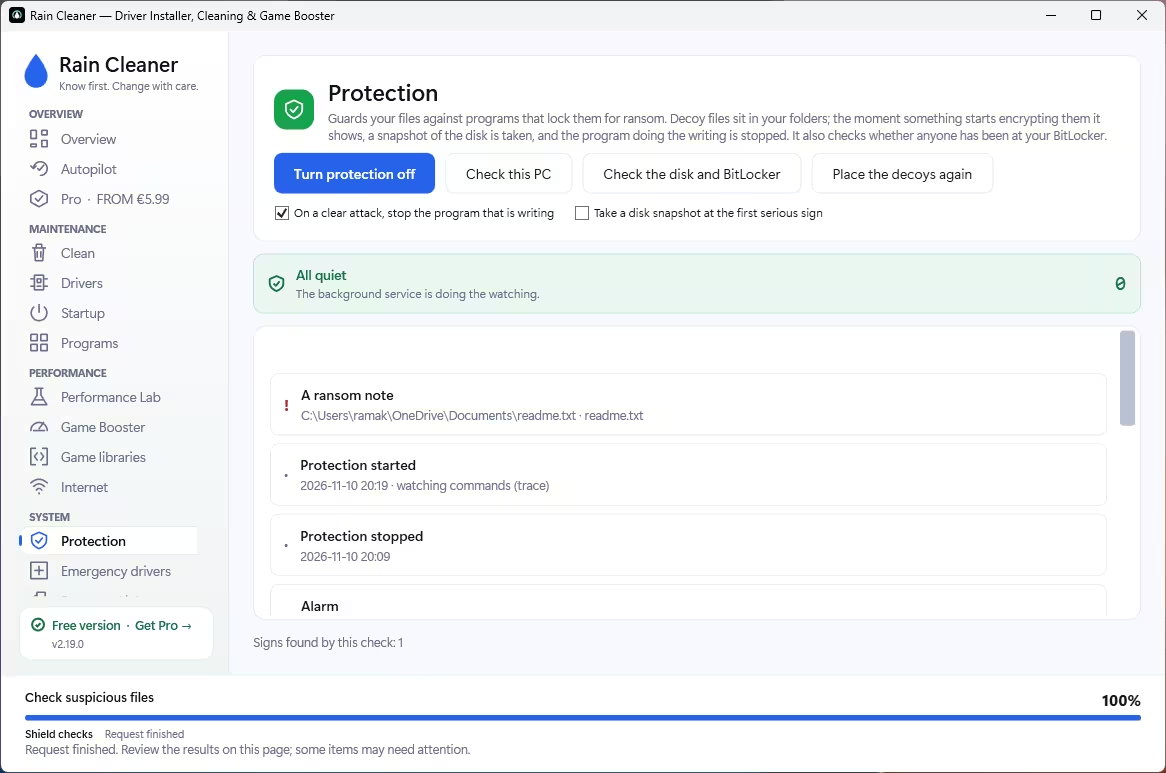
The Protection log, with my harmless readme.txt listed as a ransom note.
A correction to my September review: I wrote then that the guard “flagged a decoy ransom note”. After this retest, I think that entry was probably the same readme.txt false alarm, not a decoy. Rain Cleaner is still not an antivirus, and this module is an extra warning layer only.
Free vs Pro vs Pro Plus
The free version needs no account and showed no third-party ads or time limit in my test. It does promote Pro inside the app: there is a “Try Pro free for 7 days” banner on the Overview and a “Get Pro” link in the sidebar.
| Free | Pro | Pro Plus | |
|---|---|---|---|
| Price | €0 | €5.99 a month, €34.99 a year, or €74.99 once | €9.99 a month, €59.99 a year, or €119.99 once |
| PCs per key | — | 3 (as shown on my test key) | 5 |
| Clean by hand, with explanations | Yes | Yes | Yes |
| Check and back up drivers | Yes | Yes | Yes |
| Install driver updates in the app | No | Yes | Yes |
| Why is my PC slow?, PC Health Report, Fix My PC | No | Yes | Yes |
| Automatic and low-space cleaning | No | Yes | Yes |
| Turbo Mode, Ghost tasks, Deep Uninstall, Scheduled Autopilot | No | No | Yes |
Prices are the ones shown inside the app on November 10, 2026. Pro also has a 7-day trial that the app says needs no card and does not renew.
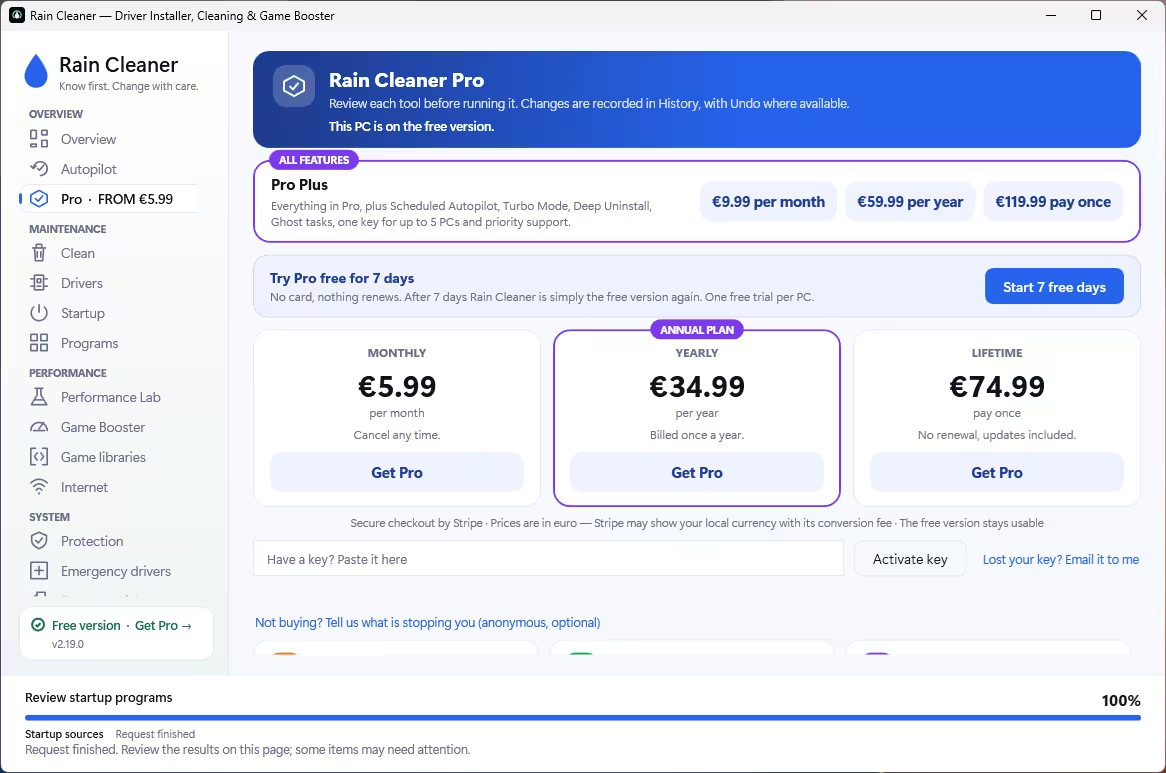
The Pro page in the free version, with the three Pro prices and the Pro Plus prices above them.
The Pro tools I ran
- Why is my PC slow? found one cause: six programs starting with Windows. It offered to switch them off.
- PC Health Report saved a one-page HTML report in my Documents folder. The report says user names, the computer name and serial numbers are removed.
- Fix My PC freed another 3 MB (30 items) and listed the 2 driver updates.
- Startup review stopped the 2 programs I chose from starting with Windows, and recorded the change in History.
- Turbo Mode is on the Pro page, but clicking it with a Pro key shows that it belongs to Pro Plus.
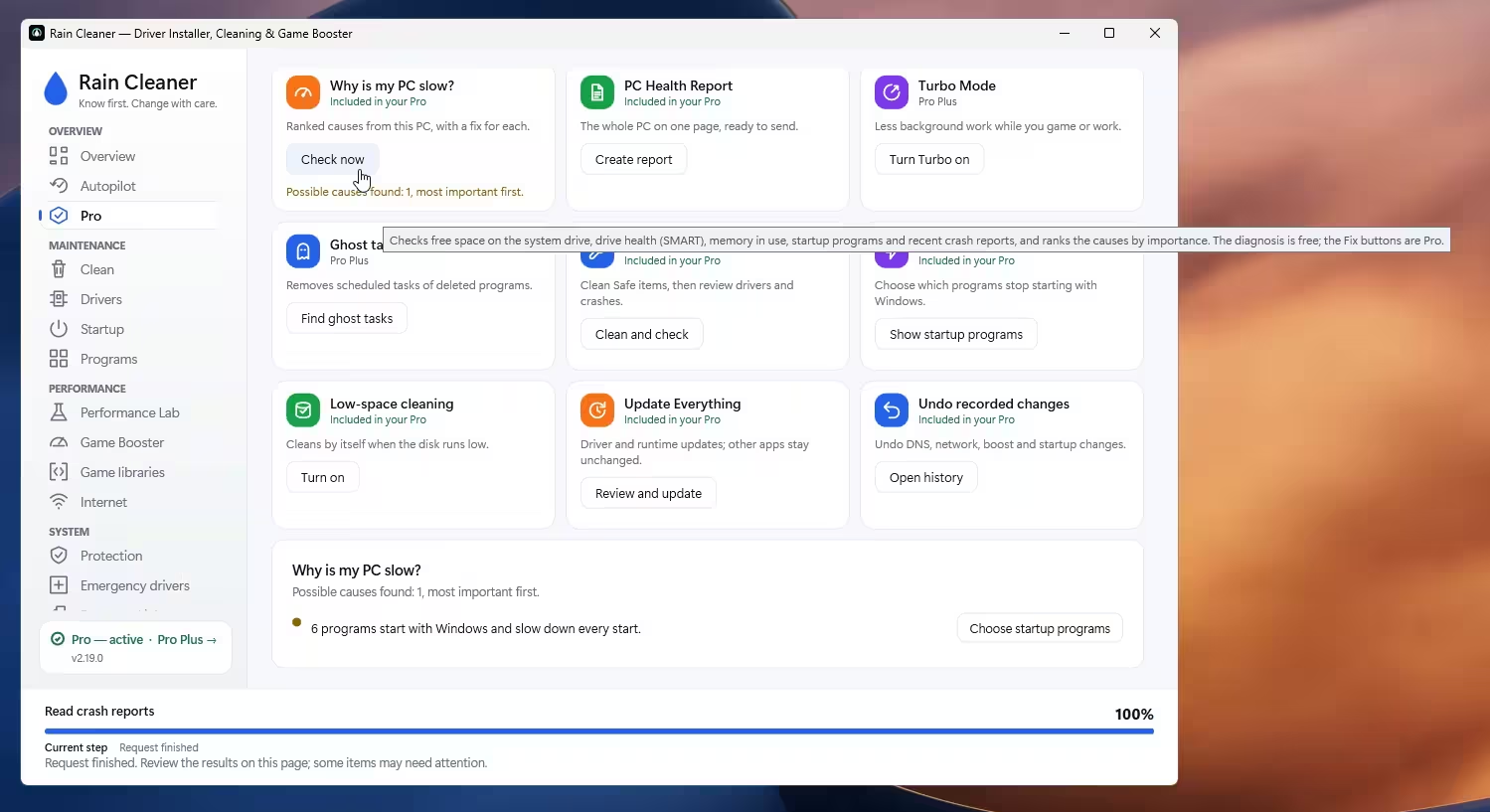
The Pro page after activation, with the result of “Why is my PC slow?”.
A Pro key can be moved. The “Move to another PC” button on the Pro page frees the licence on the current PC, switches it back to the free version, and lets you enter the key on another PC. The dialog says a key can be moved up to 3 times a month.
Pros and cons
👍 What I liked
- Cleaning explains every item and only pre-selects the safe ones.
- The progress bar is honest: real percentages, and a plain statement when a step cannot be measured.
- The installer is clean, with no bundled software, and the publisher is verified.
- Driver updates made a restore point and a backup first, and installed without problems.
- The free version needs no account and still does the core cleaning.
- A Pro key can be moved to another PC from inside the program.
👎 What I did not like
- Installing drivers was free in 2.7.1 and now needs Pro.
- The ransomware check flagged a harmless readme.txt as a ransom note.
- Some numbers are inconsistent. The Overview shows used space on C: while the Clean screen shows free space in the same style. Memory appears as 24 GB on one screen and 23.4 GB on another. The PC health score read 85 at first launch and 79 later in the same session.
- Turbo Mode and Deep Uninstall sit on the Pro page but need the more expensive Pro Plus.
- There is still no registry cleaner or secure file shredder, if you want those.
Who should use it?
If you want a tidy PC and like to see what a tool will remove before it removes anything, the free version is enough. It belongs with the light, focused tools in our 35 best free PC programs of 2026. Pro makes sense for advanced users who want driver updates, the slow-PC diagnosis and automatic cleaning in one place, or who look after more than one PC.
⬇ Download Rain Cleaner (Free)
✅ The Verdict — 4.4 / 5
Version 2.19.0 is much better than the 2.7.1 I tested in September. It is easier to read, more honest about what it is doing, and has more useful tools. The careful, explained cleaning that I liked is unchanged and still free.
The cost of that progress is the new paid tier. Driver installs have moved into Pro, and the best extras need Pro Plus. The ransomware check also needs work, because it gave me a false alarm.
How the 4.4 breaks down (six criteria, equal weight): transparency and control 4.9, cleaning 4.5, ease of use 4.7, drivers and rescue 4.5, performance and game tools 4.3, security depth 3.3. These average 4.37, rounded to 4.4. In September the score was 4.3.
Bottom line: use the free version for basic cleaning. Consider Pro if you are an advanced user who will use the driver and diagnosis tools.
Want Pro for free? I have 200 one-year Pro keys for readers. The Rain Cleaner Pro giveaway runs from November 12 to November 16, 2026.
Rain Cleaner runs on Windows 10 and 11. Version reviewed: 2.19.0. Developer: Where2Go LTD. First reviewed on September 22, 2026 (version 2.7.1).