

Listening to music at high volume feels great—until it doesn’t. That faint ringing in your ears after a long session? It’s not harmless. Long-term exposure to loud audio is one of the leading causes of hearing loss worldwide, and the worst part is that it happens gradually, without obvious warning.
That’s where SoundBrake comes in—a lightweight, free, and open-source app designed to protect your hearing quietly while you enjoy your favorite content.
Contents
What Is SoundBrake?
SoundBrake is a free, open-source desktop application that runs silently in your system tray and monitors your computer’s audio output in real time. Think of it as a smart, science-backed guardian for your ears—one that never nags you unnecessarily but steps in precisely when your hearing is at risk.
Available for Windows 10/11, macOS 12+, and Linux (Ubuntu/Fedora), SoundBrake is cross-platform, requires no account or internet connection, and weighs in at under 5 MB. It’s built entirely in Go, which means it’s blazing fast and uses virtually zero CPU or RAM while running in the background.
The project is MIT-licensed and hosted on GitHub, making it fully transparent and community-auditable—a breath of fresh air in an age of bloatware and subscription fatigue.
Why Your Ears Actually Need This
Most people assume hearing damage only comes from extreme scenarios—standing next to a speaker stack at a rock concert or operating heavy machinery. The reality is far more mundane and therefore far more dangerous.
Hearing damage is cumulative. Scientific guidelines from bodies like the National Institute for Occupational Safety and Health (NIOSH) and the WHO establish that even moderate volume levels—say, 75% on your laptop—can cause measurable hearing degradation if sustained for over an hour daily. There’s no pain signal, no warning buzzer from your body. The damage just quietly stacks up.
SoundBrake is built around this exact science. It doesn’t just flag when you’re blasting audio at 100%—it tracks cumulative exposure time at tiered volume levels and intervenes before the threshold for damage is crossed.
Key Features of SoundBrake
✅ Real-Time Volume Monitoring
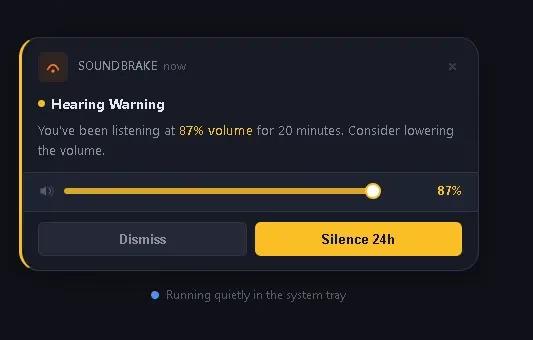
SoundBrake checks your system’s audio output every 5 seconds. Crucially, it’s smart enough to know whether audio is actually playing—so it won’t penalize you for leaving your volume turned up while your screen is idle or during a silent pause in a video.
✅ Three-Tier Alert System
SoundBrake uses a traffic-light model for warnings, grounded in occupational noise guidelines:
| Volume Level | Threshold | Action |
|---|---|---|
| 75–84% (Moderate) | 60 continuous minutes | Gentle pop-up reminder |
| 85–94% (High) | 20 continuous minutes | Firmer warning notification |
| 95%+ (Critical) | 5 continuous minutes | Auto-reduces volume to 70% |
The critical-level auto-reduction is the standout feature—SoundBrake acts rather than just alerting, which matters when you’re deep in a gaming session or a film and genuinely miss the notification.
✅ Smart Backoff—No Notification Spam
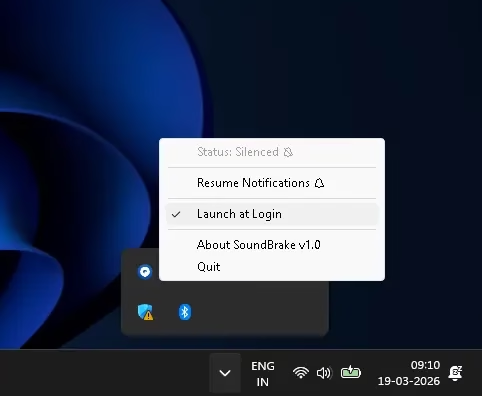
Dismiss a warning? SoundBrake doesn’t immediately restart it. It uses a progressive backoff system—each dismissal pushes the next reminder further out, up to 2 hours. Need a longer break from alerts? A single right-click on the tray icon gives you a “Silence for 24 hours” option.
✅ Activity-Aware Detection
This is a clever, underappreciated feature. SoundBrake distinguishes between your volume setting and whether audio is actually flowing. You won’t accumulate “exposure time” just because you forgot to turn your volume down before stepping away.
✅ 13 Languages Supported Out of the Box
SoundBrake automatically detects your operating system’s language and displays all notifications and menus natively. Supported languages include English, German, French, Spanish, Italian, Portuguese, Russian, Japanese, Korean, Chinese (Simplified), Dutch, Polish, and Turkish.
✅ Total Privacy—Zero Telemetry
There is no analytics engine, no account system, and no network calls during normal operation. Your listening habits never leave your machine. In a world where even flashlight apps want your location data, this simplicity is genuinely refreshing.
✅ Feather-Light System Footprint
At under 5 MB and written natively in Go, SoundBrake compiles to a single binary. It starts automatically with your OS and uses near-zero CPU and RAM between its 5-second polling intervals. You’ll forget it’s running—which is precisely the point.
How to Download and Install SoundBrake
Installation is straightforward across all platforms:
Windows (10 / 11—64-bit): Download the Inno Setup installer (~4 MB) directly from soundbrake.xyz/#download. Run the .exe, and SoundBrake will install and add itself to your system tray automatically.
macOS (12+—Intel & Apple Silicon): Download the universal .dmg (~5 MB), mount it, and drag the app to your Applications folder. It supports both Intel Macs and Apple Silicon (M1/M2/M3) natively.
Linux (Ubuntu 20.04+ / Fedora 36+—amd64): Download the binary directly. Note that Linux requires PulseAudio or PipeWire for audio monitoring. Advanced users can also build from source via the official GitHub repository.
Who Should Install SoundBrake?
SoundBrake is genuinely useful across a wide range of users:
- Gamers spending long sessions in immersive soundscapes with headphones
- Music lovers commuting with earbuds at high volumes daily
- Remote workers and students on long video calls and lecture recordings
- Content creators, podcasters, and video editors doing extended monitoring sessions
- Parents wanting a passive safety layer on shared family computers for kids
- DJs and audio professionals wanting a free second line of defense during mixing sessions
If your computer produces sound and you use it for more than an hour a day, SoundBrake is relevant to you.
SoundBrake vs. Phone OS Volume Warnings
You might wonder: don’t smartphones already do this? Yes—iOS and Android do offer periodic volume warnings, but they’re limited to mobile and are often easy to dismiss permanently.
SoundBrake brings this protection to the desktop, where most people spend the bulk of their productive and leisure audio time, and it does it with significantly more scientific nuance (cumulative exposure tracking vs. simple peak-level warnings).
Final Verdict: Is SoundBrake Worth Installing?
Absolutely—and there’s genuinely no reason not to.
SoundBrake is free, open-source, private, cross-platform, and so lightweight you’ll never notice it. It does one thing exceptionally well: it tracks your audio exposure with scientific rigor and nudges you before permanent damage occurs. There’s no subscription, no bloat, no data collection, and no learning curve.
In a category where “health tech” often means expensive wearables or intrusive apps, SoundBrake is a remarkable exception—a small, elegant, well-designed utility that could genuinely make a difference to your long-term quality of life.
Download it, run it once, and let it quietly do its job. Your future self—especially your future ears—will thank you.
👉 Download SoundBrake free at soundbrake.xyz
Have you tried SoundBrake? Share your experience in the comments below. For more free tool reviews and tech deep dives, stay tuned to Techno360.
Disclosure: Techno360 has no affiliate relationship with SoundBrake. This is an independent editorial review.


Discover more from Techno360
Subscribe to get the latest posts sent to your email.