

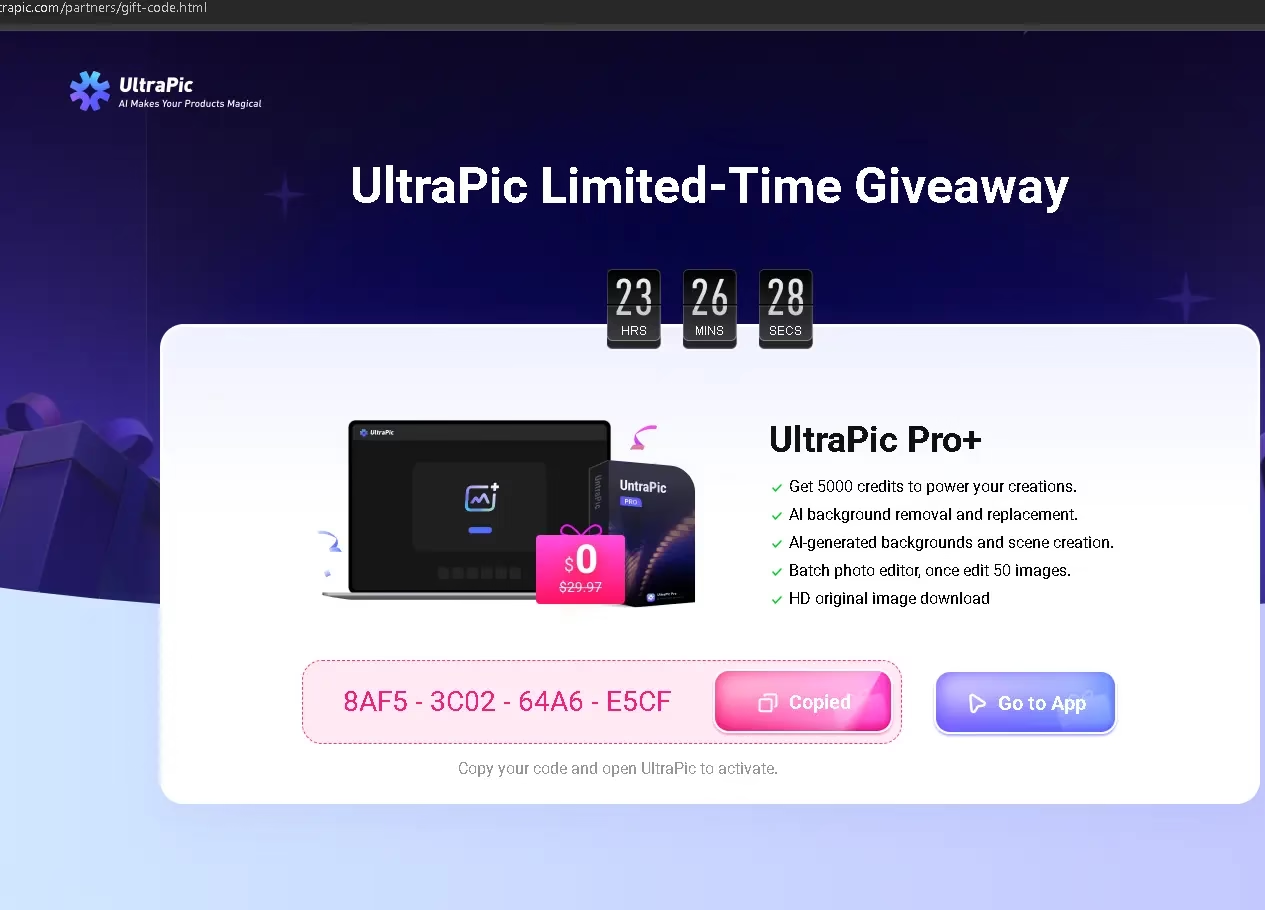
If you edit product photos, remove backgrounds, or touch up portraits, today is your lucky day. UltraPic Pro+, the AI-powered image editing platform by AOMEI Technology, is running an exclusive giveaway that gives you a free activation code worth 500 credits. That means full, unrestricted access to every Pro+ feature — at zero cost.
In this post, I’ll walk you through exactly what you get, how to redeem your free code, and why UltraPic is worth your time.
⚡ Quick Heads-Up: This is a limited-time offer. Grab your activation code before it expires — the link is at the bottom of this post.
Contents
- 1 What is UltraPic?
- 2
- 3 What Do You Get with the UltraPic Pro+ Giveaway?
- 4 How Many Credits Does Each Feature Use?
- 5
- 6 How to Claim Your Free UltraPic Pro+ Code — Step by Step
- 7 Who Is UltraPic Pro+ Best Suited For?
- 8 UltraPic Pro+ vs Free Plan — Is the Upgrade Worth It?
- 9 🎁 Claim Your Free UltraPic Pro+ Activation Code
- 10 Final Verdict
What is UltraPic?
UltraPic is an online AI photo editing platform developed by AOMEI Technology — a well-known software company trusted by millions of users worldwide. The tool is built specifically for e-commerce sellers, content creators, and digital marketers who need professional-quality image outputs without spending hours in Photoshop.
It runs entirely in the browser—no installation is required— and produces HD-quality results in seconds. It’s already popular among Amazon, Shopify, Etsy, and Alibaba sellers who need clean, platform-ready product photos at scale.

What Do You Get with the UltraPic Pro+ Giveaway?
The giveaway includes a Pro+ activation code with 500 credits, which unlocks the following premium features:
- BG Remover — Instantly remove backgrounds from any photo with AI precision. No manual selection needed.
- AI Background Generator — Generate entirely new, professional AI-created backgrounds to replace the original in seconds.
- Batch Editor — Edit up to 50 images at once — ideal for e-commerce sellers with large product catalogues.
- Photo Retouching — Enhance portraits and product images with smart AI skin smoothing and color correction.
- Remove Watermark — Cleanly eliminate watermarks from images without leaving any artefacts behind.
- Magic Eraser — Intelligently remove unwanted objects, people, or distractions from any photo.
- AI Generative Fill — Fill or modify parts of an image creatively using AI—perfect for expanding scenes or fixing cropping.
- HD Image Download — Download your edited images in full HD resolution—print and platform-ready quality.

How Many Credits Does Each Feature Use?
With 500 credits in your account, here is a quick breakdown of how far they go:
| Feature | Credits Used |
|---|---|
| HD original image download | 1 credit / image |
| Batch background removal | 1 credit / image |
| AI background generation | 5 credits / 2 images |
| 2x HD upscaling | 5 credits / 1 image |
At 1 credit per background removal, you can process up to 500 product images — more than enough for most sellers and creators to run for months.
How to Claim Your Free UltraPic Pro+ Code — Step by Step
The redemption process is straightforward and takes under two minutes:
- Visit the giveaway page and copy your activation code.
- Go to the UltraPic app at ultrapic.com/app and sign in or create a free account.
- Click your profile avatar in the top-right corner of the app and click “Enter Activation Code” in the drop-down menu.
- Enter your activation code in the field provided and click “Activate.”
- In the next window, once again click the “Activate” button, and you will notice the added Pro credits are valid for 90 days.
- Done! Your 500 Pro+ credits will appear in your account immediately.
💡 Your remaining credit balance is visible under Account Settings → Credit Details. Check the same section for the expiration date of your credits.

Who Is UltraPic Pro+ Best Suited For?
Based on the feature set, UltraPic Pro+ is an excellent fit for:
- E-commerce sellers on Amazon, Flipkart, Meesho, Shopify, or Etsy who need clean, white-background product shots in bulk.
- Content creators and bloggers who need quick image cleanup and background swaps for thumbnails and social posts.
- Freelance designers who handle repetitive photo editing tasks for clients and want to speed up their workflow.
- Small business owners who can’t afford a professional photographer for every product update.
- Social media managers who need polished visuals at speed, without a full Photoshop subscription.
UltraPic Pro+ vs Free Plan — Is the Upgrade Worth It?
The free tier of UltraPic gives you limited credits and access to basic tools. The Pro+ tier, however, unlocks the full AI-powered suite — including the AI Background Generator, Generative Fill, and batch processing for up to 50 images at once. For anyone doing regular photo work, the Pro+ features are the reason to use UltraPic in the first place.
Since this giveaway gives you Pro+ access completely free, there is genuinely no reason not to claim it.
🎁 Claim Your Free UltraPic Pro+ Activation Code
Visit the link below, copy your activation code, and follow the four steps above to get your 500 Pro+ credits instantly:
👉 Claim Free UltraPic Pro+ Code Here
If you need any clarification about the activation or your credits, you can reach the UltraPic support team directly at support@ultrapic.com.
Final Verdict
UltraPic Pro+ is a capable, browser-based AI photo editor that punches well above its weight class — especially for e-commerce and content use cases. The AI background generator and batch editor alone make it a serious time-saver. With 500 credits on the line for free, this giveaway is an easy win for anyone who regularly edits images.
Claim your code while it’s still active, put it to the test, and drop a comment below to let me know how it works for you!
Disclosure: This post includes a partner giveaway from UltraPic by AOMEI Technology. Readers receive the activation code and credits for free. All opinions expressed are independent.


Discover more from Techno360
Subscribe to get the latest posts sent to your email.
You must be logged in to post a comment.