
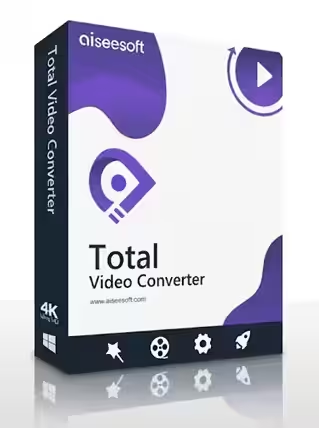
Convert, Edit & Upscale Any Video – Free for a Full Year
Aiseesoft Total Video Converter turns MKV, MOV, AVI, MTS and 1,000+ other formats into files that play on any phone, TV or console, and adds 4K upscaling, 2D-to-3D conversion and one-click video enhancement. Right now, Aiseesoft and German magazine PC-WELT are handing out an Aiseesoft Total Video Converter free license – a 1-year registration code for software whose lifetime license lists at $49.95.
The giveaway page’s countdown runs to 31 December 2026, but promotions can end early. Claim the code first, then install at your own pace.

⚡ Quick Read
- What it is: An all-in-one Windows video converter and editor – 1,000+ formats, device presets, 4K/HEVC support, 2D-to-3D and one-click quality fixes.
- The deal: A free 1-year registration code (Jahreslizenz) from Aiseesoft’s German site, run in cooperation with PC-WELT.
- Normal price: Aiseesoft’s US store lists the lifetime license at $49.95 (on sale for $39.96) and a 1-month license at $25 (checked 30 September 2026).
- Works on: Windows 11, 10, 8.1, 8 and 7. The installer is about 49 MB.
- Time needed: About 3 minutes – name, email, one code to paste.
- Heads-up: It’s a 1-year license, not lifetime, and the registration page is in German.
Why You Still Need a Video Converter in 2026
Phones shoot HEVC, camcorders spit out MTS, screen recorders save MKV, and your smart TV, old tablet or video editor each want something different. The result is the familiar “format not supported” message – or a 4 GB file that won’t upload to WhatsApp or YouTube fast enough.
A good desktop converter fixes all of that in one place: drop the files in, pick the device or format you need, and let it batch-convert while you get on with your day. Aiseesoft Total Video Converter does exactly that, and adds light editing and enhancement tools so you don’t need a second app for simple trims, crops or watermarks.
What Is Aiseesoft Total Video Converter?
Aiseesoft Total Video Converter is a Windows video conversion and editing program from Aiseesoft Studio, the developer behind Video Converter Ultimate, Screen Recorder and Blu-ray Player. It reads and writes common formats such as MP4, H.264/AVC, H.265/HEVC, MKV, MOV, AVI, DivX, WMV, FLV, WTV, VOB, MTS and MXF, and can pull the soundtrack out of any video as MP3, AAC, AC3, AIFF, FLAC, OGG, WAV or WMA.
Instead of making you memorise codecs, it ships with ready-made profiles for iPhone, iPad, Android phones, Samsung and Google Pixel devices, Xbox and PlayStation, smart TVs, and editing software such as Adobe Premiere, DaVinci Resolve, Final Cut Pro and Avid Media Composer.
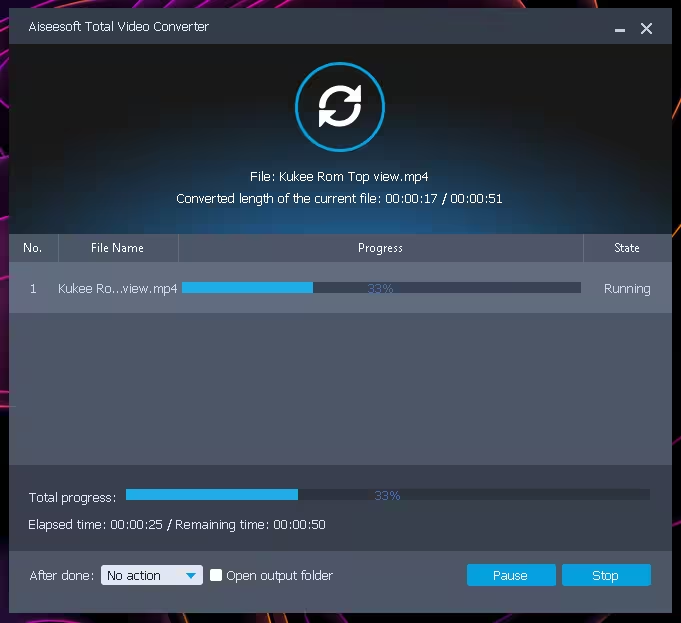
Key Features of Aiseesoft Total Video Converter
1. Convert between 1,000+ video and audio formats
Convert almost any video or audio file into another format for playback, sharing or editing, including camcorder and phone footage. Batch conversion lets you queue a whole folder and convert it in one run.
2. 4K UHD and HEVC support
Aiseesoft says the program handles 4K encoding and decoding in H.265, H.264, MPEG, Xvid, VP8 and VP9. You can upscale HD/SD video to 4K, or shrink 4K down to HD/SD for phones and older TVs.
3. 2D to 3D (and back)
Turn regular videos into 3D with 14 modes – 10 Anaglyph types, Side-by-Side (half-width/full) and Top-and-Bottom (half-height/full) – or flatten 3D files back to 2D.
4. One-click video enhancement
Four enhancement options clean up old or low-quality footage: upscale resolution, auto-adjust brightness and contrast on dark clips, remove video noise, and reduce shaking in handheld recordings.
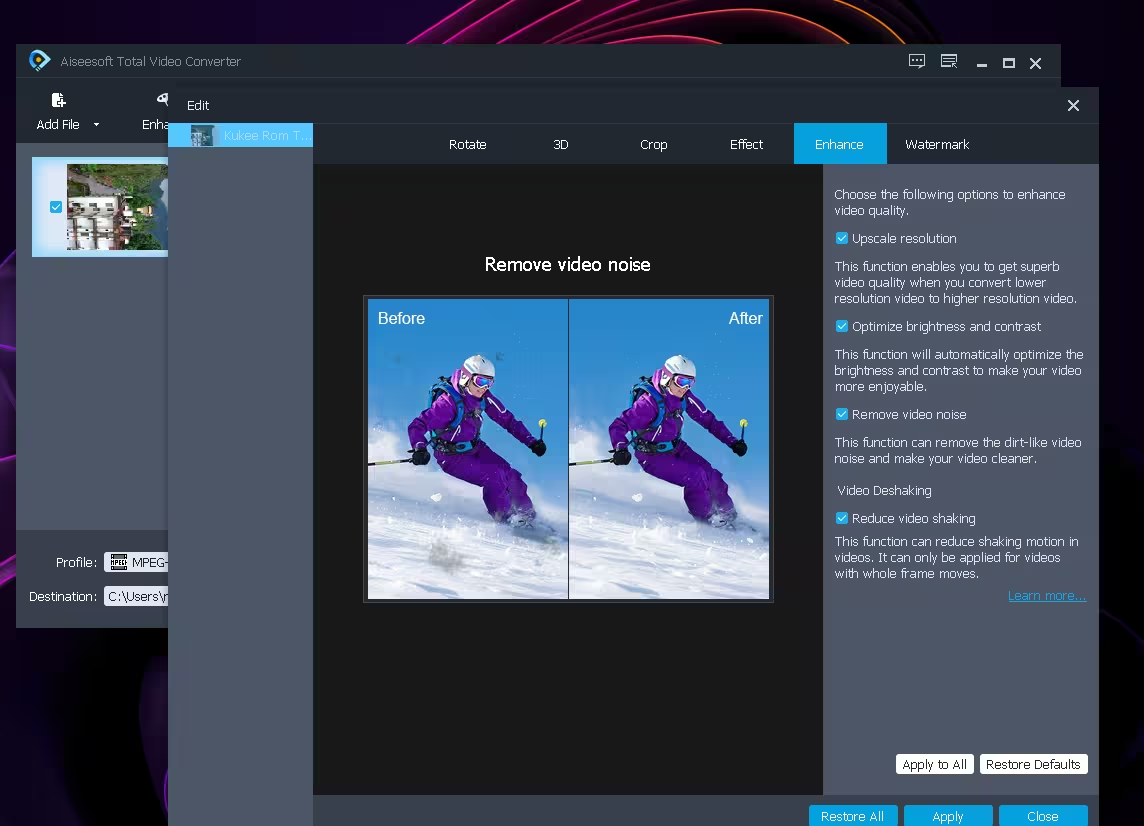
5. Built-in editing tools
Trim clips, crop black borders, rotate sideways phone videos, merge several clips into one file, add a text or image watermark, and adjust brightness, contrast, saturation and hue – with a real-time preview before you convert.
6. Audio tracks and subtitles
Add extra audio tracks for background music or voice-over, change or remove existing tracks, and add subtitles to your videos.
7. GPU-accelerated conversion
Aiseesoft advertises NVIDIA GPU acceleration with conversion “up to 50X faster”. Treat that as the developer’s best-case figure – real speed depends on your graphics card, the source file and the output format.
System Requirements
| Operating system | Windows 11, 10, 8.1, 8, 7 |
| Installer size | About 49 MB (total-video-converter.exe) |
| GPU acceleration | NVIDIA graphics cards (optional) |
| License in this giveaway | 1 year, 1 PC |
| Mac version | The giveaway page has a separate “Für Mac” tab (macOS 10.12 and later) |
Source: Aiseesoft’s official product, purchase and giveaway pages, checked 30 September 2026.
How to Get Aiseesoft Total Video Converter for Free
The giveaway runs on Aiseesoft’s German website in partnership with PC-WELT. The form is in German – in Chrome or Edge, right-click the page and choose Translate to English if you need it. The steps below cover everything.
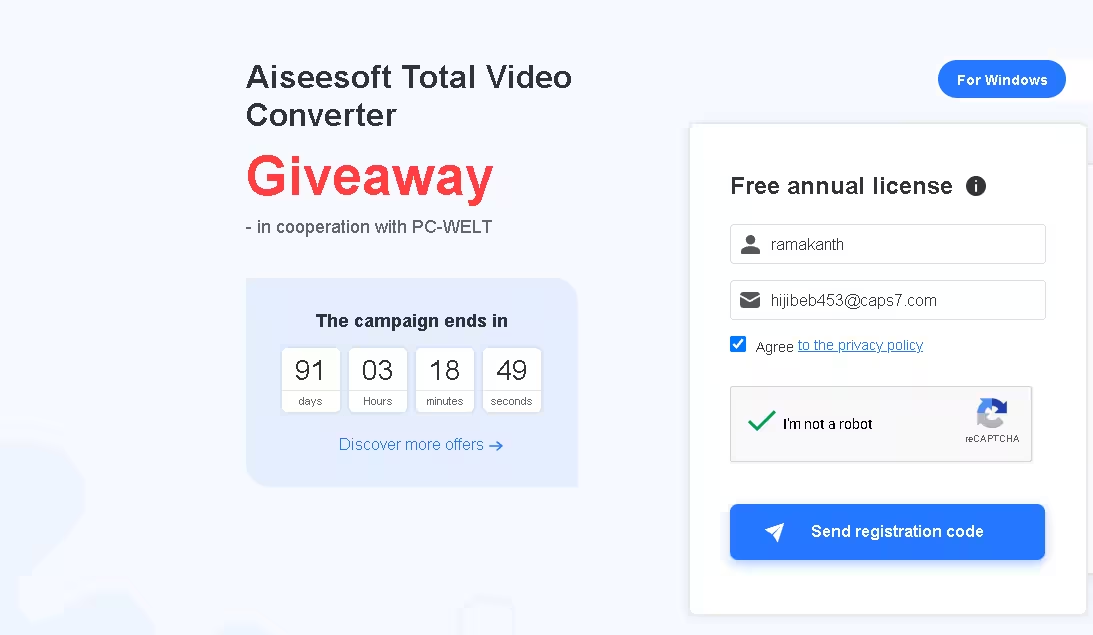
Step 1: Request your free registration code
Open the official Aiseesoft Total Video Converter giveaway page. In the purple “Kostenlose Jahreslizenz” (free annual license) box, make sure “Für Windows” is selected, then:
- Enter your name (Ihr Name) and email address (E-Mail-Adresse).
- Tick Datenschutzrichtlinie zustimmen to accept the privacy policy.
- Complete the reCAPTCHA and click “Registrierungscode senden” (send registration code).
Step 2: Check your inbox for the license code
Within a few minutes you’ll receive an email from registrieren@aiseesoft.de containing your Registrierungscode (registration code). If it doesn’t show up, check the Spam, Junk or Promotions folders.
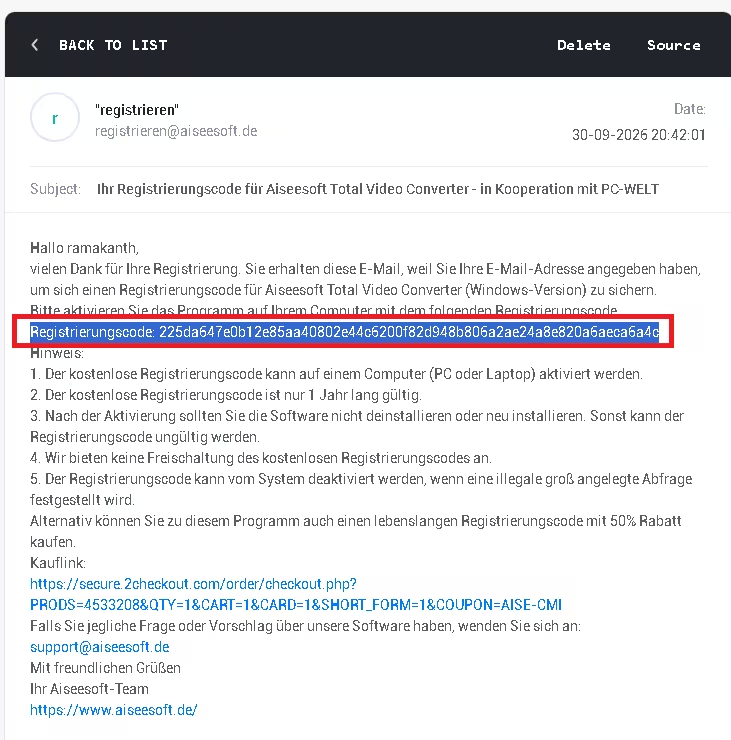
💡 Tip: Use your real email address – the code is only sent there. Aiseesoft also warns that codes can be deactivated if its system detects large-scale automated requests, so request just one per person.
Step 3: Download and install
Download the official installer directly from Aiseesoft: total-video-converter.exe (about 49 MB). Run it, follow the setup wizard and launch the program.
Step 4: Register the full version
- When the program opens, the registration window appears (you can also open it from the key/menu icon).
- Enter the email address you used on the giveaway page.
- Paste the registration code from the email and click Register.
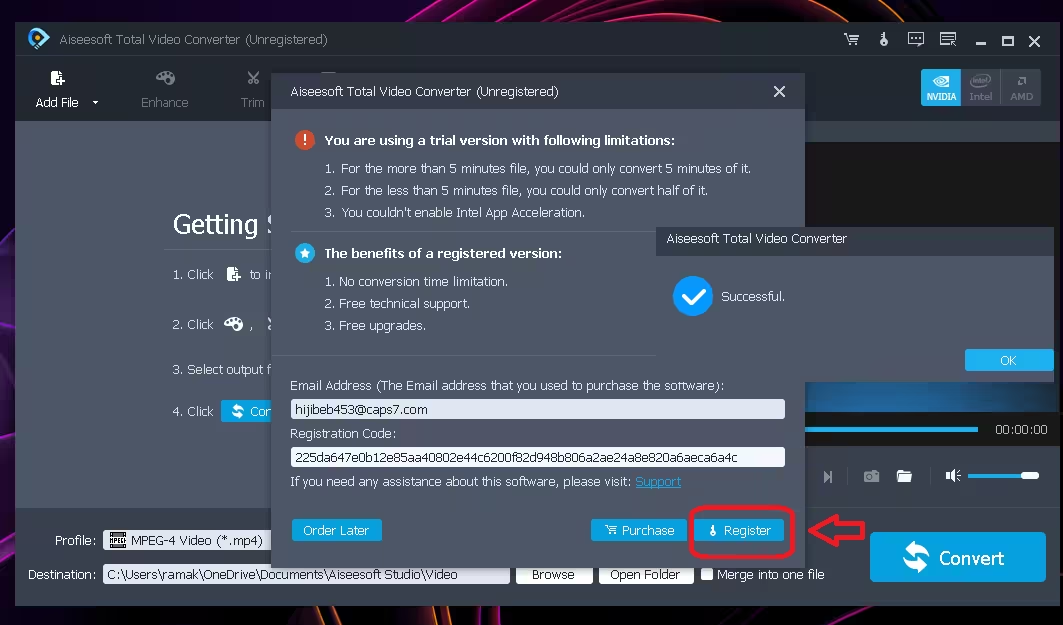
⚠️ Before you install: This is a 1-year license for one PC. When Aiseesoft ran an English giveaway of this same product, it listed the free 1-year license with “No free upgrades. No free technical support.” – expect similar limits here. Save the license email so you can re-register after a reinstall.
How to Convert a Video in 3 Steps
- Add files: Click Add File and import one or more videos or audio files.
- Choose the output: Open the Profile menu and pick a format (MP4, MKV, MP3…) or a device preset (iPhone, Android, TV, Premiere…).
- Convert: Click Convert. Use Edit or Enhance first if you want to trim, crop, add a watermark or improve quality.
Giveaway vs. Paid Version
| This giveaway | Paid lifetime license | |
|---|---|---|
| Price | Free | $49.95 list ($39.96 on sale) |
| Duration | 1 year | Lifetime |
| PCs | 1 | 1 (Business license: 3 PCs, $69.96 on sale) |
| All conversion, editing & enhance tools | ✔ | ✔ |
| Free upgrades & tech support | Not expected | ✔ |
| Money-back guarantee | – | 30 days |
US prices from Aiseesoft’s official store, checked on 30 September 2026, and may change. The German giveaway page also offers the lifetime license at 50% off (€24.97 instead of €49.95).
Who Should Grab This?
- Anyone fighting “unsupported format” errors on TVs, phones, consoles or older media players.
- YouTubers and editors who need MTS, MXF or HEVC footage converted into editing-friendly formats for Premiere or DaVinci Resolve.
- Families with old camcorder clips that need brightening, denoising or stabilising before sharing.
- Music lovers who want to extract audio from videos as MP3, FLAC or WAV.
Want more video tools? Grab the Aiseesoft 4K Converter free license for dedicated 4K work, try the VideoProc Converter AI 1-year giveaway for AI upscaling, or fix blurry clips with SHARPEN Video 2. Need to capture your screen too? See our Aiseesoft Screen Recorder free license guide, or compare with the Vidmore Video Converter giveaway.
Techno360 Verdict
Worth grabbing
Aiseesoft Total Video Converter covers nearly every everyday video job in one window: converting stubborn formats, preparing files for phones and TVs, extracting audio, and giving old footage a quick clean-up. It isn’t a full video editor, and this licence lasts only a year, but for a free, official code that takes three minutes to claim, it’s an easy recommendation for anyone who regularly deals with video files on Windows.
- 1,000+ formats plus device presets
- 4K/HEVC support and upscaling
- One-click enhance, denoise and stabilise
- Batch conversion with live preview
- 1-year license only
- Registration page is in German
- GPU speed-up limited to NVIDIA cards
Frequently Asked Questions
Is Aiseesoft Total Video Converter really free?
Yes, for one year. Aiseesoft’s official German giveaway page, run with PC-WELT, emails a free 1-year registration code to anyone who fills in the form. No payment details are required.
How long does the giveaway last?
The countdown on the giveaway page runs to 31 December 2026, but promotions can end earlier without notice, so it’s best to request your code now.
What happens after the 1-year license expires?
The registration code stops working after its 1-year term. To keep using the full version, you would need a paid license – or you can switch to another free converter.
Which Windows versions are supported?
Aiseesoft lists Windows 11, 10, 8.1, 8 and 7. A separate Mac option is available on the giveaway page for macOS 10.12 and later.
Is this giveaway safe and legal?
Yes. It’s an official promotion from Aiseesoft, not a cracked copy. Download the installer only from aiseesoft.com and register it with the code emailed to you.
I didn’t receive the license email. What should I do?
Wait a few minutes, then check your Spam, Junk or Promotions folders for a message from registrieren@aiseesoft.de. If it still hasn’t arrived, submit the form again with the same email address.
About the author: Ramakanth is the lead writer and co-founder of Techno360. After years in IT support, he’s been testing and writing about Windows software since 2008. The giveaway page, download link and prices in this article were re-checked on 30 September 2026.
Looking for more freebies? Browse our full collection of free software giveaways and deals.