

🎁 NEW CODE · VERSION 7.1 · VALID TILL 20 NOV 2027
iTop Screen Recorder 7.1 Pro — A Full Year of Pro, No Watermark, No Time Limit
We have a fresh giveaway code for iTop Screen Recorder Pro. We installed the latest 7.1 build on Windows 11 on 7 November 2026, pasted the code, and the app switched to PRO straight away with an expiry date of 20 November 2027. That’s 378 days of Pro, more than four times what the previous code gave.
⚡ Quick Read (30 seconds)
- What: iTop Screen Recorder 7.1 Pro for Windows — screen, webcam, audio and game recording, plus an editor and AI tools.
- Giveaway code:
4AC14-62F1F-29FCA-C44B7 - Valid until: 20 November 2027 (our copy showed 378 days left on 7 Nov 2026).
- Where to enter it: key icon at the top right of the app → paste → Register.
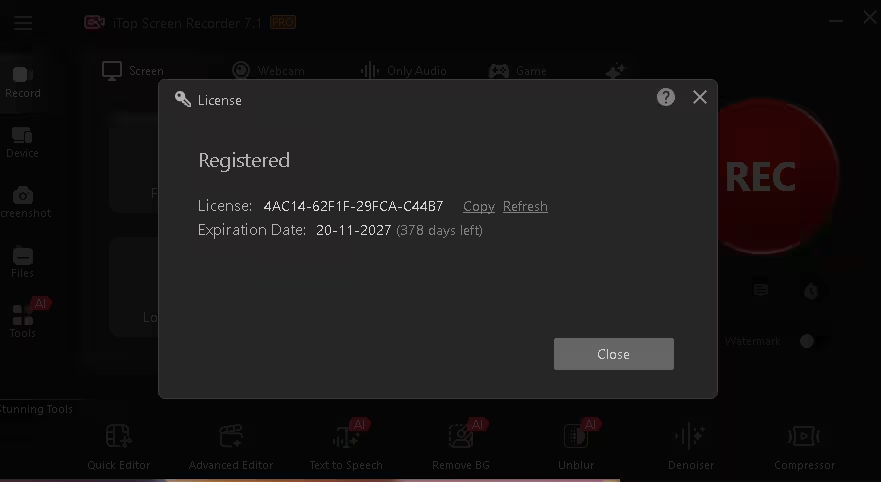
- What we confirmed: the code activated version 7.1 on Windows 11, the PRO badge appeared and the watermark switch could be turned off.
- New in 7.1: subtitle translation, one-click screenshot OCR and search in the Files list.
What’s New in iTop Screen Recorder 7.1?
iTop released version 7.1 at the end of October 2026. The official installer on iTop’s server was last updated on 29 October 2026 and is about 131 MB. It builds on the big version 7 release from August, which introduced Auto Focus. According to iTop’s update page, 7.1 adds three practical features:
🌐 Subtitle translation
The Quick Editor can now translate a video’s subtitles into multiple languages — handy if you publish for viewers in more than one country.
🔤 Screenshot OCR
Take a screenshot and pull the text out of it with one click, instead of retyping error messages or code from an image.
🔍 Files search
The Files list now has a search box for videos, audio and screenshots, which helps once your recordings folder fills up.
iTop also lists “other known bugs” as fixed, without naming them. Everything from version 7 carries over:
- Auto Focus — according to iTop, it follows your mouse pointer and typing and zooms into that part of the screen while you record, so viewers on phones can read small menus without you adding zoom keyframes later.
- Bigger Text to Speech library — 370+ AI voices across 50+ languages, with search.
- Reworked Enhanced Mode — iTop says it cuts down black-screen recordings of hardware-accelerated apps and browsers.
- Faster Remove BG and TTS — iTop rebuilt the back end of both AI tools.
Free vs Pro: What the Code Unlocks
The watermark and 10-minute timer rows match what we saw in the app. The rest comes from iTop’s official feature list.
For context, when we checked on 7 November 2026, iTop’s store listed Pro at $19.99 for one month, $32.99 for one year on one PC and $39.99 for one year on three PCs. Prices change with promotions and by region, so treat those as a snapshot. This code gives you roughly a year of Pro on one PC for free.
How to Get iTop Screen Recorder 7.1 Pro Free (Step by Step)
The whole thing takes about three minutes, most of it waiting for the 131 MB installer.
Step 1: Download the latest installer
Get it from the official iTop Screen Recorder page, or use iTop’s direct download link (setup.exe). Both are official iTop routes and served version 7.1 when we checked. Already on version 7? Use the app’s update option, or install 7.1 over it.
Step 2: Install and open the app
Run the setup file and follow the prompts. Watch the installer screens for bundled offers and untick anything you don’t want. When it’s done, launch iTop Screen Recorder. The title bar shows FREE until you register.
Step 3: Click the key icon and paste the code
The key icon sits at the top right of the main window. Click it, and a License window opens. Copy the code below and paste it into the box. Paste rather than type; one wrong character and it fails.
🎁 iTop Screen Recorder 7.1 Pro Giveaway Code
4AC14-62F1F-29FCA-C44B7
Tap or click the code to select it · Valid until 20 November 2027

Step 4: Hit Register and confirm
Click the red Register button. On our Windows 11 PC the window changed to “Registered” straight away, the title bar badge flipped to PRO, and the License screen showed the code with an expiration date of 20-11-2027 (378 days left). Open the same window later to see how many days remain.
What You Can Do With It
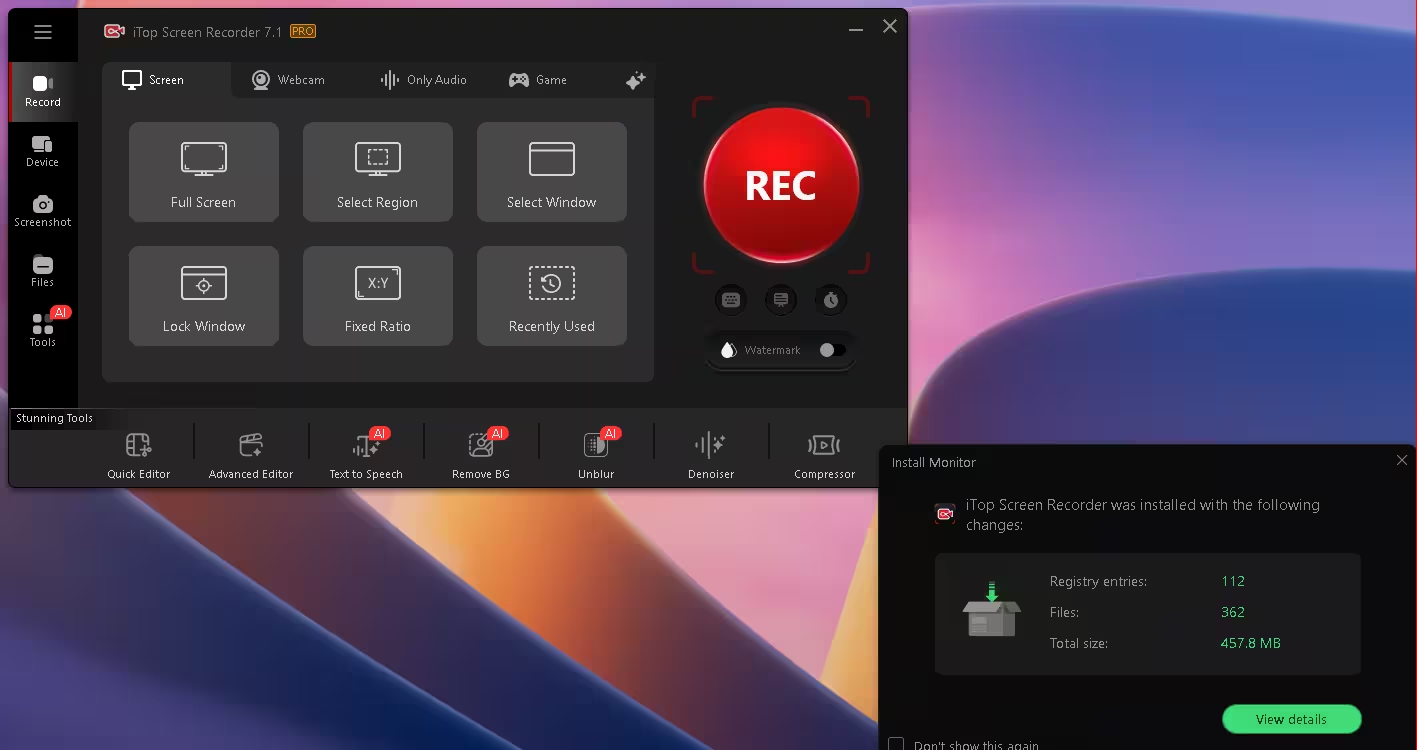
The app is split into four recording tabs (Screen, Webcam, Only Audio, Game), plus Device, Screenshot and Files in the sidebar. Here’s how that maps to real jobs.
🎓 Tutorials and online classes
Record full screen, a region, one window, or a fixed ratio such as 9:16 for Shorts. Lock Window keeps capturing a chosen app even when another window overlaps it. Auto Focus, click highlights and the teleprompter cut editing time.
🎮 Gameplay
According to iTop, the Game tab uses Intel and AMD GPU acceleration and records at up to 60 FPS, with a Boost option that tweaks system settings before a session. iTop names Minecraft, PUBG, Roblox, WoW and League of Legends.
📷 Facecam videos
In our test, the Webcam tab offered background replacement, a brightness slider and camera and audio source pickers. iTop says you can blur or remove the background without a green screen.
📝 Docs and support notes
New in 7.1: grab a screenshot and extract its text with OCR, then find any old capture fast with the Files search.

Editing and AI extras
The Tools bar holds seven utilities. Quick Editor handles trims, filters, music and subtitles — and in 7.1, subtitle translation. Advanced Editor adds a multi-track timeline, transitions, speed changes and frame-by-frame edits, with export to MP4, MOV, MKV, GIF, MP3 and more. Then there’s Text to Speech for voiceovers, Remove BG, Unblur for soft images and clips, a Denoiser for mic hum, and a Compressor that iTop says trims files by up to 70%.

Quick Editor: basic edits without leaving the app
The Quick Editor gives you a preview, a trim bar and buttons for Split and Crop. Tabs on the right add filters, stickers, music and subtitles, then you export. That covers most quick fixes. For multi-track projects, move over to the Advanced Editor.

Before You Activate: Giveaway Terms
⚠️ Worth knowing before you start a big project
- Pro access ends on 20 November 2027, whatever day you activate. After that, expect the app to go back to the free build’s limits.
- If you reset or reinstall Windows, the code may not activate a second time.
- Giveaway licenses typically don’t include priority support, and future major versions aren’t guaranteed to accept the code.
- Giveaway codes can have activation limits, so register while the offer is live.
More Free Screen Recorder Deals on Techno360
We’ve covered iTop’s recorder before: our earlier iTop Screen Recorder Pro giveaway shows how far the app has come. If you’d rather compare options, the EaseUS RecExperts Pro free license is another solid recorder for Windows. And if you record voiceovers, pair this with our iTop Voicy review and giveaway for real-time voice effects. You’ll find every live code in our software giveaways hub.
✅ Techno360 Verdict
In our Windows 11 test on 7 November 2026, the new giveaway code activated iTop Screen Recorder 7.1 Pro and showed an expiry date of 20 November 2027. That’s a full year without the free build’s 10-minute timer and locked watermark, which are the two limits that make it hard to use for real videos. Version 7.1’s subtitle translation and screenshot OCR are useful additions on top of Auto Focus. It’s still a time-limited license, not a lifetime one, but a year of Pro is long enough for most creators to get real value from it.
👍 What we liked
- Activated first time on 7.1
- 378 days of Pro — about a year
- Auto Focus zoom built into recording
- New subtitle translation and OCR
👎 Keep in mind
- Pro ends on 20 Nov 2027
- Windows only, no Mac build
- ~458 MB on disk after install
- Code may not survive a Windows reinstall
FAQs
Is iTop Screen Recorder 7.1 Pro really free with this code?
Yes. The code turns the free build into Pro at no cost. We didn’t have to enter a card or create an account; we pasted the code into the License window and clicked Register.
How long does the free Pro license last?
It expires on 20 November 2027 no matter when you activate. When we registered on 7 November 2026, the License window showed 378 days left, so the sooner you register, the more Pro days you get.
What’s the latest version of iTop Screen Recorder?
Version 7.1, released at the end of October 2026. It adds subtitle translation in the Quick Editor, one-click OCR for screenshots and a search box in the Files list.
Will my videos have a watermark after activation?
Not if you switch it off. Once the badge showed PRO, the watermark switch on the main screen could be turned off. iTop says you can also create your own watermark with text and an image.
I activated the old code. Do I need the new one?
The earlier code expires on 23 December 2026. To keep Pro after that, open the License window and enter the new code, which runs until 20 November 2027. We tested it on a fresh install, so if the License window won’t accept a second code, contact iTop support.
The code says it’s invalid. What now?
First, check that you copied it exactly, with no extra spaces. If it keeps failing, the code may have reached its activation limit or the promotion may have ended. Our giveaways hub lists the offers that are still live.