
![SoftOrbits Flash Drive Recovery Free License [Windows] – Recover Lost Files](https://i0.wp.com/techno360.in/wp-content/uploads/2022/04/SoftOrbits-Flash-Drive-Recovery-Box-Shot.webp?fit=280%2C297&ssl=1 "SoftOrbits Flash Drive Recovery Free License [Windows] – Recover Lost Files")
SoftOrbits Flash Drive Recovery is a free USB flash drive recovery software for Windows that helps you recover deleted, lost, or corrupted files from flash drives, SD cards, and memory cards — without any technical expertise.
Whether you accidentally deleted important photos, documents, or media files, this dedicated flash drive recovery software gets them back quickly. Preview each recovered file before saving it, so you restore only what you need.
If you don’t have a backup, losing important files from a USB drive or memory card can be stressful. SoftOrbits Flash Drive Recovery (formerly known as SoftOrbits Flash Card Recovery) is one of the most reliable tools for recovering lost data from removable storage. Whether you accidentally delete, lose, or format files on a USB drive or SD card, this powerful app gets them back.
Recover data from virtually any removable storage — USB drives, digital cameras, flash drives, memory cards, and more. The built-in recovery wizard handles the entire process: select your device, scan, preview, and restore.
The software analyzes FAT32 and NTFS file systems, locates partitions and MBRs, and performs a deep scan when needed to find files based on signatures and sizes — automatically restoring your data with minimal effort.

Contents
- 1 What Is SoftOrbits Flash Drive Recovery?
- 2 Supported Devices
- 3 What File Types Can It Recover?
- 4 Key Features of SoftOrbits Flash Drive Recovery
- 5 How to Get SoftOrbits Flash Drive Recovery Free License
- 6 Frequently Asked Questions (FAQ)
- 6.1 Is SoftOrbits Flash Drive Recovery free?
- 6.2 Can SoftOrbits Flash Drive Recovery recover files from a formatted USB drive?
- 6.3 What operating systems does SoftOrbits Flash Drive Recovery support?
- 6.4 Can it recover RAW photos from a camera SD card?
- 6.5 Is there a preview feature before restoring files?
- 6.6 40
- 6.7 Like this:
What Is SoftOrbits Flash Drive Recovery?
SoftOrbits Flash Drive Recovery is a dedicated USB flash drive data recovery software for Windows that restores lost, deleted, and formatted files from virtually any removable storage device — automatically, with no technical know-how required. It supports FAT32 and NTFS file systems and uses intelligent deep-scan algorithms to find files even from severely damaged drives.
Supported Devices
SoftOrbits Flash Drive Recovery works across a wide range of storage media:
- USB flash drives and USB disks
- Secure Digital (SD) and MicroSD cards
- Compact Flash (CF) cards
- xD Picture Cards and Smart Media Cards
- Sony Memory Sticks
- MicroDrive and Zip Disks
- Floppy disks
- Digital cameras and card readers
What File Types Can It Recover?
This USB recovery tool can recover a wide range of file types from formatted or corrupted drives:
- Photos: JPEG, JPG, BMP, GIF, TIFF, PNG, TGA
- RAW camera images: PEF, CRW, RAF, CR2, NEF, RAW — perfect for DSLR photographers
- Documents and media: MP3, video files, Office documents — even from reformatted drives
Key Features of SoftOrbits Flash Drive Recovery
- Recover lost, deleted, or formatted data from damaged or corrupted flash drives and memory cards
- Preview recovered files before restoring — save only what you need
- Fix a corrupted flash drive without reformatting it
- Supports MicroSD, SD, CF, and all major USB flash storage types
- Built-in recovery wizard — no technical experience needed
- Deep scan mode for recovering files from reformatted or severely damaged drives
- Analyzes FAT32 and NTFS file systems automatically
How to Get SoftOrbits Flash Drive Recovery Free License
You can grab a free full license for SoftOrbits Flash Drive Recovery through the current giveaway on Techno360. Follow the steps below to activate your free copy on Windows:
- Download the giveaway installer from the official link: Download SoftOrbits Flash Drive Recovery (Giveaway Version)
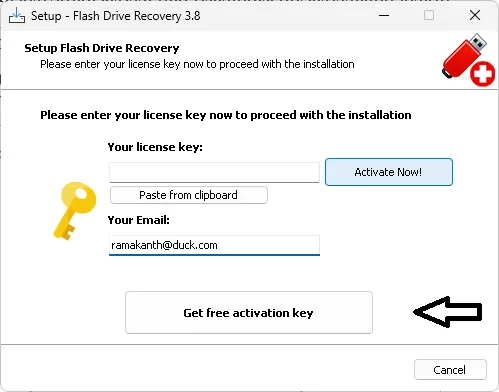
- Run the installer. During setup, look for the activation screen.
- Enter your email address and click “Get free activation key”.
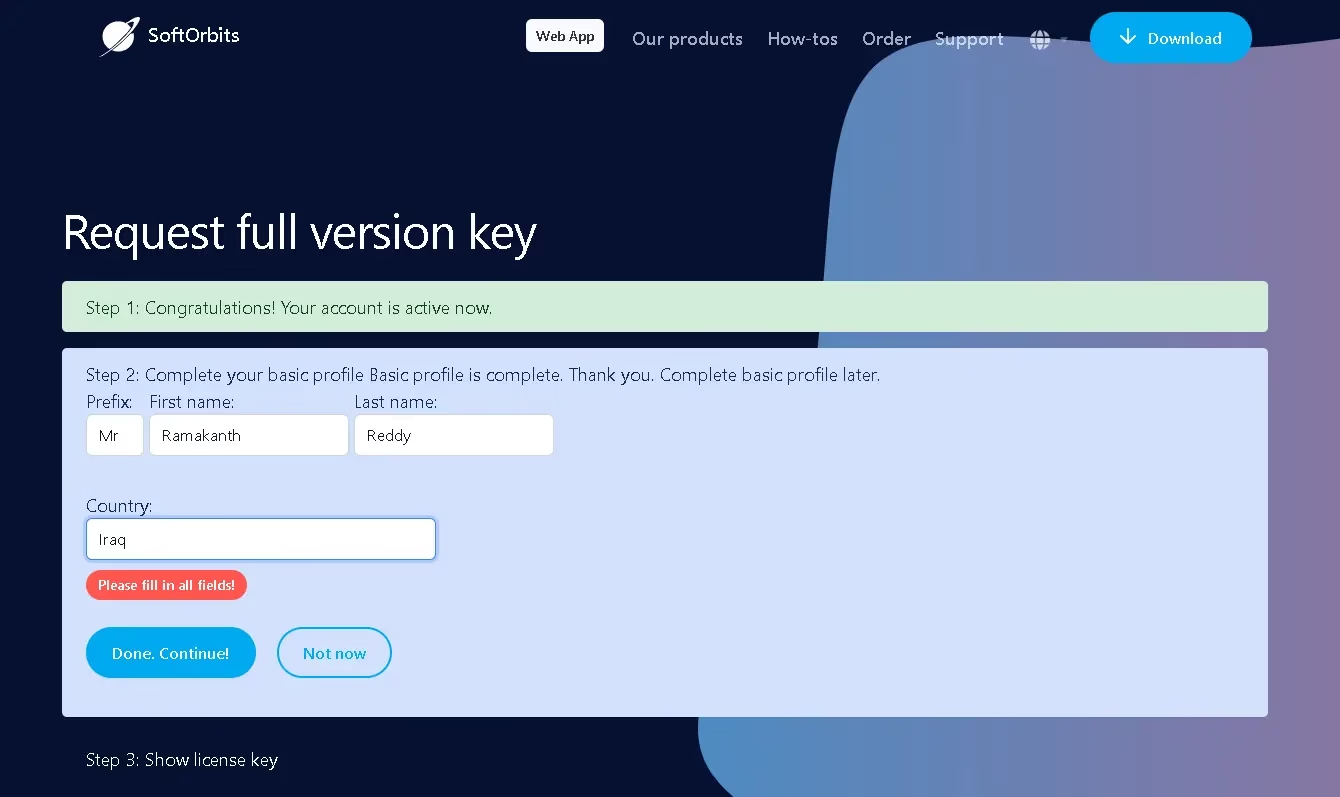
- Check your email inbox for a confirmation email from SoftOrbits. Click the confirmation link — it will open the giveaway page.
- Fill out the short form on the giveaway page and click “Done. Continue”.
- Copy the license code displayed on the page, paste it into the activation screen, and click “Activate Now!”
- Click “Next” to finish the installation and start recovering your files.
[Thanks to Pavel from SoftOrbits for offering this exclusive giveaway to Techno360 readers.]
Frequently Asked Questions (FAQ)
Is SoftOrbits Flash Drive Recovery free?
Yes — through the current Techno360 giveaway, you can get a full free license for SoftOrbits Flash Drive Recovery for Windows at no cost. Follow the activation steps above to claim your free copy.
Can SoftOrbits Flash Drive Recovery recover files from a formatted USB drive?
Yes. The software supports deep scan mode which can recover files from formatted, reformatted, or severely corrupted USB drives and memory cards by scanning for file signatures.
What operating systems does SoftOrbits Flash Drive Recovery support?
SoftOrbits Flash Drive Recovery is compatible with Windows 11, Windows 10, Windows 8, and Windows 7 (both 32-bit and 64-bit versions).
Can it recover RAW photos from a camera SD card?
Yes. It supports recovery of RAW image formats including CR2, NEF, PEF, RAF, and CRW — ideal for photographers who need to recover RAW files from a camera’s memory card.
Is there a preview feature before restoring files?
Yes. SoftOrbits Flash Drive Recovery lets you preview each file before restoring it, so you can choose exactly which files to save without having to restore the entire drive.


Discover more from Techno360
Subscribe to get the latest posts sent to your email.
You must be logged in to post a comment.