
🎁 Giveaway · Updated 13 November 2026
New giveaway build, tested today: Wise Data Recovery Pro 6.2.2.520 installs already activated
I installed this giveaway build on my own Windows PC, and the About window reads 6.2.2.520 (Giveaway Version) with the status Activated. There is no license key to type, which means the free edition’s 2 GB recovery cap is gone from the moment you open it.
✅ Pre-activated📦 Version 6.2.2.520💰 Worth $39.97/year🪟 Windows 11, 10, 8, 7
⚡ Quick Read
- The deal: a pre-activated giveaway build of Wise Data Recovery Pro 6.2.2.520. Install it, open it, and Pro is already on. No code, no sign-up.
- Why it matters: the free edition stops at 2 GB of recovered data. Pro removes that limit, which is what you need for a folder of videos or a full camera card.
- What I saw: a scan of my C drive listed more than 490,000 files under “Other types” alone, each with a Good or Poor recoverability rating.
- Watch out for: the in-app update. Giveaway builds are tied to their version, so updating can drop you back to the free edition.
- Golden rule: install it now, before you lose a file. Every write to a drive after a deletion lowers the odds of getting the file back.
Wise Data Recovery Pro is WiseCleaner’s file undelete tool for Windows. It does one job: it finds files you deleted, emptied from the Recycle Bin, or lost to a quick format, and copies them back to a safe place. It’s small, it doesn’t try to be a full disk-repair suite, and you can be scanning within a minute of opening it.
WiseCleaner sells Pro for $39.97 a year for one PC (or $49.99 a year for three). This giveaway build gives you the same Pro edition for free. I’ve rewritten this page around the new 6.2.2.520 giveaway installer, with fresh screenshots from my own PC, and removed the old download links that no longer apply.
🔄 What changed on this page (13 Nov 2026): a new direct download for the 6.2.2.520 giveaway build replaces the old SharewareOnSale and VideoProc links. I added new screenshots of the activated About window, the drive picker and a finished scan, and updated the free-vs-Pro details to match WiseCleaner’s current product page.
Wise Data Recovery Free vs Pro: what the giveaway unlocks
The free and Pro editions use the same scan engine. The difference is how much you’re allowed to bring back. Here’s how WiseCleaner’s own product page lays it out:
| Feature | Free edition | Pro (this giveaway) |
|---|---|---|
| Recoverable data | Up to 2 GB | Unlimited |
| Scan by file type, path or keyword | Yes | Yes |
| Drives and devices | HDD, SSD, USB, SD card, external drives | Same |
| File systems | FAT, exFAT, NTFS, HFS/HFS+/HFSX, Ext2/Ext3 | Same |
| Price | Free | $0 here (normally $39.97/year) |
In plain terms: if you only ever need to rescue a handful of Word files, the free edition is enough. The 2 GB cap starts to hurt when you’re recovering phone videos, RAW photos from a camera card, or a whole project folder. That’s where this giveaway pays off.
Proof it’s activated: the About window
Right after installing, I opened the About window from the menu. It lists the version as 6.2.2.520 (Giveaway Version) and the status as Activated, and the title bar shows the orange PRO badge. I didn’t enter anything to get there.
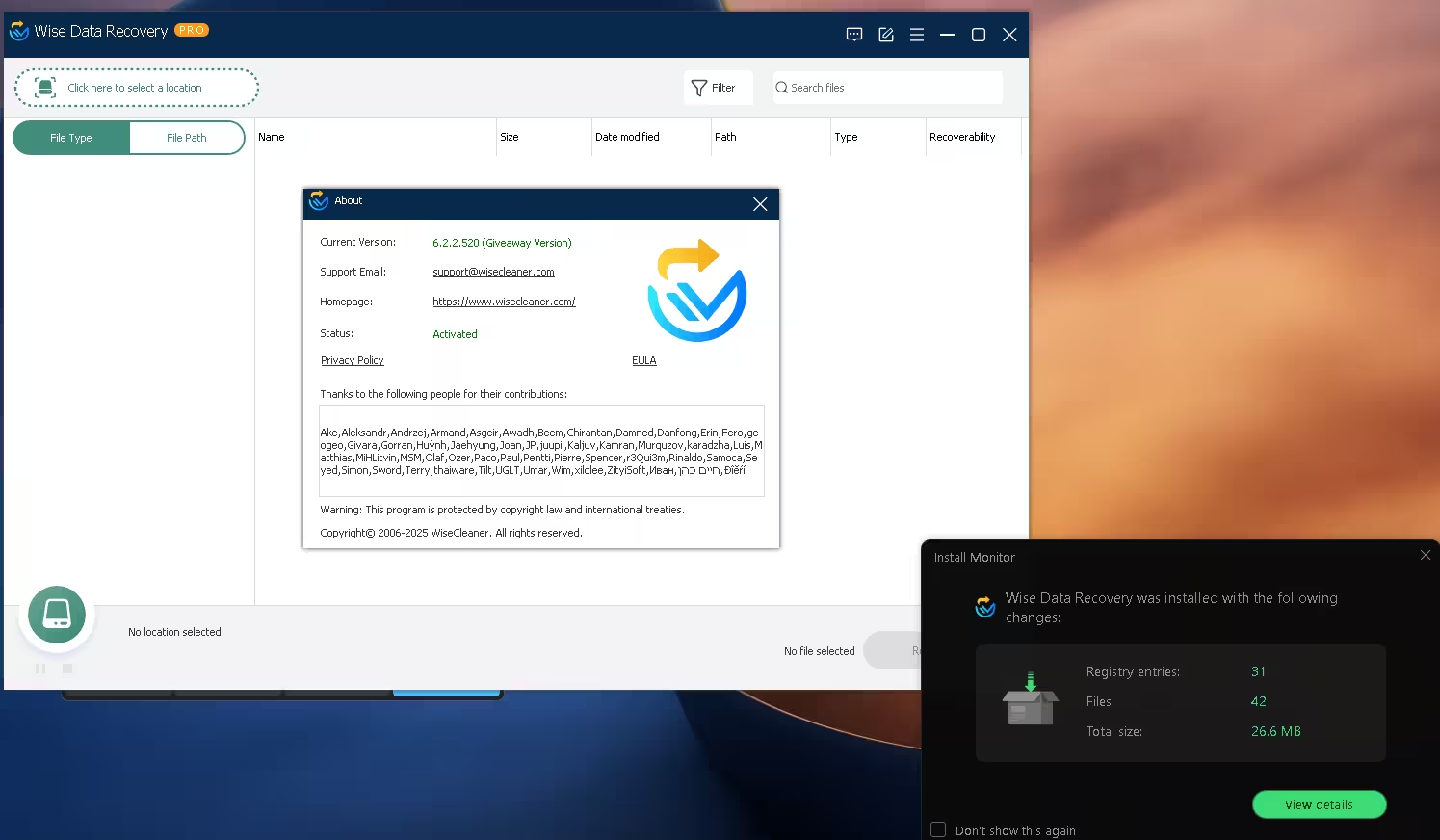
The install itself is light. My install monitor recorded 42 files and 31 registry entries, 26.6 MB in total. The installer didn’t offer any toolbars or extra apps.
One thing I can’t confirm is how long the activation lasts. The About window doesn’t show an end date, and other giveaway sites describe this build as either a one-year or a lifetime license. What I can say is that it showed Activated on 13 November 2026. If WiseCleaner adds an end date later, I’ll update this page.
How to install the Wise Data Recovery Pro giveaway
⬇️ Giveaway download
File: Wise_Data_Recovery_Pro_V6.2.2.520-GIVEAWAY.exe · Size: about 10.6 MB · Works on: Windows 11, 10, 8 and 7 (32-bit and 64-bit)
- Install it on a different drive from the one with your lost files. If you deleted files from C:, install to D: or another drive if you can. Every write to the affected drive can overwrite the data you’re trying to save.
- Run the installer and follow the standard setup screens.
- Open Wise Data Recovery. The PRO badge should appear next to the name in the title bar.
- Check the About window (menu icon at the top right). You should see “Giveaway Version” and “Activated”.
- Skip updates. If the program offers a newer version, ignore it. Updating can replace the giveaway build with the regular free edition.
How to recover deleted files with Wise Data Recovery Pro
1. Pick a location to scan
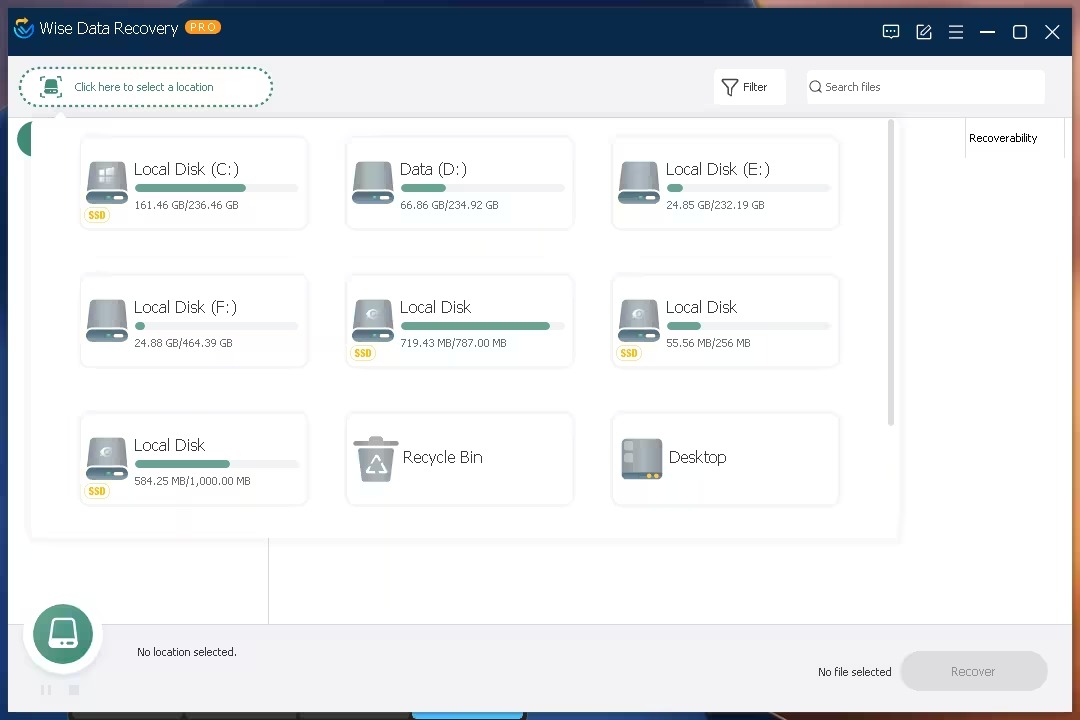
Click Click here to select a location at the top left. A panel opens with every drive Windows can see, each with a usage bar and an SSD tag where it applies. You’ll also see two handy shortcuts: Recycle Bin and Desktop. If you know roughly where the file was, use those to cut scan time.
2. Browse the results by file type or path
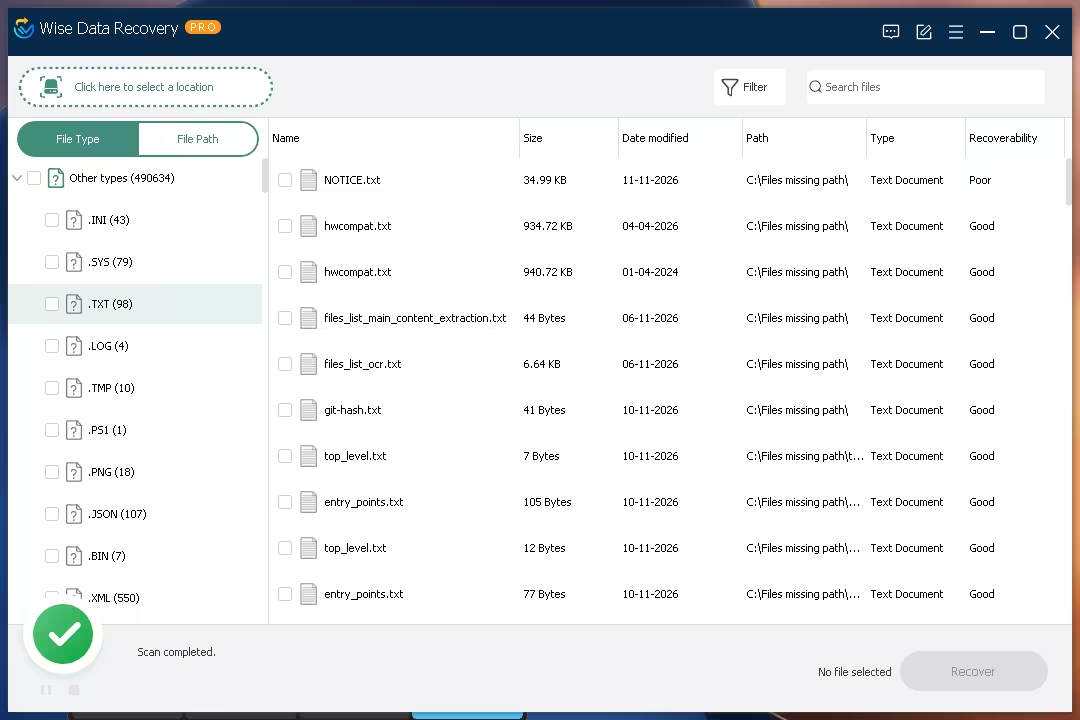
When the scan finishes, the left pane splits results into File Type and File Path tabs. File Type groups everything by extension (.TXT, .PNG, .JSON, .XML and so on), with a count beside each. File Path rebuilds the folder tree, which helps when you know the folder the file was in.
The main list shows each file’s name, size, date modified, original path, type and a Recoverability rating. On my C drive, the “Other types” group alone held 490,634 files. Files the scanner couldn’t match to a folder are listed under “Files missing path”. Use the Search files box or the Filter button to narrow a list that big.
3. Recover to a safe folder
Tick the files you want and click Recover at the bottom right. Choose a folder on a different drive, or on a USB stick, so recovered files don’t overwrite ones you haven’t saved yet. Start with files marked Good. Files marked Poor have been partly overwritten and may open damaged, or not at all.
What file types can it recover?
WiseCleaner says the engine recognises more than 1,000 formats. The main groups:
- Documents: DOC/DOCX, XLS/XLSX, PPT/PPTX, PDF, TXT and more
- Photos: JPG, PNG, GIF, BMP, TIFF, PSD and camera RAW formats such as CR2, NEF, ORF, RAF and DNG
- Videos: MP4, MOV, AVI, MKV, WMV, FLV, 3GP, MPEG and more
- Audio: MP3, WAV, WMA, M4A, AAC, OGG, AIFF and more
- Email: Outlook PST, Outlook Express DBX and Apple Mail EMLX
- Other: ZIP, RAR, ISO and other archives, plus EXE and HTML files
Pros and cons
| 👍 What I liked | 👎 What could be better |
|---|---|
| Pre-activated: no key, no account, no email | Windows only, with no Mac or phone version |
| Small install (26.6 MB on my PC), and no bundled extras | Giveaway builds can’t be updated without losing Pro |
| Recycle Bin and Desktop shortcuts save scan time | A full drive scan can return hundreds of thousands of files, so you’ll lean on search and filters |
| Good/Poor rating tells you what’s worth recovering | No disk imaging or partition repair. Badly damaged drives need a heavier tool |
Wise Data Recovery Pro vs free alternatives
| Feature | Wise Data Recovery Pro (giveaway) | Recuva Free | Windows File History |
|---|---|---|---|
| Recovers files with no prior backup | Yes | Yes | No, it only restores what it backed up earlier |
| Recovery limit | None | None | Size of your backup |
| Ease of use | Pick a drive, scan, recover | Wizard-based, older interface | Built in, but must be set up before you lose anything |
| Cost | Free with this giveaway | Free | Free, part of Windows |
Want more options? Our roundup of the best free data recovery software for Windows compares several side by side, and we’ve also covered giveaways for EaseUS Data Recovery Wizard Pro and iTop Data Recovery Pro. From the same developer, check out the Wise Care 365 Pro 8 giveaway and Wise Program Uninstaller Pro.
📊 Our Take
Is the Wise Data Recovery Pro giveaway worth grabbing?
Yes. It’s a 10.6 MB download, it installs already activated, and it removes the one real limit of the free edition. The interface is about as simple as recovery software gets: pick a drive, scan, tick, recover.
Get it if you want a recovery tool ready before something goes wrong, especially for photos, videos and USB sticks. Look elsewhere if your drive is physically failing or the partition is gone. That needs a tool with disk imaging, or a professional lab.
Frequently asked questions
Do I need a license key for this Wise Data Recovery Pro giveaway?
No. The 6.2.2.520 giveaway build is pre-activated. Install it and the About window shows “Activated” straight away.
Is this a cracked version?
No. It’s WiseCleaner’s own giveaway build, labelled “Giveaway Version” inside the program. Nothing is patched.
What’s the difference between Wise Data Recovery Free and Pro?
The free edition recovers up to 2 GB of data. Pro has no limit. Both use the same scanner and support the same drives and file types.
Can I update the giveaway version?
I wouldn’t. Giveaway builds are tied to their version number, and installing a newer release can turn it back into the free edition. Stay on 6.2.2.520.
Does “deleted” mean a file is gone forever?
Usually not right away. Windows marks the space as free, but the data stays on the drive until something new is written over it. That’s why you should stop using the drive and scan as soon as possible. On SSDs with TRIM turned on, deleted data can be wiped quickly, so the odds there are lower. Our guide on how to recover deleted files on Windows 11 for free covers the built-in options as well.
Does it work on Windows 11?
Yes. WiseCleaner lists Windows 11 and 10 plus older versions back to XP, in both 32-bit and 64-bit.
Looking for more free licenses? Browse our free software giveaways section. About Techno360.