
🎁 GIVEAWAY · UPDATED OCTOBER 2026 · WINDOWS 7–11
Wise Registry Cleaner Pro 11.3.3, pre-activated and free to keep
WiseCleaner’s official giveaway installer has been refreshed to the latest build. No serial key, no email, no sign-up: install it and every Pro feature is already unlocked.
Worth $29.95 Build 11.3.3.735 No key needed

⚡ Quick Read
- What: Wise Registry Cleaner Pro, a registry cleaner, defragmenter and system tune-up tool for Windows.
- Version: 11.3.3 (Build 735), the current release. We checked the installer’s file properties ourselves.
- Normal price: $29.95 for 3 PCs / 1 year on the official WiseCleaner store.
- Activation: none. The giveaway installer comes pre-activated.
- The catch: Pro stays on this build only. No free upgrades and no official support, and it’s for personal use.
A cluttered Windows registry rarely announces itself. It shows up as broken file associations, “missing file” errors at startup and leftover entries from apps you removed years ago. Wise Registry Cleaner Pro finds and fixes that clutter, and right now you can get the Pro edition free through WiseCleaner’s official giveaway build.
The giveaway installer was refreshed in late August 2026, so it now ships the latest version 11.3.3 instead of the older 11.3.1 build this post covered before. Below you’ll find what’s new, what the Pro edition adds over the free version, and how to install it in under two minutes.
Wise Registry Cleaner Pro Giveaway: Offer at a Glance
| Detail | What you get |
|---|---|
| Product | Wise Registry Cleaner Pro |
| Version | 11.3.3.735 (released 15 June 2026) |
| Developer | WiseCleaner |
| Regular price | $29.95 (3 PCs / 1 year) |
| Giveaway price | Free |
| License | Pre-activated Pro on this build. The activation doesn’t expire, but it doesn’t carry over to newer versions |
| Supported OS | Windows 11, 10, 8.1, 8 and 7 (32-bit and 64-bit) |
| Installer size | About 9.6 MB |
| Key or account needed? | No |
⚠️ The small print: the free Pro license is for home, non-commercial use. It covers build 11.3.3 only. Upgrading to a newer version puts you back on the free edition, and free technical support isn’t included.
What Is Wise Registry Cleaner?
Wise Registry Cleaner is a Windows utility from WiseCleaner, the developer behind Wise Care 365. It scans the registry for invalid, orphaned or outdated entries, such as leftovers from uninstalled programs, dead file paths and broken file extensions. You can review each item before you remove it.
It’s built to be cautious. Entries are marked as safe or risky to delete, the registry is backed up before every clean, and a System Restore point is created before defragmenting. If a fix ever causes a problem, one click rolls it back.

What’s New in Wise Registry Cleaner 11.3.3
The 11.3 series has had three updates in 2026. Here’s what changed, based on WiseCleaner’s release notes:
| Version | Released | Key changes |
|---|---|---|
| 11.3.3 (Build 735) | 15 June 2026 | New “Disable Remote Assistance” option under System Security and Privacy. Registry Defrag now hits fewer “Access Denied” errors. Clearer UI text and stability fixes |
| 11.3.2 (Build 734) | 24 March 2026 | Better rules for cleaning invalid file extensions. Improved Auto Clean and an updated Sticky Keys tweak |
| 11.3.1 (Build 733) | 16 January 2026 | Better detection of invalid paths and files left behind by uninstalled programs |
Key Features of Wise Registry Cleaner Pro
- Fast Scan and Deep Scan: a quick pass over the usual problem areas, or a full sweep of the whole registry. You can pick custom scan categories and add keys to an exclusion list.
- Automatic backups: deleted entries are backed up automatically, and you can save a full registry backup or a restore point at any time.
- Registry Defrag: compacts the registry files to reclaim wasted space. A System Restore point is created first.
- System Tune-up: one-click tweaks to Windows, network and privacy settings, such as the new Remote Assistance kill switch. Each tweak can be reset to the Windows default.
- Scheduled cleaning: run it daily, weekly, monthly, when the PC is idle or at log-on.
- 1-Click Clean icon: a desktop shortcut that cleans without opening the app.
- Multi-User Cleanup (Pro): scan and clean the registry of every user account on a shared PC in one go. This is the headline Pro-only feature.
Wise Registry Cleaner Free vs Pro
| Feature | Free | Pro (this giveaway) |
|---|---|---|
| Registry scan and clean (Fast / Deep) | Yes | Yes |
| Automatic backup and restore | Yes | Yes |
| Registry Defrag | Yes | Yes |
| System Tune-up tweaks | Yes | Yes |
| Scheduled cleaning | Yes | Yes |
| Multi-User Registry Cleanup | No | Yes |
| Price | Free | $29.95, free with this offer |
The free edition is already capable. The Pro unlock matters most on family or office PCs with several Windows accounts, where cleaning each profile by hand gets tedious.
How to Download and Install Wise Registry Cleaner Pro Free
The whole thing takes about two minutes:
- Download the official giveaway installer (link below).
- Run the .exe file and finish the setup wizard.
- Launch the app. Pro is already active.
- Turn off automatic updates so you stay on the free Pro build.
⬇️ Giveaway installer: v11.3.3.735
Hosted on WiseCleaner’s own download server · about 9.6 MB
Step 1: Download the giveaway installer
Click the button above to download WRCSetup_SharewareOnSale.exe. This is the special giveaway build, not the regular download from the product page, so get it from this link.
Step 2: Run the setup
Double-click the file, accept the Windows prompt and follow the wizard. If Wise Registry Cleaner Free is already installed, it’s best to uninstall it first so the Pro build installs cleanly.
Step 3: Launch and confirm Pro is active
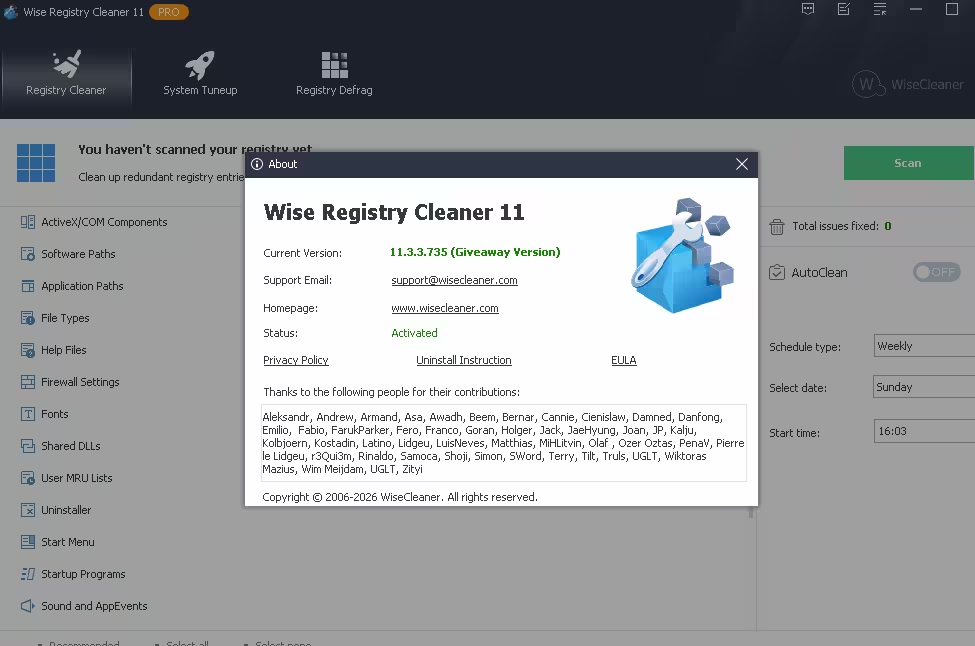
Open the app. The setup is already activated, so there’s no code to enter. You’ll see the Pro label in the window, and Multi-User Cleanup will be unlocked.
Step 4: Switch off automatic updates
Open the main menu, go to Settings and untick the automatic update check. Installing a newer version later would drop you back to the free edition, because the free Pro activation belongs to build 11.3.3 only.
Is Registry Cleaning Safe? How to Use It the Right Way
Registry cleaners have a mixed reputation, and for good reason. Microsoft’s support policy on registry cleaning utilities says it doesn’t support them and that problems caused by bad registry edits may not be fixable. Cleaning also won’t make a modern PC dramatically faster. Its real value is removing leftovers and fixing the errors those leftovers cause.
Wise Registry Cleaner is one of the more careful tools in this space. To stay on the safe side:
- Keep automatic backup switched on (it is by default).
- Start with Fast Scan. Only clean the items marked as safe until you’re comfortable.
- Create a restore point before running Registry Defrag. The app does this for you.
- Skip any System Tune-up tweak you don’t understand. They can all be reverted, but there’s no need to change what isn’t broken.
System Requirements
- Windows 11, 10, 8.1, 8 or 7, 32-bit or 64-bit
- About 10 MB for the installer, plus a little extra disk space for backups
- Admin rights to install
Pros and Cons
| 👍 Pros | 👎 Cons |
|---|---|
| Pre-activated, so there’s no key, email or account | Free Pro stays on build 11.3.3 with no upgrades |
| Automatic backup and one-click undo | No official tech support for giveaway users |
| Lightweight, at about 10 MB | Speed gains on modern PCs are modest |
| Multi-User Cleanup for shared PCs | Personal, non-commercial use only |
📊 Techno360 Verdict: 4.2/5, Worth Grabbing
Wise Registry Cleaner is one of the safest registry cleaners around, thanks to backups and undo on every action. The giveaway now covers the latest 11.3.3 build, so you aren’t settling for old software.
Treat it as a maintenance tool, not a magic speed-up. For the price of zero, that’s an easy recommendation, especially if you share your PC with others.
More Free PC Optimization Giveaways
- Wise Care 365 Pro 8 Free Full Version: WiseCleaner’s all-in-one cleanup and privacy suite.
- Advanced SystemCare Ultimate 18 Giveaway: tune-up plus security, free for 6 months.
- Glary Utilities Pro Free 1-Year License: 20+ PC maintenance tools in one place.
- Ashampoo UnInstaller 15 Free License: remove apps along with their leftover registry entries.
- Sioni Windows Toolkit Pro: a free Windows repair and diagnostic toolkit.
- Browse more registry cleaner deals, or every live offer in our free software giveaways section.
Frequently Asked Questions
Is the Wise Registry Cleaner Pro giveaway legit?
Yes. The installer is an official promotional build from WiseCleaner, served from WiseCleaner’s own download server (downloads.wisecleaner.com). It isn’t a crack or a keygen.
Do I need a license key or serial number?
No. The giveaway setup is pre-activated. Install it and Pro is unlocked with nothing to type.
How long does the free Pro license last?
The activation doesn’t expire on build 11.3.3, but it’s tied to that exact version. Newer versions won’t inherit the free Pro status, so turn off automatic updates.
What happens if I update to a newer version?
The new version installs as the free edition. Cleaning still works, but Pro-only features such as Multi-User Cleanup lock again. To get Pro back, reinstall the 11.3.3 giveaway build while it’s still available.
Can a registry cleaner damage Windows?
A careless one can. Wise Registry Cleaner backs up entries before deleting them and lets you undo any clean. Stick to items marked as safe, and leave backups switched on.
Will Wise Registry Cleaner make my PC faster?
Don’t expect a big speed boost on a modern PC. The real benefit is clearing leftovers from uninstalled software and fixing errors caused by broken registry entries. Disk cleanup and startup management usually do more for raw speed.
Does it work on Windows 11?
Yes. Version 11.3.3 supports Windows 11, 10, 8.1, 8 and 7, in both 32-bit and 64-bit.
Can I use it on an office PC?
No. The giveaway license is for personal, non-commercial use only. Businesses should buy a regular license from WiseCleaner.
Last updated 16 October 2026 by Ramakanth, Techno360. Installer version verified from the giveaway file’s properties (11.3.3.735). This is a promotional giveaway; terms may change or the download may be withdrawn without notice.