
🎁 100% Free License Giveaway
Ashampoo® Photo Commander 18 — Get the Full Version FREE (Worth $25)
Grab a lifetime license of Ashampoo’s flagship all-in-one photo manager and editor — featuring 200+ tools, four-way duplicate detection, RAW/AVIF/SVG support, and 4K slideshows. No credit card. No trial. Permanent activation.
If you’ve ever opened your Pictures folder only to be greeted by thousands of unsorted holiday snaps, screenshot duplicates, and unnamed phone uploads, you already know how chaotic a modern photo collection can be. Standalone editors handle the touch-ups, but they rarely organize. Cloud galleries organize, but they rarely edit. Ashampoo Photo Commander 18 is one of those rare desktop applications that genuinely does both — and does it well.
For a limited window, the German developer Ashampoo is offering a full lifetime license of Photo Commander 18 — completely free. The software normally retails for $25 (regular price $50), but you can activate it permanently using a giveaway license key delivered to your email. In this guide, I’ll walk you through exactly what the software does, why it’s worth grabbing, and how to claim your free license in under three minutes.
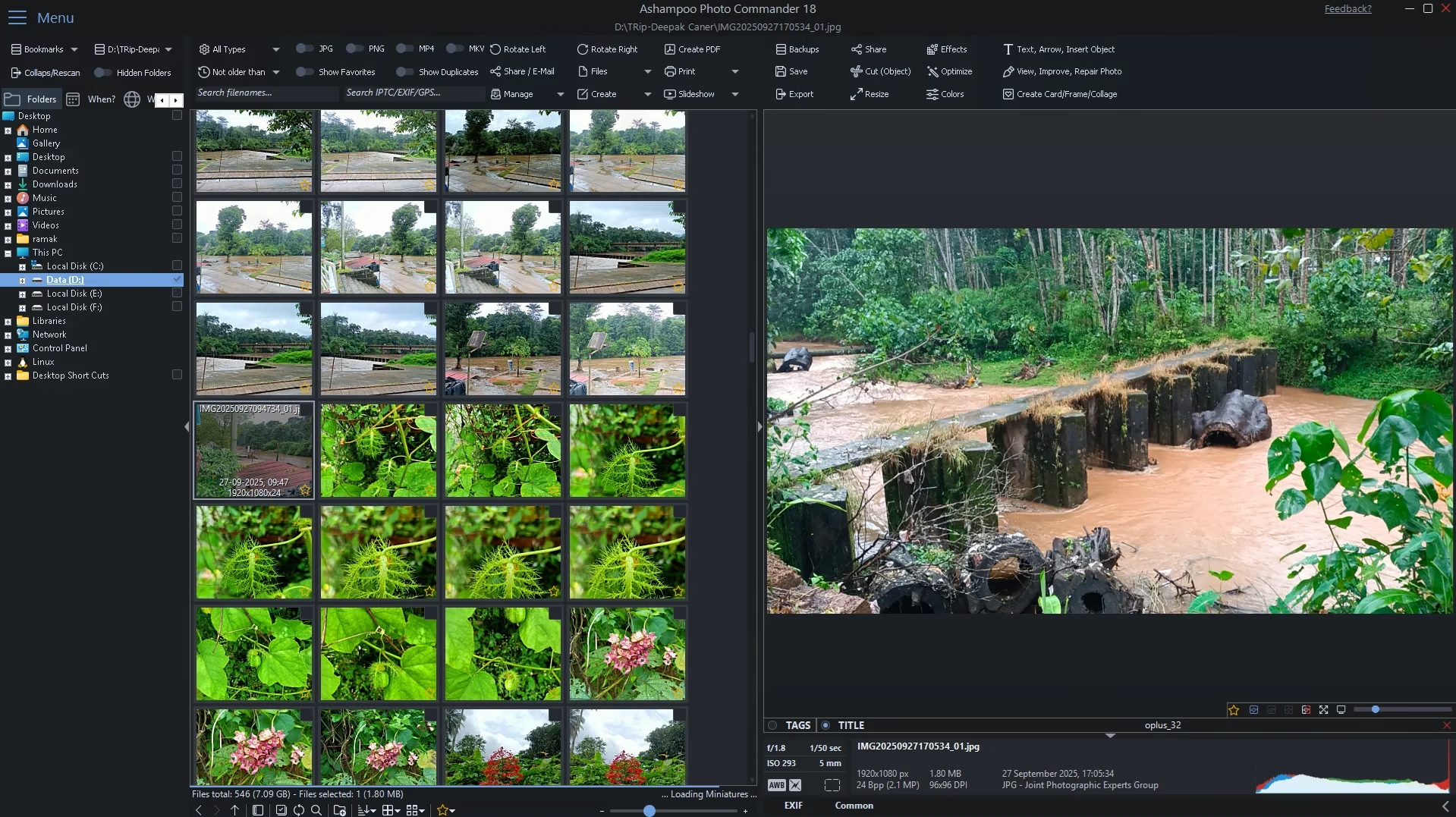
Ashampoo Photo Commander 18 — clean dark interface with thumbnail browser and EXIF panel
📌 Quick Read — Key Highlights
- Software: Ashampoo Photo Commander 18 (latest 2026 release)
- Giveaway Value: $25 USD (≈ ₹2,100) — 100% Free
- License Type: Full version, lifetime activation for v18
- Requirements: Valid email + free Ashampoo account
- Offer Expiry: Approximately 25 days from publication
- Compatibility: Windows 10, 11, and Windows 11 ARM (64-bit)
- Reading Time: ~6 minutes
- Difficulty: Beginner-friendly (no technical knowledge required)
📑 Table of Contents
What is Ashampoo Photo Commander 18?
Ashampoo Photo Commander 18 is an all-in-one photo management and editing suite for Windows. It bundles three categories of tools that most people end up paying for separately — a fast image viewer, a non-destructive editor with optimization wizards, and a media organizer with EXIF/IPTC support, geotagging, and duplicate detection. The latest version has been rebuilt for native 64-bit performance and ships with over 200 functions covering everything from one-click auto-correct to multi-display presentations.
What sets it apart from Adobe-style heavyweights is its philosophy: guided workflows over technical menus. Wizards walk you through creating slideshows, calendars, greeting cards, and collages step-by-step, so even users who’ve never touched a histogram can produce polished results. At the same time, advanced features like gradation curves, tonal value correction, and batch RAW processing are tucked into the interface for power users.
For a closer look at how it stacks up against alternatives, also check out our roundup of the best free photo editing software for Windows.
What’s New in Version 18
Version 18 is more than a cosmetic refresh. Ashampoo has reworked the engine, the UI layout, and the duplicate detection system. Here’s what genuinely matters in this release:
🔍 Four-Way Fingerprint Duplicate Detection
The headline feature. Photo Commander 18 now uses four simultaneous fingerprinting techniques to identify duplicate or near-duplicate images — even if they’ve been renamed, resized, slightly cropped, or re-saved in a different format. For anyone with a decade of phone backups, this alone is worth the install.
📐 Auto-Adaptive UI Layout
The interface reorganizes itself based on whether your monitor is in portrait or landscape orientation — useful if you run a vertical secondary display for editing.
🖼️ New Format Support: SVG, AVIF, RAW
Photo Commander 18 adds native support for SVG vector files, AVIF (used by modern Android phones), and the latest RAW formats from Sony, Canon, Nikon, and Fujifilm. PNG load times are up to 50% faster than version 17.
🎨 New Effects and Tools
Three new effect families were added: Bevel, Inner Glow, and Pseudo 3D, alongside Pop Art filters and an improved “Change Color” tool that swaps a target color across an entire image without affecting nearby tones. The full-screen viewer also gains new transition effects and faster zoom for 32-bit images with alpha channels.
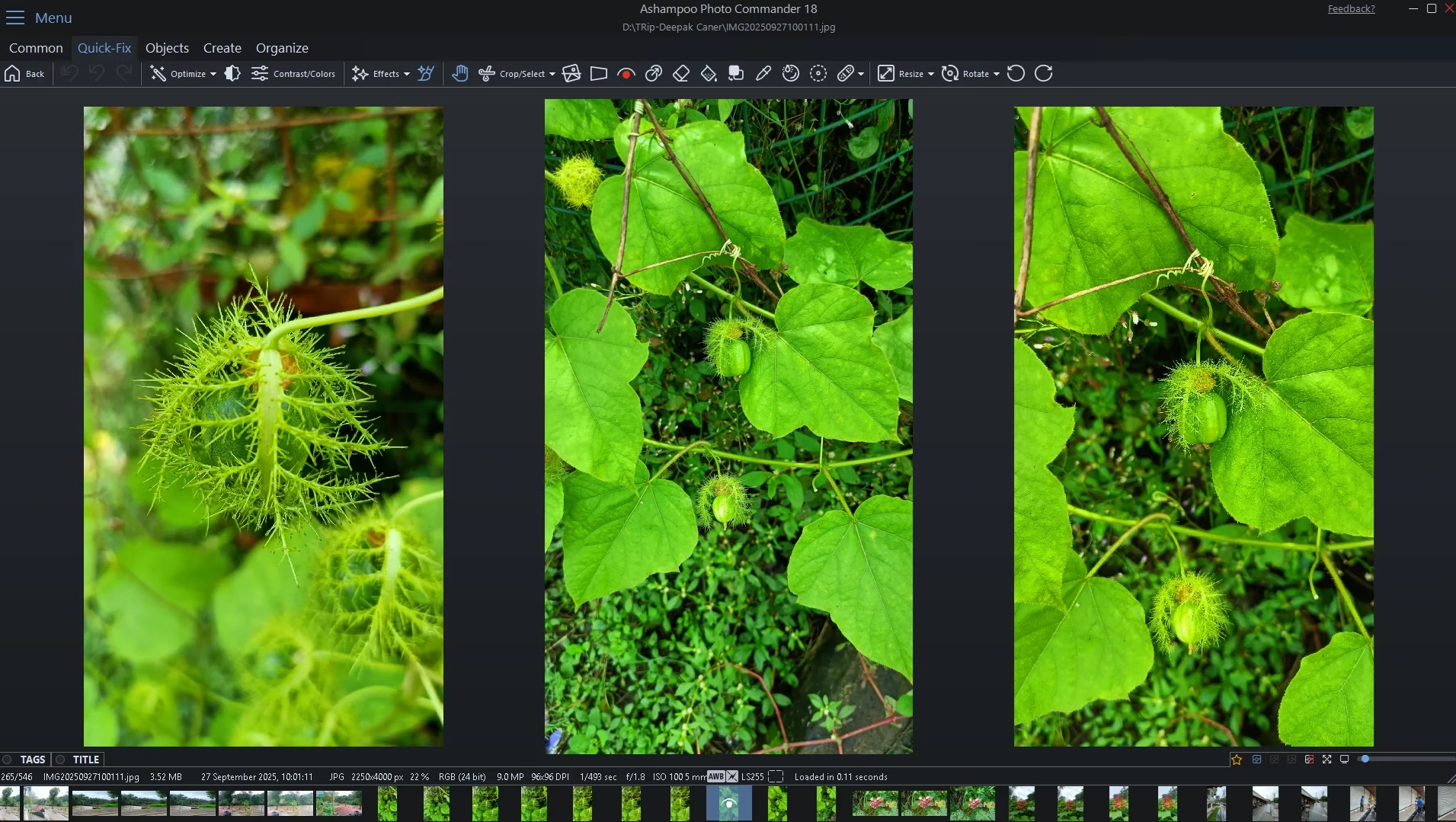
The Quick-Fix mode with side-by-side comparison view
Top Features You’ll Actually Use
📂 Smart Photo Organization
Sort by capture date, GPS location, file name, rating, or custom tags. The new auto-listing feature pulls city names directly from GPS metadata, so you can browse “all photos taken in Chennai” or “all photos from Goa” without manually labeling anything. Real-time filters for favorites, duplicates, and file formats keep huge libraries manageable.
✂️ Crop, Straighten, and Perspective Correction
Crop to common aspect ratios with one click, straighten crooked horizons, and correct keystone distortion in architecture shots. The cut-out tool isolates people or objects from busy backgrounds, and the auto-enhance algorithm handles exposure, contrast, and color cast in a single click.
🎬 4K Slideshows With Music
Build high-resolution 4K slideshows with custom transitions and background music. Finished projects can be exported as videos or burned directly to disc.
🧙 Wizards for Cards, Calendars, and Collages
Pick a template, drop in your photos, add captions, and export. Greeting cards, custom 12-month calendars, and themed collages can all be built without opening a layout panel.
🌍 Geotagging With Google Maps Integration
The software not only reads GPS data — it can also add or edit geotags for older photos that lack location info. Click any image and view its capture spot in Google Maps directly from the interface. Useful for travel bloggers, real-estate photographers, and anyone documenting location-based projects.
⚡ Batch Processing
Convert hundreds of images between formats, apply watermarks, resize for web or email, rotate, mirror, or auto-correct in bulk. The batch engine is multi-threaded and uses every core your CPU offers.
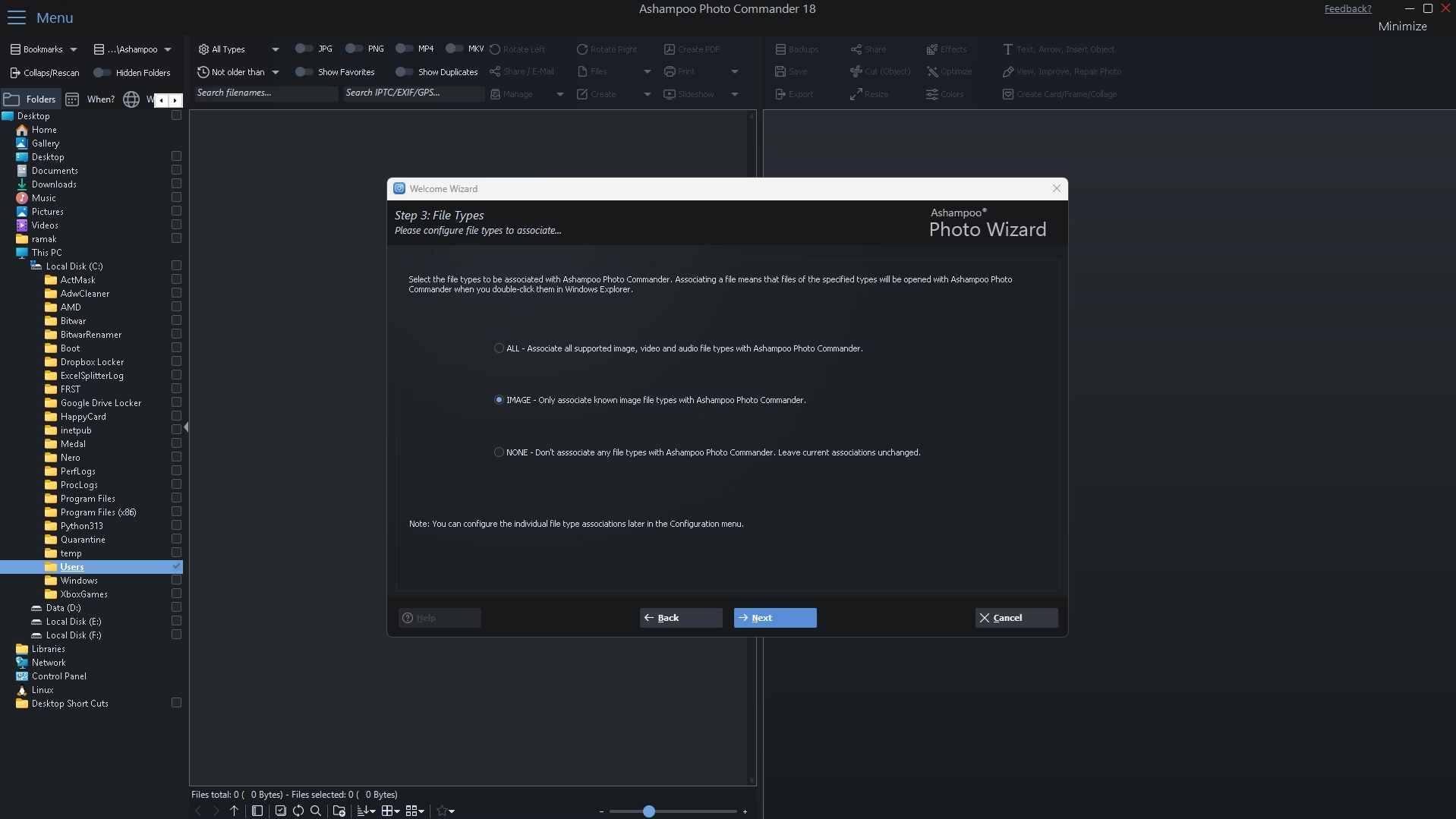
The first-launch Photo Wizard helps configure file associations
System Requirements
Processor: Any modern 64-bit CPU (Intel/AMD/ARM)
RAM: 4 GB minimum, 8 GB recommended for large libraries
Storage: ~250 MB for the application; additional space for media
Display: 1280×768 minimum; 1920×1080 or higher recommended
Internet: Required for activation and updates only
The application is light on resources for a feature suite of this scale — it runs smoothly on entry-level laptops and even older second-generation Ryzen mobile chips, which I confirmed during testing.
How to Claim Your Free Ashampoo Photo Commander 18 License
The entire process takes about 2–3 minutes if you already have an Ashampoo account, or 4–5 minutes for first-time users. Follow these six steps exactly:
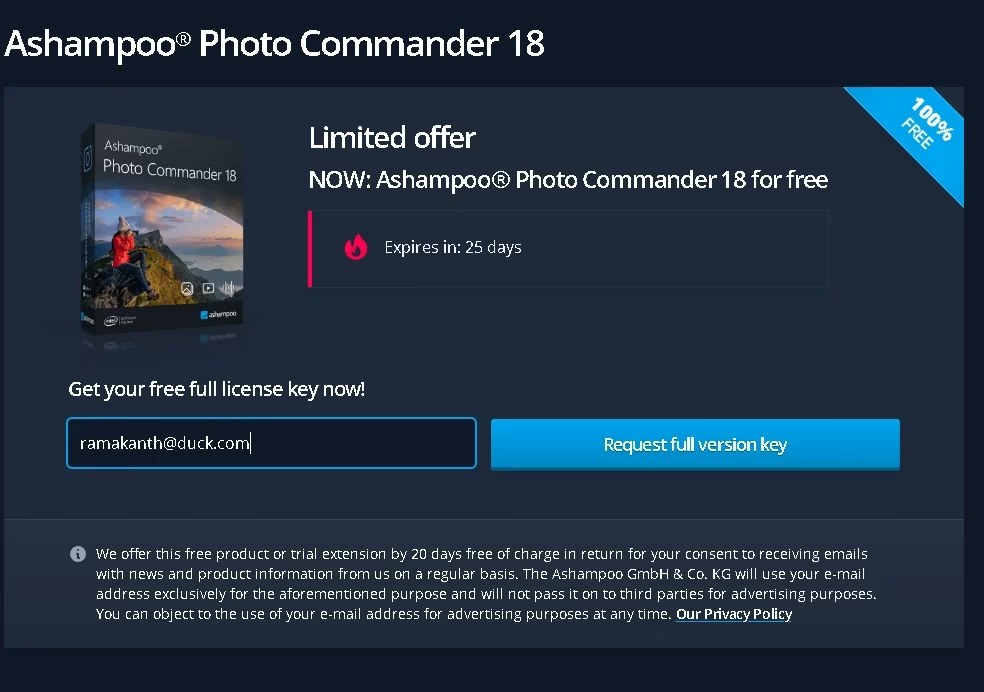
Step 1 — The official giveaway registration page
Step 1 — Visit the official giveaway page using the dedicated promotional link below.
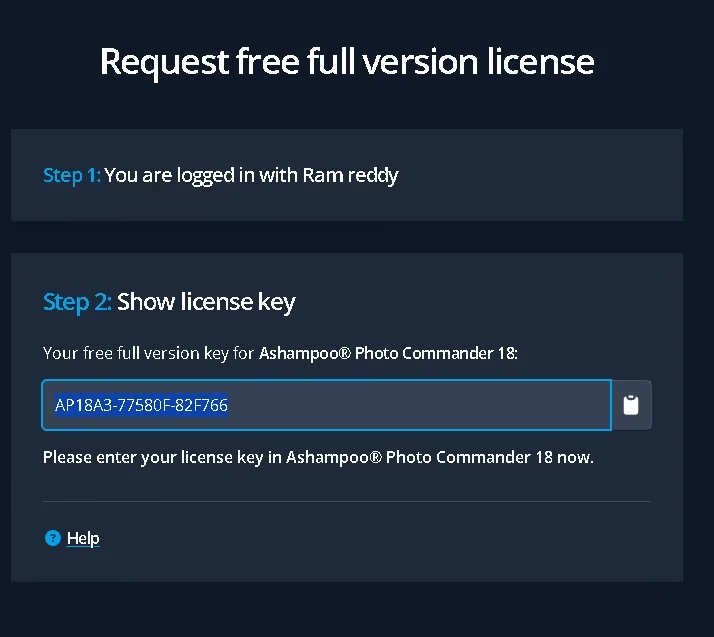
After login, your free license key is revealed instantly
AP18A3-XXXXXX-XXXXXX) is revealed. Copy it. You can also access it later under “My Licenses” in your Ashampoo account dashboard.Step 5 — Download the installer from one of the official sources below.
Installation and Activation — Walkthrough
The installer ships as a clean, lightweight executable around 200 MB in size. There are no bundled toolbars, no opt-in offers for unrelated software, and no system modifications beyond a Start Menu shortcut and file associations you choose explicitly.
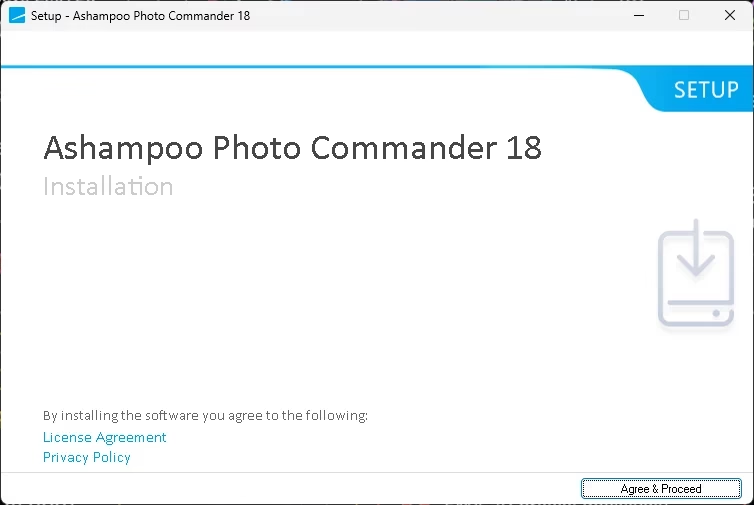
The minimal, clean installer welcome screen
Click “Agree & Proceed” on the welcome screen. The installer will then ask for your license key — paste the key you received from the giveaway page using the “Paste from clipboard” button, then hit “Activate now!”. Activation is instant if you’re online.
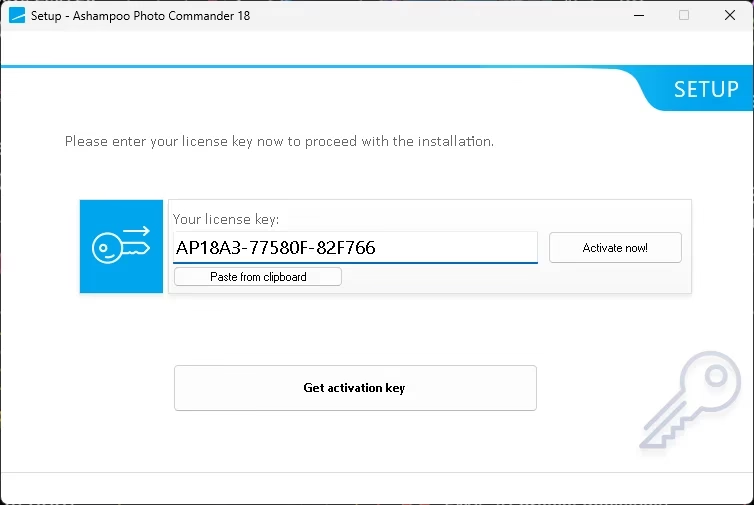
Paste the license key and click Activate now!
Once installation completes, Photo Commander launches its first-run Photo Wizard. I’d recommend choosing “IMAGE — Only associate known image file types” in the file association step. This prevents the app from hijacking your video and audio file defaults, which VLC or your existing media player usually handle better. You can always change associations later by going to Configuration → File Types.
🏆 Final Verdict — Ashampoo Photo Commander 18
👍 Pros
- Free lifetime license worth $25
- 200+ genuinely useful tools in one app
- Four-way duplicate detection actually works
- Native AVIF, SVG, and latest RAW support
- Beginner-friendly wizards for cards & slideshows
- Lightweight installer with no bundled bloat
- Geotagging with Google Maps integration
- True 64-bit performance on Windows 11
👎 Cons
- Requires email registration to claim license
- Newsletter opt-in is part of the giveaway terms
- No native macOS or Linux version
- Cloud sync features are absent
- Future major versions need separate purchase
Frequently Asked Questions
Is the Ashampoo Photo Commander 18 license really free?
Yes. Ashampoo runs periodic giveaways for older versions of its commercial products as a marketing strategy. The license you receive is a real, full-version activation key — not a time-limited trial. You only need to register your email and complete email verification.
How long is the license valid?
The license itself does not expire — it’s a lifetime activation for version 18. The giveaway promotion expires in roughly 25 days from publication, so claim the key now even if you plan to install later.
Can I edit RAW photos with this software?
Yes. Photo Commander 18 supports the latest RAW formats from Sony, Canon, Nikon, Fujifilm, and other major camera makers. You can view, organize, and apply non-destructive edits to RAW files directly.
Does it work on Windows 11 ARM laptops?
Yes. The 2026 release adds native support for Windows 11 ARM and Windows 10 ARM, alongside the standard x64 builds. Performance is excellent on Snapdragon X Elite devices.
Can I install Photo Commander 18 on more than one PC?
The free license is intended for single-PC use. If you need it on multiple machines, you can either purchase additional licenses or register separate Ashampoo accounts using different email addresses.
Will my photos be uploaded to the cloud?
No. Photo Commander 18 is a fully offline desktop application. All edits and metadata operations happen locally on your machine. Internet is only used for license activation and optional update checks.
What happens when version 19 comes out?
Your version 18 license continues to work indefinitely. You’ll only need to upgrade if you want the new features in a future major release — and Ashampoo typically offers upgrade discounts to existing users.
Final Thoughts
Ashampoo Photo Commander 18 is a rare example of a desktop photo suite that respects your time. The interface doesn’t try to look like Photoshop, the wizards don’t condescend to beginners, and the duplicate finder genuinely works on libraries that have grown messy over a decade. At its $25 retail price, it’s already strong value compared to subscription-based alternatives. At zero dollars through this giveaway, it’s an unambiguous win.
Claim your license today, install it on your main Windows machine, and let it loose on your Pictures folder. You’ll likely reclaim a few gigabytes of duplicates within the first hour.
If you found this guide useful, you might also like our coverage of other ongoing freebies like the Ashampoo WinOptimizer 2026 giveaway and our regularly updated free apps and software deals page.
🎁 Get Ashampoo Photo Commander 18 Free Now
Have you tried Ashampoo Photo Commander 18 already? Found a feature you love or a quirk worth flagging? Drop a comment below—I read and reply to every one.
Discover more from Techno360
Subscribe to get the latest posts sent to your email.
