
![Driver Booster 13 Pro Review 2026: Is It Worth Buying?[Giveaway]](https://techno360.in/wp-content/uploads/2026/02/Driver-Booster-13-Pro-Giveaway-Box-Shot.avif "Driver Booster 13 Pro Review 2026: Is It Worth Buying?[Giveaway]")
If your PC is running slow, crashing, or throwing up “Device not found” errors, outdated drivers are almost always to blame. In this Driver Booster 13 Pro review, we break down whether IObit’s flagship driver updater is worth your money in 2026.
We tested Driver Booster 13 Pro on a Windows 11 machine with 200+ installed drivers to see how it performs on speed, detection accuracy, safety, and value. Here’s everything you need to know before you buy.
What Is Driver Booster 13 Pro?
Keeping drivers updated is one of the easiest ways to improve PC performance, fix hardware issues, and prevent crashes.
Driver Booster 13 Pro is a powerful driver updating tool designed to scan, download, and install driver updates quickly and safely. It ensures your system runs smoothly and that your devices perform at their best.
Why Driver Booster 13 Pro?
While the free version is a fantastic start, the Pro edition is where the magic happens. It’s the difference between a quick tune-up and a full pit crew for your computer.
Massive Database: Access to over 18,000,000 drivers. If a driver exists, this tool probably has the latest version.
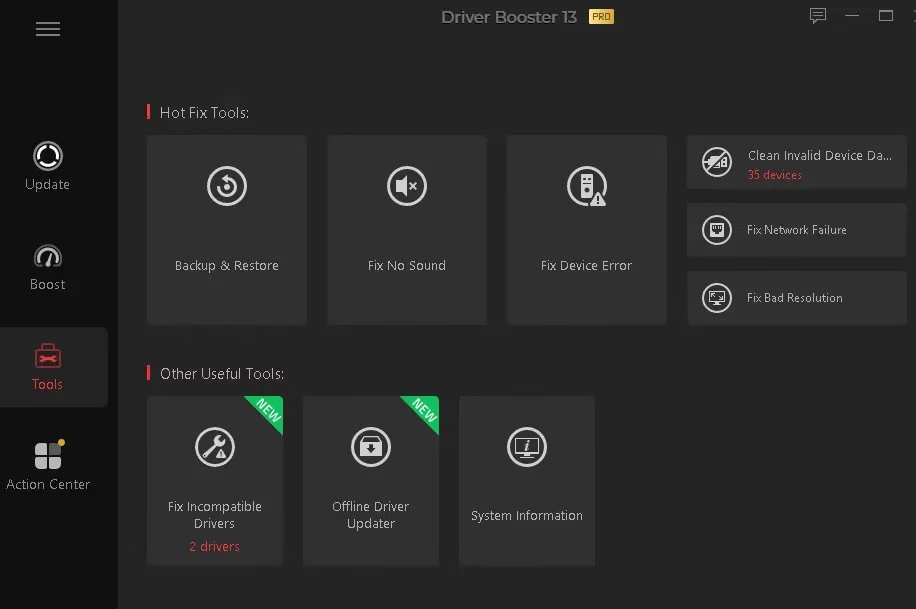
One-Click Fixes: Resolve annoying “No Sound” errors, network failures, and the dreaded Blue Screen of Death (BSOD) with a single click.
Game Boost: It prioritizes game-ready drivers and shuts down unnecessary background processes to squeeze every bit of FPS out of your rig.
Offline Updates: Need to install drivers on a PC without internet? No problem.
Automatic Backups: Safety first! It automatically creates a restore point before updating, just in case things get weird.
Driver Booster 13 Pro: Pricing & Plans (2026)
Driver Booster 13 is available in both free and pro tiers. Here’s a quick breakdown:
- Free: Scans and updates up to 2 drivers per day, basic speed
- Pro (1 PC / 1 Year): ~$22.99/year—unlimited driver updates, priority server speed, Game Boost, Silent Mode
- Pro (3 PCs / 1 Year): ~$39.99/year—covers a full household
IObit frequently offers discounts of 50–70% on their official site. Check the current price before buying.
💡 Is It Worth Installing?
If you:
Regularly install Windows updates
Game on PC
Face device or driver conflicts
Don’t want to manually search OEM websites
Then yes—it saves time.
However, if your system runs perfectly and you prefer manual updates from hardware manufacturers, the free Windows Update method may already be sufficient. Always weigh convenience vs. software clutter.
Giveaway [Free 6-Month License]:
Download Driver Booster 13 using the official link: Driver Booster—IObit Official Download.
Install the program. Open Driver Booster → Click the “Activate Now” button and select “Enter License.”
Enter any one of the license codes below.
License key 1: CF344-0BA8C-C3A82-28ABC(Expires on October 20, 2026)
License key 2: CB102-E900A-4E404-808BC (Expires on Sep 11, 2026)
License key 3: 35CC7-26959-D2E64-345BC (Expires on Aug 23, 2026)
License key 4: AED8B-BAF14-21DF4-E47BC (Expires on Aug 11, 2026)
License key 5: 70394-E2A29-9DD4B-811BC (Expires on: May 14, 2026)


Discover more from Techno360
Subscribe to get the latest posts sent to your email.
You must be logged in to post a comment.