

Offer Status: 🟢 ACTIVE — Giveaway valid until July 31, 2026
Platform: Windows 11 / 10 / 8 / 7 & macOS
Official Partner: Leawo Software
Disclaimer: This is an official promotional giveaway by Leawo Software. We do not host cracked or unauthorized software. The license provided is for personal, non-commercial use only.
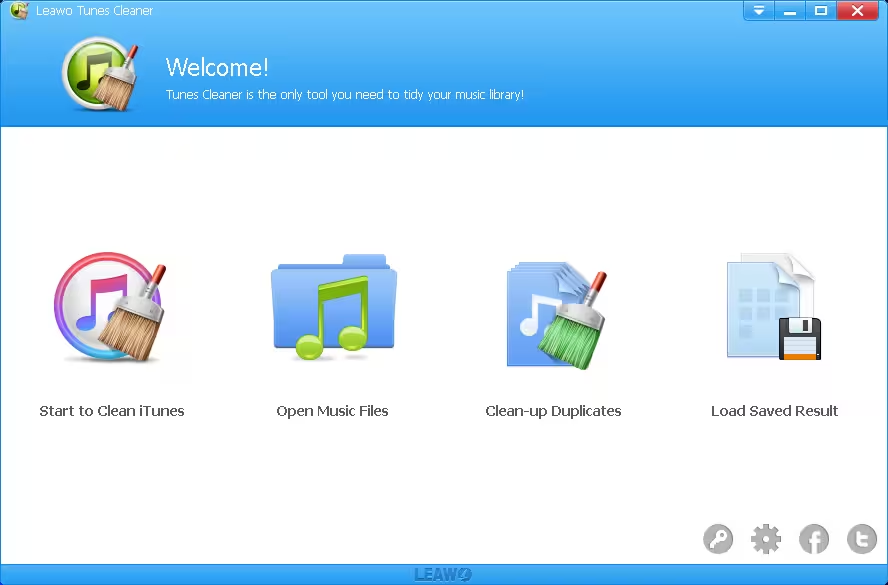
Leawo Tunes Cleaner is a dedicated iTunes and local music library cleanup tool for Windows and Mac. If your iTunes collection has grown over the years — full of duplicate tracks, missing album artwork, broken tags, and unorganized folders — this software handles all of it in just a few clicks. And right now, you can grab a full license completely free through Leawo’s official giveaway.
Why We Are Featuring This Giveaway
Managing an iTunes library manually is genuinely time-consuming. Tracks accumulate from different sources — CD rips, downloads, streaming syncs — and before long you end up with duplicate songs, half-tagged files, and missing cover art scattered across your folders.
We tested Leawo Tunes Cleaner on a Windows 11 machine with a library of around 1,200 songs. The Deep Scan picked up 47 duplicates that a manual cleanup had missed, and the tag editor let us batch-fix missing album and artist info in minutes. For anyone who uses iTunes regularly or has a large local MP3 collection, this free license is genuinely worth grabbing.
If your library is small and already well-organized, you might not need it. But if you have been putting off a cleanup for months, this is the tool to finally get it done.
Pros & Cons of Leawo Tunes Cleaner
| What We Liked | What Could Be Better |
|---|---|
| Deep Scan catches duplicates that Quick Scan misses | Interface feels dated compared to modern alternatives |
| One-click duplicate removal saves a lot of time | No automatic cloud backup integration |
| Works on both iTunes and local MP3 folders | Free trial only scans up to 50 songs |
| Built-in tag editor handles artist, album, artwork in one place | Mac version UI is slightly different from Windows |
| Official giveaway — no crack or workaround needed | No real-time monitoring or scheduled scans |
Leawo Tunes Cleaner — Key Features
- Fix & Clean iTunes Library: Scans your iTunes collection and fixes broken or incomplete music files automatically.
- Quick Scan & Deep Scan: Choose a fast scan for obvious duplicates, or run a Deep Scan to catch near-identical tracks with slightly different filenames or tags.
- One-Click Duplicate Removal: Detects and removes duplicate songs from both iTunes and local music folders in a single click.
- Integrated Music Tag Editor: Lets you manually add and edit music tags including artist name, album, song title, year, and album artwork.
- Supports iTunes + Local Folders: Not limited to iTunes — you can also point it at any local MP3 folder on your PC or Mac.
How to Claim Your Free Leawo Tunes Cleaner License
Follow these steps carefully to make sure your license registers correctly before the promotion closes on July 31, 2026.
- Visit the Official Giveaway Page: Head over to the Leawo official giveaway page.
- Select Your Platform: Click either “Get Win Now” (for Windows) or “Get Mac Now” (for macOS).
- Enter Your Details: Fill in your name and email address, then click the “Get it Now” button.
- Check Your Inbox: Leawo will email you a license code and a download link. Check your spam folder if it doesn’t arrive within a few minutes.
- Install the Software: Download and run the installer. The installation is straightforward — no bundled extras to watch for.
- Activate Your License: Once the app is open, click the “Key” icon at the top of the dashboard, paste your registration code, and click Register to unlock the full version.
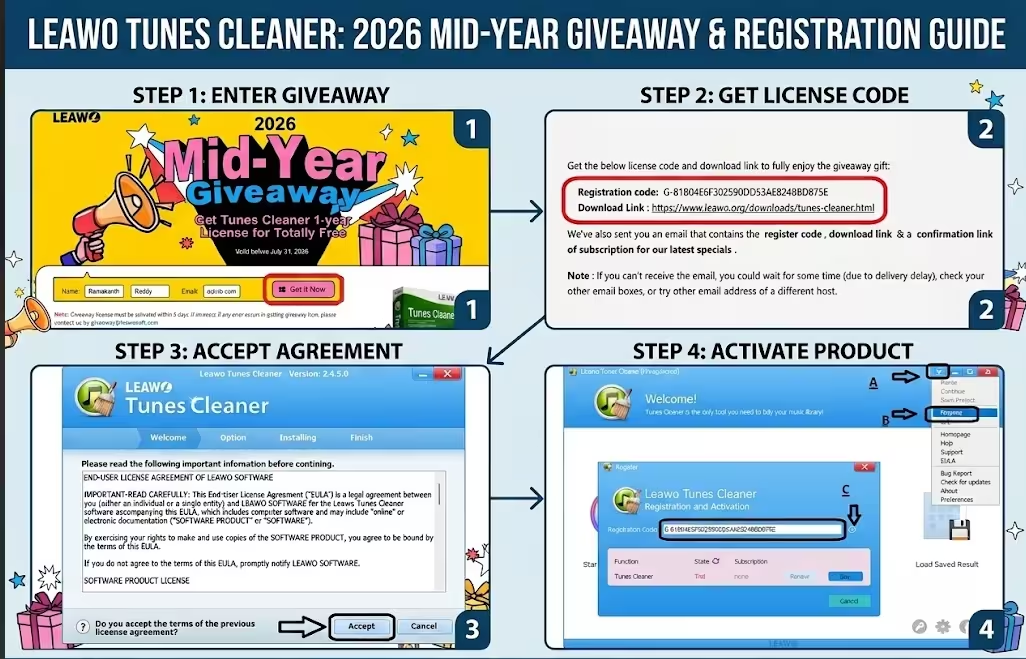
Note: This giveaway expires on July 31, 2026. Once activated, the full version is yours to keep for the license period.
Leawo Tunes Cleaner vs. Free Alternatives
You might be wondering how this compares to just doing it manually, or using another free tool. Here is a quick breakdown:
| Feature | Leawo Tunes Cleaner (Free License) | Wise Duplicate Finder Pro | iTunes Built-in Tools |
|---|---|---|---|
| Duplicate Detection | Quick Scan + Deep Scan | File-based scan (all file types) | Basic (Show Duplicates view only) |
| Music Tag Editor | Yes — artist, album, artwork | No | Limited (manual only) |
| Local MP3 Folder Support | Yes | Yes (all files) | No |
| Album Artwork Fetch | Yes | No | Yes (via iTunes Store) |
| Ease of Use | One-click, beginner-friendly | Simple drag-and-drop | Requires manual effort |
Bottom Line: If you only need to find duplicate files across your whole PC, Wise Duplicate Finder Pro is a solid free pick. But if you specifically want to clean your iTunes library, fix broken tags, and recover missing artwork all in one go, Leawo Tunes Cleaner is purpose-built for exactly that job. And since the license is free right now, there’s no reason not to grab it.
If you also want to convert your iTunes or Apple Music files to MP3 or FLAC so you can play them on any device, check out our post on DRmare Audio Converter — another useful tool for iTunes users.
About Leawo Software
Leawo Software has been around since 2007 and is known primarily for media conversion and management tools for both Windows and Mac. Their product lineup includes video converters, Blu-ray tools, and music utilities. Leawo Tunes Cleaner is their dedicated iTunes cleanup product, originally priced at $39.99, and has been featured on CNET and reviewed positively across various tech blogs for its straightforward duplicate removal and tag-fixing capabilities.
Discover more from Techno360
Subscribe to get the latest posts sent to your email.

You must be logged in to post a comment.