
If you’ve ever had to break apart a 50-page PDF into individual files or stitch together a dozen separate PDFs into one clean document, you know how tedious it gets. Softdiv PDF Split and Merge is a lightweight Windows tool built specifically for this — and right now, you can grab a free 1-year license through this giveaway.
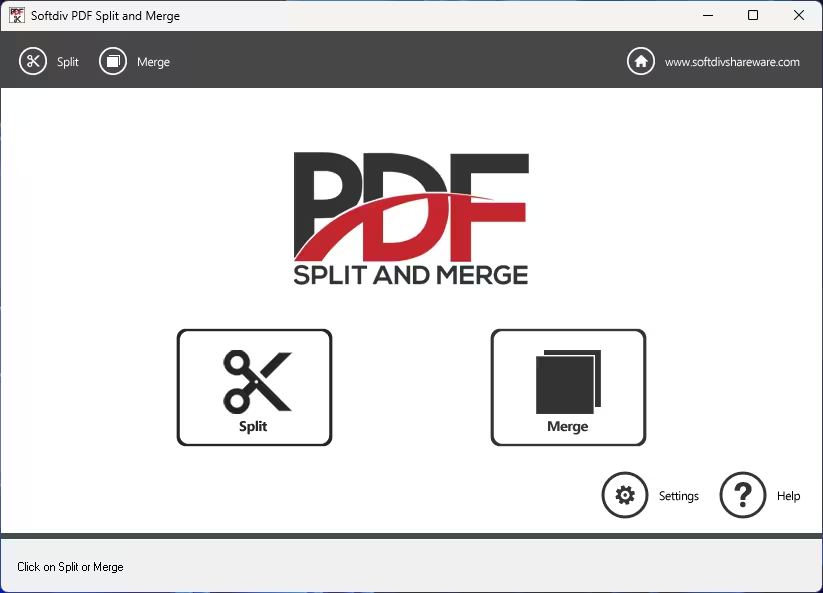
What Is Softdiv PDF Split and Merge?
PDF files are everywhere — invoices, reports, eBooks, contracts. The problem is that most PDF tools either cost a fortune or are loaded with features you’ll never use. Softdiv PDF Split and Merge cuts through the noise by doing exactly two things really well: splitting and merging PDFs.
It’s a no-frills desktop app for Windows. There’s no subscription, no cloud upload required, and no bloatware. You install it, open a PDF, and get to work. Whether you’re a student splitting lecture notes, a small business owner separating invoices, or just someone trying to reorganize a big document, this tool handles it without any fuss.
The software also handles password-protected PDFs — you just need to supply the password and it processes the file like any other. It even lets you set password protection on the output files, which is handy when dealing with sensitive documents.
Key Features of Softdiv PDF Split and Merge
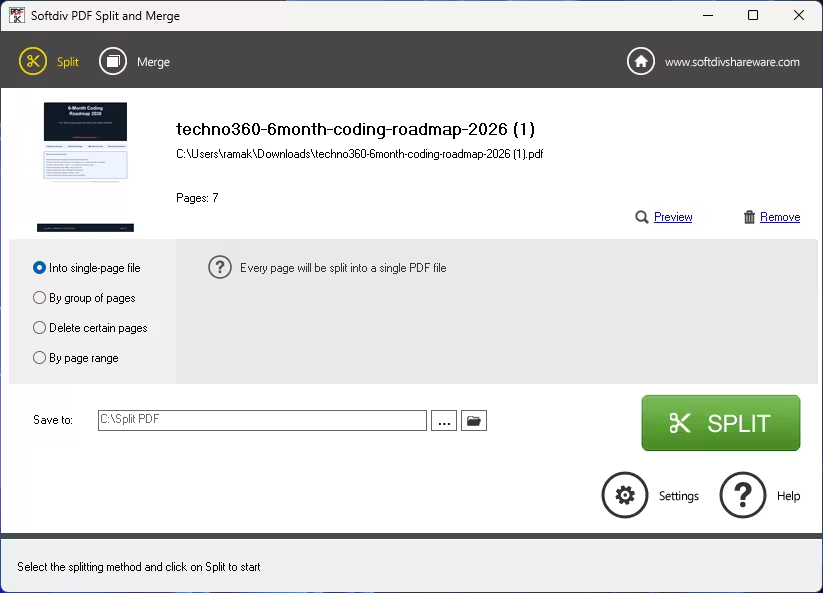
- Split PDFs four ways — Extract every page as a separate file, group pages into chunks (e.g., every 5 pages), remove specific pages, or define custom page ranges. Handy when you receive a combined report and only need certain sections.
- Merge unlimited PDFs — Combine as many PDF files as you like into a single document. You can also choose to include only selected page ranges from each file instead of the whole thing.
- Built-in PDF viewer — Preview files before you split or merge them. This saves you from accidentally processing the wrong file or including blank pages you didn’t want.
- Metadata editing — Set the title, author, creator, and subject fields for your output PDF. Useful for keeping things organized, especially in professional or academic settings.
- Password-protected PDF support — Open and process locked PDFs (with the correct password), and optionally add password protection to your output files.
- Output folder control — Choose exactly where your processed files land. No hunting around in default folders.
- Fast processing with preserved quality — The output PDF quality stays intact. No re-rendering, no compression artifacts — just a clean split or merge.
- Simple interface — The two-tab layout (Split / Merge) means you’ll figure it out within minutes, even if you’ve never used a PDF tool before.
How to Split a PDF with Softdiv
Once you’ve installed the software:
- Open the app and click the Split tab.
- Load your PDF file using the browse button.
- Choose your split mode — single pages, page groups, or a custom range.
- Set an output folder.
- Hit the Split button and you’re done.
The whole process takes under a minute for most documents. Even large PDFs process quickly without hogging system resources.
How to Merge PDFs with Softdiv
- Click the Merge tab.
- Add your PDF files (as many as you need).
- Use the built-in viewer to preview each file before including it.
- Arrange the order if needed.
- Set the output location and hit Merge.
It’s that straightforward. No confusing options, no mandatory sign-up, no hidden steps.
Softdiv PDF Split and Merge vs. Other Free Tools
There are quite a few free PDF splitter and merger tools around. Here’s where Softdiv stands out compared to some popular alternatives:
- Vs. online tools (Smallpdf, iLovePDF): Softdiv works completely offline. Your documents never leave your computer — a big deal for anything confidential.
- Vs. PDFsam Basic: PDFsam is open-source and powerful, but can feel heavy for simple tasks. Softdiv is lighter and faster for straightforward split/merge jobs.
- Vs. Adobe Acrobat: Acrobat can do everything, but costs a lot per month. Softdiv is free (via this giveaway) and does the specific tasks most people actually need.
If you need a full-featured PDF editor with annotation, form filling, and OCR, check out our review of PDFgear — it’s free and covers a lot more ground. For PDF conversion needs, ThunderSoft PDF Converter Pro is also worth a look. And if you’re specifically looking for a dedicated PDF splitter, we’ve also covered the Coolmuster PDF Splitter free license offer.
Who Should Use This Tool?
Softdiv PDF Split and Merge is a good fit for:
- Students who need to extract specific chapters from a textbook PDF
- Office workers combining monthly reports into a single archive
- Freelancers sending only relevant sections of a larger document to clients
- Anyone who regularly deals with PDFs and wants a quick, offline solution
It’s not meant to replace a full PDF editor — for that, you’d want something like SwifDoo PDF Pro or iTop PDF VIP. But for splitting and merging specifically, it does the job cleanly.
How to Get the Free 1-Year License
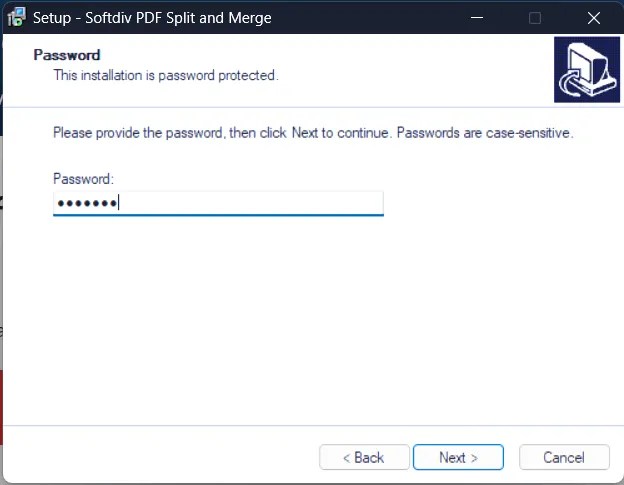
Getting the free license is simple. Just follow these steps:
- Download the installer from one of the links below:
[ Link 1 ] / [ Link 2 ] / [ Link 3 ] - Run the installer.
- When prompted, enter the password: 7766366
- Complete the installation.
- The software is now activated as the full version — valid for 1 year.
Note: Giveaway licenses are time-limited. If you miss this offer, keep an eye on our PDF tools giveaway page for future deals. You might also want to check out the PDF to X free license if you need PDF conversion on top of splitting and merging.
Final Verdict
Softdiv PDF Split and Merge is one of those tools you install once and quietly rely on for years. It doesn’t try to do too much. It splits PDFs and merges PDFs — and it does both well. The interface is clean, the processing is fast, and the fact that it works fully offline is a real advantage if you’re handling anything sensitive.
Grab the free 1-year license while the giveaway is active. It’s a solid tool to have in your PDF toolkit, especially at no cost.
Discover more from Techno360
Subscribe to get the latest posts sent to your email.

You must be logged in to post a comment.