
SoftOrbits AI Photo Editor is a handy Windows application that lets you clean up, enhance, and transform your photos without needing any design background. Right now, you can grab a free 1-year license (worth $24) for a limited time — a great deal if you edit photos regularly and want a capable tool on your desktop.
What Is SoftOrbits AI Photo Editor?
SoftOrbits AI Photo Editor is a Windows-based photo editing tool that uses built-in AI to handle the heavy lifting. Whether you want to remove a photobomber, fix a blurry shot, or change the background entirely, the software handles it with surprisingly little effort on your end.
It is designed for everyday users — not professional photographers — so the learning curve is quite low. You open an image, pick what you want to fix, and the tool takes care of the rest.

SoftOrbits AI Photo Editor — Main Window on Windows
Key Features of SoftOrbits AI Photo Editor
Here is a quick look at what the software brings to the table:
- AI Object Removal: Select and remove unwanted objects, people, or watermarks from your photos. The AI fills in the background naturally so the edit looks clean.
- Smart Background Editing: Replace or remove backgrounds with automatic edge detection. Useful for product photos or portrait shots.
- AI Portrait Enhancements: Smooth skin, fix blemishes, adjust facial features, and fine-tune skin tones — all without manually painting anything.
- Automated Image Corrections: Fix blur, noise, overexposure, and motion artifacts in just one click. Great for salvaging photos taken in bad lighting.
- Style Transformation: Convert your photos into anime, pencil sketches, or other artistic styles — a fun feature for social media content.
- Generative Fill: Extend or modify parts of an image by describing what you want added or changed.
- Watermark & Text Tools: Add copyright watermarks or remove existing date stamps and logos easily.
- Crop, Rotate & Resize: Standard composition tools with pixel or percentage-based resizing.
- Image Correction Panel: Manually adjust brightness, contrast, saturation, temperature, tint, gamma, and sharpness for fine-tuned control.
- Batch Processing: Edit multiple images at once — a big time-saver if you have a folder full of photos to process.

SoftOrbits AI Photo Editor — Tools Panel Overview
Supported File Formats
The software works with most common image formats, so you won’t run into compatibility problems. Supported formats include PNG, JPG, BMP, GIF, TIF, TGA, PSD, PCX, and WMF. You can open RAW-style and legacy formats too, making it versatile for older photo collections.
SoftOrbits AI Photo Editor vs Other Free Tools
There are a handful of free photo editors out there, but most either lack AI-powered tools or push you towards a paid upgrade after the basics. SoftOrbits sits in a middle ground — it gives you genuine AI features like smart object removal and portrait retouching without a subscription, especially during a giveaway period like this one.
If you have tried tools like Inpaint for object removal or grabbed licenses for software like SoftOrbits Photo Editor Pro v9 in the past, you will find this newer AI version a notable step up in terms of automation and output quality.
How to Get the SoftOrbits AI Photo Editor Free 1-Year License
Follow these steps to claim your free license before the offer expires:
- Go to the official giveaway page: https://www.softorbits.net/actions/getfreekey.html
- Enter your email address and click the “Request full version license key” button.
- Fill in your first name, last name, and country, then click “Done”.
- The page will show your license key — copy it.
- Download the software installer: PhotoEditor-Setup.exe
- Install the application, launch it, and click the “Key” icon in the main window.
- Enter your email address and paste the license code, then click “Register”.

SoftOrbits AI Photo Editor — Giveaway Page to Request Free License Key
Registering Your License
Once you have installed the software, the registration process is straightforward. Open the app, hit the Key icon on the toolbar, type in your email, and paste the code you received. That is all it takes — no credit card, no account dashboard, just a quick activation and you are good to go for a full year.
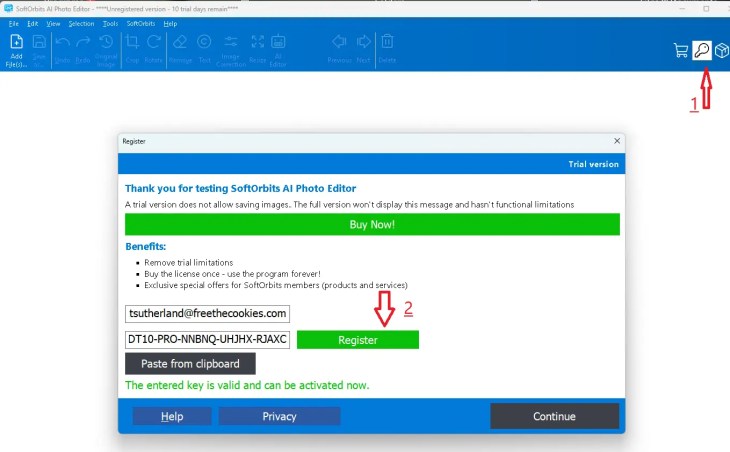
SoftOrbits AI Photo Editor Pro — License Activation Screen
Who Should Grab This?
This tool is a good pick for:
- Bloggers and content creators who need clean, professional-looking photos without spending time in complex editors.
- Small business owners who edit product images for online listings.
- Casual users who want to remove unwanted objects or fix portraits from family events.
- Anyone who wants an AI photo editor on their Windows desktop without a monthly subscription.
If you are into exploring free software deals, do check out our coverage of ACDSee Gemstone Photo Editor 12 Free License, Luminar AI Free 1 Year License, and UltraPic Pro+ AI Photo Editor Giveaway for more great options.
Official Links
Official Website: https://www.softorbits.net/simple-photo-editor/
Giveaway Page: Request Your Free License Key Here
Download: PhotoEditor-Setup.exe


Discover more from Techno360
Subscribe to get the latest posts sent to your email.
You must be logged in to post a comment.