
SoftOrbits PDF Logo Remover is an easy-to-use tool for removing logos, watermarks, stamps, signatures, and other embedded images from PDF files. In batch mode, it can process every page of every PDF file.
The software is designed to remove image watermarks and backgrounds from PDF files, allowing restrictions to be removed. It has easy-to-understand options.
As the name suggests, the PDF Logo Remover is a simple piece of software whose goal is to remove image logos and watermarks from PDF files.
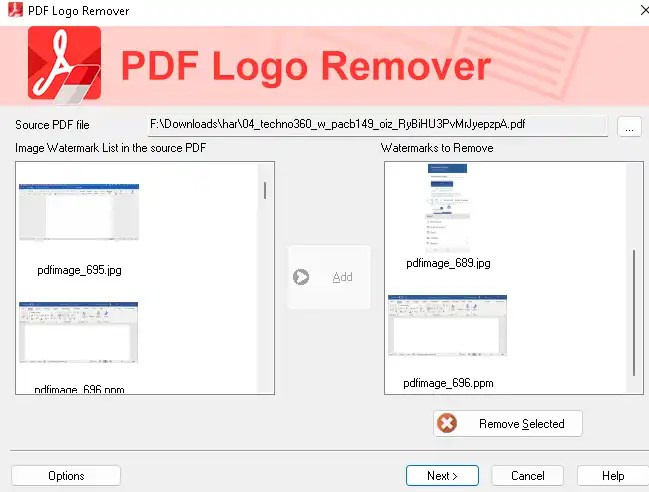
Installation is straightforward; simply run the PDFLogoRemover.exe program. Then, follow the instructions on the installation program’s main screen. Its interface resembles a wizard and consists of a basic window with a straightforward layout.
You can start by choosing the source PDF files from the file browser. The app shows all the watermarks and backgrounds it found, and you can select which to delete.
In the next panel, you can import more PDFs to process them all at once with the same logo.
SoftOrbits PDF Logo Remover Features:
- Remove images and text from a PDF
- The software identifies watermarks in PDFs, allowing for easy removal.
- Batch mode—you can select multiple files with the same watermark and remove them all at once.
- Remove any watermarks, logos, or stamps from PDF files.
- Easy to use and user-friendly.
- No need to install large and expensive PDF editors.
- Supported OS: Windows 11, Windows 10, Windows 8/8.1, and Windows 7.
- Software Home page:
Get SoftOrbits PDF Logo Remover for Free:
Download the giveaway version installer from https://download.softorbits.com
Run the installer, and you will notice an activation window similar to the one shown in the screenshot below.

Enter your email address and click the “Get free activation key” button.
You will receive a confirmation email from SoftOrbits. Click the link in that email to launch the giveaway page in your PC’s default web browser.
Fill out a minor form on that webpage with your first and last name, select your country, and click the “Done” button.
The giveaway page will display a license key. Copy the code.

Now, on the activation window, enter the license key you received and click the “Activate Now” button and complete the installation process.
That’s it!


Discover more from Techno360
Subscribe to get the latest posts sent to your email.
You must be logged in to post a comment.