
WinExt Pro is a Windows utility kit. It is a collection of essential utilities that help you manage your computer’s storage space. The program aids in the efficient management of hard disc resources.
Third-party solutions make it easier to keep your PC’s registry, system, corresponding files, and folders organized.
WinExt can do registry searches, find and delete duplicate files to free up space, identify giant resources to assist you in figuring out what’s eating up so much space, monitor directories for file operations, and much more.
In addition, WinExt Pro makes it simple to synchronize specific resources, both automatically and manually.
The software’s clean and user-friendly interface allows you to rapidly access the registry scanner and spot duplicates, perform batch actions, or sync files.
Check the health of your PC:
WinExt includes features that allow you to quickly assess the health of your PC and take steps to enhance it. The well-organized registry scanner will allow you to run scans, preview issues, and, if desired, rectify them individually or as a group.
Furthermore, the “Clean” module’s system and privacy sub-modules are a significant addition to the app’s feature set, as they provide users with a more profound understanding of their system’s status and the privacy levels resulting from their current settings.
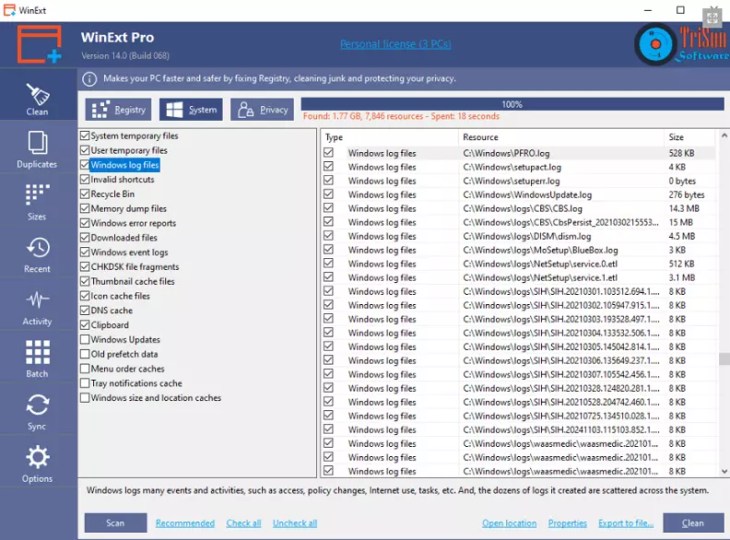
WinExt Pro Features:
- Fixes registry errors and cleans Registry garbage to keep your PC running smoothly.
- Securely cleans away unnecessary or invalid system resources, making your computer work faster and giving you more disc space.
- By sweeping the traces of Windows, Microsoft apps, and browsers, it protects your privacy while also making your system and browsers work more quickly.
- Optimizes start/shutdown, stability, system, UI, network, and SSD settings to greatly increase system performance, speed, and stability.
- Quickly find duplicate files on your drives, based on file contents.
- Lets you quickly see all drives/directories/files’ sizes in 1 tree view.
- Recently, accessed resources can be viewed and opened (files and directories).
- ‘Deleted,’ ‘Renamed,’ ‘Created,’ and ‘Modified’ activities of files and folders are automatically tracked and recorded for Windows.
- Run batch operations: With the help of WinExt, you can run a multitude of activities in batches. You can, for example, send items to the Recycle Bin, delete them from the computer permanently, and copy your files to a shared place.
- The sync feature is useful for moving files back and forth between two folders until both folders have the same content. This action can be performed only once (manually) or multiple times (automatically).
Get WinExt Professional for Free:
The professional edition of WinExt costs $19.99 for one year, but you can acquire it for free by following the instructions below.
Share to unlock
Share this giveaway on any network. One click unlocks the download links and codes below.
A new tab opens to share this page. Come back here — your content unlocks automatically.

You must be logged in to post a comment.